Add MobilityArena as a preferred source on Google
South Korea is a high-tech powerhouse and is also home to some of the world’s most cutting-edge mobile devices. In fact, smartphones assembled in South Korea are known for their top-tier quality, innovative features, and sleek designs — especially with Samsung leading the charge. When it comes to smartphones assembled in South Korea, Samsung dominates the scene with its Galaxy series, pushing the boundaries of mobile technology year after year. These devices are packed with powerful processors, stunning displays, and advanced camera systems, making them a top choice for both everyday users and tech enthusiasts. Whether you’re a gamer, a content creator, or someone who just loves a smooth, fast phone experience, these smartphones deliver on all fronts. Samsung isn’t the only name in the game. LG, despite stepping back from the smartphone market, left behind a legacy of innovation, while smaller South Korean brands continue to experiment with niche and futuristic designs. Smartphones assembled in South Korea stand out not just for their premium hardware but also for their deep integration with cutting-edge AI, 5G capabilities, and seamless user experiences. So, whether you’re looking for a flagship device or a powerful mid-range option, South Korea’s smartphone industry offers some of the best choices out there. With world-class assembly and engineering, these phones are designed to impress — no matter where in the world you are!

- List of Top Smartphones Assembled in South Korea Samsung Galaxy S25 Ultra Samsung Galaxy S24 Ultra Samsung Galaxy Z Flip 6
- Conclusion
List of Top Smartphones Assembled in South Korea
Samsung Galaxy S25 Ultra
The Galaxy S25 Ultra is the flagship of Samsung’s 2025 lineup, and it’s a powerhouse of innovation:
- AI-Driven Features: This phone boasts a custom Snapdragon 8 Elite processor, 12GB RAM, and a range of AI features like real-time phone call translations and enhanced photo editing.
- Display and Battery: It features a stunning 6.9-inch AMOLED display and a reliable 5,000mAh battery, making it perfect for gaming and multimedia.
- Camera Capabilities: With four cameras capable of shooting 200MP photos and 8K video, this phone is a photographer’s dream.
Samsung Galaxy S24 Ultra
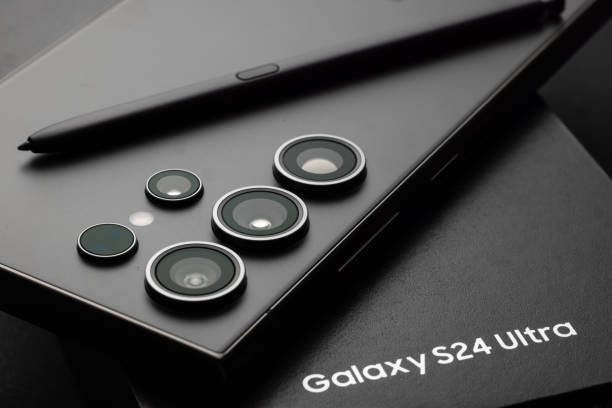
The Galaxy S24 Ultra is another top contender from Samsung, known for its powerful processor and versatile camera setup:
- Sales Success: It’s been a best-seller in 2025, accounting for 55% of the Galaxy S24 series sales in Korea.
- Features: It includes a large display, S Pen stylus, and advanced camera features, making it ideal for productivity and multitasking.
Samsung Galaxy Z Flip 6
For those who love a bit of nostalgia with their tech, the Galaxy Z Flip 6 is a flip phone like no other:
- Design and Features: It offers a 6.7-inch display when unfolded and is powered by the Qualcomm Snapdragon 8 Gen 3 processor.
- Use Cases: Perfect for those who want a stylish, compact phone that still packs a punch.
Conclusion
In conclusion, South Korea isn’t just known for K-pop and kimchi—it’s also home to some of the most advanced mobile technology in the world. With smartphones assembled in South Korea, particularly from tech giant Samsung, users can expect cutting-edge innovation, sleek designs, and powerful performance that set new industry standards. If you’re looking for reliability, top-tier cameras, and blazing-fast processors, smartphones assembled in South Korea are a solid choice. Whether you’re upgrading your device or just curious about what makes these phones stand out, there’s never been a better time to explore what Korean tech has to offer.
Author:Ifeoluwa Adeleke
Add MobilityArena as a preferred source on Google
We’ve all been there, on a plane, in a meeting, or just needing a break from constant notifications. That’s when Airplane Mode comes to the rescue! But did you know it’s useful for more than just flights? Whether you want to save battery, boost charging speed, or minimize distractions, knowing how to activate or deactivate Airplane Mode can be a game-changer. Turning it on is simple. Whether you’re using an Android or iOS device, you can activate or deactivate Airplane Mode with just a tap. On iPhones, swipe down to open the Control Center and tap the airplane icon. For Android, swipe down from the top of the screen and find the Airplane Mode toggle. Want to reconnect? Just tap it again to turn everything back on. Beyond flights, Airplane Mode is great for conserving battery when you’re running low, avoiding unwanted calls during important moments, or even fixing network issues. So next time you need a quick break or a battery boost, remember how easy it is to activate or deactivate Airplane Mode and make the most of this underrated feature!

- Activate or Deactivate Airplane Mode Mode on Android
- Activate or Deactivate Airplane Mode Mode on iOS
- Deactivating Airplane Mode
- When to Use Airplane Mode
- Conclusion
Activate or Deactivate Airplane ModeMode on Android
Turning on Airplane Mode on Android is a breeze:
- Method 1: Quick Settings Swipe down from the top of your screen to open the Quick Settings panel. Tap the Airplane Mode icon to toggle it on.
- Method 2: Settings App Open your device’s Settings app. Go to Network & internet (or Connections on some devices). Toggle Airplane Mode on.
- Method 3: Power Menu Press and hold the Power button. Tap Airplane Mode from the menu that appears.

Activate or Deactivate Airplane ModeMode on iOS
For iPhone users, it’s just as easy:
- Method 1: Control Center Open Control Center by swiping down from the top right corner of your screen (or up from the bottom on older models). Tap the Airplane Mode icon.
- Method 2: Settings App Open the Settings app. Toggle Airplane Mode on.
Deactivating Airplane Mode
To turn off Airplane Mode, simply follow the same steps as above and toggle it off. Easy peasy!
When to Use Airplane Mode
- Traveling: Use Airplane Mode during flights to comply with airline rules and avoid interference with aircraft systems.
- Meetings and Events: Turn it on to silence your phone without missing important notifications.
- Battery Saving: Enable Airplane Mode when you’re not using your phone to conserve battery life.
Conclusion
In the end, knowing when to activate or deactivate Airplane Mode can make a big difference in how you use your phone. Whether you’re trying to save battery, avoid distractions, or keep your device connected while staying off the grid, this simple feature comes in handy more often than you’d think. So next time you need a break from notifications or want to extend your battery life, just activate or deactivate Airplane Mode as needed. It’s a small action that can have a big impact on your phone experience. Give it a try — experiment with when to activate or deactivate Airplane Mode, and see how it can make your tech life just a little bit smoother!
