Add MobilityArena as a preferred source on Google
A voice-recognition app comes in handy for a variety of people, especially those who drive a lot. Texting or talking on the phone while driving is not only illegal, but dangerous. That aside, it can distract the person and cause them to get lost. This would be a big problem if the person drives for a living. Fortunately, voice-recognition apps make these types of situations a lot easier. Here are five of the best voice-recognition apps for Androids. It’s fine if the person doesn’t have an Android because some of these apps are compatible with other systems.
Google Voice Search Google Play Store’s best app is Google Voice Search, hands down. This handy app has the capability to recognize 90 percent of the words used in common vocabulary. It works by simply tapping the mic icon and saying whatever is needed. This app is also great for doing a quick Google search. It’s recommended to turn the volume up, so the written words can be heard.
Speaktoit Not only will this app type out what a person says, but it also can follow commands, such as opening an email. Just like with Google Voice Search, it’s able to perform internet searches through voice activation. The app is so productive that it was mentioned in Forbes magazine. It will also notify a person about important events and occasions. Speaktoit actually has a memory of its own. This app has the ability to adjust to a person’s schedule.
Speech/Text Notepad This particular app is perfect for storing passwords, birthdates, anniversaries, and other important information. Furthermore, it can be used for taking notes, which would be perfect for college students. Certain words can be highlighted in different colours to aid organization. Since this app stores essential information, it has a security feature that won’t allow access without the correct password. Naturally, the person is able to change their password at anytime. The Speech/Text app is a must-have for just about anyone.
AskWiki-Voice Recognition App The Ask/Wiki-Voice app is ideal for those who like to search things on Wikipedia. It works so fast that it will bring search results within seconds. This app supports three languages which are Czech, English and German. There has been nothing but happy reviews on Google Play Store regarding this app.
Utter Voice Command Utter Voice Command is able to perform tasks both online and offline. One can now easily open up their inbox, messages or any other app with Voice Command. It works super fast and has extremely advanced algorithms. This amazing app enables one to do everything on their phone hands-free. It can set alarms, schedules, go on Facebook, music and more.
All five of these apps are easily voice-activated and give the Android user more convenience. In certain ways, some of these are better than others. There is no reason why a person can’t download more than one of these apps. However, everyone should have at least one of these apps.
- Don’t miss our reviews .
- Join our WhatsApp Group , to be notified of the most important articles and deals,
- Follow us on Instagram , Facebook , Twitter , and YouTube .
Author:Jessica Kane
Add MobilityArena as a preferred source on Google
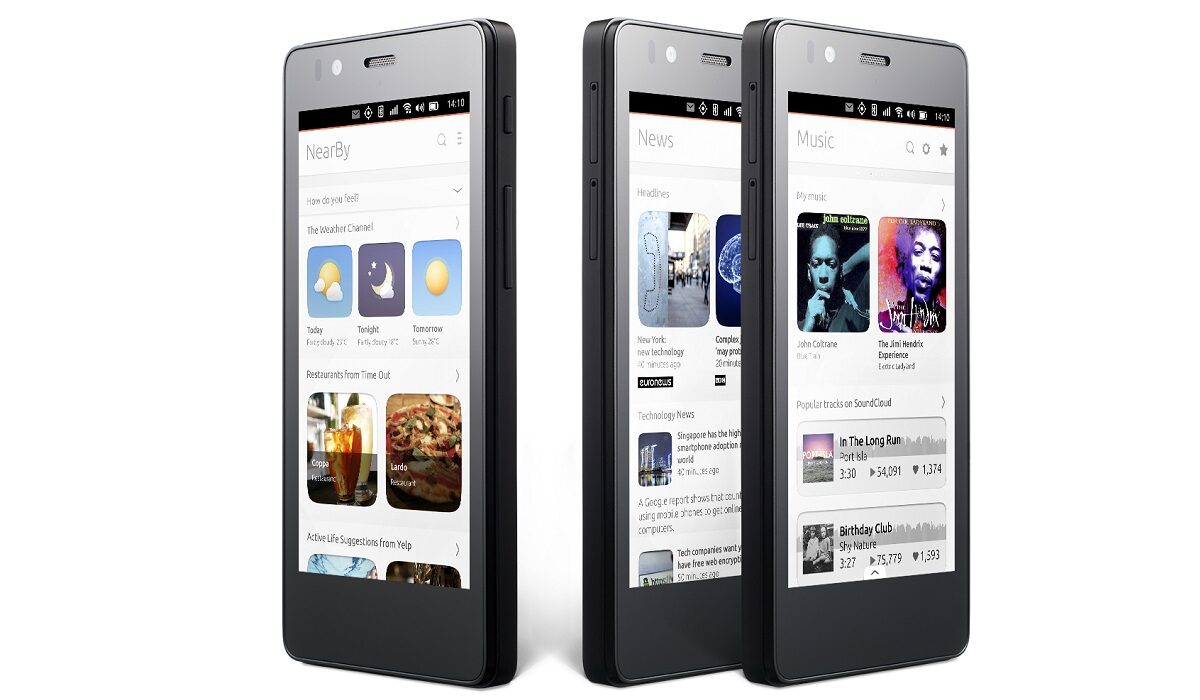
The BQ Aquaris E4.5 Ubuntu Edition is the world’s first Ubuntu phone, and I have had one for some days now. I shared my thoughts with Mister Mo, and he asked me to share my first impressions of the rare smartphone.
I am not a writer or a blogger, so bear with me: this article is not a detailed one. Let’s start with the key specs of the phone before I jump into my thoughts.
About BQ
Let’s get to meet the company, BQ, first. Originally called Mundo Reader , BQ is a Spanish company brand making smartphones, tablets, and e-readers, among other electronic gadgets.
In 2014, they produced the Aquaris E4.5 which shipped with Android OS. This was followed by the Aquaris E4.5 Ubuntu Edition in 2015. This has the same specs but shipped with Ubuntu Mobile Operating system instead, and it is this device that is the subject of this article.
BQ Aquaris E4.5 Ubuntu Edition Specs
- 4.5-inch, 540 x 960 pixel (240 ppi), IPS capacitive screen. Dragontrail protection, display
- Ubuntu Mobile OS
- 2G, 3G networks
- MediaTek processor
- 1 GB RAM
- 8 GB built-in storage memory
- 32 GB microSD card support
- 8 megapixels rear camera
- 5 megapixels front camera for selfies
- microUSB v2.0, micro-USB OTG slot
- 2,150mAh battery.

BQ Aquaris E4.5 Ubuntu Edition
BQ Aquaris E4.5 Ubuntu Edition: My first impressions
- Not brilliant battery life – quite poor, actually. Which is no surprise, considering the measly 2150mAh capacity of the battery
- The Keyboard is annoying to type on. It has one of the worst, if not the worst, autocorrect I’ve ever come across
- But I love Scopes. I am still trying to figure out how to add an app to the Apps scope
- The rear camera isn’t too bad. I am yet to try the front one. I wouldn’t expect much, though.
- HERE Maps isn’t offline, but at least there’s a map service available
- I should also add that it is pretty easy to find your way around the phone.
Your thoughts, everyone?
- Don’t miss our reviews .
- Join our WhatsApp Group , to be notified of the most important articles and deals,
- Follow us on Instagram , Facebook , Twitter , and YouTube .
Author:Noni
Thoughtful. Pragmatic. People watcher. Professional troublemaker.
