Add MobilityArena as a preferred source on Google
The iPhone 14 models are here, and all four of them come with some exciting new features that you should know about and put to use. These cool iPhone 14 features are also available on older iPhone models that get the iOS 16 update, so you can enjoy them even if you are not buying an iPhone 14, 14 Plus, 14 Pro, or 14 Pro Max.
If you own an iPhone 8, iPhone 8 Plus, iPhone X, iPhone XR, iPhone XS, iPhone XS Max, iPhone 11, iPhone 11 Pro, iPhone 11 Pro Max, iPhone SE 2020, iPhone 12 Mini, iPhone 12, iPhone 12 Pro, iPhone 12 Pro Max, iPhone 13 mini, iPhone 13, iPhone 13 Pro, iPhone 13 Pro Max , or iPhone SE 5G , you can install iOS 16 and begin to use the new iPhone 14 features highlighted below.
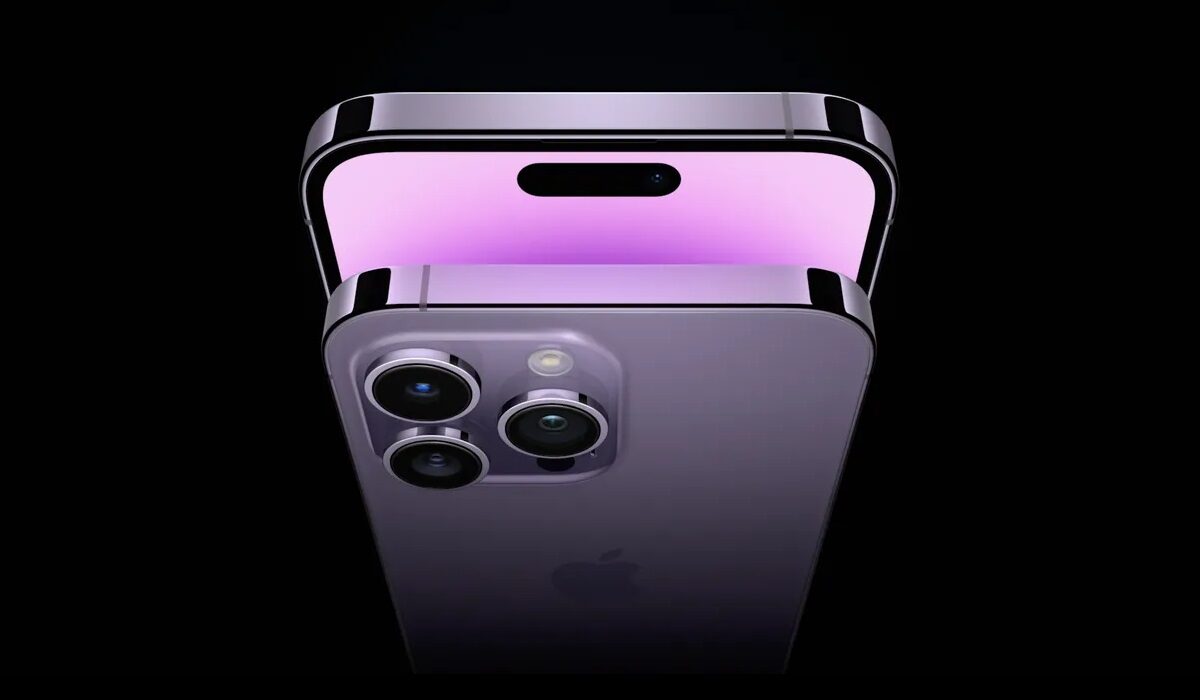
The New iPhone 14 Features
- Mark messages as unread
This cool feature that has been available for email is now available for messages. To mark a message in your Inbox as unread, swipe right on it, or press and hold on it, then select “Mark as Unread” from the list of options that pop up.
- Show battery percentage in the status bar
Since the introduction of the wide notch, iPhones with that feature have not been able to display battery percentage in the status bar, because of lack of space. Apple has finally solved that. Go to Settings > Battery > Battery Percentage. Toggle it on. This is one of the most sought after iPhone 14 features.
- Hide search on the Home Screen
If you find a search bar displayed on your home screen and wish to remove it, so you have more space for your apps, go to Settings > Home screen > Search: Show on Home Screen and turn it off.
- Enable haptic feedback for the keyboard
It is ridiculous that it has taken Apple this long to introduce haptic feedback to the iPhone, but better late than never; right? Keyboard haptic feedback gives you a subtle vibration each time you press a key while typing. To enable haptic feedback, open Settings > Sounds & Haptics > Keyboard Feedback, and enable the toggle, so it turns green.
- Convert Units from anywhere
One really useful iPhone 14 feature that you can also enjoy on your older iPhone model is the ability to do conversions from anywhere on your phone. Wherever you see a measurement, you can long-tap on the text and click on the right arrow, then select your preferred conversion from the greyed-out, options on display. This supports temperatures, currencies, time zones and more. This one is really cool. Death to conversion apps.
- Pin tabs in Safari
You can now pin a tab in Safari Web browser. To do this, long-press in the address bar and select “Pin”. This will turn the selected tab into a semi-permanent item pinned at the very top of your tab overview.
- Remove duplicate photos
Duplicate photos in photo albums are a waste of space. You can now get rid of them. Go to Photos > Albums > Scroll to the bottom and select Duplicates > Tap on Merge and the duplicates are removed.
- Paste edits between photos
If you have edited an image and want to duplicate those edits in other photos, find the “Copy Edits” option in the context menu, then go to any image you want to apply the same edits to, and choose “Paste Edits” in the context menu. Voila!
- Make music player album art display fullscreen on your lockscreen
Sometimes, you just want the album art bigger – as big as possible on your lockscreen. To make it display fullscreen, tap the small artwork to swap your Lock Screen wallpaper and widgets with a fullscreen version of the artwork of the song you’re listening to. To return it back to its original size, simply tap on it again.
How to get these cool iPhone 14 features in your older iPhone
These new features are part of the iOS 16 software update that ships with the iPhone 14 series, and iOS 16 is also available for older iPhone models from iPhone 8.
To get iOS 16 and these new features on your eligible older iPhone model, go to Settings > General > Software Update > Download and Install. Insta the update and after your phone restarts, you can begin to use them.
- Don’t miss our mobile phone reviews .
- Follow our news on Google News .
- Join our WhatsApp Group , to be notified of the most important articles and deals,
- Follow us on Instagram , Facebook , Twitter , and YouTube .
Author:MobileChic
That motivated, gadget-loving geeky chic who tries to stay on top of things. Unapologetic iFan.
Add MobilityArena as a preferred source on Google
Don’t worry if you’re having trouble with a math problem. There are applications that can perform the operations on their own. Here are the best mobile apps for solving math problems and equations.
1. Photomath
If you’re looking for a math app that works on both Android and iOS, Photomath is one of the best. Simply take a photo of the equation, formula, or problem and the app will solve it for you!
One of the tool’s strengths is that it can recognize handwritten and textbook typed problems. Furthermore, it can be used for almost any mathematical operation that comes to mind: arithmetic, logarithms, derivatives, equations. Definitely one of the necessities.
2. Malmath
MalMath is a great app for solving math problems on Android and iOS. It is a free offline tool capable of solving exercises and math problems at various levels, particularly ESO and Baccalaureate.
To accomplish this, the app provides a detailed step-by-step guide that explains how to complete each exercise. Among other things, you will be able to solve integrals, derivatives, logarithms, equations, and limits. A fantastic app for learning math quickly and intuitively.
3. Cymath
Cymath is another essential math app for your Android or iOS device. The app will guide you to the solution with clear and simple explanations, whether you use a photo or type the operation on the keyboard.
Of course, Cymath’s interface can detect handwriting and is excellent for solving algebra and other calculations. The app is free, but you must purchase the Plus version to use it ad-free.
Best Apps for Elementary Math
If your child starts to grasp some of the fundamental concepts of mathematics, a good strategy is to use apps to reinforce their learning in a fun way. If that’s what you’re looking for, we’ll go over the best primary school math apps in this section.
4. Smartick
Smartick is a math app designed for elementary school students. The application helps children understand math in a fun and intuitive way. This works with fifteen-minute sessions per day, adapting in real time to each student’s responses.
It is an excellent application for increasing motivation and removing frustration from “not reaching” a certain level. All of this is accomplished through entertaining exercises and math games that will improve your children’s problem solving and mathematical understanding.
5. Addition and subtraction
Addition and Subtraction is one of the most basic math apps for children. They will learn addition and subtraction operations through numbers with friendly and colorful designs using this tool.
The tool has three difficulty levels (easy, intermediate, and difficult) that can be increased as the child learns. Each operation has three possible outcomes, and the selected answer is shown in two colors: red for failures and green for successes.
6. Math Cubes
If you have an iPad or an iPhone at home, Math Cubes is an excellent app for teaching your children to add and subtract. The tool presents operations in an appealing manner using blocks and includes music and animation to create a stimulating environment.
The operation is straightforward: five operations appear and are resolved. Once completed, the cubes will display the correct answer, with points awarded for each correct answer. Math Cubes is designed for children and young people aged 4 to 14 who have special learning needs.
7. Multiplication Tables Playing!
Now it’s the turn of a multiplication app, which is available for both Android and iOS. In this case, we bring you a tool with which the children can learn the tables using various memory-stimulating techniques.
The game has 76 levels divided into 11 episodes. While solving multiplications, the goal is to assist Kelly in collecting photos for her space museum. It has a very user-friendly interface and supports up to 12 tables.
8. Bmath
Bmath is a Primary math app that should not be overlooked in this list. It is a platform where boys and girls aged 3 to 12 can learn mathematical skills through games and the Innovamat method.
Bmath has over 700 educational games (addition, subtraction, volume, Roman numerals, etc.) and a reward system to increase motivation. An app that will allow your child to learn in a personalized and enjoyable manner.
How to Solve Math Problems on Google
Using Google to solve a math problem is as simple as pasting the exercise into the search bar. Once completed, Google will show you a detailed step-by-step procedure with the exercise procedure until you reach the final solution.
Where Can You Solve Math Problems Online?
If you don’t want to download an app to solve problems, there are a number of specialized math websites that can help. Symbolab, Mathway, Math 10, Microsoft Math Solver, Zearn Math, and K5 Learning are a few examples.
- Don’t miss our mobile phone reviews .
- Follow our news on Google News .
- Join our WhatsApp Group , to be notified of the most important articles and deals,
- Follow us on Instagram , Facebook , Twitter , and YouTube .
Author:Moses Udah
Creative, teacher, web content writer, copywriter, and student.
