Add MobilityArena as a preferred source on Google
As an iPhone lover and user, I have been excited about iOS 15. Now that it is finally out, I have spent some time looking at the new features it brings to the table, and it has plenty. But I have a few fantastic ones that I think every iPhone user should jump on.
Apart from the new iPhone 13, 13 mini, 13 Pro, and 13 Pro Max , other iOS 15 supported devices include the following:
- iPhone 6s
- iPhone 6s Plus
- iPhone SE (original model)
- iPod Touch (7th-generation)
- iPhone 7
- iPhone 7 Plus
- iPhone 8
- iPhone 8 Plus
- iPhone X
- iPhone XR
- iPhone Xs
- iPhone Xs Max
- iPhone 11
- iPhone 11 Pro
- iPhone 11 Pro Max
- iPhone SE (2020)
- iPhone 12 mini
- iPhone 12
- iPhone 12 Pro
- iPhone 12 Pro Max
This means that if you own any one of the above models, you can update it to iOS 15 and enjoy the new features. Note that some older models may not get some features, because of their older processors and other hardware.
Mute Call Alert
If you are on a call and mute yourself in error and so proceed with the conversation, iOS 15 will play a sound to alert you that you are muted. Sometimes, it is the little things that make a huge difference, and this is one of them.
Press Phone Numbers To Call
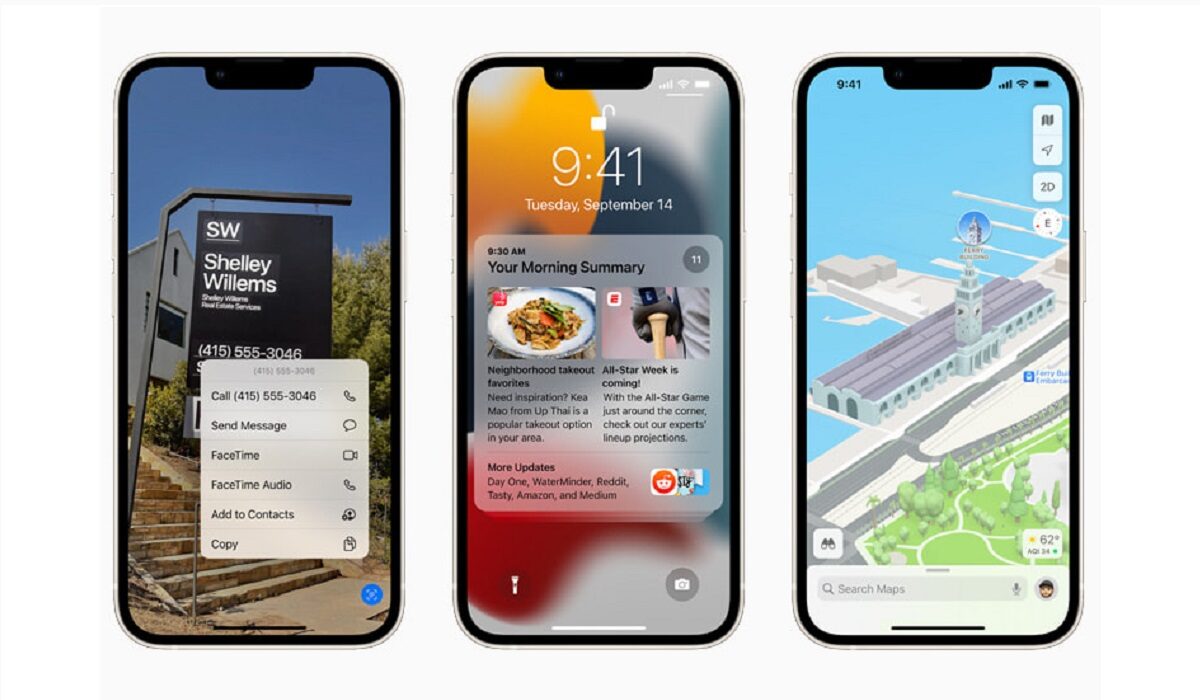
Talk about convenience: you can now long press phone numbers and addresses on images to call and get directions, respectively. Download or take a photo of that banner, and long press to get the information you need.
Copy Text From Images
Similar to the above feature, the Live Text feature lets you take a picture and copy text from it. You can then paste the text where you need to use it. This is similar to Google Lens . and, yes; you can also point your camera at an object to look up information about it. This is a great tool for explorers and inquisitive people.
System-Wide Translate
Translation has been available for iPhones before now, but for the first time, it is now available system-wide, meaning you can use the feature anywhere inside your iPhone. Yes; you can select text from photos to translate too.
Protect Your Email Activity
Block Email Trackers
Still on email security, iOS 15 now lets you block tracking pixels in Mail. That way, senders who are trying to monitor you cannot not know when you have opened their emails. Yes!
System-wide drag and drop
You can now drag and drop elements anywhere in your iPhone running iOS. Think of how drag-and-drop works on your desktop computer. Very convenient.
Web Browser Address Bar Now Easily Accessible
This i something that Mister Mobility has advocated for years . In iOS 15, Apple has moved the address bar down to the bottom of the page. The advantage is that you do not have to reach for the top of your phone when you need to type a Web address or run a search.
Find Your Stolen Phone Even When It Has Been Powered Off
Before now, once your stolen iPhone is turned off, Find My Phone is useless in locating it. That has changed. Now, even if the thief has switched off your iPhone, your phone will remain findable. This is a great bonus for the security of your iPhone.
That is it for now. There are lots more iOS 15 features than what I have highlighted on this page, so look out for them as you use your updated Apple iPhone. If you are yet to have iOS 15 on your supported device, on your device, go to Settings > General > Software Update . Once the update notification appears, go ahead to download and install it. Welcome to all the goodies.
You are reading Mobility Arena .
- Don’t miss our reviews .
- Join our WhatsApp Group , to be notified of the most important articles and deals,
- Follow us on Instagram , Facebook , Twitter , and YouTube .
Author:MobileChic
That motivated, gadget-loving geeky chic who tries to stay on top of things. Unapologetic iFan.
Add MobilityArena as a preferred source on Google
An unlocked iPhone is an unlocked iPhone; right? Not exactly. There are different types of unlocking, with different consequences that the user has to deal with, and if buying an iPhone, you need to be aware of what you are getting.
There are factory unlocked iPhones, worldwide unlocked iPhones, and chip unlocked iPhones . Each of them is different in some way from the other, and they each offer different levels of freedom. Let’s dive into the details, with a special focus on how to know what a worldwide unlocked iPhone is.
What is a WorldWide Unlocked iPhone?
When a smartphone is locked to a wireless carrier, it means that it is configured to work only with that specific carrier. For it to be usable on another carrier, it has to be unlocked. For example, you may buy a locked Walmart Family Mobile branded iPhone. It will not work with another carrier. If you want to be able to use it with Verizon or T-Mobile, for example, you have to carry out a worldwide unlock or chip unlock first.
- Chip Unlocked iPhone explained
- Worldwide Unlocked iPhone explained
- Factory Unlocked iPhone explained What is the difference between factory unlocked and worldwide unlock? How to know if your iPhone is worldwide unlocked
Chip Unlocked iPhone explained
A chip unlocked iPhone is one that is locked to a mobile network or carrier, usually on contract. As a result, the full financial value of the phone has not been paid. Payment is typically on a monthly instalment, and the network lock is a measure by the carrier to keep the user from making away without completing the payment. A chip unlock bypasses the network lock by using a small, special physical component called a chip.
So, a chip unlocked Apple iPhone is one that uses a chip inserted in the device to bypass the network lock. The disadvantage is that you can only use one network per chip. So, if you are currently using a chip to use a Vodacom SIM card in your iPhone and want to use another SIM in it, you will need to buy another chip.
Worldwide Unlocked iPhone explained
Worldwide unlocking (WWU) is done via software and enables you to use any SIM card with the device. You can change SIM cards as you please and use them without any worries or inconveniences, so long as the phone is compatible with the mobile network.
Is there any caveat? Sure: if you factory reset or wipe a Worldwide unlocked iPhone, the original carrier lock will come back and you will be unable to use it with any other carrier except the one it was originally locked to. In other words, you have to go through the software unlocking again.
Factory Unlocked iPhone explained
A factory unlocked (FU) Apple iPhone is one that is sold free of a lock to any mobile carrier – Verizon, Walmart Family Mobile, Vodafone, MTN, or Orange anywhere. This is what you should be wanting. In the USA, it is simply called an unlocked phone.
Factory unlocked iPhones are sold by Apple and at independent stores in the USA, Canada, UK, South Africa, Australia, and many other countries around the world. They offer complete freedom, as you can insert any SIM card from a compatible network at anytime and use at will.
What is the difference between factory unlocked and worldwide unlock?
A factory unlocked iPhone is one that has never been locked to any carrier at all, and so can be used on any compatible carrier. A worldwide unlocked iPhone is one that had a carrier lock but which has been removed by means of software, so it can be used on any compatible carrier anywhere in the world.
How to know if your iPhone is worldwide unlocked
To tell if your iPhone is unlocked, open the Settings on your iPhone, scroll down and tap on General , then tap on About . Scroll to the bottom and look for Carrier Lock . If it displays No SIM restrictions , then your iPhone is unlocked and can be used with any compatible carrier.
In a nutshell, a chip unlock requires a physical chip for the iPhone to be usable with another network’s SIM. A WorldWide Unlocked iPhone is one in which the carrier restriction removal is carried out via software, requires no physical chip to unlock, and can be used with any compatible carrier or mobile network operators worldwide.
A factory unlocked iPhone is the definition of true freedom and comes with no restrictions. When shopping for an unlocked iPhone, do not forget to ask what kind of unlocking it is.
Author:MobileChic
That motivated, gadget-loving geeky chic who tries to stay on top of things. Unapologetic iFan.
