Add MobilityArena as a preferred source on Google
The Galaxy A-series have been Samsung’s best sellers for good reason: they offer decent performance at. And now, there are rumours that Samsung will be announcing an entry-level, affordable Galaxy Fold and Flip, under the A-series line-up.
The rumours say that Samsung is looking to take a bigger bite of the foldable market by releasing devices that will cost about half the prices of existing models in the market. Right now, only high-end foldables exist, and Samsung owns 90% of it. This looks like a case of preemptive strike, to make sure a competitor does not undercut Samsung on the budget segment.
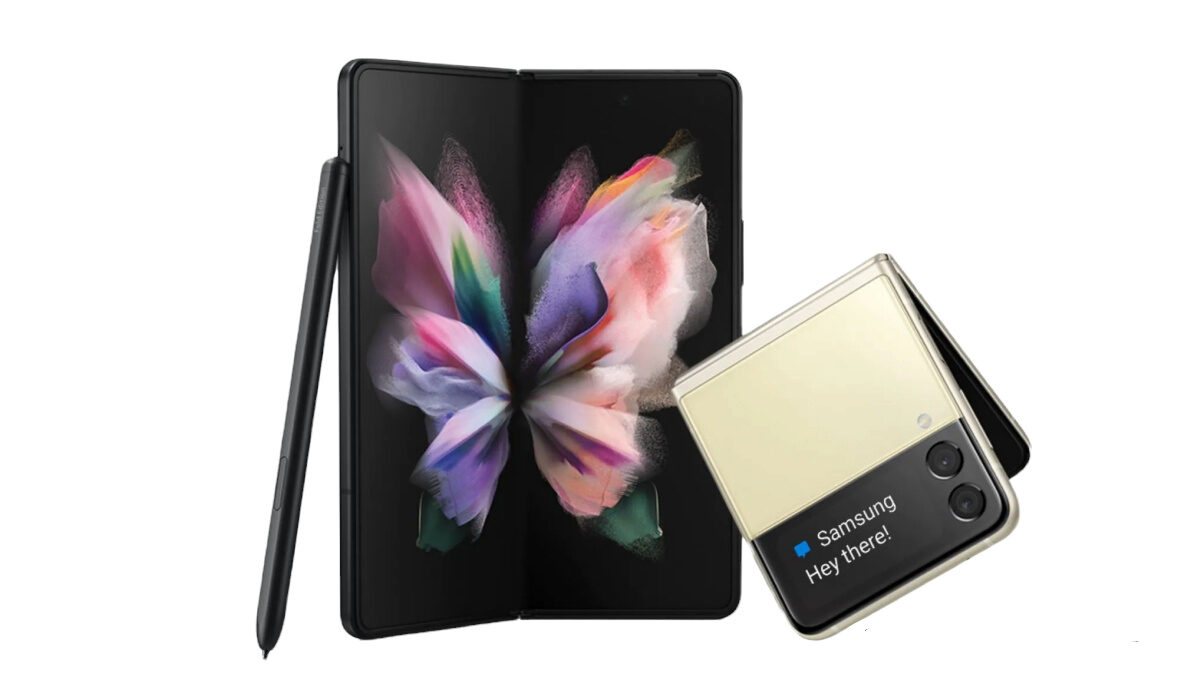
Naturally, it is expected that two affordable foldables will be released in the Galaxy a series – one a Galaxy A Fold, and the other, a Galaxy A Flip, representing budget versions of the Galaxy Z Fold and Galaxy Z Flip respectively.
What can we expect of the affordable Galaxy Fold and Flip?
In line with the pattern with the A-series, the entry-level, affordable Galaxy Fold and Flip devices will offer the most essential features and exclude premium features. For example, instead of a premium flagship processor, the entry-level Galaxy Fold will use a mid-range processor. It will likely exclude wireless charging and more premium materials, as well.
What kind of prices are we expected to see on the affordable Galaxy Fold and Flip? One report from 2020 says Samsung’s upcoming entry-level foldable smartphone, referred to then as Galaxy Fold Lite, will be priced at around US $900. A more recent one says it will carry a price tag of under 1 million Won, which is about US $770. We will have to wait to see what exactly happens and how these two budget foldable devices are priced, if the rumours turn out to be true.
The first rumour of the affordable Galaxy Fold (AKA Galaxy Fold Lite) was from Max Weinbach, who has since deleted the tweet. The more recent rumour is from Korean news website, ET News .
What is the expected release date of the affordable Galaxy Fold and Flip devices?
According to the report, these, entry-level and affordable versions of the Galaxy Z Fold and Galaxy Z Flip won’t arrive in the market till sometime in 2024. That is a long way off, in mobile phone times and seasons. We can only wait and hope that the rumour is true. Foldable phones are cool, and more people should get a chance to experience them.
- Don’t miss our reviews .
- Follow our news on Google News .
- Join our WhatsApp Group , to be notified of the most important articles and deals,
- Follow us on Instagram , Facebook , Twitter , and YouTube .
Author:MobileChic
That motivated, gadget-loving geeky chic who tries to stay on top of things. Unapologetic iFan.
Add MobilityArena as a preferred source on Google
Every day on this planet, cell phones get hacked, for a varying number of reasons. Often, the motive is to steal from you – be it your data or your money. At other times, the malicious actors are just out to prove a point. And sometimes, it is a jealous love interest who needs to know exactly what you are up to. Whatever the reason, there are regular attempts to hack smartphones. If you own an iPhone and have fallen victim to a hacking exercise, in this article, I share with you simple but helpful tips to get rid of a hacker from your iPhone.
Even if you have not fallen victim, you never know when you will need it, even if it is to help an acquaintance, friend, or family member to remove a hacker from their iPhone. The knowledge is not wasted. But before we jump into those tips, you need to determine first that your iPhone has been hacked, no? How can you tell?
Signs that your iPhone has been hacked
There are tell-tale signs of a hack job on your Apple iPhone. One of them is that, suddenly, your cell phone heats up while idle. You leave it on the desk or in your pocket, while you are attending to other things, but when you pick it up, it is significantly warm or heated up. It is not normal for smartphones to heat up when not in use; usually this is a sign that some serious background activity is going on. In this case, a hacked Apple iPhone is likely to be continually transferring data to a remote server somewhere. That activity generates heat which warms up the phone even when you are not using it.
There is also a chance that your iPhone is running slower than before, and the battery discharging faster than before. Oh, and if your data consumption jumps up without an increase in your usage, that is another red flag. All of these can be indicators that your iPhone is hacked and carrying out Internet-related activity behind your back.
How to get rid of a hacker from your iPhone
Because hacks often mean that sensitive data on your Apple iPhone are being harvested, the first thing to do if you believe your iPhone is hacked, is to take it offline. Turn off mobile data and/or Wi-Fi. What does this do? It stops the data harvesting. If done early, it can be the difference between your bank account being emptied and your money being safe, if this is a hack job to steal your money. Cutting off Internet access is like starving the hacker of air. Without an Internet connection, your data cannot be stolen any more.
The next step to get rid of a hacker from your iPhone is to look for any strange apps on your device and delete/uninstall them. By strange apps, I mean any apps you didn’t manually install by yourself. Also, check in your iPhone’s network settings for any configuration settings that are not from your wireless provider and that you did not manually enter. Delete them. Once you have done this, it is also recommended that you change your iPhone’s password, as the hacker may already have it.
An extreme option, if you have backups from before you noticed all the strange behaviour of your Apple iPhone, is to hard reset (factory format) your device. This will wipe it clean and return it to factory state – like brand new. This is a very effective way to get rid of a hacker on any device. There are some advanced hacks (like Project Pegasus ) that a hard reset will not shake off, but you are not likely a target of those high-tech hacking operations.
After resetting your iPhone, you can restore a backup, to get your files and settings back. Just be sure to restore a backup from before the hack happened. Any backups you have from after the hacking happened are definitely compromised too, and restoring any of them simply means you are smack-bang back in the hands of the hacker.
A hard reset is extreme, but it is the most effective and the surest way to get rid of a hacker from your iPhone. Where everything else fails, do a hard reset. Lastly, do not forget that prevention is better than cure. It is better to prevent the hacking from happening than to get rid of a hacker from your iPhone.
Steps to prevent your iPhone from being hacked
What are the steps you can take to prevent your iPhone from being hacked? Put a strong password on your iPhone and do not leave your phone with a third party in your absence. Physical access is the easiest way cell phones get hacked. Also, do not click unverifiable links, especially those sent to you in random mails or text messages.
- Don’t miss our reviews .
- Follow our news on Google News .
- Join our WhatsApp Group , to be notified of the most important articles and deals,
- Follow us on Instagram , Facebook , Twitter , and YouTube .
Author:MobileChic
That motivated, gadget-loving geeky chic who tries to stay on top of things. Unapologetic iFan.
