Add MobilityArena as a preferred source on Google
Samsung One UI is the replacement to Experience UI , Samsung’s current custom skin. And it is looking so good that I am loving it.
Those who have followed MobilityArena for many years will remember how much I disliked TouchWiz . TouchWiz was Samsung’s first Android skin and was released in 2010. It was perhaps my most disliked Android skin for years.
But Samsung got to work and replaced TouchWiz with Samsung Experience in late 2016. I have been using a Galaxy S9 Plus for some months now and I can tell you that Experience UI is a huge improvement over TouchWiz. See my Galaxy S9 Plus review .
From what I have seen of Samsung One UI, I am excited about it and looking forward to January 2019 when it will be rolled out with Android 9 Pie update to the S9+.
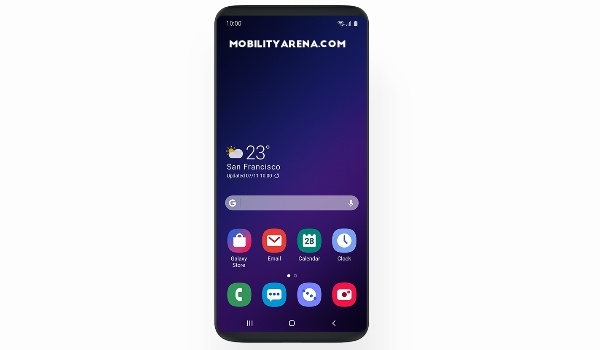
Samsung introduces it this way:
One UI helps you focus on what really matters to you. With hardware and software working together in harmony, see only what you need, using and viewing your phone with an experience that feels second nature. Because it’s the small details that make a big difference.
Samsung One UI Features
One UI packs all the extra features and customisation options that Experience UI already offers. The big change is in the user interface – what we see and how we experience it.
Samsung says one key thing they did was declutter the screen so everything is easier on the eyes. I like. And then, there is Night Mode for easier reading and usage in the dark. Can I hope for a system-wide implementation of this? I shall keep fingers crossed.
Samsung Mobile has come a long way from the kludge that TouchWiz was. This latest custom Android skin by Samsung is looking to be the best yet and I can’t wait to try it out.
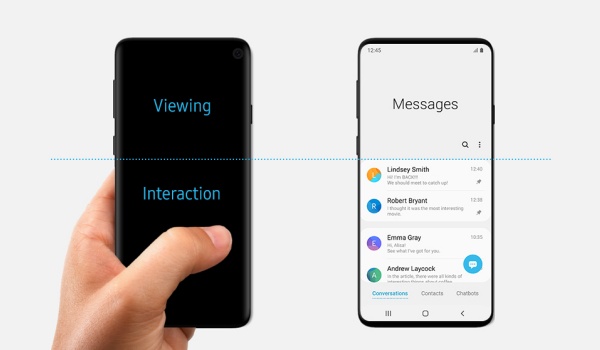
But what is really beautiful about the new Samsung One UI interface is how actionable content is presented at the bottom of the screen, and readable content is presented at the upper side. That must be the result of smart thinking.
Why do I say this? Smartphone displays are getting bigger and bigger. It makes sense to keep items and menus that require touch action where our fingers can reach them easily. It is the very same reason why on-screen keyboards are positioned at the lower half of the screen. It is great for usability.
Samsung One UI Release Date
One UI will be arriving in January 2019 as part of Android 9 Pie update for the the Galaxy S9, S9 Plus, and Note9.
Want To Beta Test?
If you are adventurous enough and are resident in China, France, Germany, India, Poland, South Korea, Spain, UK, or the USA, you can join the One UI Beta Program and beta test it before the public release.
To get started, download the Samsung Members app to your Samsung phone, login, go to Notices and select “One UI Beta Program Registration” to submit your request. Once approved, dive into your phone settings to the Software update menu to check for and install the Samsung One UI beta software.
January 2018 Update: The Android 9 update with Samsung One UI is already rolling out, beginning with Galaxy S9, S9+, and Note9. Other phones and tablets on Samsung’s Android Pie update list will follow.
It hasn’t arrived on my S9+ yet though. As a software update junkie, I have been doing manual checks daily for a couple of weeks now. I really cannot wait to get my hands on One UI.
Author:Mister Mobility
Digital Skills and Communication Coach | Mobile Phone Connoisseur since 2001 | Tech Blogging since 2004
Add MobilityArena as a preferred source on Google
Skagen Falster 2 is the second coming of this range of smartwatch and it is looking like the watch all the cool kids want to be seen with.
It features great hardware design merged with the usual slew of Android Wear features. For starters, you get a stainless-steel build, interchangeable magnetic mesh straps and customizable dials. But beyond the cool looks, you can also go swimming with this model. Which sorts of increases your cool kid factor.
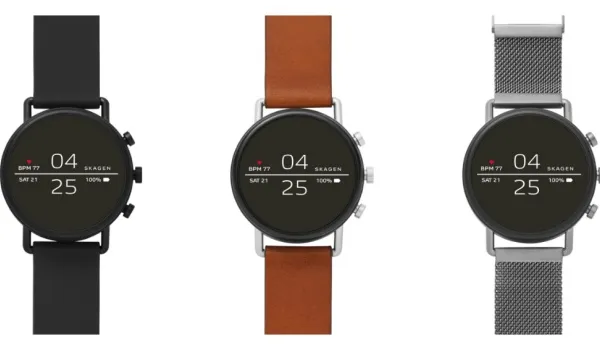
If you were to get one of these, what else would you be looking forward to? We have a quick breakdown for you.
Skagen Falster 2 Features
It is mostly standard Android Wear features. They include Heart-Rate tracking, as well as activity monitoring, so you can stay on top of your vitals.
You can interact with Google Assistant via voice commands. Who wants to type on a tiny wrist screen?
As an accessory you can pair with your smartphone, you get notifications when messages arrive on your phone.
The Falster 2 has fast charging built in too.
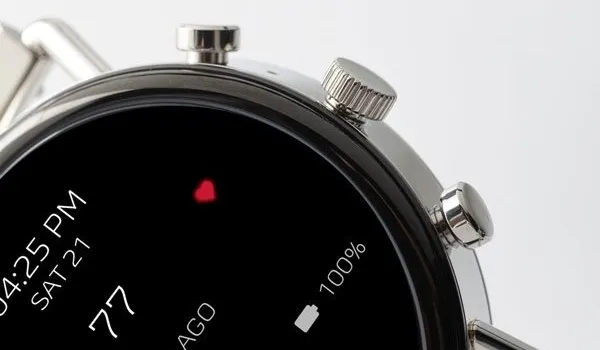
Skagen Falster 2 Quick Specs
- Display: 1.19-inch, 390 x 390 pixels, OLED
- Processor: Snapdragon Wear 2100
- Internal Storage: 4GB
- GPS, NFC, heart-rate monitor, Accelerometer, Altimeter, Gyroscope, Ambient Light
- Water Resistance: up to 300 metres
- Software: Wear OS 2.1
The display is as good as it gets, and the smartwatch is packed full of the features you want to see. But the processor is a little bit dated, which might impact performance.
Skagen Falster 2 Price
The Falster 2 costs $295. But if you’d prefer to forego the mesh strap to save some cash, leather and silicone strap options are available for $275 only.
