Add MobilityArena as a preferred source on Google
Mobile apps have become an integral part of our daily lives, from social media to productivity tools and entertainment apps. However, it can be frustrating when you encounter an error message like “ APK Not Installed as Package Appears to be Invalid .” This error message usually appears when you’re trying to install an app on your Android smartphone or tablet.
- Common causes of the “APK Not Installed” error
- Solutions to APK not installed as package appears to be invalid error Solution 1 Solution 2 Solution 3
- Solution to: The package conflicts with an existing package
- Alternative app stores to download apps from if the Google Play Store is causing the error
- Conclusion
Common causes of the “APK Not Installed” error
The error statement sheds some light on the cause of the problem. The app is not installed because the package appears to be invalid. Something is wrong with the APK file. That is the primary cause of the APK Not Installed problem.
In other words, the app does not get installed because the APK package appears to be corrupt. It is pretty self-explanatory. Where the app’s APK package is actually corrupt, it is likely that you downloaded it from a 3rd party source and not Google Play Store. There is always a security risk involved in downloading apps from random sites. Avoid it as much as possible and go download a copy from the Play Store .

However, it is not in all cases that the file is actually corrupt when you get that APK not installed as package appears to be invalid error. In those cases, you can run a few tweaks to sort out the error.
Solutions toAPK not installed as package appears to be invaliderror
There are a number of reasons why you may be getting this error. We look at the various solutions to the problem.
Solution 1
In Android Studio, go to Build > Build APK(s).
After creating the APK file, you will see a dialogue that tells you the file has been successfully. Click on locate and proceed to install it in your phone.
Solution 2
The error could be from you having downgraded the target SDK Version in the gradle app module file. For example, a downgrade from 24 to 22 .
Just change the target SDK version to the current version and the APK file should install without giving you that error any more.
Solution 3
Lastly, it is possible that you already have the app installed on the phone, but in “disabled” state. Just uninstall the disabled application and try installing your APK file again. The installation should run without an error.
One of the above fixes should resolve the APK not installed as package appears to be invalid error that you have been getting. Post a comment to let us know.
Solution to: The package conflicts with an existing package
If what you are getting is the error that says, app not installed as package conflicts with an existing package, a fix that works for most people is to uninstall the affected app, download a fresh APK file and try to install that.
Alternative app stores to download apps from if the Google Play Store is causing the error
if you keep getting this error when you download your apps from Google Play Store, you will need alternative stores and locations where you can install those apps from. You can have a look at our dedicated article listing the best 3rd party Android App Stores to download apps from .
Conclusion
In conclusion, this error message can be frustrating and confusing, especially if you’re not sure what’s causing it. However, by following the steps we’ve outlined in this article, you should be able to resolve the issue and start enjoying your favorite apps again. From verifying the validity of an APK package to updating your device’s operating system and clearing cache and data, there are several solutions you can try.
We hope that this article has been helpful in providing clarity on the causes of the error message and how to fix it. Remember, prevention is always better than cure, so be sure to keep your device updated and avoid downloading apps from untrusted sources.
Author:InfoDesk
Add MobilityArena as a preferred source on Google
I am a fan of the Communicator form factor in mobile phones, and the Cosmo Communicator takes me down memory lane. It is a clamshell smartphone with a 2-inch display outside that opens up to reveal a 6-inch display and a backlit hardware QWERTY keyboard like a small laptop. Its design is a throwback to the days of the Psion palm tops and Nokia Communicators.
On the inside, however, this is a very up-to-date piece of work. For one, it runs Android Pie, with the option to also boot into Sailfish OS and Linux. There is a Mediatek Helio P70 chipset coupled with 6GB of RAM. Internal storage is 128GB. And for photography, there is a 24 megapixel camera.
The outer 2-inch display is for viewing your notifications. Open the Cosmo up to get productive. There is a fingerprint sensor too for security. Planet Computers, the manufacturers, tout it as “a pocket computer, mobile phone and camera” rolled together in one.

Cosmo Communicator Specs
- Networks: GSM, CDMA, WCDMA, 4G LTE
- SIM: Dual-SIM (second SIM is an eSIM)
- Dimensions: 171.4 x 78.3 x 16 mm
- Weight: 320g
- Colours: Space Grey Metal, Gold-plated (limited edition)
- Software/OS: Android 9 OS (Pie), Linux OS compatible
- External Display: 2 inches, 570 x 240 pixels, Scratch resistant glass.
- Internal Display: 5.99 inches, 2160 x 1080 pixels, AMOLED display.
- Sensors: Accelerometer, compass, light sensor, gyro, magneto-sensor
- Processor: Mediatek P70 Octa-core 2.0 GHz Cortex-A73
- GPU: ARM Mali G72 MP3 @800MHz
- RAM: 6GB
- Internal Memory: 128GB
- External memory: micro SD card
- External Camera: 24 megapixels
- Internal Camera: 5 megapixels
- USB: 2x USB Type C, OTG support, HDMI out (via adapter cable)
- Battery: Li-Ion 4220
- Others: NFC, 3.5mm audio jack.
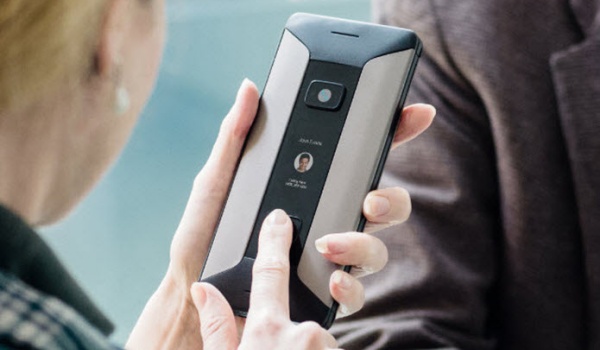
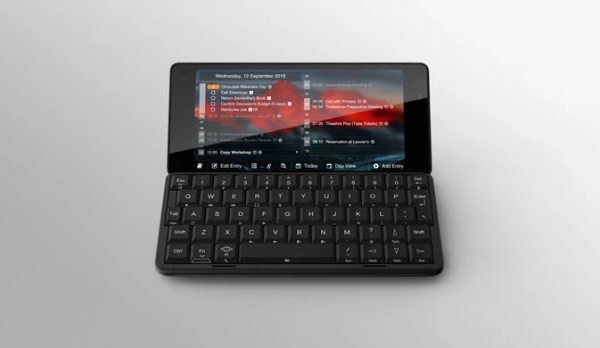
Communicators once ruled the mobile world. Will Cosmo Communicator live up to that legacy in today’s world?
Cosmo Communicator Price
The Cosmo’s regular retail price is $799, but if you support the project, you can cop one for just $549. Supporters/backers get their units in Amy 2019. Head over to the Indeigogo page for details.
Author:Mister Mobility
Digital Skills and Communication Coach | Mobile Phone Connoisseur since 2001 | Tech Blogging since 2004
