Add MobilityArena as a preferred source on Google
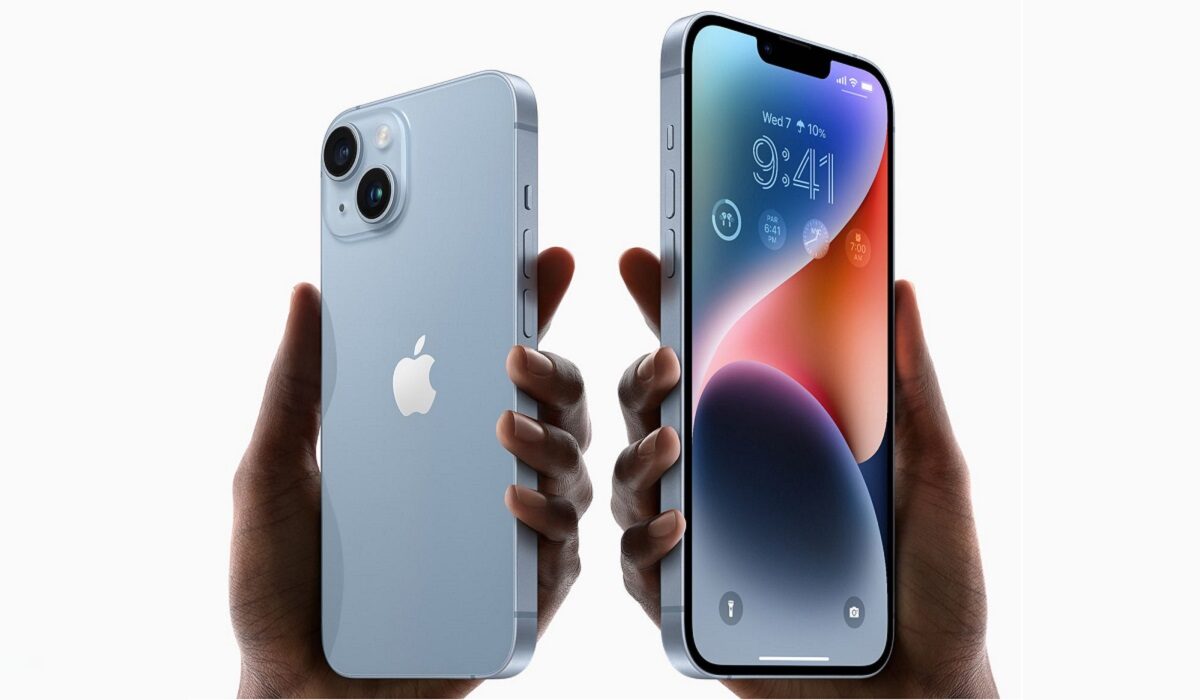
The iPhone 14 is the smallest of Apple’s premium flagships announced in 2022. The mini is gone this year. The key things to note is that the 14 has a 6.1-inch display and uses 2021’s A15 Bionic chipset. Its bigger brother, iPhone 14 Plus , uses the same chip but has a 6.7-inch display.
Also, note that iPhone 14 and iPhone 14 Plus do not have physical SIM card slots in the United States; they use eSIM standard only. Outside the USA, both models offer physical SIM card slots. These are also the first iPhone models with Emergency SOS via satellite.
- iPhone 14 and 14 Plus specifications
- iPhone 14 Prices in US, UK, EU
- iPhone 14 Plus Prices in US, UK, EU
- MobilityArena Buyer’s Guide Verdict
- Apple iPhone 14 and 14 Plus Review Rating
iPhone 14 and 14 Plus specifications
Mobile Wireless Network and Software
- 2G mobile network bands : GSM, GPRS, EDGE 850 / 900 / 1800 / 1900 MHz.
- 3G mobile network bands : UMTS, WCDMA, HSDPA 850, 900, 1700/2100, 1900, 2100 MHz
- 4G mobile network bands : LTE 1, 2, 3, 4, 5, 7, 8, 12, 13, 14, 17, 18, 19, 20, 25, 26, 28, 29, 30, 32, 66, 71, 34, 38, 39, 40, 41, 42, 46, 48, 53
- 5G mobile network bands : NSA/SA, sub‑6 GHz/mmWave, n1, n2, n3, n5, n7, n8, n12, n14, n20, n25, n26, n28, n29, n30, n38, n40, n41, n48, n53, n66, n70, n71, n77, n78, n79, n258, n260, n261
- Satellite connectivity : Emergency SOS via satellite
- SIM Type : Dual eSIM
- Software / OS : iOS 16
Design, Form Factor, Appearance
- Dimensions : 146.7 x 71.5 x 7.8 mm (160.8 x 78.1 x 7.8 mm for 14 Plus)
- Weight : 172g (203g for 14 Plus)
- Display : 6.1 inches, 1170 x 2532 pixels, 60 Hz refresh rate, 19.5:9 aspect ratio, 800 nits, OLED, Super Retina XDR display. (6.7 inches, 1284 x 2778 pixels for 14 Plus)
- Colours : Midnight, Purple, Starlight, Red, Blue.
- Physical Build : Ceramic Shield front, Glass back, aluminum frame; Rated IP68 (maximum depth of 6 meters up to 30 minutes)
Internal Hardware Specs
- CPU/ Processor : 64-bit, 2.3 GHz Hexa-core
- Chipset : Apple A15 Bionic
- GPU/ Graphics Processing Unit : 5-core Apple GPU; 16‑core Neural Engine
- RAM : 4 GB
- Extended/Virtual RAM : No.
- Internal Storage : 128 GB / 256 GB / 512 GB
- External Storage : No.
Photography, Video Recording
- Main Camera : 12 MP main sensor + 12 MP ultrawide angle lens, autofocus, LED flash, 4k video, 1080p@30fps video recording
- Front Camera : 12 MP, auto focus, Face ID, 4k video, 1080p@30fps video capture
Audio, Video Playback
- Music Support : PCM, AAC / AAC + / eAAC + / MP3 / AMR – NB / WB / APE
- Audio : No 3.5 mm audio jack
- Loudspeaker : Stereo speakers
- Video Support : H.264/MP4/MPEG4 player
- FM Radio : No.
Phone Sensors
- Digital Compass : Yes.
- Accelerometer : Yes.
- Proximity Sensor : Yes.
- Ambient Light Sensor : Yes; dual.
- Barometer : Yes.
- Pedometer : No.
- Heart Rate Monitor : No.
- Gyroscope (G-Sensor) : Yes.
- Fingerprint Scanner : No.
- Face ID/Unlock : Yes.
- Iris Scanner : No.
- Motion Sensing / Gesture Control : Yes.
- Voice Control : Yes.
- Intelligent Digital Assistant : Yes; Siri.
- Infra-red Blaster : No.
Connectivity Options
- Bluetooth Version : 5.3
- Bluetooth Profiles : A2DP
- WiFi : Wi-Fi 802.11 a/b/g/n/ac/6, hotspot
- GPS : Yes, A-GPS, GLONASS, BDS, QZSS, Galileo
- USB : Lightning port. USB 2.0
- NFC : Yes.
Miscellaneous Specs and Features
- Battery Type and Capacity : Non-Removable Lithium-Polymer 3,279 mAh (4,325 mAh for iPhone 14 Plus)
- Battery Charging : 20W fast charging; USB Power Delivery 2.0
- Wireless Charging : 7.W Qi wireless charging; 15W MagSafe fast wireless charging.
- Reverse Charging : No.
- Model Version/Number :
Launch/Release Dates and Information
- Announced : September 7, 2022
- Release Date : September 16, 2022 (iPhone 14); October 7, 2022 (iPhone 14 Plus)
iPhone 14 Prices in US, UK, EU
- USA : from $799 for the 128 GB variant
- Canada : $1099 CAD (128 GB). $1249 (256 GB). $1519 (512 GB)
- UK : from £849 (128 GB)
- European Union : from €1,000 for the 128 GB variant
iPhone 14 Plus Pricesin US, UK, EU
- USA : from $899 for the 128 GB variant
- Canada : $1249 CAD (128 GB). $1399 (256 GB). $1669 (512 GB)
- UK : £949 (128 GB)
- European Union : from €1,150 for the 128 GB variant
The above prices may change with time from country to country, as market forces and economic policies influence product price movements.
Both iPhone 14 and iPhone 14 Plus models are available unlocked and are compatible with AT&T, T-Mobile, Sprint, and Verizon in the USA and other GSM and CDMA networks all over North and South America, Europe, Africa, Asia, and other regions.
MobilityArena Buyer’s Guide Verdict
If you want the smallest and most affordable iPhone flagship, the iPhone 14 is what you want to buy. There is no iPhone 14 mini . The iPhone 14 Plus offers the same features with a larger display, so that would be your consideration if a big screen is important to you.
If you often work or travel in remote locations in the US and Canada without terrestrial cellular service, both iPhone 14 and 14 Plus offer emergency SOS via satellite connectivity, and that might come in handy some day. Pre-order starts from September 7; the iPhone 14 ships from September 16, while iPhone 14 Plus ships from October 7.
Our Buyer’s Guide Verdict is a recommendation based on the specifications of the device and a general guide to help you understand how much value a device offers for its price. It is not an endorsement of the device. Ask questions and use your judgement when buying any device; MobilityArena takes no responsibility for your buying decisions .
Apple iPhone 14 and 14 Plus Review Rating
Not available.
Author:InfoDesk
Add MobilityArena as a preferred source on Google
If you want to start downloading leaked apps or further customize your Android experience than is possible via the Play Store alone, learning how to install APK files is crucial. Not being limited to what Google has in its app store can be a blessing, depending on the situation.
You’ve probably encountered an APK file at some point if you own an Android smartphone. Perhaps you’ve even wondered what it means and what it can do for your device. There’s no need to get confused though, we’ve provided all the information about APK files in this guide, why they’re important, and how to install them on your Android smartphone if needed.
- What are APK Files?
- Why Install APK File?
- How Do I Install An APK File? Install APK Files Directly on Android Smartphones To Install APK Files from a Computer
What are APK Files?
The package file format used by the Android operating system for the distribution and installation of mobile apps is known as an Android Package Kit (APK for short). The APK serves the same function for Android devices as an .exe file does for Windows (PC) systems when installing applications.
You effectively obtain an app when you download an APK online. The majority of users only ever encounter the Google Play Store while downloading apps. However, there are times when you would want to get your apps via other means.
Why Install APK File?
APK files for upcoming Android builds are frequently leaked beforehand, basically giving you quicker access to new features that you normally shouldn’t have under normal circumstances. Some apps are also only accessible in areas outside your own. Furthermore, the delivery of automated over-the-air app upgrades can be excruciatingly slow sometimes. You can avoid the wait in these situations by obtaining the latest recent APK for your favorite programs. You can even choose to use an older version of an app after an update if you don’t like it.
APK files might also be the sole option you have for installing apps on your device if the Google Play Store is inaccessible for your Android device.
Warning : Keep in mind however that you don’t want to download phony apps, so proceed with caution when dealing with APK files. You may acquire pirated apps using some APK services; this is prohibited and should be avoided.
Even worse, suspicious APK files could contain malware, as many people who mistakenly believed they were downloading beta versions of a particular Android app later learned to their dismay. Before downloading, take some time to conduct some research to ensure that you’re not breaking the law or tainting your device.
How Do I Install An APK File?
There are different ways to get this done, either by downloading the APK file directly on your Android smartphone or tablet or by using a computer. We’ve described both methods below.
Install APK Files Directly on Android Smartphones
APK files can be installed simply from your browser on an Android smartphone or tablet. Follow these simple instructions to do so:
● Open your browser, go to the APK file you want to download, and then click it. The download status should then appear on your device’s top bar.
● After selecting the APK file and accessing Downloads, press Yes when prompted.
● Your device will start installing the app. It’s as easy and straightforward as that!
To Install APK Files from a Computer
APK files can be downloaded and set up without a smartphone. This is achievable using a desktop computer. The following steps describe how it works:
● Finding the desired APK file is the first step. Find an APK file online, then download it to a convenient spot on your computer (like your desktop). To make it simple to locate files on your Android device, you may also download a file manager software.
● Connect your Android device to your computer after downloading the APK file.
● You might be prompted to choose between charging your phone and connecting it as a “media device” at this point. Select a media device (File Transfer on some phones).
● Next, locate the folder for your phone on your computer. On Windows, you should see it appear as “My Computer” or “Computer” (PC).
● On your Android phone, copy the APK file into the folder of your choice.
● Now that the file location is known, you may search for it in your device’s My Files area.
● Locate the APK file in the file manager, press it, and then choose the Install option.
It’s worth noting that Android will ask you for permission to install unknown apps or those that you have not downloaded from the Play Store if this is your first time using the file manager to install an APK file. To authorize the program, simply follow the on-screen directions you see.
At this point, you’re done with the installation process, and you now have your desired app. Just check that it functions properly by opening it from your smartphone. Repeat the procedure with a different APK file if it doesn’t. You might also need to try another APK website, so keep this in mind.
You’ll also need to modify a system setting if your smartphone’s operating system is older than Android 8.0 in order to be able to install apps that are not downloaded from the Play Store. To do so:
● Launch the Settings app.
● Select Security .
● To enable your phone to install apps from sources other than the Google Play Store, turn on the Unknown Sources setting.
In summary , installing APK files on your Android device is pretty easy and is something you should consider if you’d like quick access to some exciting apps and features. We’d advise that you proceed with caution though so that you don’t end up with malware on your device. Adequate research and downloading APKs from trustworthy sites should help reduce this risk drastically.
If you know someone else who might benefit from this article, we encourage you to recommend it to them.
