Add MobilityArena as a preferred source on Google
The Apple MacBook Air 2018 specs make it an improvement and proper upgrade over the original MacBook Air. It was announced during Apple’s October 2018 event.
This sleek laptop features a retina display, touch ID, fingerprint sensor security and is available from November 7 2018. The MacBook Air 2018 is made up of recycled aluminium, weighs a lightweight 1.25kg and is a lot slimmer.
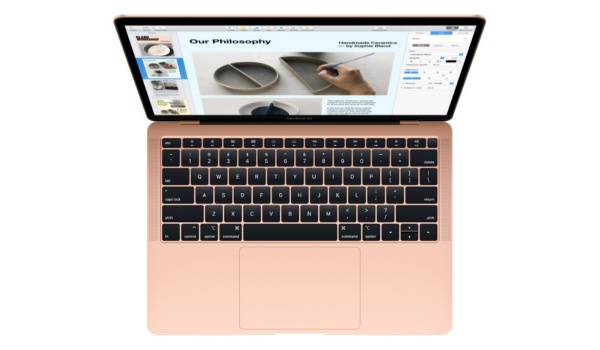
Apple MacBook Air 2018 Specs
– Processor – 8th Generation Intel Core i5.
– Display – 13.3-inch Retina Display (2560×1600) LED.
– Graphics – Intel UHD Graphics 617.
– Memory/Storage – 8GB to 16GB / 128GB, 256GB, 512GB, 1.5TB SSD.
– Connectivity – 802.11 ac Wi-Fi, Bluetooth 4.2.
– Ports – 2x Type-C USB(Thunderbolt) and 3.5mm headphone Jack.
– Upto 13 hours battery life.
– Face Time HD Camera, Touch ID, T2 Security chip.
The Apple MacBook Air 2018 boasts of a resolution of 2560 x 1600 pixels on its 13.3″ display which accounts for 48% more colour and the Retina Display – the first for a MacBook Air. This gives the screen four times the resolution of its predecessors.
Other items you will find on the ultra-slim MacBook Air 2018 specs sheet include the 8th Gen dual-core Intel core i5 base clock 1.6GHz and boost speed up to 3.6GHz processor that guarantees efficiency and better performance. This also extends to its battery life – reaching 12 hours for video play-back or wireless web use.
Apple opted for its third generation butterfly keyboard that enables durability. The keyboard is also the location for the fingerprint sensor spotted at the extreme right on the top row.
Like the MacBook Pro 2018, it also features thunderbolt enabled 2 USB-C ports, Touch ID, Force Touch trackpad, always-on audio processor and a 3.5mm headphone Jack.
That is it for the Apple MacBook Air 2018 specs. It comes in Gold, Space-gray and Silver colour with a starting price of $1199.
- Don’t miss our mobile phone reviews .
- Follow our news on Google News .
- Join our WhatsApp Group , to be notified of the most important articles and deals,
- Follow us on Instagram , Facebook , Twitter , and YouTube .
Author:Bolaji Giwa
Add MobilityArena as a preferred source on Google
Mobile apps have become an integral part of our daily lives, from social media to productivity tools and entertainment apps. However, it can be frustrating when you encounter an error message like “ APK Not Installed as Package Appears to be Invalid .” This error message usually appears when you’re trying to install an app on your Android smartphone or tablet.
- Common causes of the “APK Not Installed” error
- Solutions to APK not installed as package appears to be invalid error Solution 1 Solution 2 Solution 3
- Solution to: The package conflicts with an existing package
- Alternative app stores to download apps from if the Google Play Store is causing the error
- Conclusion
Common causes of the “APK Not Installed” error
The error statement sheds some light on the cause of the problem. The app is not installed because the package appears to be invalid. Something is wrong with the APK file. That is the primary cause of the APK Not Installed problem.
In other words, the app does not get installed because the APK package appears to be corrupt. It is pretty self-explanatory. Where the app’s APK package is actually corrupt, it is likely that you downloaded it from a 3rd party source and not Google Play Store. There is always a security risk involved in downloading apps from random sites. Avoid it as much as possible and go download a copy from the Play Store .

However, it is not in all cases that the file is actually corrupt when you get that APK not installed as package appears to be invalid error. In those cases, you can run a few tweaks to sort out the error.
Solutions toAPK not installed as package appears to be invaliderror
There are a number of reasons why you may be getting this error. We look at the various solutions to the problem.
Solution 1
In Android Studio, go to Build > Build APK(s).
After creating the APK file, you will see a dialogue that tells you the file has been successfully. Click on locate and proceed to install it in your phone.
Solution 2
The error could be from you having downgraded the target SDK Version in the gradle app module file. For example, a downgrade from 24 to 22 .
Just change the target SDK version to the current version and the APK file should install without giving you that error any more.
Solution 3
Lastly, it is possible that you already have the app installed on the phone, but in “disabled” state. Just uninstall the disabled application and try installing your APK file again. The installation should run without an error.
One of the above fixes should resolve the APK not installed as package appears to be invalid error that you have been getting. Post a comment to let us know.
Solution to: The package conflicts with an existing package
If what you are getting is the error that says, app not installed as package conflicts with an existing package, a fix that works for most people is to uninstall the affected app, download a fresh APK file and try to install that.
Alternative app stores to download apps from if the Google Play Store is causing the error
if you keep getting this error when you download your apps from Google Play Store, you will need alternative stores and locations where you can install those apps from. You can have a look at our dedicated article listing the best 3rd party Android App Stores to download apps from .
Conclusion
In conclusion, this error message can be frustrating and confusing, especially if you’re not sure what’s causing it. However, by following the steps we’ve outlined in this article, you should be able to resolve the issue and start enjoying your favorite apps again. From verifying the validity of an APK package to updating your device’s operating system and clearing cache and data, there are several solutions you can try.
We hope that this article has been helpful in providing clarity on the causes of the error message and how to fix it. Remember, prevention is always better than cure, so be sure to keep your device updated and avoid downloading apps from untrusted sources.
