Add MobilityArena as a preferred source on Google
It is an interesting world we live in. Here’s an example of why it is. The Essential PH-1 was launched without the much-loved 3.5mm audio jack. You know, because it is cool these days to leave out the audio jack. One cool thing about Essential phone is how it is designed to allow you add functionality to it via the use of modules. We have seen the 360 camera module, and now, Essential has announced a magnetic headset module called Audio Adapter HD.
Yes; you can now use a 3.5mm audio headset with your Essential phone, but you have to buy a headset and buy the module too.
You have to give it to the guys at Essential. First they sell you the phone at a premium price, then they sell you the module to add a feature they deliberately left out in the first place. One won’t be surprised to find that there’s an audio headset lurking around in the corner for sale as well. “Let us just milk those suckers for everything”, someone must have said at a private meeting at Essential HQ.
Will The Audio Adapter HD Module Help?
The Essential PH-1 isn’t selling like that. IDC reported that in 2017, the company shipped less than 90,000 units of the phone. That was six months after launch.
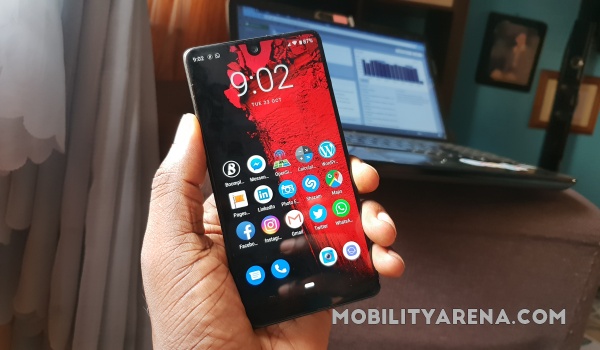
So yes, sales have been poor. The Audio Adapter HD should help the cash flow; right? Wrong. If a phone isn’t selling enough, how many people are going to buy the modules? Remember that just recently, the company said they were shopping for funds, with the possibility of a sale not out of the picture?
How many Audio Adapter HD units does Essential have to sell for it to make business sense? How many Essential phone users will buy one? Want to take a guess? Let me help you: not enough. If the main device isn’t selling, an accessory is money down the drain.
Anyway, welcome to 2018, where manufacturers remove a popular feature from a smartphone and then sell an accessory to put it right back in. Hello, suckers!
- Don’t miss our mobile phone reviews .
- Follow our news on Google News .
- Join our WhatsApp Group , to be notified of the most important articles and deals,
- Follow us on Instagram , Facebook , Twitter , and YouTube .
Author:Mister Mobility
Digital Skills and Communication Coach | Mobile Phone Connoisseur since 2001 | Tech Blogging since 2004
Add MobilityArena as a preferred source on Google
What Is Data Recovery? The process of restoring lost, corrupted, deleted or inaccessible data is known as data recovery. In IT word data recovery refers to restoration of data to digital device such as pc, laptop, and mobile phone or from server or external storage from a backup.
EaseUS Data Recovery
This data recovery wizard was created by EaseUS, in 2004, both for Microsoft Windows and Apple for getting back lost data easily. EaseUS data recovery wizard is used to recover data from storage devices such as memory cards, universal serial bus (USB’s) and others similar devices. It is user-friendly software, as the name “EaseUS” informs us, as that every single user can easily run it. Following is a list of storage devices from which data can be recovered through EaseUS:
- Hard disk drive
- External hard driver
- USB
- SD card
- Digital camera
- iPhone
- Androids
- Smart phones
- PC/laptop
- CD/DVD
How to Operate EaseUS Data Recovery Wizard
EaseUS is very simple to use and have very basic steps, explained as follow:>
- Launch : the user opens his/her device and launches the EaseUS recovery wizard.
- Scan : the storage device is than scanned thoroughly from laptop, pc, memory card, flash drives with the help of EaseUS recovery wizard and it identifies lost data it has been commanded to find and recover.
- Recover : the lost data is then recovered with help of EaseUS saving the user from a lot of inconvenience.
- Deleted Recovery: retrieve or recover lost data due to accidental deletion by “shift-delete” or from the recycle bin.
- Partition loss: retrieve or recover lost data due to system/windows re-installation or due to re-partition.
- Hard Drive/Format recovery: retrieve data from a formatted storage device such as memory card, flash drive and hard drive etc.
- Disaster recovery: retrieve data lost due to natural calamities such as earthquake, tornadoes which damages the storage devices.
Paid/Free Trial
There are two versions of EaseUS data recovery software , the paid version and the free version. In free version you have about 1GB recover able data along with basic tutorial and helpful information where as in full version you can recover a large number of data along with complete tutorial and intensive helpful material so that the user can take full advantage of the recovery wizard.
Limitations
Before recovering the lost data the user should always know that not all data can be recovered and there are limitations to it i.e. a data can be recovered from a storage device as long as it is not overwritten or fully corrupted by a virus. Some other reasons from which data recovery is sometimes not possible are:
- The storage device is severely damaged and is far from being repaired.
- Missing storage location.
- Lost files that were heavily infected due to virus such as Trojan, which makes the data irrecoverable.
- Physically damaged storage device that the system maybe unable to read.
Bottom Line
The bottom line is that if you have lost important information/family pictures/office files, you can recover it by using EaseUS Data Recovery Wizard easily and effectively and in short period of time without taking help from someone.
- Don’t miss our reviews .
- Follow our news on Google News .
- Join our WhatsApp Group , to be notified of the most important articles and deals,
- Follow us on Instagram , Facebook , Twitter , and YouTube .
