Add MobilityArena as a preferred source on Google
New technologies spring up so much these days, sometimes it’s difficult keeping track of them all. One that has been shown to us recently is Augmented Reality (AR). I am pretty sure some of us here, haven’t truly grasped what it means, hence, I’m urged to paint the clearest of pictures for us the best way I can – with words. We first look at what AR is, then how it is different from Virtual Reality (VR).
What is Augmented Reality (AR)?
The name is Augmented Reality, and the first word “augment” means to “enlarge” or “increase”, to “grow” or “intensify” . Now add “reality” to that. Essentially, what we see is a reality enhanced with digital information (relevant to us or based on present situation). Imagine pulling graphics out of your television screen or computer display and bringing them into real-world environments.
In augmented reality, elements in the real-world environment are intensified by computer-generated sensory input such as sound, video, graphics or GPS data. A view of reality is modified (possibly even diminished) by a computer. Digital information is integrated with the user environment in real time. Unlike virtual reality, augmented reality uses the existing environment and overlays new information on top of it. Pokémon Go anyone?
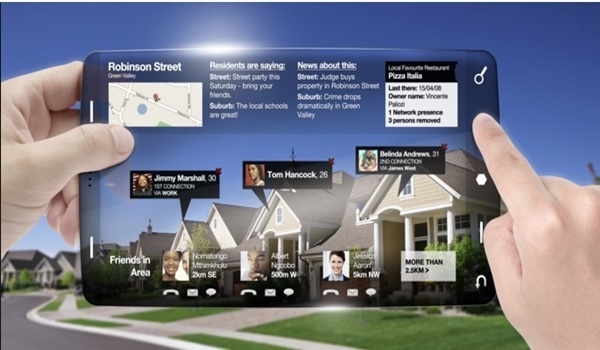
Augmented Reality (AR)
Some apps using this technology can use a phone’s GPS and compass. By knowing where you are, these can offer information relevant to you, and in the process, enhancing your current perception of reality. Pokémon Go is a good example. Think of swiping out your phone’s camera in a public place, and placing it in front of a building and it shows you a brief history of the structure. Or for firms, it could instantly display vacancies if they have any. Now you get the picture.
How is Augmented Reality (AR) different from VR (Virtual Reality)?
We have also heard of virtual reality (VR). What is the difference between the AR and VR? Virtual Reality totally replaces our real world with a virtual one. When you put on the VR headset, you’re immersed into a totally different world. On the flip side, augmented reality adds graphics, sounds, and even haptic feedback to the natural world as it exists, hence, AR is closer to the real world when compared to VR that replaces everything.
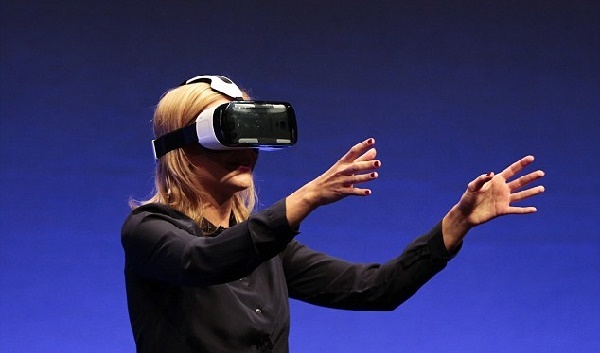
Virtual Reality headset
The most popular (and cheapest) VR devices are the paper made Google Cardboard. But you get better functionality and immersive experience on the real VR headset – like in the picture above. Samsung has theirs you can buy, then there are cheaper options in Chinese stores.
- Don’t miss our reviews .
- Join our WhatsApp Group , to be notified of the most important articles and deals,
- Follow us on Instagram , Facebook , Twitter , and YouTube .
Author:Etoniru Chibueze
Chibueze is an award-winning gadget reviewer and geek. He loves research, while living and breathing tech. You can reach him on Facebook, Twitter ,OR LinkedIn
Add MobilityArena as a preferred source on Google
I keep saying that images and photos do no justice to some devices. When I took the Priv in my hands, I had a nerdgasm. This beauty oozes class and taste all the way. The Priv looks and feels so much better in real life. And it is so good that it immediately made a flagship like the Lumia 950 feel cheap. Everyone I gave the two devices to for comparison gave the same verdict too.

Yes; this was how I felt the first time I took the BlackBerry Priv in my hands.
The 5.4-inch display is smooth and gorgeous. It is also a dual curved edge display. In other words, it curves at both left and right edges. I need more words to describe this. Also, BlackBerry has performed an amazing feat fitting a slider device into such a slim profile.

The BlackBerry Priv is heavier than most devices in its class. As such, it has some heft in the hand, but gives it a very solid feel.
BlackBerry Priv Review: Software

This is Android 6 Marshmallow with modifications to the UI and underlying security by BlackBerry. It looks good. It feels mostly good.
BlackBerry has baked in some security features into the Priv. Most of those features check to make sure that YOU the user take certain steps to keep your phone and data secure and then notify you of your security status. This reinforces my eternal position that the user is the single most important factor for security.
BlackBerry Priv Review: 4G LTE Compatibility

The BlackBerry unit I have is an ATT-branded one. As such, it is clearly not a model targeted at Europe, Middle East, and Africa. So, bear this in mind when I say that it doesn’t work with any of our 4G networks here in Nigeria. Also, beyond that, there is no LTE only mode in the phone’s settings.
BlackBerry Priv Review: Slide-out Keyboard
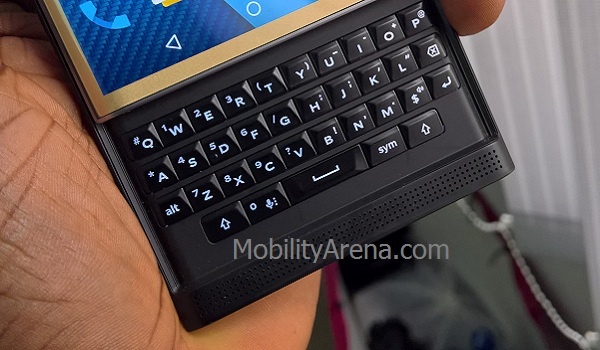
I have been a hardware keyboard advocate all my life, but the slide-out keyboard on the Priv feels out of the place to me. I have used it a few times, and each time I ended up hiding it away and using the onscreen keyboard. This time, I feel absolutely no need for the keyboard. Perhaps that is because the keys are small, or perhaps extending them out pushes the gorgeous display away from me. Anything that pushes the display of the Priv away should be considered a sin. That screen is absolutely gorgeous.
BlackBerry Priv Review: Performance

Sadly, it isn’t all good news with the BlackBerry Priv. Occasionally, it freezes during use and wont respond to touch for a few moments before it goes back to normal or displays an app not responding error. And to be honest, the benchmark results of the Priv do not look good either, considering this is a flagship. Have a look:
- Antutu : 54,484
- Geekbench 3 : 900 Single-Core; 2,383 Multi-Core
- Quadrant : 12,070
The Priv also warms up quite a bit during normal use. Much more during intensive use.
BlackBerry Priv Camera

The 18 megapixel camera on the BlackBerry Priv sports a Schneider-Kreuznach lens. You know, same way Lumias sport Carl Zeiss. Having a big name brand on the camera is good. But is the camera really any good? From the few photos I took with it, it is. Here’s an indoor shot with flash:

Click to view full-sized image
Multimedia

First up, while the audio from the front-facing speaker is good, I am of the impression that it isn’t as good as what I got on the Passport. Unfortunately, I did not have a Passport to test this opinion with. But music is good on the Priv and if you plug in a very good audio headset, bam!
Of course, watching video on this beauty is an awesome experience. That display is just so, so beautiful and clear. Everything looks great on it.
BlackBerry Priv Review: Battery And Charging

The beefy 3,410 mAh battery performs well. It charges quite fast, thanks to fast charge technology. And it has a cool visual factor to the charging thing when the screen of the Priv is locked. Have a look at the photo above: there is a green vertical bar on the right edge. It is a charging indicator. When charging from 0%, it starts out red (see below) and turns green at some point. The bar extends all the way up at 100% charge.
BlackBerry Priv Review: Conclusions

I really like the BlackBerry Priv. It has one of the most tasteful physical build around. The display is gorgeous. Audio is good. Camera is good too. Battery performance is good. The Priv is good in many ways. I have a problem with the occasional freezing though. That should never happen on a smartphone that costs anything in the vicinity of NGN200,000.
I also wish this was a dual SIM smartphone. Yes; if wishes were horses. It does not appear that BlackBerry (or Apple) will ever produce a dual SIM smartphone. At least, they are both still forming big boys for now. But I am nitpicking. Minus a few niggles, the Priv is a really, really good smartphone.
- Don’t miss our mobile phone reviews .
- Follow our news on Google News .
- Join our WhatsApp Group , to be notified of the most important articles and deals,
- Follow us on Instagram , Facebook , Twitter , and YouTube .
Author:Mister Mobility
Digital Skills and Communication Coach | Mobile Phone Connoisseur since 2001 | Tech Blogging since 2004
