Add MobilityArena as a preferred source on Google
Every day, we see different apps get added to Play Store, potentially giving us more ways to get the best out of our Android devices. However, there are certain apps that are a MUST-HAVE for your Android smartphone in 2021.
In this article, we will look at some of the best apps for your Android device in 2021 and some of their incredible benefits.
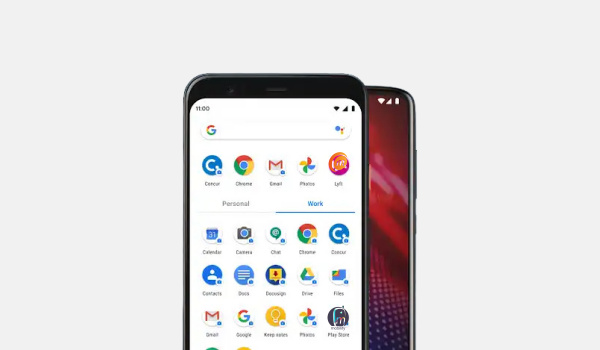
- Google Drive: This app is a cloud storage option for Android users that offers free 15GB when users sign on. For users who may need more memory, they can buy more at a sensible subscription rate. One of Google Drive’s huge benefits is the plethora of Android apps attached to it. Google Drive also lets users access Google Docs, Sheets, Slides, Calendar, Photos, Keep and Gmail. You can follow this link to get the app.
LastPass Password Manager: This app is a very vital app for Android users who have issues keeping up with different passwords on different platforms. LastPass Password Manager lets users save their log in credentials in a safe and secure way. It can also help users generate new passwords to use on their accounts. This app has a master password and functions across a number of platforms ranging from mobile to PCs and tablets, making it easier to use and incorporate across a number of devices.
Podcast Addict: Podcasts have become rather popular nowadays, with many a smartphone user preferring to listen in to podcasts while commuting or carrying out some other activity. This is where Podcast Addict comes in, as this app is one of the best apps for your Android device if you love listening to podcasts. It features a variety of podcasts and has a simple and effective UI. Podcast Addict also boasts plenty of playback and download features, while offering a single-cost premium version. It also supports Chromecast and SONOS, alongside Android Auto and Wear OS.
Google Assistant: This list won’t be complete without this versatile Android app. You can easily download this free resource and enable it. With Google Assistant , you can carry out a number of operations ranging from simple math calculations to controlling lights. Google Assistant (one of the popular apps for your Android device) also comes in handy when you want to play content on your Chromecast or other compatible devices.
Google Maps: Another on the list of indispensable tools from Google, Google Maps gives you access to different places of interest, while also showing you traffic data and helping you with directions to certain spots. This app, one of the go-to apps for your Android device, makes it easier for you to navigate around your region, as its weekly updates mean that new locations and places get added to the map frequently.
YouTube and YouTube Music: Already rather popular with billions around the world, this dynamic duo gives you unlimited music while also letting you enjoy videos on YouTube Ad free. It costs $12.99 per month and should effectively cover all of your streaming needs (audio and video) for the month.
Author:Alfa Baye
Staff Writer
Add MobilityArena as a preferred source on Google
What does a smartphone reviewer do when he gets the chance to publish a Samsung Galaxy A3 Core unboxing and hands-on review? Duh. He takes it! And that was exactly what I did.
Samsung is the world’s largest Android phone maker, but the brand is not very prolific at the entry-level. The Galaxy A3 Core is an entry-level Android s.smartphone, and I got my hands in one and took it for a spin.
In this my Samsung Galaxy A3 Core unboxing and hands-on review, I share photos of the box and its contents, as well as my first impressions of the device.
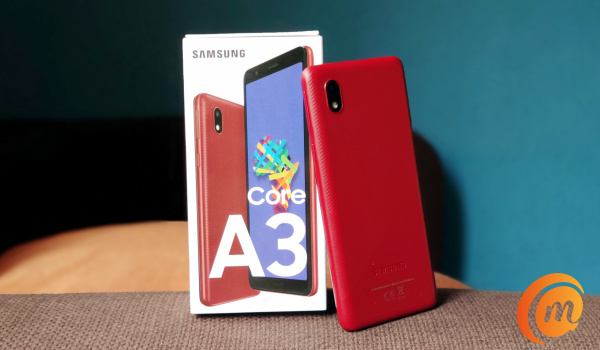
But first, a picture of the positioning of this phone. The Galaxy A3 Core is on the lowest rung of the ladder, occupying the same place as its predecessor, the Galaxy A2 Core . It is directly below the Galaxy A02 and above that is the Galaxy A02s . Higher up the ladder, you will find the Galaxy A10s and the Samsung Galaxy A12 . At the extreme top end are the Samsung Galaxy S21, S21+, and S21 Ultra .
So, again, it is clear that this is Samsung’s entry-level offering. If you want the cheapest Samsung smartphone, it doesn’t get any cheaper than the Galaxy A3 Core. Now, let’s get into the unboxing and hands-on review, and have some fun!
Samsung Galaxy A3 Core unboxing and photos

The box contains the phone itself, paper documentation, 3.5mm audio headphones, wall charger, and SIM slot ejector pin.
Samsung Galaxy A3 Core hands-on review
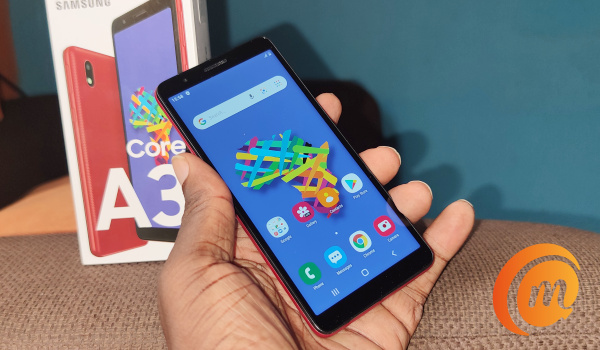
It is time to handle the phone and see what it is like.
Of course, considering its price point, the Galaxy A3 Core is built of plastic material. In the hand, it feels solid – like it is well built.
It is a compact smartphone and feels just right in my hands. I am a fan of compact devices. Those screen sizes that keep inching towards the figure 7 are just stressful to use compared to compact devices.
Samsung Galaxy A3 Core has a 5.3-inch display. Being a low-end phone, it has some bezels all round.
It runs Android 10, so there’s Dark Mode (Yay!). Internal storage is 16GB. Of that, 11GB is free at boot. There’s a memory card slot though, so you can add a microSD card for extra storage.
The card slot is dedicated too, meaning you do not have to give up any SIM in order to put in a memory card. Yes; it has two SIM slots and a memory card slot.
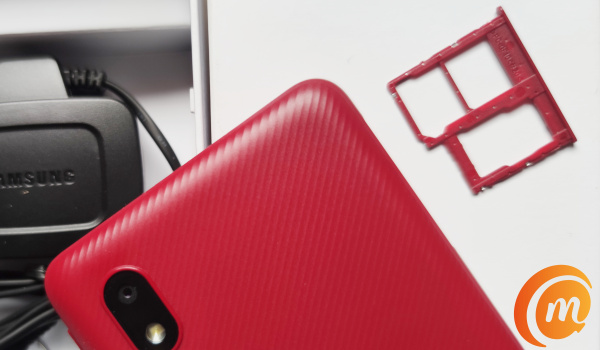
RAM is 1GB. It is early days, but at least the first impression I get is that the switching through apps, the phone runs smoothly. We will see if that changes after a longer period of usage and report on it in our full review.
Of course, the trick with low-end phones is to not switch through many apps at the same time. 1GB RAM is pretty limiting and you have to manage that. You don’t drive a city car like you would a sports car; do you?
Also, this is a 4G LTE smartphone. 4G Android phones are found at slightly higher prices these days, so this is one of the cheapest in the market.
At the back, all you have is the camera. There is no fingerprint reader on this baby. Many competing devices at this price point have one though.
Samsung Galaxy A3 Core hands-on video
Entry-level smartphones are always a game of give and take, as the manufacturer has to decide what features to leave out in order to keep the price below a certain point.
In the case of the Samsung Galaxy A3 Core, it misses a fingerprint scanner and a big display. In exchange, it gets 4G LTE.
Competing phones at the same price point have a fingerprint reader and a bigger display, but lack 4G LTE.
Is that a trade-off you are willing to take? At the end of the day, it is your call.
Copyright Notice : Reproduction of this article on any website, e-book, book, newspaper, magazine or other media without express written permission from MobilityArena is a violation of copyright rules and will result in appropriate action being taken.
Author:Mister Mobility
Digital Skills and Communication Coach | Mobile Phone Connoisseur since 2001 | Tech Blogging since 2004
