Add MobilityArena as a preferred source on Google
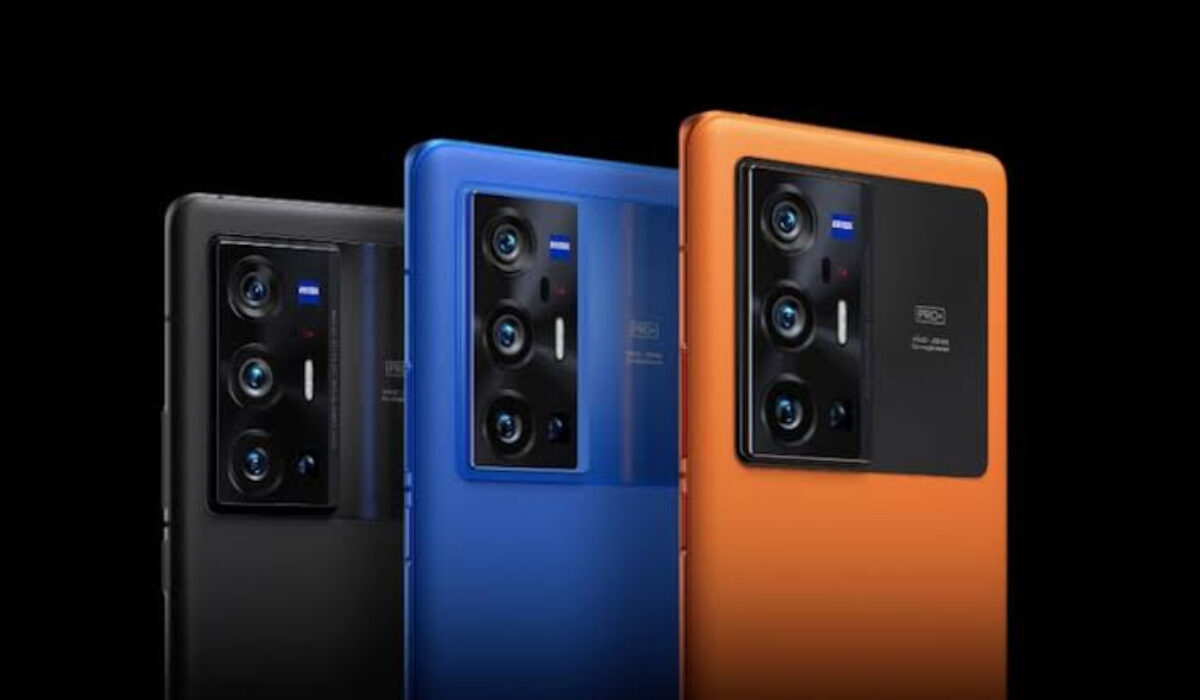
Since the announcement of the Vivo X70 Pro+ on September 30, 2021, there has been some chatter on social media about how the Vivo phone has a better camera than the iPhone 13 Max Pro. The problem is that Apple’s baby is not even the best camera phone of 2021.
You read that right: the iPhone 13 Pro Max is not the camera phone that Vivo X70 Pro+ has to beat. As at the last time we checked, Huawei P50 Pro is. That is the very baddest camera phone of 2021 up till the time of this writing. And close behind that is Xiaomi Mi 11 Ultra. Those are the phones that both the iPhone 13 Pro Max and Vivo X70 Pro+ – and even the Pixel 6 Pro – have to beat.
As for Google’s Pixel 6 and 6 Pro, we have to wait to see what they have to offer. The Pixels fell behind in the last few years, and none of the Pixel 3, 4, and 5 series even make it to the top 5 of the best camera phones. We can blame Google using the same sensor for multiple years. With a new camera sensor being adopted this year, perhaps they can power through to the top again.
While Google slept in the last few years, brands like Huawei and Xiaomi (along with Vivo and OPPO) rose up to the task and have consistently churned out sterling cameras that made it to the top. Apple’s iPhones have also stayed in contention, never far off from the top of the chart.
What is special about the vivo X70 Pro+? For one, it has the same main sensor that is believed to be in the upcoming Google Pixel 6/6 Pro. That’s the Samsung GN1, which is also the same sensor in….wait for it .. TECNO Phantom X (see review ). Yes; I already wrote about that earlier.
But having the same sensor is not all there is to the quality of pictures that a camera phone takes. It is only a part of the equation. The other part has to do with software optimisations. The question is, how well do Vivo, Google, and TECNO, individually pull that off?
We know that both Google and Vivo have a track record of solid software optimisation for their cameras, so everyone is full of expectations from both brands.
The verdicts on the Vivo X70 Pro+’s camera prowess will soon start rolling in from phone reviewers around the world, and we will get to know where it stands against all the contenders.
Perhaps this year, the title goes to Vivo, or to Google. Time will tell. Google Pixel’s fanbase is excited and waiting for the Pixel 6 and 6 Pro to hit the market. That includes me. I really would love to see what this year’s duo can pull off.
You are reading Mobility Arena .
- Don’t miss our reviews .
- Join our WhatsApp Group , to be notified of the most important articles and deals,
- Follow us on Instagram , Facebook , Twitter , and YouTube .
Author:Mister Mobility
Digital Skills and Communication Coach | Mobile Phone Connoisseur since 2001 | Tech Blogging since 2004
Add MobilityArena as a preferred source on Google

Use your phone as a webcam.
Due to the pandemic a lot of activities had to be carried out over the internet to reduce physical contact. A lot of video conferencing applications (Zoom, Google Meet, Teams, Skype, etc.) were used by different organizations to keep activities going whether for school or work. Regardless of the application used, one thing was common, this being the fact that the means of communication was through video. These applications made use of the webcams of the devices there were used on, and this was a problem at times.
Depending on the device (laptop or PC) used, we had to settle for low video qualities. The webcams present on laptops are not as good as we might expect, so attending video conferences while using these webcams will result in grainy and very low-quality videos.
Another issue that using a webcam poses is the “line of sight”. What do we mean? When video conferencing the laptop or device used is often kept on a flat surface such as a table and by placing it on a table the webcam stays below our eye level. This in itself does not look good, maintaining eye contact while speaking with a person or group of persons is very important, but with a laptop’s webcam it is like people we are talking with are looking up at us due to the angle between the webcam and our eyes.
So what can we do to solve these stated problems? Simply use your phone as your webcam. How?
Advantages Of Using Your Phone As A Webcam
Smartphones these days are maxing out their specs in terms of cameras, the completion is fierce, and every smartphone production company tries to add new features to their cameras in a bid to stay relevant in the market.
Most devices are launching with bigger and better image sensor, better image processing chips, a more clean software to compliment photos and videos taken on the device. These smartphones cameras are in no competition with laptop webcams; they are just better.
So by using your smartphone as a webcam for your video conferencing, you solve the first problem we mentioned, being poor video quality. It is advisable to use the main camera on your smartphone instead of the selfie camera.
The second issue mentioned is also solved by using our phone as a webcam in place of our laptops’ webcam. By using your smartphone as a webcam you can move it around independent of your laptop or desktop computer, hence you can place the smartphone camera at our eye level to achieve good eye contact with those we are speaking with, this will make what we say appeal to the listeners. With your smartphone as a webcam, you can also try out various angles and create a dramatic background view while video conferencing.
Guidelines To Use Your Phone As A Webcam

Use your phone as a webcam.
To use your phone as a webcam, you will need to download a webcam application from your device’s App Store if you are using an iPhone and PlayStore if you are using an Android device. I complied a list of a few webcam applications that you can use on either mobile platforms, these applications also support at least one platform for your laptop or PC (windows, ChromeOS, MacOS, Linux). For each of the application that will be mentioned you will need to download the application on your mobile device to be used as a webcam and secondly on the video conferencing application select an external camera to be used.
- EpocCam : If you are using an iPhone and a Windows PC, this can be a good choice for you. The application is free and also easy to set up. Also download the driver to your PC and the application will connect your smartphone camera to your PC. You have the option to connect your phone to your PC via USB or WiFi.
- Iriun : This is the webcam application of my choice, I find that it works perfectly for me. Setting it up was really simple. Similar to the EpocCam, you will need to install this application on your PC and mobile phone.
These two applications are totally free to use and can be accessed from the Google PlayStore and App Store. If you set up your mobile device to be used as a webcam, ensure you use the main camera and also keep your phone plugged in to a power source, since the application drains battery quickly. You might also consider getting a tripod stand to mount your device on for better video stabilization.
You are reading Mobility Arena .
- Don’t miss our reviews .
- Join our WhatsApp Group , to be notified of the most important articles and deals,
- Follow us on Instagram , Facebook , Twitter , and YouTube .
Author:KittysTech
Tech analyst, Collins Eshiet, writes about technology. Follow me on Twitter @KittysTech.
