Add MobilityArena as a preferred source on Google
Data loss is an incredibly stressful and unpleasant event to deal with, whether caused by hardware or software failure, deleting accidentally, or cybercrime. Usually, you’ll find several software options for data backup and disk cloning software that can help you recover data in a relatively simple process. For example, fixing an iPhone stuck on Attempting Data Recovery can be a fairly simple task.
However, if there are no such options, you will need specialized tools for data recovery if your hard drive ever crashes or gets corrupted. If you’ve therefore been looking for the best recovery software for lost data, this guide is for you. Keep reading to discover our helpful tips about the best recovery software so that you can regain lost files and folders with ease.

- What are the Best Recovery Software Options? Disk Drill EaseUS Data Recovery Wizard Stellar Data Recovery
What are the Best Recovery Software Options?
When looking for the best recovery software, there are several things to consider, especially in terms of value and functionality. This might make the choice seem difficult, so we’ve simplified the choice for you by describing some of the best options recommended by experts. Consider the following options if you’re looking for the best recovery software:
Disk Drill
Disk Drill is among the most popular and best data recovery software for macOS, and it’s also currently available for Windows devices. This data recovery software comes in free and premium editions, and it’s made to recover data from HDDs, SDDs, SD/CF cards, USB flash drives, digital cameras, and even cell phones. It will also typically work for any type of lost data file.
Disk Drill can also mount and read previously unmountable USB flash drives and recover data from them in a short time. The PRO edition is priced as a one-time license charge rather than a monthly or yearly fee, at roughly $100 / £100 / AUD$150, which may be the most cost-effective long-term. Based on all these features alongside its cost-effectiveness, it ranks among the best recovery software.
EaseUS Data Recovery Wizard
Another option among the best recovery software is EaseUS Data Recovery Wizard. This software is simple to use, guiding you through the recovery procedure step by step. If you run EaseUS Data Recovery Wizard Pro soon enough after a disaster, it will be able to recover almost all your data, from accidentally lost partitions to virus-damaged files.
Upgrading to a premium license is a little pricey, but the features you gain in return represent excellent value for money. Moreso, when you combine the app’s excellent performance, EaseUS’s prompt customer service, and clean user experience, we’re sure you’ll agree that it is definitely among the best recovery software options.
Stellar Data Recovery
For good reason, Stellar Data Recovery is one of the best recovery software solutions, especially for businesses. This software has a number of scan choices, allowing you to customize the scan to the type of data loss that has happened. This saves time if you accidentally erased a vital file and discovered the mistake immediately, thus eliminating the need for a thorough system scan.
The software also includes advanced search features, making it simple to locate and extract the most important data. Stellar Data Recovery also supports all file formats and disks, which is a significant feature. It is a versatile service that can recover data from internal and external hard drives, flash drives, memory cards, and optical media such as CDs and DVDs.
Note that with this recovery software, a license must be purchased annually rather than monthly, with prices starting around $80 / £80 / AUD$120. Regardless, you’ll find that this tool offers a lot of value, so it maintains its place among the best recovery software currently available.
In summary , when it comes to the best recovery software, it’s obvious that you need to pick carefully so as to achieve data recovery successfully. The options we’ve suggested in this guide have incredible features with affordable pricing. So, feel free to select anyone you prefer for your data recovery.
Author:Joan Agie
Add MobilityArena as a preferred source on Google
Samsung Galaxy A04e is an affordable, entry-level Android phone. It features a 6.5-inch PLS LCD screen and has a robust 5000mh battery. It is available in five memory variants – 3/32GB, 4/32GB, 3/64GB, 4/64GB, and 4GB/128GB. Note that it does not have a fingerprint sensor.
The Galaxy A04e is sold in countries like United States of America, Germany, South Africa, Nigeria, Kenya, India , Sri Lanka, among others. We have the price of this phone in each of those countries listed towards the end of this page.
- Samsung Galaxy A04E Specs
- When was Samsung Galaxy A04e released?
- Prices: how much is Samsung Galaxy A04e in the US, UK, Canada, EU, Australia, and others?
- Frequently Asked Questions About Samsung A04E Does Samsung Galaxy A04E have a fingerprint reader? How do I add fingerprint to Samsung A04e? Is Samsung Galaxy A04E a dual SIM phone? Does Samsung Galaxy A04E support fast charging? Is Samsung A04E’ display/screen Super AMOLED? Is Samsung A04E waterproof? Does the Samsung Galaxy A04e have a headphone jack? Will Samsung Galaxy A04e get Android 14? Is Samsung Galaxy A04e unlocked? Does Samsung have stores in the US? Will Samsung Galaxy A04E work in the USA?
- is Samsung Galaxy A04e worth buying?
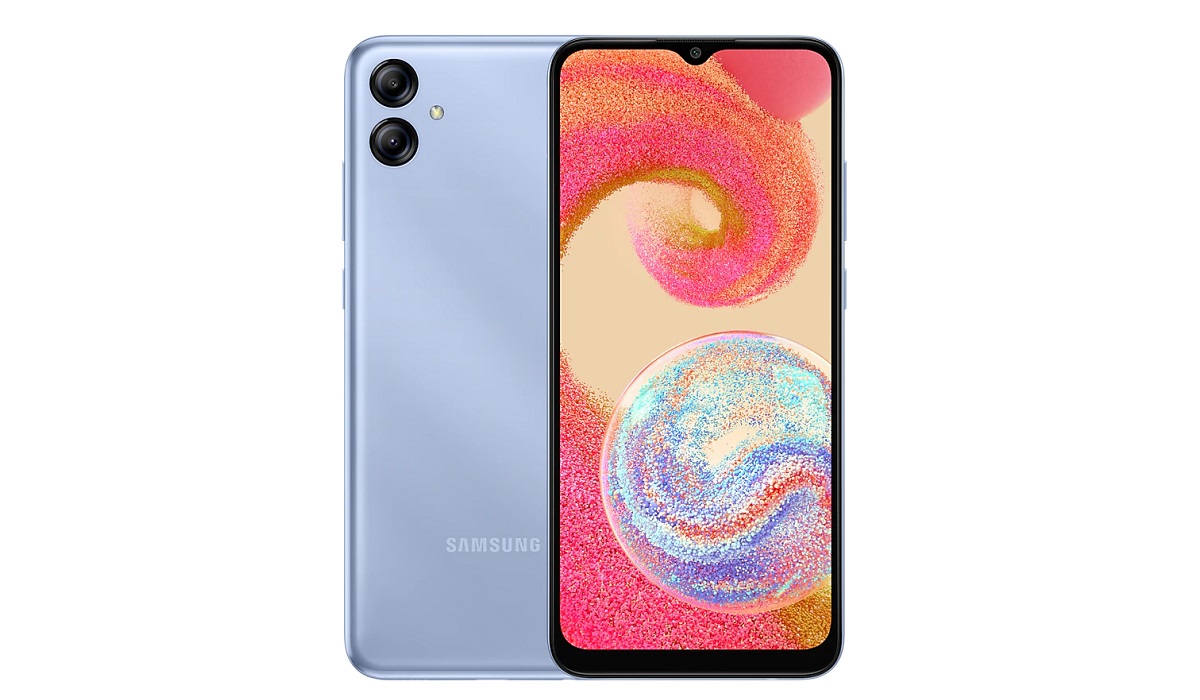
Samsung Galaxy A04E
Samsung Galaxy A04E Specs
Mobile Wireless Network and Software
- 2G mobile network bands : GSM, GPRS, EDGE 850 / 900 / 1800 / 1900 MHz.
- 3G mobile network bands : UMTS, WCDMA, HSDPA 850 / 900 / 2100 MHz
- 4G mobile network bands : LTE B1(2100), B3(1800), B5(850), B7(2600), B8(900), B20(800), B28(700), B38(2600), B40(2300), B41(2500)
- 5G mobile network bands : No.
- SIM Type : Nano-SIM, Single and Dual SIM options
- Software / OS : One UI 4.1 Core based on Android 12
Design, Form Factor, Appearance
- Dimensions : 164.2 x 75.9 x 9.1 mm
- Weight : 188g
- Display : 6.5 inches, 720 x 1600 pixels (HD+), 20:9 aspect ratio, PLS LCD, Infinity-V display.
- Colours : Light Blue, Black, Copper.
- Physical Build : Plastic frame, plastic back.
Internal Hardware Specs
- Processor Type : 64-bit, 2.3GHz Octa-core, Cortex-A53
- Processor Name : Mediatek MT6765 Helio P35 (12nm)
- Graphics Processor : PowerVR GE8320
- RAM : 3 GB / 4 GB
- Virtual RAM : Up to 4 GB
- Internal Storage Memory : 32 GB / 64 GB / 128 GB
- External Storage : microSD, up to 1 TB (dedicated slot)
Photography, Video Recording
- Rear Triple Camera : 13MP main sensor + 2MP depth sensor, LED flash, 1080p@30fps video recording
- Front-facing Camera : 5MP, Face Recognition, 1080p video capture.
Audio, Video Playback
- Music Support : PCM, AAC / AAC + / eAAC + / MP3 / AMR – NB / WB / APE
- Audio : 3.5 mm audio jack
- Loudspeaker : Mono speaker
- Video Support : H.264/MP4/MPEG4 player
- FM Radio : No.
Phone Sensors
- Digital Compass : N/A.
- Accelerometer : Yes.
- Proximity Sensor : Yes.
- Ambient Light Sensor : Yes.
- Barometer : No.
- Pedometer : No.
- Heart Rate Monitor : No.
- Gyroscope (G-Sensor) : N/A.
- Fingerprint Scanner : No.
- Face Unlock : Yes.
- Iris Scanner : No.
- Motion Sensing / Gesture Control : No.
- Voice Control : No.
- Intelligent Digital Assistant : Yes; Google Assistant. Bixby.
- Infra-red Sensor : No.
Connectivity Options
- Bluetooth : v5.0, A2DP
- WiFi : Wi-Fi 802.11 b/g/n, hotspot
- GPS : Yes, A-GPS, Glonass, Beidou, Galileo
- USB : microUSB v2.0. USB Type-C.
- NFC : No.
Miscellaneous Spec ifications
- Battery Type and Capacity : Non-Removable Lithium-Ion 5000 mAh
- Battery Charging : 5W charging
- Wireless Charging : No.
- Reverse Charging : No.
- Model Number : SM-A042F, SM-A042F/DS, SM-A042M, SM-A042M/DS.
When wasSamsung Galaxy A04e released?
- Announced : October 2022
- Release Date : November 2022
Prices: how much is Samsung Galaxy A04e in the US, UK, Canada, EU, Australia, and others?
- United States: from $119.
- UK : from £134
- Europe : from €149 – Germany, Netherlands
- Canada : from C$ 273
- Australia : from AUD 238
- South Africa : ZAR 1,999.00
- Nigeria : from N108,000
- Kenya : from KES 13,800
- Sri Lanka : from LKR 25,500
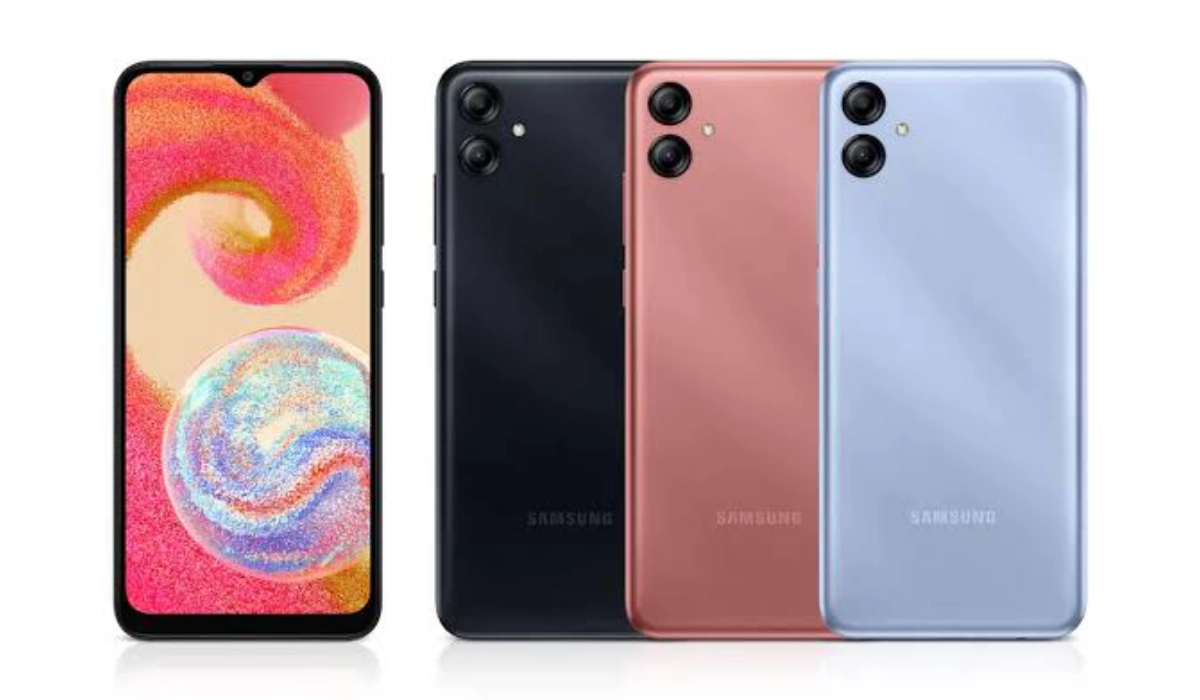
Samsung Galaxy A04E
Does Samsung Galaxy A04E have a fingerprint reader?
Does Samsung A04e have fingerprint reader? No; it does not have a fingerprint scanner.
How do I add fingerprint to Samsung A04e?
There is no known way to add a fingerprint sensor to the Galaxy A04e.
Is Samsung Galaxy A04E a dual SIM phone?
The Samsung A04e has both single and dual SIM options available for buyers to pick from.
Does Samsung Galaxy A04E support fast charging?
Samsung A04e does not have fast charging.
Is Samsung A04E’ display/screen Super AMOLED?
No; the display of Samsung A04e is not Super AMOLED. It uses a PLS LCD screen.
Is Samsung A04E waterproof?
No; Samsung A04e is not water or dustproof.
Does the Samsung Galaxy A04e have a headphone jack?
The Galaxy A04e has a headphone jack, so you can use wired headphones or earphones with it.
Will Samsung Galaxy A04e get Android 14?
It is not clear at this time whether the Galaxy A04e will get updated to Android 14 or not.
Is Samsung Galaxy A04e unlocked?
In the United States, the Galaxy A04e is available in both unlocked and locked forms, depending on what carrier or retailer you buy it from. Ask your carrier for details.
Does Samsung have stores in the US?
Samsung has multiple stores in the United States where you can walk in to buy their phones. Visit Samsung.com USA and use the Store Locator tool to find the locations of Samsung stores in the USA.
Will Samsung Galaxy A04E work in the USA?
The Galaxy A04E is a GSM phone and is supported on US GSM carriers like AT&T and T-Mobile and other networks riding on their networks. It does not support CDMA networks. Do make enquiries from your carrier to know what bands/frequencies are supported on their service.
is Samsung Galaxy A04e worth buying?
Released in November 2022, Samsung Galaxy A04e might be the most affordable Samsung smartphone you can buy in 2023. It lacks a fingerprint scanner, so you will have to do without that. If that feature is important to you, though, you will have to look to one of the numerous Chinese phone brands in the same price segment. They often provide more features for the same price, when compared to Samsung. Lastly, it charges at a measly 5W speed. For the price, you will find competing phones that have at least 10W charging and better memory options.
Our Buyer’s Guide Verdict is a recommendation that we make based on our evaluation the specifications of the device. It is a general guide designed to help you understand how much value a smartphone offers for its price. It is not a stamp of quality assessment or an endorsement of the device or of the manufacturers. Be sure to ask questions and use your judgement when buying any device, as MobilityArena may not be held responsible for your buying decisions .
Samsung Galaxy A04E Review Rating
We are yet to review the Samsung Galaxy A04E and so do not have a review rating for it yet. This section will be updated with our review rating and a link to the review page, as soon as we have a review ready.
