Add MobilityArena as a preferred source on Google
The BlackBerry Passport is something of a legend. Some people – mostly those who have never used one – will disagree. Those who owned and used one, however, are unequivocal about its status: legend.
I owned a Passport, graciously gifted to me by BlackBerry’s representatives in Nigeria. You must know what I think of it then, because to experience the Passport was a novel experience.
This is 2019 – 5 years after the BlackBerry Passport was launched and years after it was discontinued. BlackBerry Ltd has since abandoned BB10 OS and switched to putting Android OS in their phones. But that hasn’t stopping me from picking up the Passport again and marvelling at how solid a job it was and still is.
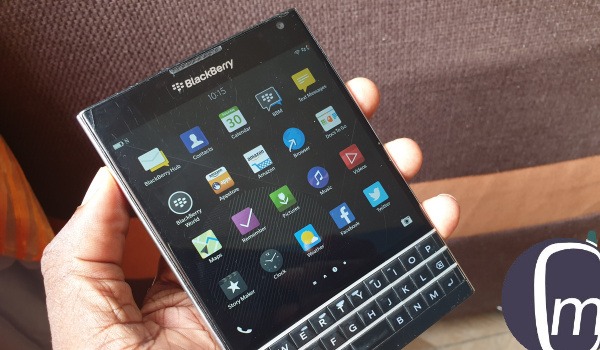
In terms of software and apps, this phone is a dinosaur. I can’t even run WhatsApp on it any more unless I find a means to sideload the app. There are many modern apps that are not available for BB10 any more.
The range of pre-installed apps is very limited. We have Twitter, Docs To Go, Evernote, Dropbox, and common utilities like File Manager, calculator, etc.
The scanty availability of apps aside, this old dog still impresses today. In my opinion, there are a number of things that more recent smartphones can learn from the Passport. Which are the items I am focused on in this long-term review of the BlackBerry Passport.
Great Display
The square display of the Passport makes it the best phone I have ever used for any kind of reading or productivity. You see more on that screen. You are also able to do more. It is only 4.5 inches in size, but because of its size, it looks much bigger than the 6.4-inch screens we carry around today. Today’s narrow smartphone screens are a pain in comparison, and I wonder why no-one has explored a square display again since then.
App compatibility issues? Or has the 21st century world just determined that narrow and taller is better, and to hell with anything different? I doubt that. Foldable phone displays – when opened up – are not narrow and we are Oooh-ing and Aaah-ing over them.
Whatever it is, I’d like to see another smartphone with a square display. Thanks to Nokia Mobile, we are in the age of retro designs, so perhaps this is something that BlackBerry Ltd can explore.
BlackBerry Web Browser has great usability
The BlackBerry Passport’s web browser is easily the mobile browser with the best usability till today. ALL of the controls are located at the bottom of the screen, where they are easy to reach and use. Along with the fact that the browser runs on a display that is not tall and narrow, it is a superb experience.
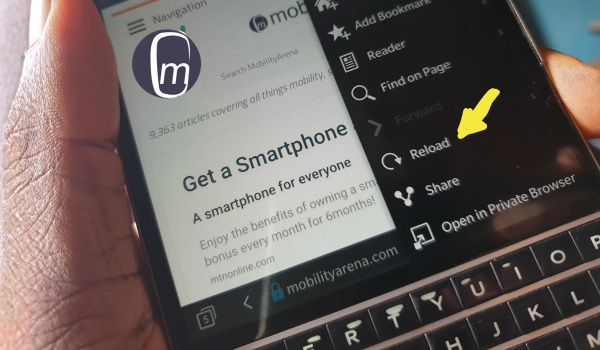
Why do modern mobile web browsers still have the address bar and controls at the top of tall, narrow displays? You have to reach far to type in a URL, and stretch to refresh a web page. That makes for poor usability.
Samsung’s Internet browser has made some adjustments that bring it close to the BlackBerry browser in this regard. Samsung just needs to move the address bar and Reload button to the buttom of the screen, and we can throw a party.
Solid physical build
One of the really nice things about the Passport is its physical build. The great quality plastic at the back and aluminium frame combination feels solid. It also has a distinct premium feel. When using the phone – or even when just holding it – you do not get the fear of it dropping and shattering to pieces. It is a very calming feel.
Today, what we have is glass everywhere, and despite the assurances of protection from Gorillas , Dragons , and others, the glass often shatters from a small drop. It isn’t out of place to say that the BlackBerry Passport is built like an armoured vehicle.
Battery life
The BlackBerry Passport was a battery life champ in its day, and it still is today. While there are smartphones with bigger battery capacity, its 3450 mAh battery does such a marvellous job that you’d be forgiven for thinking it was bigger.
What of the BlackBerry Passport’s hardware QWERTY keyboard?

Nah. I now find the keyboard too cramped and not as easy to use. I’d rather not have to use it in 2019. Let’s leave that behind in 2017, please.
Wrapping up this BlackBerry Passport long-term review
What do I use the BlackBerry Passport for these days? Reading. Online and offline reading. I have no apps installed. Heck; I do not even remember my BlackBerry account ID any more, so I can’t get into BlackBerry World to download apps.
Here are more reviews and feature articles about this unique smartphone:
- BlackBerry Passport Review
- The Passport 18 months after
- These top techies all think that the Passport is the best
Author:Mister Mobility
Digital Skills and Communication Coach | Mobile Phone Connoisseur since 2001 | Tech Blogging since 2004
Add MobilityArena as a preferred source on Google
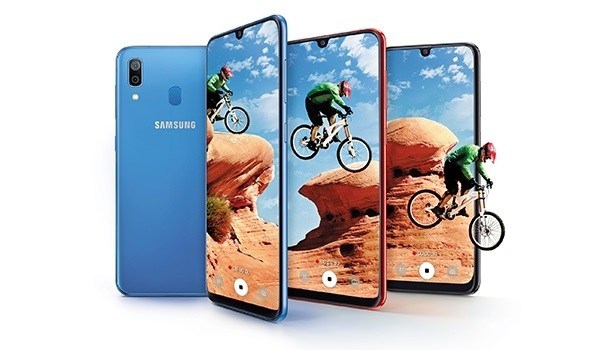
Samsung Galaxy A30 Quick Specs : Android 9 Pie smartphone features a 6.4-inch display, EXYNOS 7904 chipset, 16 MP selfie camera, 16 MP + 5 MP rear dual camera, up to 4 GB RAM, 64 GB internal memory, and a 4000 mAh battery.
Samsung Galaxy A30 Specs and Features
Wireless Network and Software
- 2G mobile network bands : GSM, GPRS, EDGE 850 / 900 / 1800 / 1900 MHz
- 3G mobile network bands : UMTS, WCDMA, HSDPA 850 / 900 / 1900/ 2100 MHz
- 4G mobile network bands : LTE 1(2100) / 3(1800) / 5(850) / 7(2600) / 8(900) / 20(800) / 38(2600) / 40(2300) / 41(2500).
- SIM Type : Nano-SIM, Single and Dual SIM
- Software / OS : Android 9 Pie + One UI
Design, Form Factor and Appearance
- Dimensions : 158.5 x 74.7 x 7.7 mm
- Weight : 165 g
- Display : 6.7 inches, 1080 x 2340 pixels,19.5:9 aspect ratio, Super AMOLED, Infinity-U display, Corning Gorilla Glass 3.
- Sensors : Fingerprint (rear-mounted), Face Unlock, Accelerometer, Proximity sensor, Compass
- Colours : Black. Blue. Red.
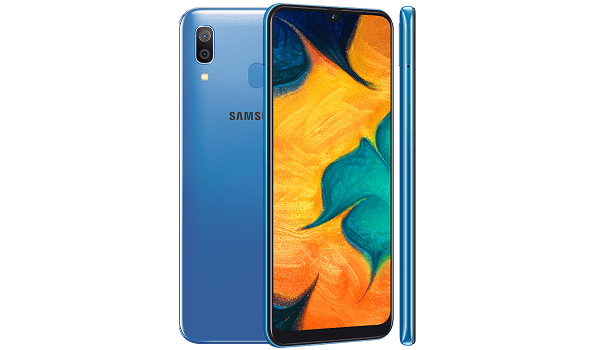
Samsung Galaxy A30
Internal Hardware Specs
- Processor Type : 64-bit 1.8 GHz Octa-core Cortex-A73
- Processor Name : EXYNOS 7904
- Graphics Processor : Mali-G71 MP2
- RAM : 4 GB
- Internal Storage : 64 GB
- External Storage : microSD, up to 512 GB (dedicated slot)
Photography and Video Recording
- Rear Camera : 16 MP + 5 MP dual camera, LED flash, 1080p@30fps video recording
- Front-facing Camera : 5 megapixels, f2.0 Aperture, AI Face Recognition, 1080p@30fps video capture.
Audio and Video Playback
- Music Support : PCM, AAC / AAC + / eAAC + / MP3 / AMR – NB / WB / APE
- Audio : 3.5 mm audio jack
- Loudspeaker : Mono speakers
- Video Support : H.264/MP4/MPEG4 player
- FM Radio : Yes
Connectivity Features
- Bluetooth : v5.0, A2DP
- WiFi : Wi-Fi 802.11 a/b/g/n/ac, hotspot
- GPS : Yes, A-GPS, GLONASS, BDS.
- USB : microUSB v2.0. Type-C. USB-OTG
Miscellaneous Specs and Features
- Battery Type and Capacity : Non-Removable Lithium-Polymer 4000 mAh
- Battery Charging : 15W Super Fast Charging
- Announced : March 2019
- Market Availability : April 2019
Samsung Galaxy A30 Price and Availability
- Country Availability : Europe. Asia. North America. Africa. Middle East.
- Price : The price in Nigeria is ₦78,000.00. It sells for R4,500 in South Africa.
In Nigeria, the Galaxy A30 smartphone can be purchased from online retailers like Jumia and others, as well as in some brick-and-mortar stores.
Samsung Galaxy A30 Review Rating
Not available yet.
MobilityArena Buyer’s Guide Verdict
The Samsung Galaxy A30 is a mid-range smartphone that will be loved by many.
There is a rear fingerprint sensor, 4 GB of RAM, 64 GB storage for your videos, pictures and other files, as well as a big 4000 mAh battery coupled with 15W fast charging. There is a dual camera at the back as well.
It costs ₦78,000.00, which is not a bad price for the features and specs that it offers. The Samsung Galaxy A30 looks like a solid device to spend your money on.
Our Buyer’s Guide Verdict is a recommendation that we make based on our evaluation the specs of the device. It is a general guide designed to help you understand how much value a smartphone offers for its price. It is not a stamp of quality assessment or an endorsement of the device or of the manufacturers. Be sure to ask questions and use your judgement when buying any device, as MobilityArena may not be held responsible for your buying decisions.
- Don’t miss our reviews .
- Join our WhatsApp Group , to be notified of the most important articles and deals,
- Follow us on Instagram , Facebook , Twitter , and YouTube .
