Add MobilityArena as a preferred source on Google
The BLU Vivo 8 is a dual-SIM, 4G LTE phablet with a 5.5-inch display and 4010 mAh battery. Under the hood, it is powered by a Helio P10 processor and 4 GB of RAM.
For our US-based readers, BLU Vivo 8 supports 4G LTE networks across different US carriers, including AT&T, T-Mobile, MetroPCS, and all MVNO networks. If travelling to Nigeria, note that the Vivo 8 supports only one of the two GSM frequencies in use in Nigeria – 1800 MHz. This means that you will lose GSM signal in locations where the network runs on 900 MHz. Thankfully, it fully supports Nigeria’s 3G frequencies, so the phone will hop on to 3G. All other things being equal, you will stay connected to the network.
BLU Vivo 8 Phone Price & Specs
Network and Software
- 2G : GSM Frequencies 850 / 1800 / 1900 MHz
- 3G : UMTS/HSDPA 850 Frequencies / 900 / 1900 / 2100 MHz
- 4G : LTE Frequency bands 1(2100) / 2(1900) / 3(1800) / 4(1700/2100) / 5(850) / 7(2600) / 28(700); 1(2100) / 2(1900) / 3(1800) / 4(1700/2100) / 5(850) / 7(2600) / 28(700)
- SIM Type : Dual SIM (Micro-SIM/Nano-SIM, dual stand-by)
- OS : Android 7.0 Nougat
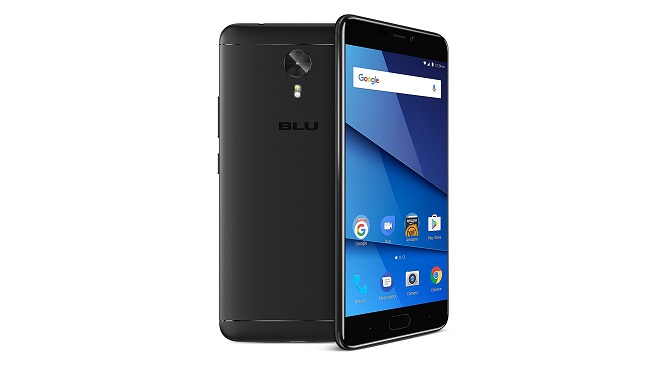
Design
- Dimensions : 154.5 x 76.5 x 8.3 mm
- Weight : 180 g
- Display : 5.5-inch, 1080 x 1920 pixels (401 PPI), In-Cell display with Gorilla Glass 3
- Sensors : Fingerprint, Infra-red, Accelerometer, Gyro, Proximity, Compass
- Build : Metal
- Colours : Black. Gold.
Hardware
- Processor Type : 64-bit Octa-core 2.0 GHz Cortex-A53
- Processor Name : Mediatek MTK6755 Helio P10
- Graphics Processor : ARM Mali-T860
- RAM : 4 GB
- Internal Storage : 64 GB
- External Storage : microSD, up to 64 GB
Cameras
- Rear : 13 megapixels, Sony IMX 258, f/2.0, autofocus, LED flash
- Video recording : 1080p @ 30fps
- Front-facing : 16 megapixels, f/2.0 aperture, with LED flash
Multimedia
- Music Support : MP3/WAV/eAAC+ player
- Audio : MAXXAudio
- Loudspeaker : Mono
- Video Support : MP4/MPEG4/H.263/H.264 player
- FM Radio : Yes
Connectivity
- Bluetooth : v4.1
- WiFi : Wi-Fi 802.11 a/b/g/n, hotspot
- GPS : Yes
- USB : microUSB v2.0
Miscellaneous
Charging : 18W Ultra Quick Charge
Battery : Non-removable Li-Polymer 4,010 mAh
Announced : August 2017
Availability : August 2017
Phone Price : $299.99
Don’t miss our reviews .
Join our WhatsApp Group , to be notified of the most important articles and deals,
Follow us on Instagram , Facebook , Twitter , and YouTube .
Author:InfoDesk
Add MobilityArena as a preferred source on Google
USB-C is the latest connection available for smartphones and computers. It has been here a few years, and now it has evolved to the extent that you can now charge certain laptops through it. There are tons of smartphones and other mobile devices that you can charge via USB-C. this works well, because past USB connections had enough wattage to power smaller batteries. But previous versions of USB could only handle a limited amount of power. That is why laptop chargers have been largely bulkier than smartphone cables.
All this changed with USB-C. this connection provides enough power to charge most laptops. Eventually, the majority of laptops are going to use the USB-C connection. But then, how do you know if your laptop has a USB-C port that also works with charging? Here’s how you can tell: a Type-C connector is small and rounded, which is very different from the old USB versions. Also, you can flip it around in any direction to plug it in.
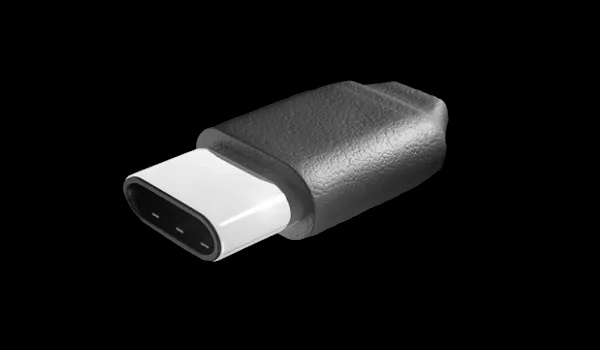
Furthermore, USB-C is a universal charging standard, which means that it does not matter what Type-C charger you use, it should always be able to power your laptop. Today, however, the major of USB-C laptop chargers are interchangeable. However, it is not guaranteed.
Some laptops come with Type-C ports that do not charge. This is most common with laptops that come with their own chargers. However, there are certain laptops that can charge over USB-C, even if they have their own chargers. The Samsung Notebook 9 is an example of such a laptop.
Now, one factor that can determine whether your laptop can charge over a USB-C port is the power setting. You might want to make sure your laptop is set to receive power when you plug in your charger. Some laptops can switch the Type-C’s output settings, choosing whether to send or receive power.
The USB Type-C charger is universal, and thus can do multiple things at once. This means that there are some unique charging circumstances you will find. These include Charge Through, where you can use the same connection to send information to a screen from the laptop, and charge the laptop from the screen at the same time.
When it comes to charging your laptop with a USB Type-C charger, stick to the simplest configuration possible. Also, it is important to note that not all USB-C ports can charge, thus you have to make sure that the laptop is configured for Type-C charging for the process to work.
- Don’t miss our reviews .
- Follow our news on Google News .
- Follow us on Instagram , Facebook , Twitter , and YouTube .
