Add MobilityArena as a preferred source on Google
XDA Developers reports that they are “confident that Android P will finally add support for the Bluetooth HID device profile service, which allows for your smartphone to be used as a Bluetooth keyboard or mouse.”
Some weeks ago, I wrote about the smartphone-powered laptop by Razer. In that article, I also mentioned Microsoft’s Continuum and Samsung’s DeX, which allow supported Lumia and Galaxy smartphones respectively to be used as a trackpad.
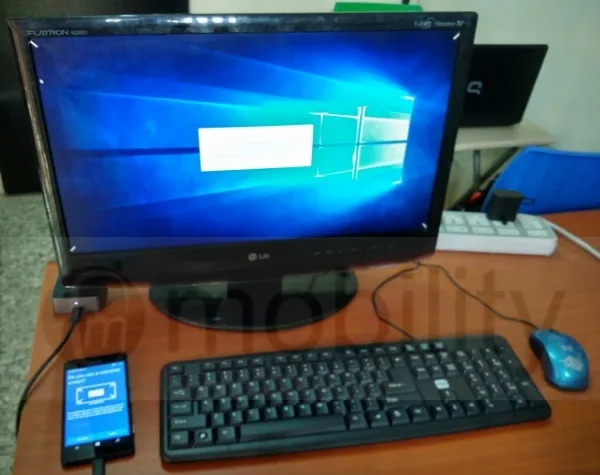
Think of what Microsoft did with Continuum using cables, replace the cables with Bluetooth, and that is what we are looking at. What will make that possible is a Bluetooth profile called Human Interface Device (HID).
- What is Bluetooth HID Device Profile?
- How to Enable Bluetooth HID Device Profile
- Extending The Capabilities Of Smartphones
What is Bluetooth HID Device Profile?
Bluetooth HID Device Profile is the standard for Bluetooth-enabled user-input devices like mice, keyboards, trackpads, and joysticks.
Before now, this Bluetooth profile did not exist in Android OS. As such, Android app developers cannot create apps that can enable your smartphone to be used as an input device. If Bluetooth HID Device Profile is added to Android P, then any smartphone running Android P can be used as input devices over Bluetooth.
That means, you can pair your smartphone with a smart TV or flatscreen PC and use it as a mouse, trackpad, or keyboard. Android P is the next version of Android OS after Android 8 Oreo (also called Android O).
How to Enable Bluetooth HID Device Profile
If your smartphone has it, it is already enabled. There is nothing for you to do.
Extending The Capabilities Of Smartphones
Clearly, everyone involved in mobile sees the future of smartphones in productivity. Microsoft’s Continuum aside, the company has repeated that it wants to create a new category of mobile devices that focus on productivity. Their successful Surface tablet line is part of this.
Samsung is pushing ahead with DeX. Huawei has developed a PC mode that runs on the same principle. And now, Google takes up the task.
Why are all the big names facing productivity and bigger screen computing? Mobile has conquered the consumer market completely. Now, it is time for it to tackle office/enterprise/productivity. The idea is to rule both mobile and desktop with the same OS, and initiatives of this sort are pointed squarely at that.
There are quite a number of Bluetooth profiles, each enabling a different functionality for devices. Read up more about these Bluetooth profiles .
Source
Author:Mister Mobility
Digital Skills and Communication Coach | Mobile Phone Connoisseur since 2001 | Tech Blogging since 2004
Add MobilityArena as a preferred source on Google
Android P is not available to the public yet, but a developer preview has been pushed out. One key benefit of this next version of Android OS is that it will prevent apps from using your smartphone’s microphone or camera whenever they’re in the background and not actively being used on screen.
If you have been worried about secret recording activity happening on your phone, Google has got your back with Android P. Whenever an app in the background tries to use your microphone or camera, a new security feature will trigger a notification to tell you and you can decide to let it happen or not.
So, Android P is big on user privacy. Are there any other new stuff? Yes, there are.
Display Notch Support
Remember how Android smartphone manufacturers went crazy with display notches at Mobile World Congress 2018 ? Well, Google approves and has added support for display notch in Android P.
New Notification Panel
Android OS gets a new notification panel and improved messaging notifications.
Wi-Fi Indoor Positioning
Indoor positioning via Wi-fi means your smartphone will be able to measure the distance to multiple Wi-fi hotspots and use this information in indoor positioning apps to calculate the near exact location of the phone with an accuracy of 1 to 2 meters.
New Media Formats
Android P adds support for HDR VP9 Profile for video and HEIF image compression.
HDR VP9 makes it easier to watch HDR videos, while HEIF is a new image compression format that can compress images to less than half the size of a JPEG while maintaining higher image quality.
Multi-camera API
We are in the age of dual and triple camera. Perhaps we shall even see quad cameras soon. Android P includes native support for multiple cameras.
Think of using twitter and wanting to share a quick selfie, so you call up the camera from inside the tweet you are composing. You will be able to use zoom or even bokeh in that situation.
There has been no mention of Bluetooth HID device profile that enables your smartphone as an input device.
Get Android P Developer Preview
Android P won’t be ready for the public until 3rd or 4th quarter 2018, so it is still a long way off. If you are a developer and need to test out things with your apps, you can download and use Android P Developer Preview right away. Just head this way .
