Add MobilityArena as a preferred source on Google
As someone who has been a digital entrepreneur all my adult life, emails are the lifeblood of my work. The ability to get, read, and respond to mails is so core to my work that I am constantly looking for ways to manage my emails more effectively. Which is why, you can imagine, that being able to read emails on a smartwatch is important to me.
I get lots of useless mails, though, and so would like to be able to see exactly what a mail is about before I pick up my phone or grab my laptop. That way, I can save myself some time and trouble. I am not particular about being able to reply to emails from a smartwatch, because that tiny screen is just a pain for such activity. I am aware that replies can be done via voice, but that is a conversation for another day.

Can you read emails on a smartwatch?
- Can you read emails on a smartwatch?
- Smartwatches you can read email on
- How to setup email for supported Samsung watches
- How to read your email on your Samsung Watch
- Can you read emails on your Apple Watch?
Can you read emails on a smartwatch?
While it is not a popular functionality on smartwatches yet, there are some models that provide the ability to read your e-mails without picking up your smartphone. Most current wearable devices allow you to only see email notifications. You cannot read or reply to your mails on them.
I have owned the Oraimo Tempo C Waterproof Smart Fitband, as well as the Oraimo Tempo-S, and both of them only allow the user to see email notifications. The notifications do not even display the subject line of the mails, which would have been adequate for me. If the notifications included the subject line, I would be able to figure out whether a mail was important or not. Alas, they do not. It is such a limiting thing.
Below, I highlight a few smartwatch models that let you read your emails without picking up your phone or laptop.
Smartwatches you can read email on
If you want the functionality to read emails on a smartwatch, these are the brands and models you should be looking at: Samsung, Amazfit, Apple. Some of the models that already allow you to read and even reply to your mails include:
- Amazfit Bip
- Amazfit GTR
- Samsung Gear S
- Samsung Gear S3
- Samsung Galaxy Watch Active2
- Apple Watch
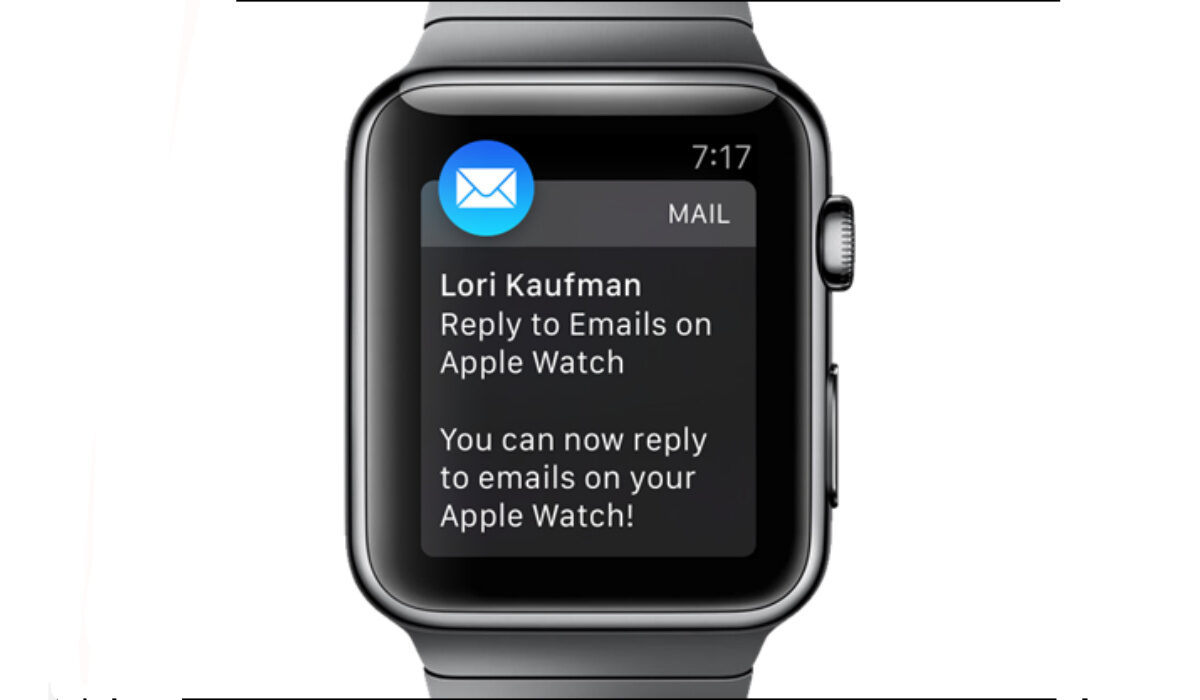
With any of these smartwatches, you can reply to, delete, or access emails conveniently from your wrist.
Note that for Samsung watches, this full email functionality is only available if your watch is connected to a Samsung smartphone. It works via the Galaxy Wearable app. It works for Gmail, as well as Microsoft Outlook.
At the time of typing this, as already alluded to earlier, Oraimo smartwatches do not have the functionality to read emails. You can get email notifications, and that’s it.
How to setup email for supported Samsung watches
- On your smartphone, tap the Galaxy Wearable app .
- Tap Apps .
- Tap the Email Settings icon then do one of the following: If no email account has been linked, tap Email accounts . If an email account has previously been linked, tap Add account .
- If prompted, tap Allow for applicable permissions.
- Complete all remaining steps to add the account (e.g., enter the email address, password, etc.) then tap Sign in (lower-right).
You will now be able to read emails on your Samsung watch.
How to read your email on your Samsung Watch
- From the Watch screen, press the Home button to go to the Apps screen.
- Tap Email .
- Tap an email to open the email screen.
- Tap the More options icon for additional options: Reply: Compose a reply email from your Gear . Star: Mark the email as a Favorite. Show on phone: View the email on your smartphone.
Can you read emails on your Apple Watch?
You can also read and reply emails on your Apple Watch. This feature has been available since WatchOS 2. Of course, it is only available when your Apple Watch is paired with an iPhone. When you receive an email notification, tap on it to open the mail to read it.
Over time, more wearable manufacturers will add the ability to read emails on their smartwatches and fit bands. It is a convenient tool that makes life easier for users.
Author:Mister Mobility
Digital Skills and Communication Coach | Mobile Phone Connoisseur since 2001 | Tech Blogging since 2004
Add MobilityArena as a preferred source on Google
Everyone loves something free. It doesn’t matter whether we are in the United States, Nigeria, India, United Kingdom, Australia, Kenya, or Ghana; we all do. Ranging from shopping coupons to discounts on products, flash sales and so much more. We all love when we have access to services at a little cost than usual. This also applies to our internet connection. A lot of people use public Wifi hotspots when out and about. Many businesses now give free internet access to their customers as a form of marketing strategy or just to make the customers feel comfortable.
Personally, I have friends that go to the library in school just to use the public WiFi, or head over to a café to browse the internet at the cost of the café. I mean, it saves you the cost of using your own data. The question is, is it safe to use public WiFi? Not entirely. You need to be aware that this act can be dangerous if you are not careful.
What are the dangers of using public WiFi?
Using a public WiFi can serve as an opportunity for a hacker to gain access to information on your device. How? This is possible through a means called WiFi Phishing, where hackers serve a bait to unsuspecting individuals and this bait is access to an open WiFi that is very identical to that of a genuine Wi-Fi access point.
These hackers understand that most people coming to the school library, the cafe, hotel, eatery, etc, are going to connect to the WiFi offered by the institute or firm, so they take countermeasures to also offer a WiFi access that is very similar to that of the institute or firm. By doing this, some people might connect to the WiFi they set up and as simple as that you might have just sold away your vital information.

If you have connected to a WiFi before, or you have a WiFi at home, or you even simply turn on your phone’s hotspot, you will know that once someone connects to your hotspot. You can immediately tell the device, it’s IP address, and so much more. So the moment you connect to a WiFi set up by hackers, this information is open to them and by the aid of a sniffing tool they can pick out your device and intercept data packets between your device and the internet to gain access to your browsing history. Now the level of damage they can do will depend on what you are browsing online. If you are using the Wi-Fi to bank online then you might just be in big trouble. The question then is, how can you use public WiFi safely?
How To Use public WiFi safely And Keep Your Information Safe
Keeping your personal information safe should be top priority to you whenever you are surfing the internet. This is because you are at constant risk of being attacked by hackers and even worse when you are connected to an unprotected network. There are very important steps you need to take when connecting to any WiFi network that you are not sure about (if it doesn’t belong to you or to anyone you are sure of). The following tips will help you stay safe if you need to use public Wifi anywhere.
- Set your device to always ask before it connects to a network: This feature is very important. Head over to your settings, most devices have the option in the settings to enable automatic connection to a WiFi, you can find this in your Network and Internet section. You have the option of turning this on or leaving it off. If you turn it on then you must also select the option to “always ask” before your device connects to any WiFi. By doing this, you set your device so as not to just connect to the strongest signal around you. This keeps your device and your sensitive information safe.
- Do not use any login or password when on a public network : How hackers attract via Wi-Phising is to keep track of your device browsing history, and by doing so they can see any website you accessed and your activity while on that website. So you can see why I earlier said that if you are banking online on a public network, you are in big trouble. By gaining access to your browsing history, these hackers can see or even alter your logins, either to your social media account or even your bank login. Do not use any login while on a public network.
- Choose the correct network : It would not hurt if you walk up to the workers at the café, library, restaurant, etc to ask for the actual network they want their customers to connect to. This will save you from connecting to any wrong network. I also advise that you save the network after confirming so that any time you are in the location of the public network, it will pop up as a saved network.
- Choose a secure network : Before connecting to a public network you can also check if it is secure and this can be seen just by the right-hand side of the network name. A padlock sign will be displayed. This signals that the network is secured. Then proceed to request the password from the network provider or the WiFi owner.
- Use a VPN : Wondering what a VPN is? Check out this article published here on MobilityArena. This means virtual private network, and it helps to keep your browsing anonymous.
To use public Wifi safely, ensure that you follow these steps to keep your device privacy in one piece and safe from hackers.
You are reading Mobility Arena .
- Don’t miss our reviews .
- Join our WhatsApp Group , to be notified of the most important articles and deals,
- Follow us on Instagram , Facebook , Twitter , and YouTube .
Author:KittysTech
Tech analyst, Collins Eshiet, writes about technology. Follow me on Twitter @KittysTech.
