Add MobilityArena as a preferred source on Google
Disney recently released the animated movie Cars 3. Now, the company has released a mobile game based on the movie, called Cars: Lightning League. This game is a simple level based runner game. It features the popular third-person auto-running camera from Temple Run. However, in this case, it is auto-driving. The game features the protagonist of the Cars movies, Lightning McQueen. In the game, McQueen has been crowded out of the racing sport. You have to help him train in order to get back in the game as soon as possible. There are a lot of nice gameplay elements that should appeal to younger readers and fans of the Cars franchise.
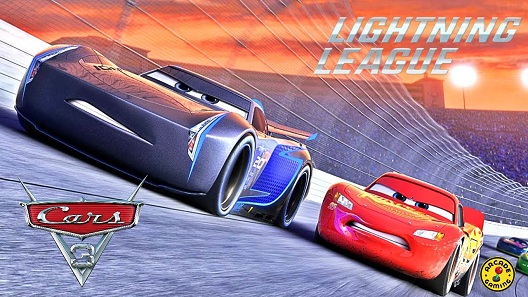
Cars: Lightning League features many colorful characters and locations from the movie, which can be unlocked through acquiring an in-game currency. In Cars: Lightning League, you get to give it everything you got by assembling a garage of legendary racers, including Lightning McQueen, Cruz Ramirez, Jackson Storm and more. Upgrade each car and explore their true potential by reaching insane, record-breaking speeds. Feel the thrill of high-octane sport racing in Pixar’s Cars: Lightning League. You also get to race on tracks inspired by Cars 3 – cruise the beach, burn rubber near Radiator Springs, and more. You also collect new cars and old favorites along the line. Also, you complete high-speed missions in order to gain new upgrades.
Playing this game is quite simple. You simply dodge, jump or slide in order to collect as many coins as you can. And yes, the app contains ads and in-app purchases. These in-app purchases range as high as $74.99 per item, which is quite outrageous for a game targeted towards young children. Furthermore, there are options to watch in order to get rewards. These shortcomings aside, this game should be a nice companion for anyone interested in the Cars 3 movie, and in the Cars franchise in general.
Author:EmmyCN
Add MobilityArena as a preferred source on Google
If you feel like emojis cannot convey the exact emotion you want and you think your face would be better, then don’t worry. There’s an app for transforming your selfies into stickers. You can use these stickers for your messages. This app is known as Sticky AI, and it was created by Prisma. You might have used the Prisma app recently, which lets you convert your pictures into art using filters and other graphic effects. Prisma does this by replicating the styles of famous artists like Van Gogh and Picasso. This makes for a truly unique image.
Sticky AI lets you take a picture or an animated Boomerang. Then it cuts around your face to create a sticker, which you can edit according to your preferences. When you first download Sticky AI, it takes you directly to the camera. There you can take your first selfie, or you can browse from selfies you have already taken. The app cuts out your face using AI technology, and having a transparent background will make it look less untidy.
Now, when you take your selfie, you can edit your photo by tapping on it. Right now, there are two filters available, on in black and white and one in color. You can also make the sticker stand out by adding text. Just click on the T button on the top right corner of your screen. The button underneath the T will create a white border around you sticker. Also, you can change the background of your sticker. Just tap on the background repeatedly until your preferred background comes up.
When you are done editing, you can share your sticker to various messaging platforms. Tap the Export button at the bottom right of the screen. this gives you different platforms where you can share your sticker, including iMessage, Messenger and SnapChat.
Sticky AI is currently available only on iOS. However, the Android version will soon be out, according to Prisma.
- Don’t miss our mobile phone reviews .
- Follow our news on Google News .
- Join our WhatsApp Group , to be notified of the most important articles and deals,
- Follow us on Instagram , Facebook , Twitter , and YouTube .
