Add MobilityArena as a preferred source on Google
You were sending an iMessage or carrying out some other Internet-dependent activity on your iPhone, but find out that the message is not going through, or the other tasks are not working. Why is your cellular data not working ?
Your cellular data not working may happen for a few reasons. It may be a wrong setting on your device, a physical problem with your smartphone, a need for a software update, or a network fault from your carrier.
- How to fix iPhone and iPad Cellular Data not working 1. Check to make sure Airplane Mode isn’t enabled 2. Check Cellular Data Settings 3. Restart Your iPhone 4. Check For A Software Or Carrier Settings Update 5. Reset Network Settings 6. Factory Reset Your iPhone 7. Contact Your Wireless Carrier 8. Contact Apple Support
How to fix iPhone and iPad Cellular Data not working
Outlined below are the steps you need to take to fix the issue. Try one after the other, till the issue goes away.
1. Check to make sure Airplane Mode isn’t enabled
If you mistakenly toggled Airplane mode, then your iPhone cannot connect to the mobile network at all and cellular data cannot work. To check, look at your phone’s notification bar at the top of the screen: if Airplane mode is active, you will see an airplane icon in place of your network icon. To toggle it off, go to Settings . Then, select Network & Internet , and disable it.
2. Check Cellular Data Settings
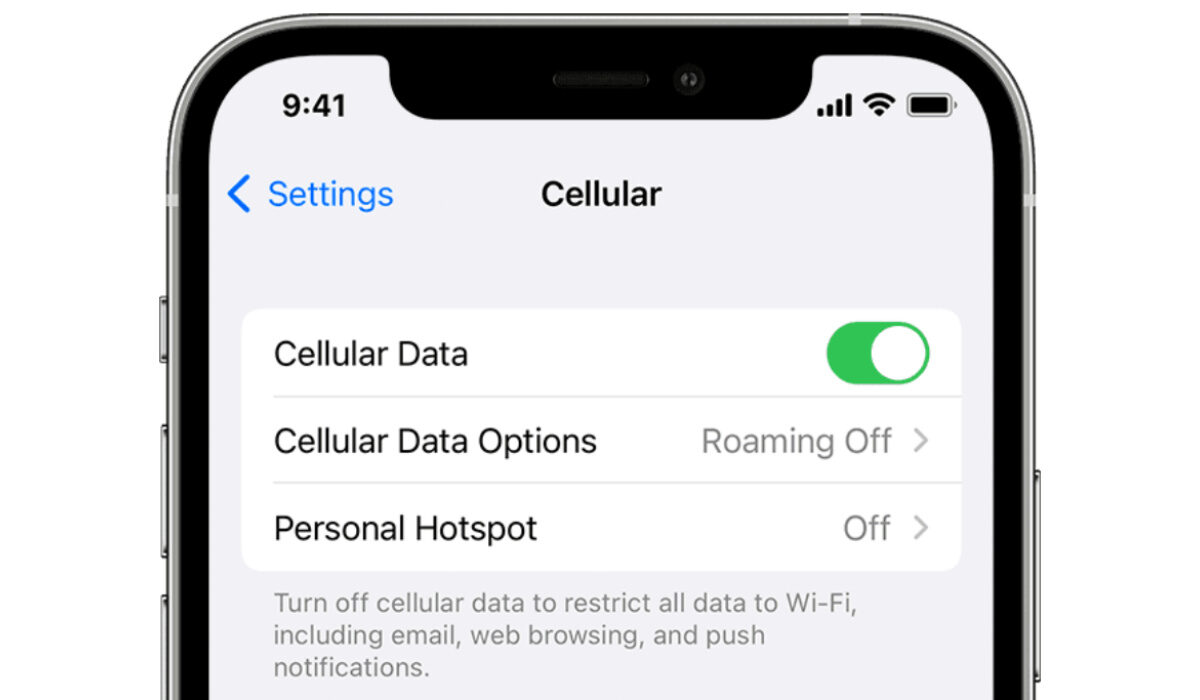
Another possibility is that you inadvertently turned off cellular data on your device. To check if this is the case, swipe down from the top right side of your phone’s screen. The antenna icon should be green when cellular data is on. If it is not green but greyed out, you need to turn it back on. Go to Settings > Cellular, and toggle the switch next to Cellular Data at the top of screen. Problem solved. If this isn’t the issue, let’s move on to the next fix below.
3. Restart Your iPhone
Sometimes, a restart serves as a refresher of electronic systems and fixes issues. It has been known to fix cellular data problems. So, let’s restart your iPhone at this point. Hold down either of the volume buttons and the side button, then on your screen, slide to power off. When your device powers back on, check to see if cellular data now works. If it does, congratulations.
4. Check For A Software Or Carrier Settings Update
A software update from Apple, or an update from your carrier, is sometimes made available to fix issues of this sort.
- To check for software updates for your iPhone or iPad, connect to a Wi-Fi network (your cellular/mobile data isn’t working; remember?) and then go to Settings > General > Software Update . Run any available updates.
- To check for carrier updates, again connect to a Wi-Fi network, and go to Settings > General > About : if a carrier update is available, you’ll see a pop-up that says “ Carrier Settings Update ”. Click Update to accept and run it.
After the update(s) have been downloaded and installed, and your iPhone restarts, turn off the Wi-Fi and then check to see if you are now able to use mobile data.
5. Reset Network Settings
Your Apple iPhone has the option to allow you to reset network settings. This is the next option to fix the cellular data not working issue. First, backup your settings: if you have iCloud backup active, a backup should exist already. Do check to make sure before you proceed. You can also manually store your settings for safekeeping.
To carry out a network settings reset, on your iPhone, go to Settings > General > Transfer or Reset iPhone > Reset > Reset Network Settings . Then, tap Reset Network Settings when the confirmation pop-up appears. Your phone’s network settings will be reset, and the device will restart, hopefully with the cellular data not working issue fixed.
6. Factory Reset Your iPhone
A factory reset will erase everything on your device – photos, contacts, settings, videos, and other files. You should make sure that you have a backup of the data on your iPhone, so you don’t lose any important information. Then, go to Settings > General > Reset , and tap Erase All Content and Settings . Your phone should restart as good as new.
7. Contact Your Wireless Carrier
If none of the above fixes have helped, there is a chance that the issue is from your wireless carrier – perhaps a network fault, or a maintenance issue. Call your carrier’s customer support to lay a complaint and see if they can fix the cellular data not working issue at their end.
8. Contact Apple Support
Finally, if you have gone through all the above steps and your iPhone’s cellular data is still not working, perhaps your device has a hardware fault. In which case, it is time to contact Apple Support for them to have a look at it. All the best.
Author:InfoDesk
Add MobilityArena as a preferred source on Google
What is 5G Voice over New Radio (VoNR)? Also called Voice over 5G or Vo5G, it is a wireless standard by which voice calls can be handled over the 5G network. This technology is implemented in standalone 5G networks, and weans 5G away from its dependence on 4G LTE for phone calls.
What is VoNR in 5G?
It is the same as Voice over New Radio – the ability to make voice calls over a standalone 5G network.
What is VoLTE and VoNR?
VoLTE is to 4G LTE networks what VoNR is to 5G networks. VoLTE enables voice calls on 4G networks, while VoNR enables voice calls over 5G wireless networks.
What is the full form of VoNR?
The full form of VoNR is Voice over New Radio .
How does 5G voice call work?
It uses a core packet to deliver voice calls over the 5G network
Is 5G used for voice or data?
Originally, 5G did not support voice calls, and 5G phones have to switch to 4G LTE for voice (and video). With Voice over New Radio, voice calls can now be made over a standalone 5G network.
Which networks or carriers have VoNR?
In July 2021, M1 in Singapore became the first telco in the world to provide VoNR service on their 5G SA network. M1 beat A1 Belarus, which had tested Vo5G as early as May 2020, to the launch.
In December 2021, AIS became the first mobile operator in Thailand to launch VoNR. In March 2022, TIM became the first wireless network in Brasil to operate the core 5G technology, and the first in Latin America.
What is video over 5G new radio (ViNR)?
Similar to Voice over New Radio, Video over New Radio uses the 5G core packet to deliver video calls, without the need to fall back on 4G LTE.
What phones support Voice over New Radio (VoNR)?
Samsung Galaxy S21 Ultra, Galaxy S21+ and Galaxy S21 were some of the first smartphones to be capable of making 5G standalone voice calls or Voice over 5G (Vo5G). Remember, these terms are used interchangeably with Voice over NR (VoNR).
- Don’t miss our reviews .
- Follow our news on Google News .
- Join our WhatsApp Group , to be notified of the most important articles and deals,
- Follow us on Instagram , Facebook , Twitter , and YouTube .
Author:Mister Mobility
Digital Skills and Communication Coach | Mobile Phone Connoisseur since 2001 | Tech Blogging since 2004
