Add MobilityArena as a preferred source on Google
I did not think that I would like the addition of Chat Bubbles to Android 11 , and after experiencing it, I am sure I don’t. Why is anyone excited about this? What value exactly do chat bubbles In Android 11 bring?
Chat Bubbles are message notifications that pop up and float on top of whatever app you are currently using. As such, you can respond to that chat by tapping on the bubble to open a floating chat screen. You do not have to leave the app you are in to attend to that message.
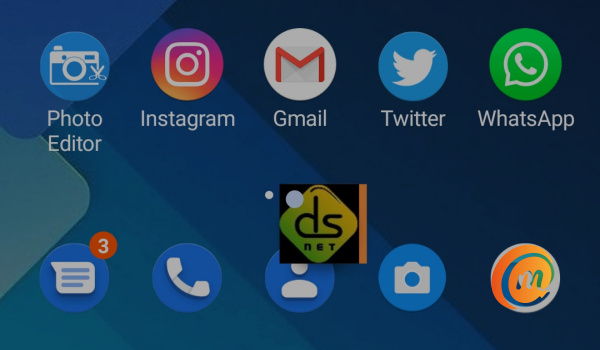
Chat Bubbles In Android 11
My first encounter with the Chat Bubble feature was in Facebook Messenger, which was also the first time we saw the feature. It was distracting and intrusive, and I quickly found the toggle to disable it. It has stayed turned off ever since. I was sure I’d never have to deal with it again.
I have been told that it is a great convenience feature, because you never have to leave what you are doing to respond to a message. I disagree. I am already bombarded with so many smartphone notifications every day that I do not want to immediately attend to.
Does anyone else understand that? I do not have a need to respond to every message that arrives on my smartphone. My life is not a flurry of activities and urgent needs. I do not work for the FBI, secret service, or fire service.
When I am doing something, I focus on it and do not want distractions. Contrary to what you may have been told, multitasking is a myth. It impedes productivity. Multitasking is distraction.
So, I am typing this article on my Android 11 smartphone at 3.31am and a text message comes in. The Chat Bubble pops up on my screen – right in the middle of the very keyboard I am typing with. Who thought this distraction and annoyance would be a great idea? It isn’t. It sucks. I don’t want it. I definitely do not want to stop my train of thoughts to respond to an SMS right now or at any point in time.
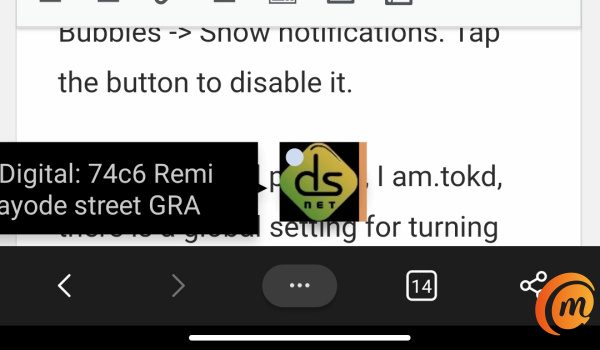
The thing is, without this new Chat Bubbles feature, I could already respond to a text message, WhatsApp message, and Telegram message without opening the respective app. All I have to do is pull down the notification shade, select Reply , type my response there, and send – without leaving what I am doing and opening another app. See? The new Chat Bubbles in Android 11 add no real value.
Why add this clunky, distracting, and annoying layer? It beggars belief that as we are leading crusades to wean people off smartphone addiction and FOMO (fear of missing out), the Android strategy team though it would be fantastic to implement system-wide Chat Bubbles in Android 11 operating system.
You got it wrong, guys. It is a bad idea, and I can’t say it enough. After updating my Xiaomi Mi Note 10 Pro to Android 11 , Chat Bubbles began to pop up each time a message arrived on my phone. If there was hell on earth, this was it.
On Google Pixel phones, I am told, there is a global setting for turning the feature on and off. But I haven’t found it on my MIUI 12 smartphone. I have checked multiple times. It isn’t there. I hunted for that global menu where I could turn it off. Turns out there isn’t one. Aargh! What? How can there not be a kill switch for this? How is the user so poorly thought of that the option to kill this pesky feature with just one tap does not exist?
This is absolute tomfoolery. This is a likely a fault of the MIUI developer team, and it is unacceptable. Eventually, I found that I had to dive into the Additional settings in the app for Messages, where I found a menu named Bubbles, where I could toggle the feature off for the Messages app.
How to turn off or disable Chat Bubbles in Android 11
The path to follow is: Settings > Notifications > Messages > Additional settings in the app > Bubbles > Show notifications. Tap the button to disable it.
Update : I am told that the path to follow has changed since when this article was published. If you cannot find it using the above path, try this one: Settings > Notifications > tap on the word “Messages” > In-app Notification Settings > Bubbles > tap on “None”. Thanks, Andrew!
Does this mean I’d have to do this for each app that has Chat Bubbles in Android 11 implemented? That would suck. For now, I am glad that I am no longer subjected to this distraction and annoyance. I do not need to respond to every incoming message urgently. And Xiaomi needs to implement that global toggle to disable or enable, system-wide, Chat Bubbles in Android 11 and place it in a location that is easy to find.
- Don’t miss our reviews .
- Follow our news on Google News .
- Join our WhatsApp Group , to be notified of the most important articles and deals,
- Follow us on Instagram , Facebook , Twitter , and YouTube .
Author:Mister Mobility
Digital Skills and Communication Coach | Mobile Phone Connoisseur since 2001 | Tech Blogging since 2004
Add MobilityArena as a preferred source on Google
OnePlus has officially unveiled 3 devices in the 9 series, namely: OnePlus 9, 9 Pro, and 9R.
Here is a quick breakdown of what they offer, some of which are common to them all, while each model has its own unique specs and features. We start with what they all have in common.
All three of them run OxygenOS 11, which is based on Android 11. All three of them have 120Hz AMOLED displays. All three have 8GB and 12GB RAM options, and 128GB and 256GB internal storage. As such, each of them has an 8GB/128GB and 12GB/256GB variant.
All three of them have a 4500mAh battery and 65W fast charging. All three of them have a 48MP Sony main camera lens, though the specific sensors differ.
Differences between OnePlus 9, OnePlus 9 Pro, and OnePlus 9R
Here are the differences between these three smartphones.
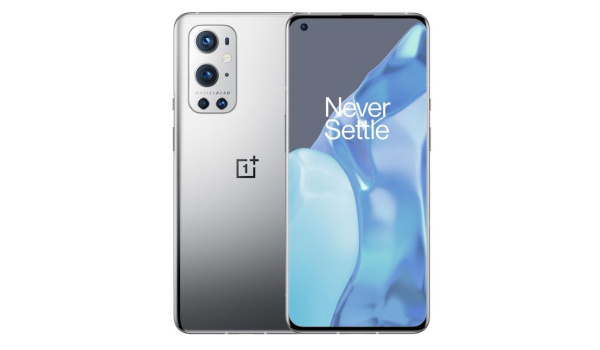
The 9 Pro has a Hasselblad camera
The OnePlus 9 Pro is the top tier device. It has the largest display at 6.7 inches and has a higher screen resolution as well. It also has an IP68 water and dust-proof rating. It is powered by a Qualcomm Snapdragon 888 chipset.
In the camera department, the 9 Pro has a Hasselblad quad camera setup at the back. It comprises a 48MP main lens, 50MP ultrawide lens, 8MP telephoto lens, and a 2MP monochrome lens. At the front is a 16MP EIS-enabled selfie camera.
In addition to 65W fast charge, it also has 50W fast wireless charging.
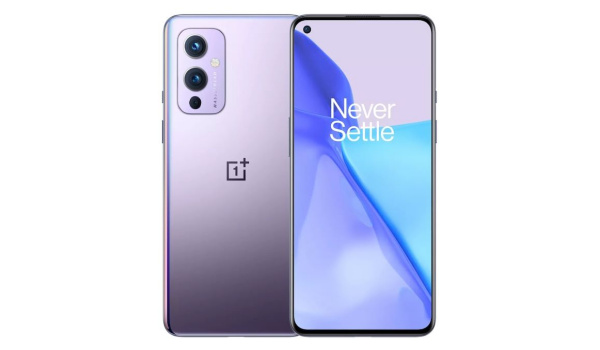
The vanilla 9
The OnePlus 9 has a 6.55″ display. Its main camera is also in partnership with Hasselblad and comprises four lens – a 48MP main lens, 16MP ultrawide lens, 8MP macro and 2MP monochrome.
The front camera is a 16MP snapper as well. Like its Pro sibling, the 9 is also powered by a Qualcomm Snapdragon 888 chipset.
Lastly, the OnePlus 9R is the budget baby of the three. It has a 6.55″ Fluid AMOLED display just like the vanilla 9.
Powered by a Snapdragon 870 chipset, it has a quad-camera without a Hasselblad input or label. It does not have wireless charging though.
Pre-orders for the 9R begin in April 2021.
You can check the full specifications of the OnePlus 9 series .
Author:MobileChic
That motivated, gadget-loving geeky chic who tries to stay on top of things. Unapologetic iFan.
