Add MobilityArena as a preferred source on Google
A few years ago, a story broke out on the Internet, where a certain presenter was demonstrating how students in Illinois, USA could get juvenile offenses expunged from their records. The presenter used his/her phone. During the demonstration, someone happened to notice a link to popular adult site in the presenter’s browser history. Well, you can imagine how embarrassing that turned out to be for the presenter.
The moral of that story is this: if you have anything you would not want anyone to see in your browser history, it is best to delete it before giving anyone your phone or showing it to anyone in any context. Here are some tips on clearing your browser history and keeping it clean.
CLEAR BROWSER HISTORY ON GOOGLE CHROME FOR ANDROID
This is actually quite easy. Here’s how to clear your browsing history on Chrome for Android:
- Tap on the menu button from anywhere within the app.
- Press the History button/ to clear an individual item, search for the item, then press X beside it. to clear everything at once, tap on Clear Browsing Data. You can also find this button at the bottom of Settings > Privacy.
- Here, you can delete browser history, cache, cookies, site data, saved passwords and any other autofill data you have set up. When you press the Clear button, just wait for the process to complete.
USE INCOGNITO MODE
If you cannot be bothered to clear your browser history, you can save yourself the stress by using Incognito mode on Chrome for your dirty work. Incognito Mode will not store any history, cookies and cache for as long as you use the feature. However, this does not stop people from looking at your network activity, so if you suspect that your network activity could be monitored.
USE OTHER BROWSERS
Of course, you could simply use another browser with more privacy features. Here are a few other options with privacy modes:
- Firefox: Has individual private tabs
- Opera Mobile: Browser-wide privacy mode
- Dolphin; Browser-wide privacy mode
- Dolphin Zero: Always in privacy mode no matter what you do
- Maxthon: Browser-wide privacy mode
OTHER TIPS FOR KEEPING YOUR DATA PRIVATE
If somehow none of this is enough, there are other tips you can use to keep your data away from other eyes:
- Put a lock on your phone: This is a fail-safe that you cannot afford to miss out on, especially if you have things you would rather keep to yourself.
- Use an app locker before giving your phone to anyone. Most snoopers tend to borrow your phoneunder the guise of making a phone call or text, but somehow they turn up deep in your browser history. An app locker would make sure they cannot get at your most sensitive apps without your permission. Of course, there are lots of good options in the Google Play Store.
- How about not looking at adult material at all? That’s also a good idea.
Conclusion
browsing the internet has become an integral part of our daily lives. We use our web browsers to access various websites, social media platforms, and online services. However, as we surf the web, our browsers collect a vast amount of data about our browsing habits, including our search history, cookies, and cache files.
While this information can be useful for improving our browsing experience, it can also compromise our online security and privacy. In this context, clearing our browser history becomes an essential step to protect ourselves from online threats and maintain our digital privacy. This article will explore why it is crucial to clear your browser history and how it can help improve your online security and privacy.
Author:EmmyCN
Add MobilityArena as a preferred source on Google
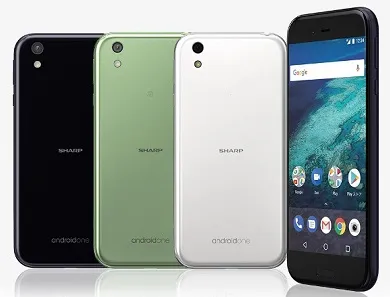
Who would ever consider Japan as a target for Google’s Android One project? You know – Japan, the most advanced mobile country in the world. What would Android One be needed there for? We haven’t figured that out, but the Sharp X1 has announced another Android One smartphone for that country. The first was Sharp 507SH released in 2016. Others have included Y!Mobile Kyocera S2 and Y!Mobile Sharp S1.
But the Sharp X1 Android One is all shades of badass. In addition to running stock Android, it has three water and dust resistant ratings – IP6X, IPX5, and IPX8, plus digital TV and FeliCa. Felica is an early form of NFC developed by Sony and is used for contactless card payments. In Japan, Apple Pay uses Felica. Chances are that Android Pay will ride on this too in the country.
Sharp X1 Android One Specs
Network and Software
- GSM : GSM 900 / 1800
- 3G : HSDPA 850 / 900 / 2100
- 4G : LTE
- SIM Type : Nano-SIM
- OS : Android 7.1.1 Nougat
Design
- Dimensions : 152 x 74 x 8.9 mm
- Weight : 169 g
- Display : 5.3 inches, 1080 x 1920 pixels (416 PPI), IGZO LCD
- Sensors: Fingerprint, Accelerometer, Proximity, Light, Gyroscope, Orientation, Magnetometer
- Build : IP6X / IPX5 / IPX8 dust and water resistance
- Colours : Dark Purple, Mint Green, and White
Hardware
- Processor Type : 64-bit Octa-Core 1.4 GHz Cortex-A53
- Processor Name : Qualcomm MSM8940 Snapdragon 435
- Graphics Processor : Adreno 505
- RAM : 3 GB
- Internal Storage : 32 GB
- External Storage : Dedicated MicroSD card up to 256 GB
Camera
- Rear : 16.4 megapixels, auto-focus, and LED flash
- Video recording : Yes
- Front-facing : 8 megapixels
Multimedia
- Music Support : mp3, aac, aac+, eaac+, amr
- Loudspeaker : Mono
- Video Support : mpeg4, h.263, h.264
- FM Radio : NA
Connectivity
- Bluetooth : v4.2
- WiFi : Wi-Fi 802.11 b/g/n, Wi-Fi Direct, hotspot
- GPS : Yes
- USB : microUSB v2.0
Miscellaneous
Miscellaneous : Digital TV. Felica for e-payments
Charging :
Battery : Non-removable 3,900 mAh
Announcement : June 30th, 2017
Availability : July 2017
Launch Price : ¥70,524 / $628
Don’t miss our reviews .
Join our WhatsApp Group , to be notified of the most important articles and deals,
Follow us on Instagram , Facebook , Twitter , and YouTube .
