Add MobilityArena as a preferred source on Google
While browsing, you might have received a notification saying that a certain site you might be trying to access requires cookies and cache data. So, what are cookies and cache data, and why is it important that you clear them from your browser?
I have always had the habit of clearing the cache data from my browser and applications because they occupied unnecessary space (when I started using a smartphone, I had a device with little storage). This habit got the better half of me and even when I started using devices with larger storage I still cleared the cache data. But regularly clearing the cookies and cache data is not all about getting more storage space, it goes beyond that.
What Are Cookies And Cached Data?
The cookies made mention of here are not actually “cookies” that can be eaten, instead, they are saved information. When you browse the internet on any browser of your choice, certain information from the websites you visit is being saved. Why?
The saved data can serve a lot of purposes on the side of the cookies, they are little files created by websites you visit, and they help save browsing data in case you return to these websites or webpages at a later time. While, cache refers to specific parts of websites or webpages that we visit, and these parts can be recalled at any time to help the pages open faster when next you visit them.
Therefore, if cookies and cache data help save browsing data and make pages one has previously visited load faster, why should you clear them? It is all about your privacy and the information gathered about you from the sites you visit.
If you are the kind of person that shops online for things like fast food (just an example), you will notice that whenever you open your browser, you will see ads about food-related websites. The same is true for whatever you previously searched for on your web browser. That is simply the cookies and cache data you have generated at work.
Certain websites take your cookies and cache data to serve you with ads relating to things you constantly browse. The more these acquired data stays on your browser, the more information these websites have, hence the more ads are likely to see. So from time to time, it is important to clear the cookies and cache data.
How To Clear Your Browser Cookies And Cached Data
We will show you how to clear these acquired data on a few browsers like Chrome and Microsoft Edge. We will start up with Chrome and since Chrome is used on both mobile phones and computers we will show you how you can clear these data on both ends.
Google Chrome On Your Computer
- Open Chrome and click more in the top right corner of your screen.
- Click more tools and then clear browsing data.
- You have the option to select the time range you want these data to be deleted, make your choice, but it is best to go with All time.
- Select Cookies and other site data, and also cached images and files.
- Finally, click Clear data.
Google Chrome On Your Smartphones
- Open Chrome and tap more in the top right corner of your screen.
- Tap history and then clear browsing data.
- Select the time range for the data to be deleted.
- Select Cookies and other site data and cached images and files.
- Finally, click Clear data.
Microsoft Edge
Open Microsoft Edge .
Click the menu button (three dots in the top right corner of the screen) and then select settings.
Now select Clear browsing data and click on what to clear.
Select the cookies and cache data boxes (often the second and third boxes).
Click on clear. It is advisable to toggle on the option “always clear this when I close the browser,” this will always delete your cookies and cache data when you are done browsing.
Don’t miss our reviews .
Join our WhatsApp Group , to be notified of the most important articles and deals,
Follow us on Instagram , Facebook , Twitter , and YouTube .
Author:KittysTech
Tech analyst, Collins Eshiet, writes about technology. Follow me on Twitter @KittysTech.
Add MobilityArena as a preferred source on Google
If you still own and use a BlackBerry OS or BlackBerry 10 smartphone, come January 4, 2022, it is likely to stop functioning for calls, SMS, and more.
BlackBerry announced that will end support for classic BlackBerry smartphones; these are BlackBerry phones that run BlackBerry OS and BlackBerry 10. If you own an BlackBerry Android phone, you have nothing to worry about, as those retain their full functionality.
Here is the official statement on the end of support for classic Blackberry phones from Blackberry Limited:
As a reminder, the legacy services for BlackBerry 7.1 OS and earlier, BlackBerry 10 software, BlackBerry PlayBook OS 2.1 and earlier versions, will no longer be available after January 4, 2022. As of this date, devices running these legacy services and software through either carrier or Wi-Fi connections will no longer reliably function, including for data, phone calls, SMS and 9-1-1 functionality.
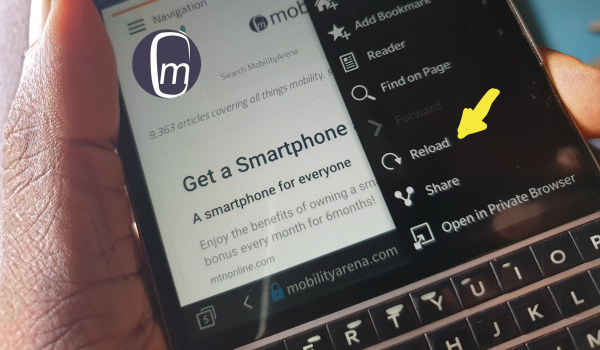
BlackBerry Passport
Before now, BlackBerry Limited had shut down the BlackBerry Services and App Store (was called BlackBerry World), though their devices continued to function for calls, SMS, mobile data, Wi-Fi, etc. This announcement changes that situation, and users of any classic BlackBerry phones might find themselves stranded after the specified date.
For example, if you depend on BlackBerry applications and services such as BlackBerry Link, BlackBerry Desktop Manager, and BlackBerry Blend, expect to hit a wall from January 4.
My Tribute to classic BlackBerry
Virtually everyone else is talking about the downfall of BlackBerry – what the brand did wrong. All of that is after the fact. Hindsight is 20:20. I choose to celebrate this legendary brand that had the world eating from its palms for a bright and exciting period.
I had my first BlackBerry in 2011. That was the BlackBerry 9800 Torch. Released in 2010, I was a little late to the party. Actually, I was quite late to the BlackBerry party as a whole. But better late than never. Once I got in, though, I became a fan. From then, I went through 12 different devices, till BlackBerry OS and BB10 were retired by the Canadian company.
When the company dabbled into tablet territory, I got a PlayBook too. PlayBook was what BlackBerry called its tablet. You might be interested in my BlackBerry Playbook first impressions . It turned out that it had the best Web browser during its time. As a Web guy, I was hooked.

My BlackBerry PlayBook tablet
The most powerful classic BlackBerry smartphone ever was the Passport, and I got my unit as a gift from BlackBerry’s agency on its release in 2014. I still own a Blackberry Passport till date, though I don’t put it to use any more. I even published a long-term BlackBerry Passport review in 2019. The Passport is the best BlackBerry device that I owned, and I daresay the best classic BlackBerry device ever.
The last BlackBerry device that I purchased was the Classic. It was such a stately built, compact premium device with hardware keys that were a delight to type on. You can enjoy a throwback to my BlackBerry Classic review . In all, I owned 12 classic BlackBerry devices.
The complete list of all the classic BlackBerry devices that I owned, and the dates I got them:
- Blackberry 9800 Torch (January 2011)
- Blackberry 9300 Curve 3G (July 2011)
- BlackBerry Curve 9360 (December 2011).
- BlackBerry Bold Touch 9900 (March 2012)
- BlackBerry Torch 9810 (April 2012)
- BlackBerry PlayBook tablet (April 2012)
- BlackBerry Curve 9320 (July 2012)
- BlackBerry Bold 9650 (February 2012)
- BlackBerry Z30 (September 2013)
- BlackBerry Z10 (September 2014)
- BlackBerry Passport (October 2014)
- BlackBerry Classic (May 2015)
As already highlighted, I owned a handful of classic BlackBerry devices back in the day and still own a BlackBerry Passport , which is a BB10 device. This means the end of the road for it for key functions. The thing is, it is sitting in a drawer anyway and isn’t used for anything on a day-to-day basis.
If you still use your BlackBerry smartphone on a daily basis (and that will be almost shocking), this is the time to start looking for a replacement. Get an Android phone from one of the numerous brands or an iPhone from Apple.
There have been rumours of a 5G BlackBerry phone for a while. Unfortunately, that device isn’t reality yet. But if you are loyal to the brand, there are BlackBerry-branded Android phones for you to select from now. BlackBerry Android phones aren’t anything like classic BlackBerry phones, though.
Author:Mister Mobility
Digital Skills and Communication Coach | Mobile Phone Connoisseur since 2001 | Tech Blogging since 2004
