Add MobilityArena as a preferred source on Google
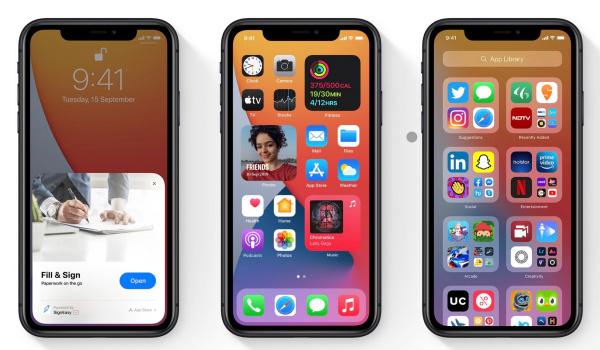
Apple released the public version of the iOS 14 in September of 2020, with this software version introducing a number of important upgrades to iPhones (iPhone 6S and newer) in different parts of the world. However, with this new update came a number of annoying bugs, with certain users noticing some glitches with otherwise perfectly working apps.
In this piece, we will take a look at some popular iOS 14 glitches and how to take care of them yourself.
- Battery draining too quickly: One problem that does seem to recur in a number of iPhone models, this issue has also surfaced on iPhones with the iOS 14, with certain users noting that their newly updated devices drained at an alarming rate. While there may be no bug fix for this yet, you can try turning off auto-brightness to help your battery stay longer. To do this, go to Settings > General > Accessibility > Display Accommodations , from here, you can set it to the level you desire.
If that does not help out, you can stop apps refreshing in the background. To do this, go to Settings > General > Background App Refres h. This should help your device’s battery stay alive for longer.
- Text notifications not showing: A significant number of users have complained that their text notifications do not appear as it should, with the notification bubbles no longer popping up. This rather annoying bug means that you may miss important messages and to avoid this, you’d need to check your messages app from time to time.
The good thing is, this glitch has a rather straightforward solution… an update! As part of the iOS 14.3 update, Apple has added a bug fix for this iOS 14 glitch, simply meaning that when you update your device to the iOS 14.3, this issue will be a thing of the past.
Widgets not working properly: One of the more important features of this update, the iOS 14 widgets brought a new lease of life to the iPhone, letting users stay up-to-date with some of the latest information from different apps. However, a number of users have been unable to add or edit widgets, missing out on the wonderful advantages these widgets offer. If you are currently facing this issue, you can take a look at our article that shows you how to add and edit widgets on iOS 14. If this still does not work out, open up the app, hit the + icon and then close it, it should appear on the widgets list after this.
Delayed Text When Messaging: Not one of the common iOS 14 glitches, this rather pesky glitch means that users experience a time lag between when they type certain words and when they appear in the field. While this is not particularly common, a quick reboot can temporarily solve this issue. However, the iOS 14.4 update brings a bug fix for delayed typing, so getting this update should help you solve this rather uncommon glitch.
Here are a number of rather common iOS 14 glitches and the best ways to get around them, but if none of the above tips work for your device, then try updating to a newer version or visit an Apple Service Centre close to you to get a specialist to check your device.
Author:Alfa Baye
Staff Writer
Add MobilityArena as a preferred source on Google
Samsung Galaxy F62 has launched in India after a number of leaks surfaced about this device last week. been. The Samsung Galaxy F62 launched with four rear cameras and an incredible 7,000mAh battery, while bringing the Exynos 9825 SoC under the hood.
The Samsung Galaxy F62 is built around a 6.70-inch full-HD+ (1080×2400 pixels) Super AMOLED Infinity-O display with a 20:9 aspect ratio. It has a 32MP snapper in a hole-punch which handles selfies and video calls.
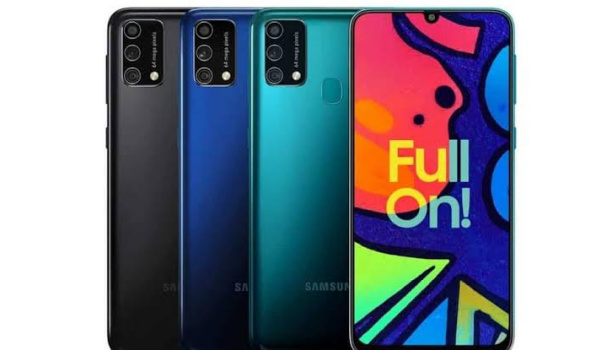
The Samsung Galaxy F62 launched with the Exynos 9825 chipset under the hood. This chipset is hooked to 8GB of RAM and offers 128GB of onboard storage (expandable via microSD to 1TB). This device runs the Android 11 OS with One UI 3.1 on top, taking care of its software needs.
In the optics department, four rear cameras line up the rearguard, with a 64MP Sony IMX682 primary sensor heading the setup. This snapper is assisted by a 12MP ultra-wide-angle sensor, a 5MP macro sensor and a 5MP depth sensor. It also packs a really powerful 7,000mAh battery with 25W quick charging support. This battery is tipped to charge fully in about two hours.
The Samsung Galaxy F62 launched with two different variants priced at $330 for the 6GB RAM variant and $358 for its 8GB RAM model, it is available in three different color options for buyers to pick from with Laser Blue, Grey and Green colors. It weighs about 218 grams and has a thickness of 9.5mm.
Samsung Galaxy F62 Price and Specs
- OS: Android 11 OS with One UI 3.1
- Release Date: February 2021
- RAM: 6/8GB
- ROM: 128GB
- Network Type: 2G/3G/4G
- Selfie Camera: 32MP
- Rear camera: 64MP+12MP+5MP+5MP
- Display: a 6.70-inch full-HD+ (1080×2400 pixels) Super AMOLED Infinity-O display
- Battery: 7,000mAh with 25W fast charging support
- Processor: Exynos 9825 SoC
- Price: starts at $330
References
- Source ;
- Source .
Author:Alfa Baye
Staff Writer
