Add MobilityArena as a preferred source on Google
Apple released the iOS 13 to considerable fanfare in 2019, with fans and critics alike welcoming this iOS eagerly. However, after a number of weeks, different bugs and stability issues surfaced, forcing users who’d installed this iOS version to seek for fixes and solutions in different places.
Today, we will take a look at some of the more common iPhone software problems on a wider scale (not just the iOS 13) out there and how to fix them. Just before we dive headlong to see what’s on the plate, we will advise you to always keep your device up to date, as this can help you keep some of the bugs away. That said, let’s take a look at some of the more common iPhone software problems and some of its possible solutions.
- Keyboard freezing while typing: One of the more common iPhone software problems that has lingered, this issue occurs intermittently in different iPhones, which is a major source of worry for its owners. If your keypad is freezing intermittently, you can try toggling off Zoom in your phone settings, as this could help take care of this issue and make your device operate more smoothly.

Certain apps not opening up properly: An issue that may spring up from a number of causes, this occasionally happens with iPhones, as certain apps just refuse to open. If you notice this with a particular app, you can try uninstalling the app or better still, reset your smartphone. To do this, go to Settings > General > Reset > Reset all settings.
iPhone freezing during update: A bit like the keyboard conundrum, this is an occasional head-scratcher for certain iPhone users. You can bypass this by rebooting your device, then trying the update again.
- Battery drain issues: A rather common issue with the iPhone, this glitch may be due to a number of factors, including a new update. You see, when you newly update your iPhone, the new OS needs to go through a number of system operations to bring your device up to date with some of the new features the update may bring. Aside that, a battery that drains quickly may be the result of certain heavy apps or games. If you’ve been battling this issue, you can follow these tips to improve the situation.
- Plug in your device and wait for a while. It could also help to turn on the Wi-Fi and ensure it is connected, in a few hours your device should return to normal. This method is particularly useful if you are restoring a heavy volume of data from iCloud or synchronizing data from a number of sources.
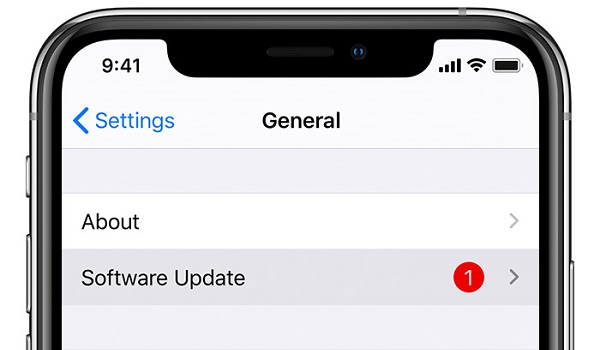
- Check your device for updates by going to Settings > General > Software Update . Some software updates feature fixes for certain bugs, meaning that a software update may be helpful in this instance.
- Check out the apps putting the most strain on your battery. Go to Settings > Battery , if you notice any app that you don’t use often putting a significant strain on your battery, uninstall the app.
- Toggle the Raise to Wake feature off. This feature uses your iPhone’s accelerometer, meaning that your screen may be on more than you know. To turn it off, go to Settings > Display & Brightness > Raise to Wake .
- If none of the above tips are helpful, you may just need to try a forced reboot of your iPhone.
While these tips are helpful with common iPhone software problems, hardware problems need a different approach, as you’d likely need to visit an Apple care center or see a certified technician.
Author:Alfa Baye
Staff Writer
Add MobilityArena as a preferred source on Google
CDMA and GSM are two different technologies available for mobile wireless service. While GSM has gained dominance around the world, CDMA has remained in use in just a few places, including the USA. What are the differences between these two technologies?
The GSM standard was created by a European industry consortium called European Telecommunications Standards Institute (ETSI) and was adopted by the region as the standard for mobile communications, hence its name. GSM is an acronym for Global System for Mobile Communications.
It went on to be adopted not just by Europe but across the vast majority of the world. So, most mobile networks elsewhere adopted GSM technologies, while in the USA and Canada, CDMA (Code Division Multiple Access) became the standard.
CDMA was the handwork of an American company named Qualcomm (yes; the chipmaker). The practical advantages of GSM gave it wider spread adoption globally. Even in the USA and Canada where CDMA once ruled, some carriers have switched to GSM.
The technical parts of the differences between CDMA and GSM are a bit complicated, but you are probably interested only in how the two practically affect you, so let’s get to those.
CDMA and GSM: What are the practical implications to you?
If you are living in the USA or travelling there, you need to know that there are two types of carriers operating there: one set operate GSM networks while another set run CDMA networks. This is true for Canada as well.
GSM phones are not compatible with CDMA networks, and CDMA phones are not compatible with GSM networks. This is important, so you do not buy a smartphone that will not work on your carrier.
One of the easy ways to know if a phone is GSM or CDMA is to check if it uses a SIM card. CDMA phones do not need a SIM and are locked to their carrier. You cannot switch carriers as you will if you are using a CDMA phone.
On the other hand, with a GSM phone, you can more easily switch carriers by buying a different SIM card for use. Note though that some GSM carriers also lock phones they sell to their networks.
But the general principle is that GSM phones use a SIM card. This may change soon as eSIMs are becoming a thing and gaining widespread use. Eventually, we may come to a time when even GSM phones do not require a physical SIM any more.
GSM phones and devices use GSM 900 and 1800 frequencies, while CDMA phones use 850 and 1900 frequencies.
Lastly GSM phones and carriers are identifiable with terms like GSM, GPRS, and EDGE. CDMA phones have terminologies like CDMA and EVDO attached to them. Note the terms CDMA and EVDO – those are CDMA-specific terminologies.
Some US-specific phones support both CDMA and GSM technologies, so you can buy them and freely use on any type of carrier.
List of GSM Carriers in the USA
- AT&T
- T-Mobile
- Virgin Mobile
- LycaMobile
- Cricket Mobile (uses AT&T towers)
- Broadpoint
- H2O Wireless (uses AT&T towers)
- Pure Prepaid (uses AT&T towers)
- Pure Talk USA (uses AT&T towers)
- Consumer Cellular (uses AT&T towers)
Travellers to the US will be able to use their GSM phones on the above carriers.
List of CDMA Carriers in the USA
- Verizon
- US Cellular
If you are travelling to the USA, your GSM smartphone may not work on the above networks unless it is a quad band phone and suppoorts both GSM and CDMA networks.
List of US Carriers that use both CDMA and GSM
- MetroPCS
- Boost Mobile
- Google Fi
- Straighttalk
- Ting
- TracFone Wireless
The above-listed US carriers use both CDMA and GSM technologies, so whichever type of cell phone you have should work with them.
The information on this page may not be accurate or out of date, as the dynamics of the US mobile industry changes. For example, new technologies keep being developed, new carriers are born, and old ones acquired. It is always a good thing to ask questions at the point of purchase of service.
Author:Mister Mobility
Digital Skills and Communication Coach | Mobile Phone Connoisseur since 2001 | Tech Blogging since 2004
