Add MobilityArena as a preferred source on Google
The iPhone X launched in 2017, going on to become the first Apple iPhone to offer an OLED display, as well as removing the popular home button. However, like most smartphones, the iPhone X occasionally suffers certain glitches and this is what we will take a good look at today.
In this piece, we will look at some of the more common issues with the iPhone X and how to take care of them yourself.
- Slow Performance Speeds: It is not uncommon for smartphones (Apple, Android) to slow down after a while. The issue is, this bug can become rather troublesome, going on to make your device slower and more difficult to operate. If this is your device, you can try out the following steps to take care of this issue:
- You can turn on Peak Performance Capability to optimize power consumption and help your device operate faster. What you need to do is go to Settings > Battery > Battery Health > Peak Performance Capability > Disable .
- If the tip above does not help out, you may need to get a new battery altogether. This can see your device’s performance improve and become faster.
- Device not charging properly: A number of owners of the iPhone X have complained about their smartphones not charging properly, with some stating that the devices took to long to charge or the wireless charging properly. To fix this, you can try:
- Changing the cables of your charger or trying a different charger entirely to see if it works better.
- Removing the case on your iPhone X to ensure it is not interfering with the wireless charging.
- Restarting your device to see if this fixes the problem.
- Contacting a technician or Apple Support.
- GPS Not Functioning Properly: The GPS on the iPhone X has been noted to occasionally drift around or just stop working totally. If this has ever happened to your device, you can try out the following fixes:
- Check Settings > Privacy > Location Services and ensure it is turned on.
- Open up the App Store and check the Update Section to ensure all your apps are up-to-date.
- Also, check for the latest iOS updates by clicking Settings > General > Software Update .
- Go to Settings > General > Reset , then select Reset Location and Privacy .
- Face ID Not Working Properly: Smartphone users nowadays have a plethora of options to unlock their devices, with some relying on the Face ID sensors to unlock their devices. However, with the iPhone X, there are times when this feature does not work properly, prompting users to find another means to access their smartphone. If this is you, you can try the following tips:
- Do not wear shades or any face accessories.
- Try turning off this feature in Settings > Face ID & Passcode . This means that you will no longer need a Face ID process, but your device may become less secure with this move.
- Go to Settings > Face ID & Passcode and click on Reset Face ID . This can help you fix the bug.
- Check your smartphone for the latest software updates. Go to Settings > General > Software Update to check for it.
- Screen Freezes: This bug is rather common with iPhones, making easy processes rather cumbersome on this device. If your smartphone has ever experienced this, you can follow these steps to fix the issue:
- Try a phone restart. Press and release the Volume Up button, then swiftly press and release the Volume Down button. After this, press and hold the Sleep button till you see the Apple logo. Your device’s display should return to normal once the smartphone turns on.
- You can attempt a factory reset, but ensure you back up your data before starting this process.
- If the issue started after physical impact on the display, then you may need to see a technician to fix the problem.
Updated August 2021 : Apple iPhones That Support Wireless Charging .
You are reading Mobility Arena .
- Don’t miss our reviews .
- Follow us on Instagram , Facebook , Twitter , and YouTube .
Author:Alfa Baye
Staff Writer
Add MobilityArena as a preferred source on Google
The Lava Z2, Lava Z4, and Lava Z6 have been announced, and they come with options that let you customise and personalise them to your taste .
Almost everyone has a smartphone . While some people will simply follow the trends and purchase any mobile device, others take their time to find the right smartphone for their needs. This means weighing up the factors that matter to them and compromising on a model they like. For some people, this will be having the most advanced camera. For others, they want a large display so that they can watch videos and not miss a thing.
But now you no longer have to compromise when you are shopping for a smartphone. Lava has recognized that people want smartphones to suit their budget and needs. Lava have announced a customizable smartphone range for customers to enjoy. You do not have to sacrifice any of your needs.
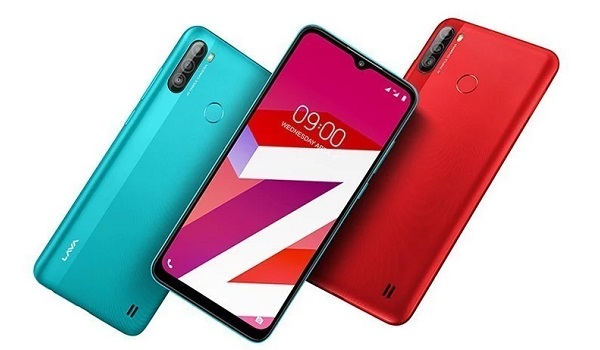
Lava Z2, Z4, and Z6: Made-to-Order Smartphones to Suit Your Needs
Lava is introducing a new Z Series, with several smartphones that a customer can personalize to their needs and enjoy. Not only is this going to be great for ensuring your mobile device has all of the best features you want, but it can also suit you if you are on a budget. In total, there are going to be 66 ways that a customer can personalize their smartphone before they order it. This can be a fun process but also a practical one.
There are going to be three mobile devices that can be customized in several ways. These are the Z2, Z4 and Z6. First of all, buyers can simply choose the size of their smartphone. For instance, this can include having anything from 2GB to 6GB RAM and 32GB to 127GB ROM.
Other features you can choose from include the type of camera your smartphone has. You can choose a dual or triple rear camera and the standard of the front camera too. Customers can even choose the color of their smartphone.
People use their smartphones for a variety of tasks. This can include spending downtime on the Unibet Pennsylvania app ; it may include attending Zoom meetings for work, WhatsApping mom, sending emails or just watching the latest blockbuster from Netflix. The Lava smartphone is going to offer the opportunity to suit your every need.
No matter what smartphone you choose from the Lava Z2, Z4, and Z6, it is going to have a 6.5-inch display and it will enjoy Corning Gorilla Glass 3 protection. In addition, they will have an 8-core MediaTek Helio G35 processor and users can enjoy using Android 10.
Another service that Lava hopes to offer in the future is the ability for users to upgrade their smartphones. In other words, if you purchase one of the smaller smartphones and realize that it does not have enough storage space for all of your needs, you can later upgrade it. This is going to save a lot of hassle.
For instance, if you bought an ordinary smartphone and this happened, you would have to sacrifice your data or purchase more cloud storage. Instead, you can upgrade your smartphone and prevent having to buy a new mobile device or have to use cloud storage.
