Add MobilityArena as a preferred source on Google
All Pixel devices have now received Google’s Android 10 update, and a growing number of other Android smartphones have also done so. This means a dark mode, also called Dark Theme, is now functional on a slew of Android mobile devices running the latest version of the OS.
When Dark Theme for Android is active on your phone, it flips the color palette of every menu and virtually every native Google application, with Chrome and YouTube not left out, all across your device. Also, it supports an array of 3rd-party apps, including Reddit and Instagram.
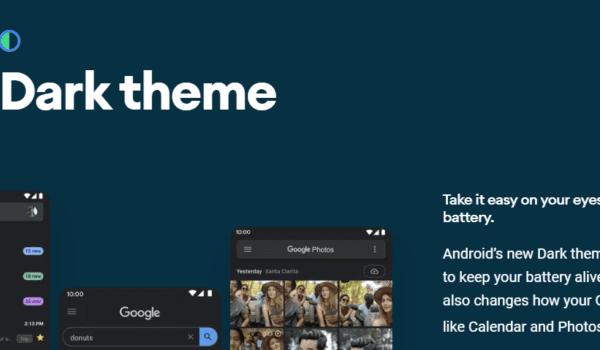
Enabling Dark Mode comes with a range of benefits
And it is expected that the list of supported mobile apps will continue to expand with time as well.
- What Are the Benefits of Dark Theme?
- When You Don’t Need to Use Need Dark Theme
- Smartphones with the Dark Theme Option
- How to Activate Dark Theme for Android 10
- First Method — Change System Settings
- Second Method — Use Quick Settings
- Third Method — Use Battery Saver Mode
- Wrapping up
What Are the Benefits of Dark Theme?
Battery Saving
It’s an established fact that your mobile phone screen is what drains your battery the most; hence, it is a no-brainer to infer that by emitting less light, you get to enjoy a longer battery life on your device.
Further, making use of Dark Theme on OLED (organic light-emitting diode) screens has offered a big boost to battery life, Google has confirmed . For instance, with screen brightness set at 50 percent, the Dark Mode interface on your YouTube mobile app cuts down on screen energy usage by around 15 percent in comparison with a flat white background.
When set at 100 percent brightness, the dark interface is reducing screen energy usage by a whopping 60 percent.
Better Health & Wellbeing
Dark Theme, the tech Giant says, will help enhance users’ health and wellbeing.
During an interview held at Google I/O in May last year, Google’s VP of product management for Android and Play, Sameer Samat, stated: “Everyone can relate to being in a room where the lights are turned down and you’ve got this white screen blinding you.”
However, it isn’t only painful and dry eyes we experience when looking at bright blue screens throughout the day. According to research , exposure to light also suppresses melatonin secretion. (If this mention of melatonin all sounds Greek to you, do note it is a hormone required for sleep.)
Improved Visibility
Lastly, Google also explained that the Dark Theme enhances the visibility for those kinds of users that show sensitivity to bright light or those that have low-light vision.
When You Don’t Need to Use Need Dark Theme
It isn’t everything about the Dark Mode that’s beneficial. For instance, when you’re making use of your phone in direct sunlight or a well-lit room, it will be difficult to read text placed on dark backgrounds.
As such, you needn’t necessarily enable the Dark Theme when you are using your mobile phone is only in bright daylight.
Hence, an automatic switch from sunset until sunrise is an essential option. The auto option let’s the phone switch between a white background and deal background by itself.
Smartphones with the Dark Theme Option
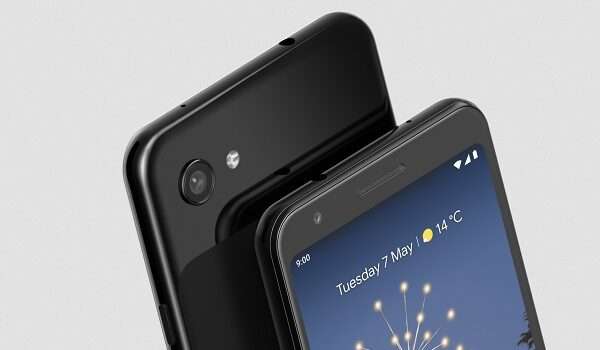
Pixel 3A is one of the first devices to receive the Android 10 update
We have multiple mobile phones with support for Dark Theme, including the following:
- Google Pixel 4 / Pixel 4 XL
- Google Pixel/Pixel XL
- Google Pixel 2/Pixel 2 XL
- Google Pixel 3a / Pixel 3a XL
- Google Pixel 3/ Pixel 3 XL
- OnePlus 7
- OnePlus 7 Pro
- OnePlus 7T
- OnePlus 7T Pro
- OnePlus 6
- OnePlus 6T
- Samsung Galaxy 10 series
- Samsung Galaxy M20 and M30
- Samsung Galaxy Note 10 and Note 10 Plus
- Samsung Galaxy Note 9 models
- Nokia 8.1
- Nokia 9 PureView
- Nokia 7.1
- Huawei P30 and P30 Pro
- Huawei Mate 10
- Huawei Mate 10 Pro
- Huawei P20
- Huawei Mate 10 RS Porsche Design
- Huawei Mate 20 RS Porsche Design
- Huawei P20 Pro
- Huawei Mate 20 X 5G
- Huawei Enjoy 9s
- Huawei Nova 4e
- Huawei Enjoy 10 Plus
- Huawei Maimang 7
- Huawei Maimang 8
- Honor 10 Youth Ed
- Honor 20i/Lite
- Essential Phone
- Xiaomi Mi 9T
- Xiaomi Redmi K20
- And many others
This list is constantly growing since a lot of phone makers are releasing their devices with Android 10, so you will soon be able to enjoy the Dark Theme on your device, too.
Also, it is pertinent to bear in mind that, while the above-listed smartphones are currently running Android 10, a handful of interfaces offer alternated Dark Mode imitations, which you may also fancy.
How to Activate Dark Theme for Android 10
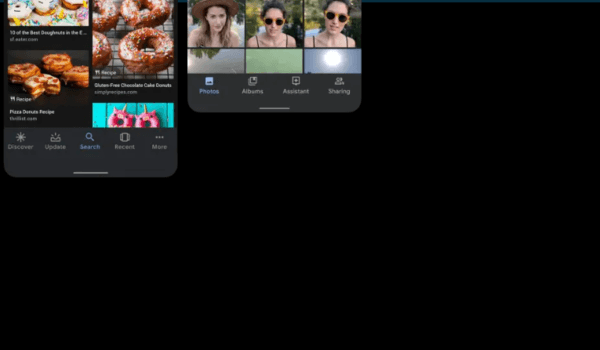
There are 3 ways to activate Dark Theme for Android phones
Now, let us talk about how you can activate the Dark Theme on your Android. There are three methods you can use for enabling dark backgrounds on your smartphone.
Here is a detailed guideline of how each of them works:
First Method — Change System Settings
This technique involves enabling the Dark Mode directly from your system settings. To do this, start by hitting the Settings icon, which you will find by swiping down the Home screen or checking your menu. Then, tap Display .
The next you will see is a toggle for Dark Theme; press to enable it. That’s all!
Second Method — Use Quick Settings
In case you are wondering what the Quick Settings feature is, they are those big tiles that show up when you swipe down the notification bar.
Having said that, you can add Dark Theme to the Quick Settings by pulling that notification bar down until a large grid of tiles appears.
Please, note that you may have to pull on the notification bar down twice since you’d want it to look just like this below picture from Google.
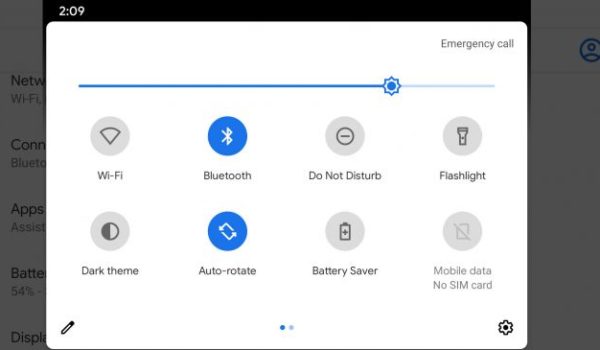
Image credit: Google
The next thing is to hit the pen icon, which you will see at the bottom of the drawer.
Once you have done this, it will open a separate set of icons that you can include in your tiles.
Proceed by holding the Dark Theme icon and dragging it into the top folder, beside the icons for Airplane Mode, WiFi & Battery Saver, as you can see in the picture below:
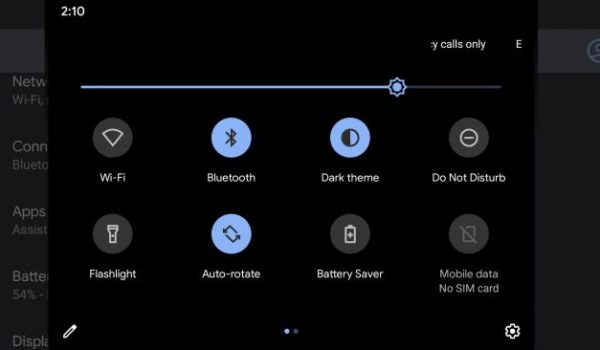
Image credit: Google
By dropping the Dark Theme icon close to the top of the grid, it’ll also show up in the slimmer icon bar, which appears when you drag down the notification bar for the first time.
Lastly, exit by hitting the back button.
It’s all good now: You can now enable Dark Theme simply by pulling your notification bar down and then pressing the icon.
Third Method — Use Battery Saver Mode
This technique is exclusively for Google Pixel smartphone users.
On your device, you can activate the Dark Theme automatically by turning on Battery Saver mode, which you will find in the dropdown notification bar.
Please, note that when you turn on Battery Saver mode, you are also enabling all other features that work with this mode. This implies that you are turning off your location as well as some background processes.
Thus, you might consider using this method only when your phone’s battery is low.
Wrapping up
The Dark Theme comes with a number of benefits and perks, including cutting down on battery usage, enhancing your health & wellbeing, and improving visibility.
Now that you have been able to enable the Dark Mode on your device, you can enjoy the new look of the device screen and layout and the benefits mentioned above. Dark Theme will apply itself automatically to native apps from Google — the likes of YouTube, Gmail, Chrome, and Google Photos.
Furthermore, it’ll work with an expanding range of 3rd-party apps. Some of them could need some adjustment from your end, though. For instance, the Reddit app will require that you set the Auto Night Mode to Follow system ; this will be done in your app’s settings menu.
In case you find that your favorite apps do not reflect the dark background on their own, you can navigate through their settings and try applying it yourself.
What is your experience using the Dark Theme in Android 10 and later?
Author:Tijani Mustapha
Deji is a web content developer and tech writer, who is passionate about tech-related topics and issues. A graduate of Physics from the University of Ibadan, he loves writing, conducting research, playing football, and meeting people of diverse backgrounds and interests.
Add MobilityArena as a preferred source on Google
French handset maker, Alcatel, is one of the first brands to stir the waters at CES 2020 with the unveiling of the Alcatel 3L (2020) – a budget smartphone that immediately took its place as the cheapest 48MP camera phone in the market right now.
But the Alcatel 3L didn’t come to the show alone, as it was announced along with other budget devices, namely Alcatel 1B and Alcatel 1S (2020). Those are even more affordable.
As we await further details on these phones, let’s quickly take a sneak peek at what these devices bring to the table.
Alcatel 3L (2020)
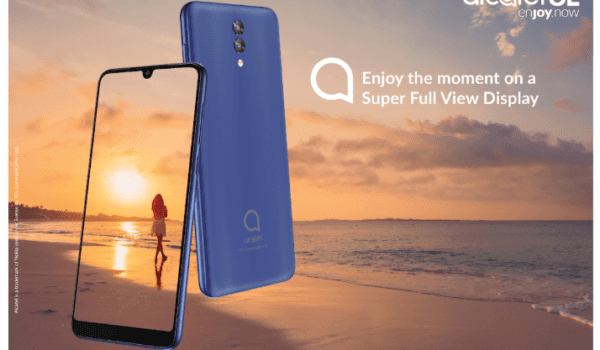
The Alcatel 3L ‘s price tag makes it the cheapest 48MP camera phone we know.
This is the star device with the 48MP sensor cam, coupled with a 5MP ultra-wide angle and 2MP macro cameras.
The screen is 6.2” in size. No other details of the display have been revealed. The phone will ship with 4GB of RAM and 64GB of built-in storage.
The Alcatel 3L is scheduled for launch in early 2020 and will set you back by $155 (about €139, £120, and AU$225), meaning it is quite affordable.
Alcatel 1S (2020)

Alongside the 3L and the 1B, the Alcatel 1S was unveiled in CES 2020, held in Nevada, US
The next handset of the trio, the Alcatel 1S, comes even cheaper than the 3L, starting at just $110 (approximately €99, £85, and AU$160). As a budget smartphone, you’re getting a range of decent features some of which you may even find surprising given the price.
The 1S sports a 6.2-inch HD+ display. In the camera department, it has a setup comprising 13MP primary snapper, in addition to a 5MP depth sensor and a 2MP macro unit.
Alcatel 1B
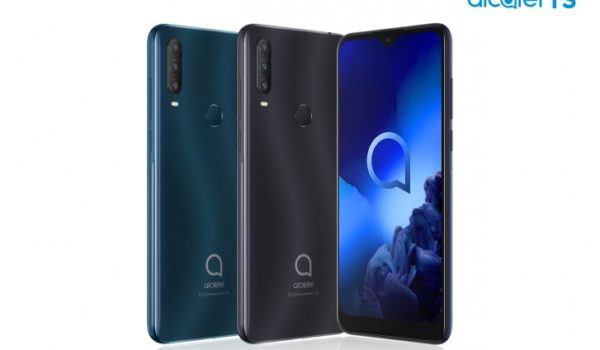
This is one of the 3 budget devices Alcatel announced in CES 2020
The Alcatel 1B is the cheapest device in the pack. In fact, with a price tag of just $90 (around €79, £65, and AU$125), it is perhaps the most affordable smartphone too. What makes it juicier is the fact that it runs very up-to-date software, Android 10 (Go Edition). For more information on what Go Edition is, read our quick primer, Android Go Edition: All You Need To Know .
The handset offers a 5.5-inch screen, a single 8MP rear shooter, and 2GB RAM. However, you also get a 3,000mAh battery.
Follow MobilityArena on social media!
Author:Tijani Mustapha
Deji is a web content developer and tech writer, who is passionate about tech-related topics and issues. A graduate of Physics from the University of Ibadan, he loves writing, conducting research, playing football, and meeting people of diverse backgrounds and interests.
