Add MobilityArena as a preferred source on Google
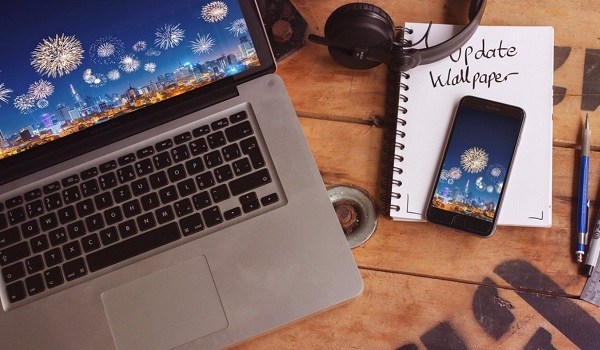
Changing your wallpaper or background is the easiest way to customize your laptop. Here are sites you can download laptop wallpapers and laptop backgrounds from to spice up your computer’s screen.
Our laptops are everyday work tools and often an extension of our selves. We love to customize them to our personal tastes. The easiest way to do this is to change the default laptop wallpaper or laptop background to something we like.

We work and play better when our environment are tools are reflective of our personalities and mindsets. Customizing our laptop backgrounds may be a basic task, but it goes a long way in making it a tool that we are comfortable with.
There are tons of websites on the internet that you can get laptop wallpapers and backgrounds from. This short list presents our favourites.
- Where to download laptop wallpapers and laptop backgrounds
- How to change your desktop background on Windows
Where to download laptop wallpapers and laptop backgrounds
Here are five websites where you can download wallpapers and backgrounds for your laptop. All of them have great looking wallpapers, with quite a lot of variety available.
We recommend that you go through them one by one. You just might like them all, in which case you can bookmark them on your laptop for easy access any other time you want to go hunting for a wallpaper.
- Wallpapers Craft . This website provides 3D wallpapers for laptops with 1366 x 768 pixel resolution for download. Don’t worry about that pixel thing, though. Whatever your laptop’s display specs are, you can fit in whatever wallpapers you download from here. Visit the site .
- Pexels . Download desktop wallpapers for your Windows and macOS computers. Visit the site .
- Wallpaper Cave . Download HD wallpapers. Visit the site .
- HD Wallpapers . Download full HD wallpapers. Those are wallpapers with 1920 x 1080 pixels or 1920 x 1200 pixels resolution. Visit the site .
- Desktop Nexus . Download laptop backgrounds. Visit the site .
Feel free to download wallpapers for your laptop from any of these. If you are not sure how to go about changing your laptop’s wallpaper, we also have a quick guide ready for you below, showing you how to do so.
How to change your desktop background on Windows
This quick guide is based on Windows 10, but is very similar to the process for Windows 8 and 7 as well.
- Browse to your favourite download site for laptop backgrounds; hopefully, you found one of the above-listed websites perfect.
- Download the wallpaper or background you want to use. Be sure to note what location on your laptop you saved it in.
- Right-click on any empty space on your laptop’s desktop.
- In the menu that pops up, click Personalize .
- Under the Background title in the Personalize window, you will see an option that says, Choose your picture , click Browse to choose the wallpaper you downloaded from your computer. Click on whatever photo you want, and it will appear as your desktop background.
- There are options to fill, fit, stretch, tile, or centre options for your selected background.
- Exit the Personalization window to see your new laptop background.

Avengers EndGame laptop background
There you go. You have your laptop looking brand new, exactly the way you want it. And when you get bored with the new laptop wallpaper, simply download another. We love to hear from you, so tell us if you find any of the above-listed download sites useful. Did you find any laptop backgrounds that you love?
If you found this article useful, please share it with your social networks. Also let us know which other amazing laptop background and wallpaper download websites, besides the ones listed in this article, that you know, use, and recommend to other users.
- Don’t miss our reviews .
- Follow our news on Google News .
- Follow us on Instagram , Facebook , Twitter , and YouTube .
Author:InfoDesk
Add MobilityArena as a preferred source on Google
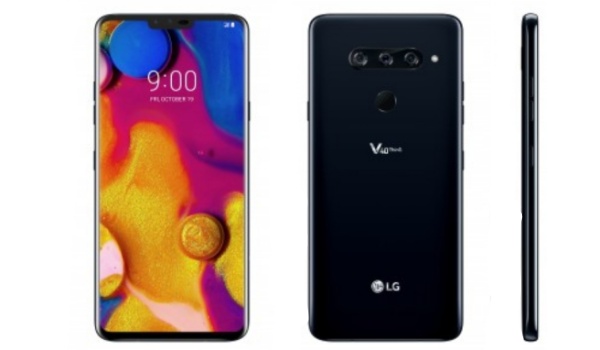
LG V40 Thinq specs in brief : Android smartphone. Announced September 2018. Features 6.4-inch FullVision AMOLED display, Snapdragon 636, 3300mAh battery, triple camera, selfie dual camera, fast wireless charging, QuickCharge 3.0, 64 GB storage, 6 GB RAM.
LG V40 Thinq Specs: Wireless Network and Software
- 2G : GSM, GPRS, EDGE 850 / 900 / 1800 / 1900 MHz
- 3G : UMTS, WCDMA, HSDPA 850 / 900 / 1900 / 2100 MHz
- 4G : Unspecified LTE bands
- SIM Type : Nano-SIM
- OS : Android 8.1 Oreo + LG UX 7.0+
LG V40 Thinq Specs: Design, Form Factor and Appearance
- Dimensions : 158.8 x 75.7 x 7.6 mm
- Weight : 169g
- Display : 6.4-inch FullVision, 1440 x 3120 pixels, 19.5:9 aspect ratio, AMOLED display with Gorilla Glass 5
- Sensors : Fingerprint, Ambient light, Accelerometer, Proximity, Compass
- Colours : Aurora Black. Moroccan Blue.
- Build : IP68 rating, MIL-STD-810G certification
LG V40 Thinq Specs: Hardware
- Processor Type : 64-bit Octa-core 2.7 GHz Kryo 385
- Processor Name : Qualcomm Snapdragon 845
- Graphics Processor : Adreno 630
- RAM : 6 GB
- Internal Storage : 64 GB
- External Storage : microSD, up to 512 GB (dedicated card slot)
LG V40 Thinq Specs: Photography and Video
- Main Camera : Triple – 12 megapixels, + 12 megapixels telephoto + 16 megapixels ultra-wide sensor, Dual Pixel autofocus, OIS, HDR, LED flash, 3x optical zoom, Cinemagraphs, 4K @ 60fps video recording
- Selfie Camera : Dual – 8MP (f/1.9, 80°) + 5MP (f/2.4, 90°), AI Portrait 2.0, 1080p@30fps video capture
LG V40 Thinq Specs: Multimedia
- Music Support : MP3/WAV/FLAC/eAAC+/WMA player
- Audio : DTS: X Surround Sound
- 3.5mm jack : Yes
- Loudspeaker : Mono
- Video Support : MP4/DviX/XviD/H.265/WMV player
- FM Radio : FM Stereo
LG V40 Thinq Specs: Connectivity Features
- Bluetooth : v5.0, A2DP
- WiFi : Wi-Fi 802.11 a/b/g/n/ac, hotspot
- GPS : Yes, A-GPS, GLONASS, BDS, GALILEO
- USB : microUSB v3.1, Type-C 1.0
LG V40 Thinq: Miscellaneous Features
- Charging : Fast Battery Charging (QuickCharge 3.0), Wireless charging
- Battery Type and Capacity : Non-Removable Lithium-Polymer 3300mAh
- Announced : October 2018
- Availability : October 2018
LG V40 Thinq Price
- Don’t miss our mobile phone reviews .
- Follow our news on Google News .
- Join our WhatsApp Group , to be notified of the most important articles and deals,
- Follow us on Instagram , Facebook , Twitter , and YouTube .
