Add MobilityArena as a preferred source on Google
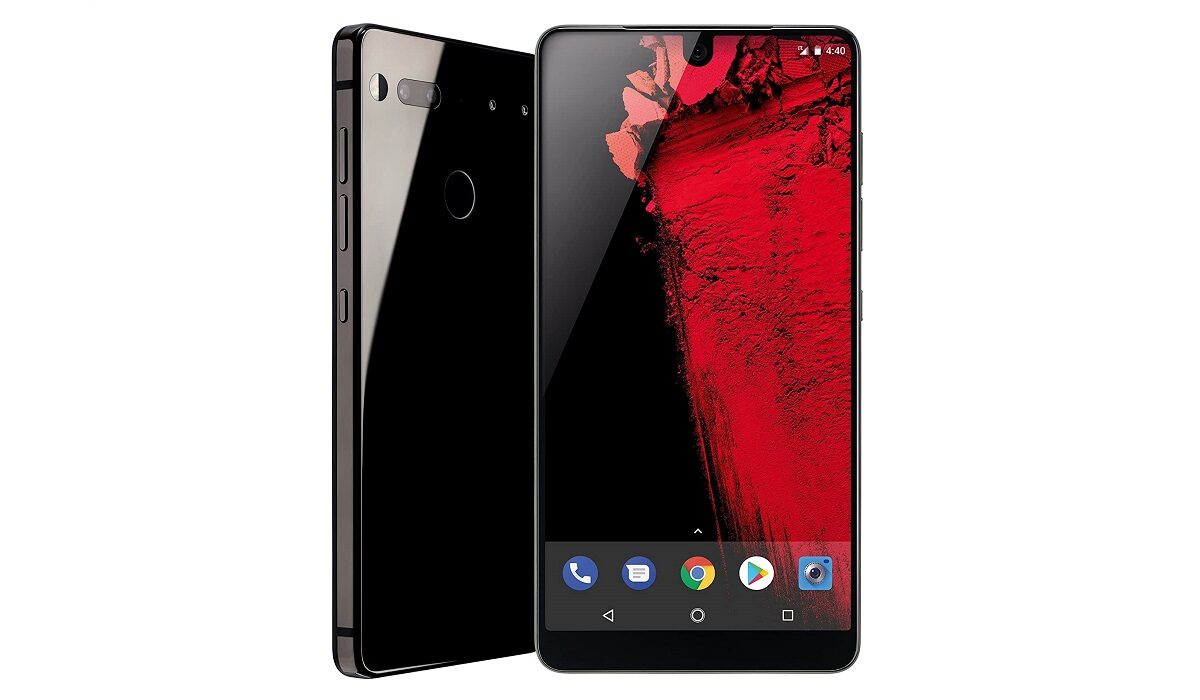
We all knew that Android co-founder, Andy Rubin, has been hard at work on a smartphone. Now it is official and the Essential Phone PH-1 has been unveiled. It is a very interesting smartphone too.
It isn’t the 5.7-inch display or Snapdragon 835 processor that sets it apart though. The Essential Phone PH-1 is special because it has an edge-to-edge display, titanium frame, supports 24 LTE bands, stereo speakers, and a magnetic connector for snapping on accessories.
The Essential Phone will have a catalogue of accessories available for it – all of which can be snapped on. These accessories include: 360 camera and the Essential Phone Dock. Other accessories will be announced.
Andy says that he created Essential to solve the problem of how modern smartphone technology clutters the lives of users. It is interesting that an Android co-founder admits this glaring problem. It is impressive that he steps up to provide a solution. Andy’s words:
But the real reason is because of what happened during a night out with an old friend of mine. As the night went on we inevitably began talking about what we didn’t like about the current state of technology. Less and less choice. More and more unnecessary features cluttering our lives. An increasing sea of products that didn’t work with one another… And just when I was about to drop another criticism it hit me: I am partly responsible for all of this. For all the good Android has done to help bring technology to nearly everyone it has also helped create this weird new world where people are forced to fight with the very technology that was supposed to simplify their lives. Was this what we had intended? Was this the best we could do?
The question that we will have to wait to answer is this, How well does Essential Phone solve this problem? The phone runs Android, after all. Yes; it does, but Essential says it is with modifications. We have heard that before. The Essential Phone PH-1 has a tall order. This is a drool-worthy device, but given all that we know about it, it does not look like it will record widespread adoption. Have a look at the specifications below.
Essential Phone PH-1 Specs
Network and Software
- GSM : GSM 850 / 900 / 1800 / 1900
- CDMA : EV-DO Rev. A: 0, 1, 10
- 3G : HSDPA 850 / 900 / 1900 / 2100
- 4G : LTE + VoLTE 1(2100) / 2 / 3(1800) / 4(1700/2100) / 5(850) / 7(2600) / 8(900) / 11 / 12(700) / 13 / 17(700) / 20(800) / 21 / 25 / 26 / 28(700) / 29 / 30 / 38(2600) / 39(1900) / 40(2300) / 41(2500) / 42 / 43
- SIM Type : Nano SIM
- OS : Android 7.1 Nougat
Design
- Dimensions : 141.5 x 71.1 x 7.8 mm
- Weight : 185 g
- Display : 5.7-inch, 2560 x 1312 pixels ( PPI), LTPS display with Corning Gorilla Glass 5
- Sensors: Fingerprint. Proximity. Ambient light. Barometer. Accelerometer. Magnetometer. Gyroscope
- Build : Titanium body + Ceramic back
- Colours : Black Moon. Stellar Grey. Pure White. Ocean Depths
Hardware
- Processor Type : 64-bit Kryo 280 Octa-core 2.45 GHz
- Processor Name : Qualcomm® Snapdragon™ 835
- Graphics Processor : Adreno 540, 710MHz
- RAM : 4 GB
- Internal Storage : 128 GB
- External Storage : None
Cameras
- Rear : Dual 13 megapixels RGB + 13 megapixels Mono, f/1.85, Phase Detect and IR Laser Assist Focus, dual-LED (dual tone) flash
- Video recording : 4K @ 30fps
- Front-facing : 8 megapixels, f/2.2, 4k video recording
Multimedia
- Music Support : MP3/WAV/eAAC+ player
- Loudspeaker : BoomSound™ Hi-Fi edition
- Video Support : MP4/MPEG4/H.263/H.264 player
- FM Radio :
Connectivity
- Bluetooth : v5.0
- WiFi : Wi-Fi 802.11 a/b/g/n, Wi-Fi Direct, hotspot
- GPS : Yes
- USB : v3.1, Type-C
Miscellaneous
- Charging : Quick Charge 3.0
- Battery : Non-removable Li-Ion 3040 mAh
- Announced : May 30, 2017
- Availability : June 2017
Essential Phone PH-1 Price
The PH-1 sells for $699 as at launch time.
Essential Phone PH-1 Review
Read our review of the Essential PH-1 with Android 9 one year after launch.
- Don’t miss our reviews .
- Join our WhatsApp Group , to be notified of the most important articles and deals,
- Follow us on Instagram , Facebook , Twitter , and YouTube .
Author:Mister Mobility
Digital Skills and Communication Coach | Mobile Phone Connoisseur since 2001 | Tech Blogging since 2004
Add MobilityArena as a preferred source on Google
If you own an Android smartwatch, then you would now that the battery life is pretty poor. It does not last a day, according to some. Therefore, you might want to know a thing or two about saving battery on your smartwatch. Here are tips to increase Android smartwatch battery life:
MANAGE APP NOTIFICATIONS
Notifications tend to deplete your smartwatch battery fast. Some are quite necessary, but not al of them, as some apps will simply besiege you with notifications. The Block App Notifications manager will allow you to add or delete apps, thus blocking notifications from them. to manage app notifications, launch the Android Wear app on your phone, click on Settings, then open the Block App Notifications option.
DISABLE THE AUTOMATIC BRIGHTNESS SETTING
As with all other mobile operating systems, you have the option to automatically manage the brightness of the screen according to your environment. This really drains your battery by constantly testing the surrounding environment and adjusting the brightness. To disable it, go to the app menu, open the watch settings then go to Adjust Brightness. There you can choose your preferred brightness level, and also disable the Auto option.
ENABLE CINEMA MODE
This mode stops the watch from disturbing you by putting it into semi-hibernation mode. This turns off the screen, and you can only switch it back on by using the power button. To activate it, pull the panel from the top down, then click on the watch icon. Since the watch remains off during this hibernation period, it saves your battery.
LIMIT CONNECTIVITY
Limiting WiFi, NFC or location services also saves battery on your smartwatch. To disable the option, simply enter the app menu, open the watch settings then click on connectivity menu. There you can disable the connectivity option.
DISABLE WRIST GESTURES
This can help increase Android smartwatch battery life. Wrist gestures allow you t scroll through Google Now cards, which requires use of the motion sensor, which in turn requires more power. To disable the option, pull the right drawer on the smartwatch, then open the watch settings. After that, go to Wrist gestures, then turn it off.
