Add MobilityArena as a preferred source on Google
The exhaust gas recirculation valve, or the EGR valve, is a small component in your vehicle designed to allow the flow of exhaust gases into the intake manifold in small amounts. This is a simple valve that opens and closes when it needs to. This is either to let exhaust gases into the combustion chamber, or to close in order to prevent the gases from entering. Now, when the car engine comes on, the valve is turned on too, and it stays in a closed position.
Once the engine crosses a certain temperature threshold, the EGR valve opens and lets the exhaust gases combine with the air-fuel mixture in the combustion chamber. When the engine is turned off, the EGR valve closes too. Now, an EGR valve can fail in two ways. It could either fail to open, or it could fail to close. Here are the symptoms of a faulty EGR valve according to the manner of failure.
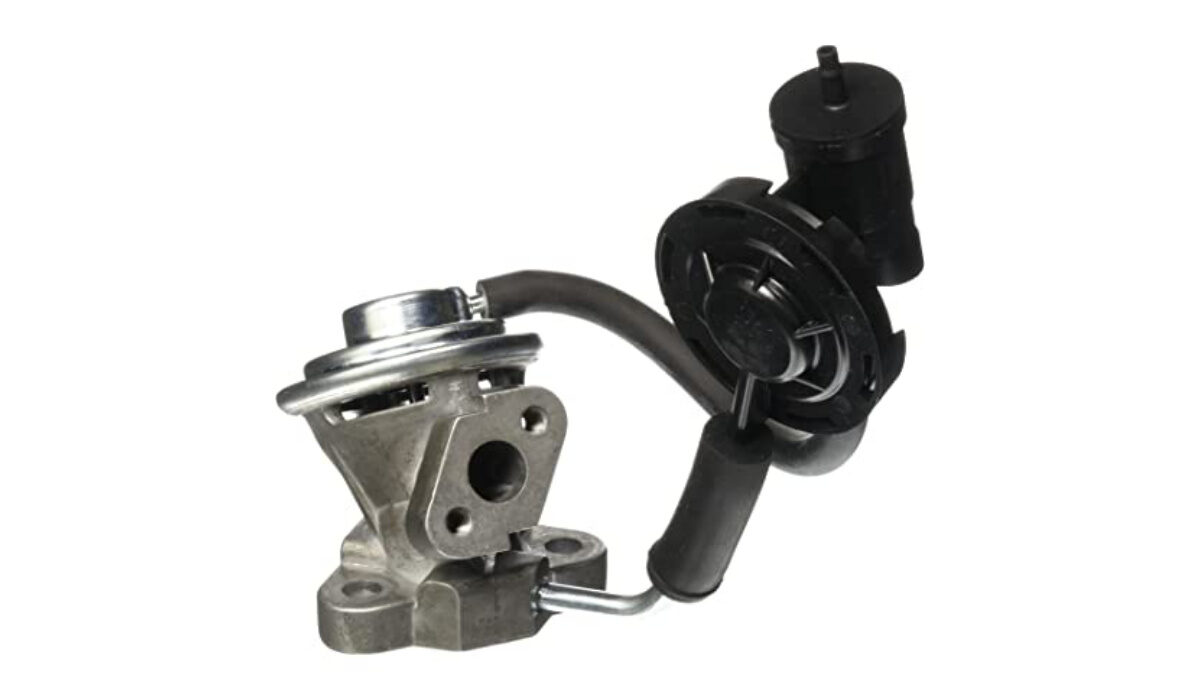
An EGR valve
IF THE EGR VALVE FAILS TO CLOSE
This will let in exhaust gases to the intake manifold continuously. The effects include the following:
- Increase in fuel consumption.
- There will be an odour of fuel in the air while operating the vehicle. This is due to the increase in hydrocarbons leaving the vehicle.
- When the engine dies, there could be stalling.
- The engine could be idling roughly when you start it, or when you are at low engine speeds.
IF THE EGR VALVE FAILS TO OPEN
This blocks the exhaust gases from reaching the intake manifold. Here are some effects of this symptom:
- After the normal ignition, there could be a second ignition, and both could combine to cause serious damage to the engine.
- There could also be tapping or pinging sounds coming from the engine at low revs-per-minute (RPM). This is the sound of early ignition of the fuel when it meets higher temperatures.
Note that in both cases, your Check Engine light will be on. In any case, the above symptoms may not necessarily be due to a faulty EGR valve. But it does not hurt to be sure. If you notice such symptoms in your car, it is best to take it to the mechanic to be checked out and repaired if necessary.
- Don’t miss our reviews .
- Join our WhatsApp Group , to be notified of the most important articles and deals,
- Follow us on Instagram , Facebook , Twitter , and YouTube .
Author:EmmyCN
Add MobilityArena as a preferred source on Google
Samsung’s Galaxy S8 has Bixby Vision, a feature intended to make your pocket assistant even more useful. With Bixby Vision, you can search for images like what your camera is currently viewing, shop for items, translate text on the go, and so much more. Here are instructions on how to use it:
HOW TO OPEN BIXBY VISION
Open Bixby Home on your phone, then tap on the Bixby Vision icon at the top of the screen. The icon looks like an eye.
HOW TO ADJUST BIXBY VISION SETTINGS

There are lots of settings you can customize on the feature. To do this, open the feature, then tap on the menu button in the upper right corner of the screen. next, tap on Settings, then turn on or turn off specific settings according to your preferences.
HOW TO EXTRACT TEXT WITH BIXBY VISION
The feature is able to capture and extract text from whatever it sees. To do this, scan an item to capture text, then tap Text. Next, tap on Extract, which looks like a T at the bottom of the screen, then tap Save to save the text.
HOW TO TRANSLATE TEXT WITH BIXBY VISION
You can also translate text captured in another language using the feature. After scanning the item to capture text, tap on Text. Then tap on Translate, swipe your finger over the text you want to translate, then swipe up to see the translated text.
HOW TO SHOP USING BIXBY VISION
After scanning an object with the feature, you can search for it online if you want to buy it. Just scan an item after opening the feature, then tap Shopping. Next, tap the item you want off the list, add it to your cart, then tap Proceed to Checkout to purchase the item.
HOW TO SEARCH FOR IMAGES WITH BIXBY VISION
You can search for images similar to the one captured on your screen. This feature is a bit rough, but it can find what you are looking for depending on the image. Just scan an item to capture it, then tap Image to search for similar images.
2023 update: another Bixby feature you might be interested in is the Bixby Text Call .
- Don’t miss our mobile phone reviews .
- Follow our news on Google News .
- Follow us on Instagram , Facebook , Twitter , and YouTube .
