Add MobilityArena as a preferred source on Google
The Apple iPhone is a type of smartphone manufactured by American tech company, Apple Inc. The introduction of the first iPhone was done on January 9, 2007 by Apple CEO, Steve Jobs. The product was not available till June of the same year, though. Since then, the iPhone has gone on to be extremely popular through multiple generations of newer models.
iOS is the name of the mobile operating system that Apple iPhones run. The company markets it as “the world’s most advanced mobile operating system”. That is up for debate, depending on who you listen to, but what is undeniable is that it is popular and loved by Apple fans.
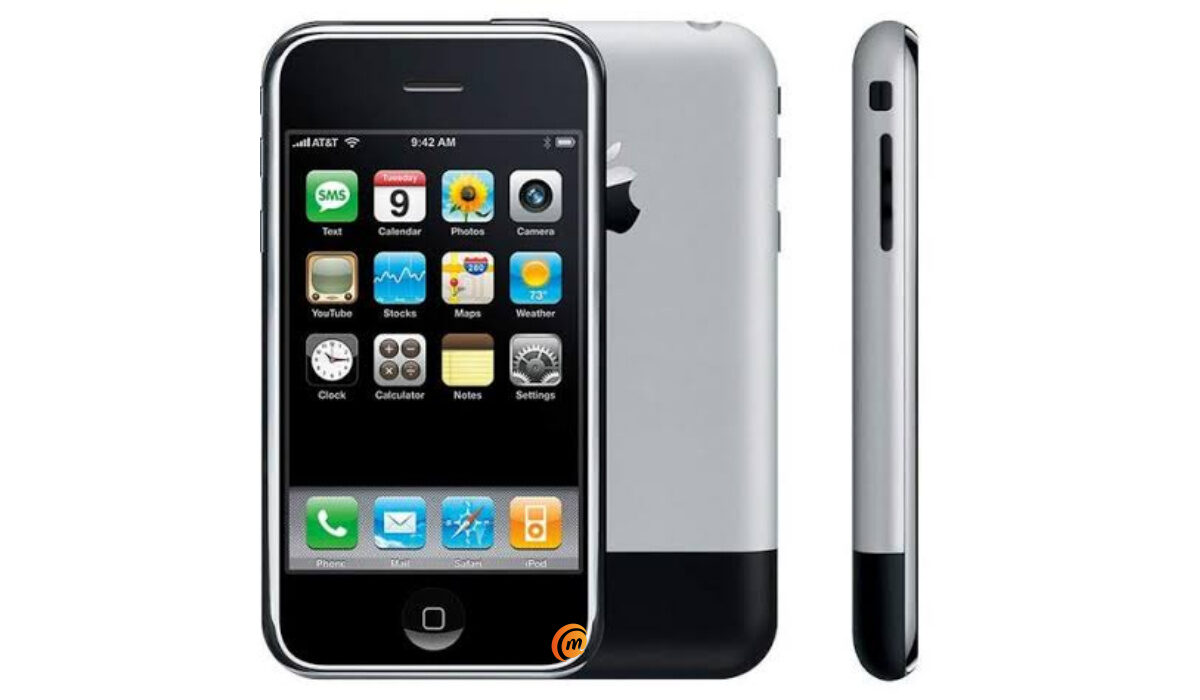
The first iPhone
- iPhone History: How did the Apple iPhone change the world?
- Apple iPhone Battery Life
- iPhone History: All Models Released Till Date When did the iPhone 7 come out? When did the iPhone 8 come out? When did the iPhone X come out? When did the iPhone 9 come out? When did the iPhone SE come out? When did iPhone 11 come out? When did iPhone 12 come out? When did iPhone 13 come out? When is iPhone 14 coming out? When is iPhone 15 coming out? When did iPhone SE 2022 come out? What is the cheapest Apple iPhone right now? Can my Apple iPhone go under water? Can my iPhone receive a fax?
iPhone History: How did the Apple iPhone change the world?
Before the first iPhone’s unveiling in 2007, several other major phone brands had been making smartphones, so the iPhone was definitely not the first smartphone. Nokia, BlackBerry, Samsung, HTC, and others had smartphones in the market years before the iPhone.
But, the first iPhone changed the world of smartphones. Firstly, it introduced capacitive touchscreen, which allows for human fingers to operate a touchscreen. Before then, previous touchscreen smartphones by other brands used resistive touchscreen technology, which could only be operated using a stylus. Apple’s finger-operated touchscreen as introduced in the first iPhone was the big revolution that the smartphone world needed. It was a hit.
Suddenly, older touchscreen smartphones felt like relics. Other smartphones used hardware QWERTY keyboards and made splashes for a few more years but eventually the pull of capacitive touchscreens saw them become an endangered species. The world embraced capacitive touchscreen smartphones. Today, all smartphone makers have embraced it.
The first iPhone also led a revolution with the app store. Again, Apple wasn’t the first with an app store; Nokia had app stores on its Symbian smartphones before the iPhone arrived. But those older app stores lacked the cohesion of Apple’s app store. And so it was, once again, that the Apple App Store kick-started a revolution on how things should be done.
iPhone models are reputed for software support years after their release – sometimes for 6 years. Not only that, all eligible models, no matter their age, get each software update immediately it is released. This is the definitive edge that Apple iPhones have over other types of smartphones.
Apple iPhones do not come cheap, but it can be argued that you are paying upfront for those years of support. And that would be a fair argument.
One iPhone model that shaped the future of the iPhone was the iPhone 6. Its iconic design was loved and became a delight of millions of users around the world. iPhone 6 was so loved that the question, “When is the iPhone 7 coming out?” was on the lips of iPhone lovers for months.
And it was that iconic design of the iPhone 6 that has been adapted into many future generations, including iPhone 7, iPhone 8, and the budget iPhone SE range up to 2022. The regular iPhone lineup deviated from that design, adopting one without a Home button, starting from iPhone X.
Apple iPhone Battery Life
For many years, iPhones had a bad reputation for poor battery life. A common joke among Android phone users was that iPhone users were almost always tethered to a power socket. Many iPhone users had to carry power banks around to compensate for the poor battery life of their devices. The iPhone 13 Pro Max changed this narrative. With a 4352mAh battery, it delivered exemplary battery life that rivalled the best of the competition.
The other iPhone 13 models didn’t live up to that expectation, though: the iPhone 13, 13 Pro, and SE 2022 all retained the less than average battery life of their predecessors.
iPhone History: All Models Released Till Date
This list provides a history of iPhone models ever released and the years they went on sale.
- iPhone – 2007 (the first iPhone)
- iPhone 3G – 2008
- iPhone 3GS – 2009
- iPhone 4 – 2010
- iPhone 4s – 2011
- iPhone 5 – 2012
- iPhone 5C – 2013
- iPhone 5s – 2013
- iPhone 6 – 2014
- iPhone 6 Plus – 2014
- iPhone 6s – 2015
- iPhone 6s Plus – 2015
- iPhone SE – 2016
- iPhone 7 – 2016
- iPhone 7 Plus – 2016
- iPhone 8 – 2017
- iPhone 8 Plus – 2017
- iPhone X – 2017
- iPhone XR – 2018
- iPhone XS – 2018
- iPhone XS Max – 2018
- iPhone 11 – 2019
- iPhone 11 Pro – 2019
- iPhone 11 Pro Max – 2019
- iPhone SE 2020 – 2020
- iPhone 12 Mini – 2020
- iPhone 12 – 2020
- iPhone 12 Pro – 2020
- iPhone 12 Pro Max – 2020
- iPhone 13 Mini – 2021
- iPhone 13 – 2021
- iPhone 13 Pro – 2021
- iPhone 13 Pro Max – 2021
- iPhone SE 2022 – 2022
- iPhone 14 – 2022
- iPhone 14 Plus – 2022
- iPhone 14 Pro – 2022
- iPhone 14 Pro Max – 2022
- iPhone 15 – 2023
- iPhone 15 Plus – 2023
- iPhone 15 Pro – 2023
- iPhone 15 Pro Max – 2023
- iPhone 16 – 2024
- iPhone 16 Plus – 2024
- iPhone 16 Pro – 2024
- iPhone 16 Pro Max – 2024
When did the iPhone 7 come out?
iPhone 7 was announced with a 4.7-inch Retina display and iOS 10. It was released in September 2016.
When did the iPhone 8 come out?
Apple iPhone 8 was announced with iOS 11 in September 2017. It was released that same month.
When did the iPhone X come out?
iPhone X was announced in September 2017, and released in November of the same year. It shipped with iOS 11 out of the box. It is also known as iPhone 10, or iPhone Ten.
When did the iPhone 9 come out?
Apple never released an iPhone 9. The company skipped from iPhone 8 and 8 Plus to iPhone X.
When did the iPhone SE come out?
The original iPhone SE was released in March 2016, as an affordable option for iPhone lovers. It shipped with iOS 9.
When did iPhone 11 come out?
iPhone 11 was announced and released in September 2019. It shipped with iOS 13.
When did iPhone 12 come out?
iPhone 12 was released, with iOS 14, in October 2020.
When did iPhone 13 come out?
Apple iPhone 13 was released in September 2021 and shipped with iOS 15.
When is iPhone 14 coming out?
iPhone 14 will be announced in September or October 2022, and will ship with iOS 16.
When is iPhone 15 coming out?
Apple iPhone 15 will be announced and released in September or October 2023, and will ship with iOS 17.
When did iPhone SE 2022 come out?
The new iPhone SE 2022 has 5G connectivity and was announced and released in March 2022.
What is the cheapest Apple iPhone right now?
The iPhone SE 2022 is the cheapest current model, launching at $420. Of course, if you are willing to buy an older iPhone, you can still find the Apple iPhone SE 2nd generation from 2020 for as low as $330.
Can my Apple iPhone go under water?
The most resistance that any iPhone models have is an IP68 dust/water resistant. This provides protection for your iPhone for diving up to 6m for a maximum period of 30 minutes. It is adequate for swimming in a shallow pool.
Can my iPhone receive a fax?
iPhones are not manufactured with fax capabilities built-in. So no; your iPhone cannot receive or send a fax.
Author:Mister Mobility
Digital Skills and Communication Coach | Mobile Phone Connoisseur since 2001 | Tech Blogging since 2004
Add MobilityArena as a preferred source on Google
There are tons of photography editing apps in Google Play store and Apple AppStore. When there are so many options, making a choice can often become difficult. Many of these apps are Medicare, some are good, and a few of them are exceptional.
With over 17 years of content creation for my websites and for social media use, I have found that three apps cover 99% my usage scenarios. I rarely ever have to look for another app outside of these three to get my photo editing done when I am on my phone.
Between the three of them, any photos I take for work or professional use can be manipulated to my satisfaction. Let’s have a look at these solid photography editing apps.
- Photo Editor
- Adobe Lightroom Photo Editor
- PhotoRoom Studio Photo Editor

Quality photography editing for official use is possible on modern smartphones
Photo Editor
Photo Editor by Dev.Macgyver is perhaps the most comprehensive image editor available on mobile phones. I am able to resize, crop, fit, rotate, add text, add shapes, add effects, add images, watermark, correct, adjust colours, and more, all with Photo Editor.
This app is available for free, with ads, but I found it so good and have used it, with satisfaction, for so long that I paid for it to support the developer. I really cannot imagine what editing photographs on my mobile phone would be like without Photo Editor.
It does not require an Internet connection for use, as all the processing is done on the device. This is unlike many other apps that have the processing done in the cloud. This is a true 100% offline image editor. I am able to use it in the most remote locations where Internet access does not exist or is crappy.
Photo Editor does not require the user to sign into any account or service. Consider this application the modern mobile equivalent of CorelDraw or PhotoShop. Manipulating photos taken to get the right sizes and appearance is a great forte of Photo Editor.
Photo Editor is so good and so comprehensive that 95% of my photography editing starts and ends in this app. In the occasional scenario that it doesn’t deliver the exact results I want, after doing most of the editing in Photo Editor, I add the extra manipulations in one or more of the following apps.
Adobe Lightroom Photo Editor
Speaking of PhotoShop, Lightroom by Adobe is a solid photography editing app that leverages on cloud processing. Sometimes, I am not getting the final results that I want after working with Photo Editor by Dev.MacGyver. I turn to Lightroom to help fix those things.
Lightroom has pretty much similar feature set to the other app. It lets me fine-tune the tones and appearances of photos after I have achieved most of my needs in Photo Editor. Like I already mentioned, the feature set is similar, but not as comprehensive.
I have tried to use Lightroom as my primary photography editing app, and that didn’t get me the best results. But it serves great as a backup for final photo quality tweaks.
PhotoRoom Studio Photo Editor
PhotoRoom is a new discovery of mine that I use for one purpose only – background removal and manipulation. The app is really good at this and it is one area that Photo Editor is not great at. When I need to remove the background in a photo, or blur the background, I turn to PhotoRoom.
There is another service that I use for background removal, a web app called Remove.bg. That is the website URL too. However, that imposes a size limit on the image results, which is not great for your professional use.
PhotoRoom does not require you to sign in to use it. It is available free, but that imposes a watermark on your finished products. To get rid of the watermark, get the Pro version for a small annual (or monthly) subscription.
Sometimes, PhotoRoom doesn’t remove everything in the background, depending on the tones and colours. Then I export the results to Photo Editor, where I can manually paint the rogue spots away.
Between these three mobile apps, I have a great time editing photographs for use on my blogs and websites, as well as for social media posts. Take some time to play with them to see what works for you. For example, it is possible that Lightroom can serve you well as your primary photography editor, different from my case. But one thing is sure: these three apps are among the very best photography editing tools available on mobile phones.
If you are wondering why Canva is not on this list, that is because while Canva is a great graphics design app (for creating banners and fliers, etc), I hardly ever need it for photography editing. The two are related, but they are not the same thing. If you do need graphics design, you definitely should try Canva. It makes design simple and breezy and is what I use for that purpose when I am working on my smartphone.
While I use these three photography editing apps for websites and social media, you can put them to use for your own specific purposes – for work or recreation. They are top notch and get the work done. All of them are available on Google Play Store for Android smartphones and tablets, and all but Photo Editor are available in Apple AppStore for iPhones and iPads.
- Don’t miss our reviews .
- Join our WhatsApp Group , to be notified of the most important articles and deals,
- Follow us on Instagram , Facebook , Twitter , and YouTube .
Author:Mister Mobility
Digital Skills and Communication Coach | Mobile Phone Connoisseur since 2001 | Tech Blogging since 2004
