Add MobilityArena as a preferred source on Google
Google has pulled a surprise move. Rather than go head-to-head against KaiOS, they have invested in it and secured a partnership that will make Google Assistant, Google Maps, YouTube, and Google Search available to KaiOS users. It sounds like the smart thing to do to me.
Google and KaiOS
Why would the people at Google think it is a good idea that their services are available on a feature phone platform? A little over half of the world’s mobile users are on feature phones, and smartphone adoption has stalled.
KaiOS is already on 30 million phones and more brands are embracing it. With Nokia Mobile now producing KaiOS phones, the platform is bound to record even greater gains.
We have some hands-on insight into KaiOS in our Nokia 8110 4G review . The phone offers 4G LTE internet and hotspot in a feature phone package.
KaiOS and India
India, the current darling hotbed of the mobile world, is where KaiOS is thriving the most. KaiOS recently overtook iOS to become the second largest mobile platform in use in India.
Everyone – including the Chinese, and even Apple – wants a piece of the Indian market. Apple now manufactures two iPhone models in India and plans to add more to the line-up.
As Feature Phones Evolve
Rather than die away, as some predicted, feature phones are evolving and adapting. And emerging markets like India and the African continent will be their core territories.
In 2017, 60% of phones sold all over Africa were feature phones . KaiOS might be a hit too on the continent. 4G LTE and Google services in feature phones is just what the doctor ordered. If Microsoft is smart, they will be drawing plans to get their services on feature phones too.
A $22 million Boost
Google’s investment in KaiOS is part of a $22 million injection into the platform. If you had turned up your nose at feature phones and KaiOS, now is a good tine to reconsider. It looks like feature phones have a great future.
Should you be new to KaiOS, we have more detailed information about the feature phone platform in this article, KaiOS: everything you need to know .
source
Author:Mister Mobility
Digital Skills and Communication Coach | Mobile Phone Connoisseur since 2001 | Tech Blogging since 2004
Add MobilityArena as a preferred source on Google
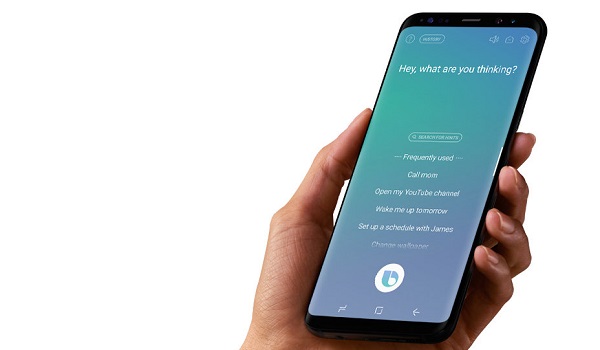
For reasons supposedly tied to advancement, we stopped talking to people, opting to message them instead, and in a quick twist, we have begun to talk to our phones, thanks to virtual assistants. Having been in possession of a Galaxy S9+, I have been using Bixby Voice , a key part of Samsung’s virtual assistant.
Bixby Voice has only one job – to help you get things done more conveniently without you touching your phone. Simply put: interact with your phone differently. Don’t be so touchy.
First Experience Using Bixby Voice
So, how have my conversations with Bixby Voice been so far? Let’s just say that they have been interesting conversations.
Using Bixby For Phone Calls
One time I needed to call my wife. I have her name stored on the phone “ICE Wife” pre-appended to it. ICE stands for “In case of emergency”. You can read up more about it and why you should have a few key contacts on your phone so labelled in this article, Use ICE: In Case of Emergency
The first time I attempted it, Bixby pulled up my wife’s contact card and asked me to select which of her numbers I want to call. But Bixby seemed to figure out over time that I call only her primary line and stopped asking.
Now, when I need to call her, it goes this way.
Mo: Hi Bixby. I want to call ICE Wife.
BV promptly dials her primary line.
Nice going, baby.
Web Browsing With Bixby Voice
Mo: Hi Bixby. Launch web browser.
BV: Actually, it looks like I can’t open the app.
Mo: Hi Bixby. Open Mobilityarena.com.
BV: Looks like we need to download Samsung Internet to continue. We can download it in Galaxy Apps.
But I have Chrome browser active on the phone. Why can’t Bixby recognise that and just use it?
Mo: Hi Bixby. But I want to use the web browser on this phone.
BV: Actually, I’m not able to do that.
Sigh.
Mo: Hi Bixby. Open Chrome browser.
BV: Got it. I went ahead and pulled up the app. [it launches Chrome browser]
Mo: Hi Bixby. Open a new tab in Chrome browser.
BV: Looks like we need to download Samsung Internet to continue. We can download it in Galaxy Apps.
Mo: Hi Bixby. You are becoming very annoying right now.
BV: Let’s take a look at what I found on the web.
I gave up on the web thing.
Sending Email Using Bixby Voice
Mo: Hi Bixby. Send an email to ICE Wife.
BV: Actually, we need to unlock the phone first [phone was locked, so I unlocked it]
BV: Look like we need to download email to continue. We can download it in Galaxy Apps.
Mo: Hi Bixby. Launch the Gmail app and use it to send an email to ICE wife.
BV: Hmm. Looks like I am unable to do that now.
Sigh. Here we go again.
So What About Using Bixby Voice With Twitter?
Mo: Open Twitter.
BV: Sure thing. Here’s the app [it launches the Twitter app]
Mo: Hi Bixby. Tweet, ‘It’s a good morning today’.
BV: Alright, let’s check the post before we tweet it. [opens the Tweet compose menu and inserts the words, “It’s a good morning today”]
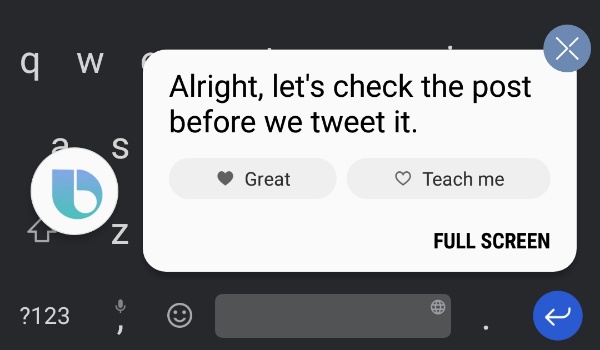
Tweet commands are a hit-and-miss though. After the above, 90% of “Tweet” commands came up with one odd response or the other. None brought up the Twitter compose page again.
My First Impressions Using Bixby Voice
My greatest frustration with Bixby Voice, and the entire Bixby experience, so far is that Samsung is bent on making its virtual assistant recognise and use only Samsung apps and services. Want to send an email? Bixby does not acknowledge the existence of Gmail, where I already have my mails setup and active.
If I want Bixby to play music, I have to specifically say, “Open Samsung Music and play”. For Bixby to be more useful, this pattern has to change. Should I say, “Hi Bixby, play music”, it should be able to detect what music player I use on the phone and launch it. That is true artificial intelligence. Anything else is artificial dumbness, and we have enough dumbness in the world already.
I can imagine that using Bixby will be a more pleasant experience if you are locked into and using Samsung’s apps ecosystem to the full. But those of us who do not want to adjust our lives to suit a virtual assistant will find Bixby Voice a tad annoying.
The good thing is that Bixby keeps learning. Samsung needs to let it loose a bit more, so it behaves like a true assistant should – adapt itself to our choices, including our app preferences, be they Samsung apps or otherwise.
Getting Bixby
If I get what Samsung says right, Bixby is available only on a handful of select smartphones for now. I remember reviewing Galaxy A5 2017 last year, and Bixby wasn’t available for it.
All the top guns – Galaxy S9 series, S8 series, and Note8 – have it. Some Galaxy A and J series devices have it too, though some have limited functionality.
- Don’t miss our mobile phone reviews .
- Follow our news on Google News .
- Join our WhatsApp Group , to be notified of the most important articles and deals,
- Follow us on Instagram , Facebook , Twitter , and YouTube .
Author:Mister Mobility
Digital Skills and Communication Coach | Mobile Phone Connoisseur since 2001 | Tech Blogging since 2004
