Add MobilityArena as a preferred source on Google
About 24 hours ago, an annoying error message that said, “Google keeps stopping”, began to pop up on my Android smartphone. Some hours later, a friend of mine reported the same error popping up on his phone as well. Looking around, I found that many other Android users are experiencing this same problem.
The Google Keeps Stopping error pops up on all kinds of Android phones, including those by Samsung. As someone who has owned and reviewed hundreds of mobile phones over the last two decades, I could deduce a few things from this scenario.
<img loading=“lazy” src=“https://mobilityarena.com/wp-content/uploads/2021/08/fix-Google-keeps-stopping-error-on-mobilityarena-1200x700.jpg" onerror=“this.onerror=null;this.src=‘https://blogger.googleusercontent.com/img/a/AVvXsEhe7F7TRXHtjiKvHb5vS7DmnxvpHiDyoYyYvm1nHB3Qp2_w3BnM6A2eq4v7FYxCC9bfZt3a9vIMtAYEKUiaDQbHMg-ViyGmRIj39MLp0bGFfgfYw1Dc9q_H-T0wiTm3l0Uq42dETrN9eC8aGJ9_IORZsxST1AcLR7np1koOfcc7tnHa4S8Mwz_xD9d0=s16000';" alt=“How to Fix the Android “Google Keeps Stopping” Error - 1”>
One was that the “Google keeps stopping” error was from the Google app for Android. The second was that it was likely from a recent update to the app. This left me with two options to fix the problem – uninstall the app update, or clear the cache of the offending app. There was the possibility of a third option though – restarting the phone. Let me explain these to you, but in reverse order.
- 3 Ways to Fix the “Google Keeps Stopping” Error on Android phones
- Google Keeps Stopping: Which Option Solved The Problem For Me?
3 Ways to Fix the “Google Keeps Stopping” Error on Android phones
Restart your smartphone : Restarting a smartphone that is throwing up random errors is one of the easiest things you can do to try to resolve the problems. Also called a soft reset, what it refreshes your smartphone by closing applications and clearing any data in RAM (random access memory). This makes it great for solving memory-based problems after a software or app update, too. Like I keep saying to mobile users, always try a soft reset first whenever something goes wrong with your phone. To soft reset your phone, press and hold the Power button and select the Restart option.
Clear Cache and Data : Clearing the cache of the offending app can also resolve issues of this sort. To do it, open the Settings menu of your cellphone, find the Apps section in there, and select it. Find the Google app in there. You will see Storage and cache : tap on it, and then tap on the “ Clear cache ” option.
Uninstall Google App Updates . As the error we are addressing here is likely caused by an update to the Google app, it is a good idea to uninstall the update as a means of fixing the problem. In this case, when I opened Google Play Store, searched for the Google app, and opened it, I saw that the app was last updated on the 16th of August 2021., the very day this “Google keeps stopping” error began to show up. So, I was on track. If you look at the options provided for you when looking at the Google app in the Store, you will see a button that reads, “ Uninstall “.
Tap it to uninstall all updates to the app. PS : Be sure to disable automatic updates in the Store though, or else the app will just get updated again in the background, and you are back to where you started. If you disable automatic app updates, make sure you set a schedule to manually update your apps at your convenience. That is it.
Google Keeps Stopping: Which Option Solved The Problem For Me?
Uninstalling the Google app updates and switching to manual app updates solved the “Google keeps stopping” pop-up error for me. It went away. The flip side is that I now have to keep an eye on future updates, so I can update the app after the problem is fixed from Google’s end.
I hope that the same option of uninstalling the Google app works for you too. Also, do not forget the other options I explained to you. If uninstalling the app updates does not work, give them a try. They will come in handy in troubleshooting problems on your Android smartphone. Thank you for reading and sharing.
Author:Mister Mobility
Digital Skills and Communication Coach | Mobile Phone Connoisseur since 2001 | Tech Blogging since 2004
Add MobilityArena as a preferred source on Google
Quick Specs Of IMO Dash 4G
- OS: Unknown
- Release Date: August 2021
- Network Type: 2G/3G/4G
- Display: 2.4-inch
- Processor: SC T107
- Rear camera: 2 MP
- RAM: 48 MB
- ROM: 128 MB
- Battery: 1500 mAh
- Specs
- IMO Dash 4G Prices by Country
- Questions and Answers about IMO Dash 4G What telecom towers and networks does IMO Dash 4G work with? Will IMO Dash 4G work in the USA?
Specs
Mobile Wireless Network and Software
- 2G mobile network bands : GSM, GPRS, EDGE 850 / 900 / 1800 / 1900 MHz.
- 3G mobile network bands : UMTS, WCDMA, HSDPA 850 / 900 / 2100 MHz
- 4G mobile network bands : LTE
- 5G mobile network bands : No.
- SIM Type : Micro-SIM, Single SIM
- Software / OS : Unknown
Design, Form Factor, Appearance
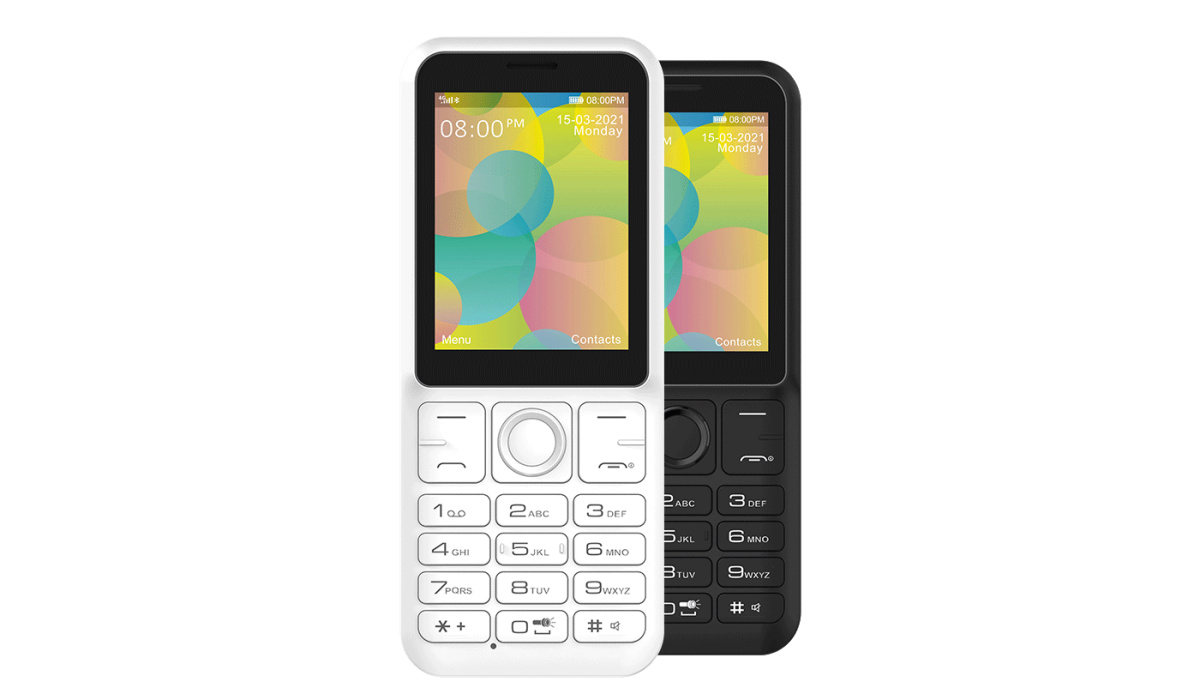
- Dimensions :125.3 x 52 x13.9 mm
- Weight : 102g
- Display : 2.4 inches, 240 x 360 pixels, IPS LCD screen
- Colours : White. Black.
- Physical Build : Plastic
Internal Hardware Specs
- Processor Type :
- Processor Name : SC T107
- Graphics Processor :
- RAM : 48 MB
- Internal Storage : 128 MB
- External Storage : microSD, up to 32 GB (dedicated slot)
Photography, Video Recording
- Main Camera : 2 MP sensor, video recording
- Front Camera : No.
Audio, Video Playback
- Music Support : PCM, AAC / AAC + / eAAC + / MP3 / AMR – NB / WB / APE
- Audio : 3.5 mm audio jack
- Loudspeaker : Mono speaker
- Video Support : H.264/MP4/MPEG4 player
- FM Radio : Yes.
Phone Sensors
- Digital Compass : No.
- Accelerometer : No.
- Proximity Sensor : No.
- Ambient Light Sensor : No.
- Barometer : No.
- Pedometer : No.
- Heart Rate Monitor : No.
- Gyroscope (G-Sensor) : No.
- Fingerprint Scanner : No.
- Face Unlock : No.
- Iris Scanner : No.
- Motion Sensing / Gesture Control : No.
- Voice Control : No.
- Intelligent Digital Assistant : No
- Infra-red Sensor : No.
Connectivity Options
- Bluetooth : v4.2, A2DP
- WiFi : No.
- GPS : No.
- USB : microUSB v2.0.
- NFC : No.
Miscellaneous Spec ifications
- Battery Type and Capacity : Removable Lithium-Ion 1500 mAh
- Battery Charging : 5W standard charging
- Wireless Charging : No.
- Reverse Charging : No.
- Model Version/Number :
Launch/Release Dates
- Announced : August 2021
- Release Date : August 2021
IMO Dash 4G Prices by Country
- Price : £20. It is available on Tesco Mobile.
The above prices may change with time from country to country, as market forces and economic policies influence product price movements.
Questions and Answers about IMO Dash 4G
Here are answers to some of the most commonly asked questions about this 4G feature phone.
What telecom towers and networks does IMO Dash 4G work with?
The Dash 4G is a 4G LTE phone. That means it supports 2G, 3G, and 4G wireless networks in the UK.
Will IMO Dash 4G work in the USA?
It is a GSM phone and is supported on US GSM carriers like AT&T and T-Mobile and other networks riding on their networks. It does not support CDMA networks. Do make enquiries from your carrier to know what bands/frequencies are supported on their service.
Buyer’s Guide Verdict
If you are looking for broadband mobile Internet without spending on a smartphone, the Dash 4G is exactly what you need. We can’t imagine why else you’d want to buy one.
Our Buyer’s Guide Verdict is a recommendation based on the specifications of the device and a general guide to help you understand how much value a device offers for its price. It is not an endorsement of the device. Ask questions and use your judgement when buying any device; MobilityArena takes no responsibility for your buying decisions .
IMO Dash 4G Phone Review Rating
Not available.

