Add MobilityArena as a preferred source on Google
Core fans of Pixel smartphones likely do not want to hear it, but for all the love that their beloved brand gets, it is plagued by one persistent issue. Pixel phones and heat are mostly inseparable. What is terrible about it is that the Google Pixel overheating problem happens very often when you are taking photos or recording videos with the camera. The very feature that Pixel smartphones are loved for is also its weakest point. If you are asking why your Google Pixel is getting hot, I have asked myself the same question.
It is an issue that plagues the brand across multiple models. At last count, the overheating problem has shown up on the Pixel 3, Pixel 4a, Pixel 5a 5G, Pixel 6, and Pixel 6 Pro. It has become so normal across multiple Pixel devices that it is almost scandalous. The Google Pixel overheating problem is so bad that many times, you have to shut down the camera, or turn off hotspot, or shut down the phone outright, to get it to cool down.
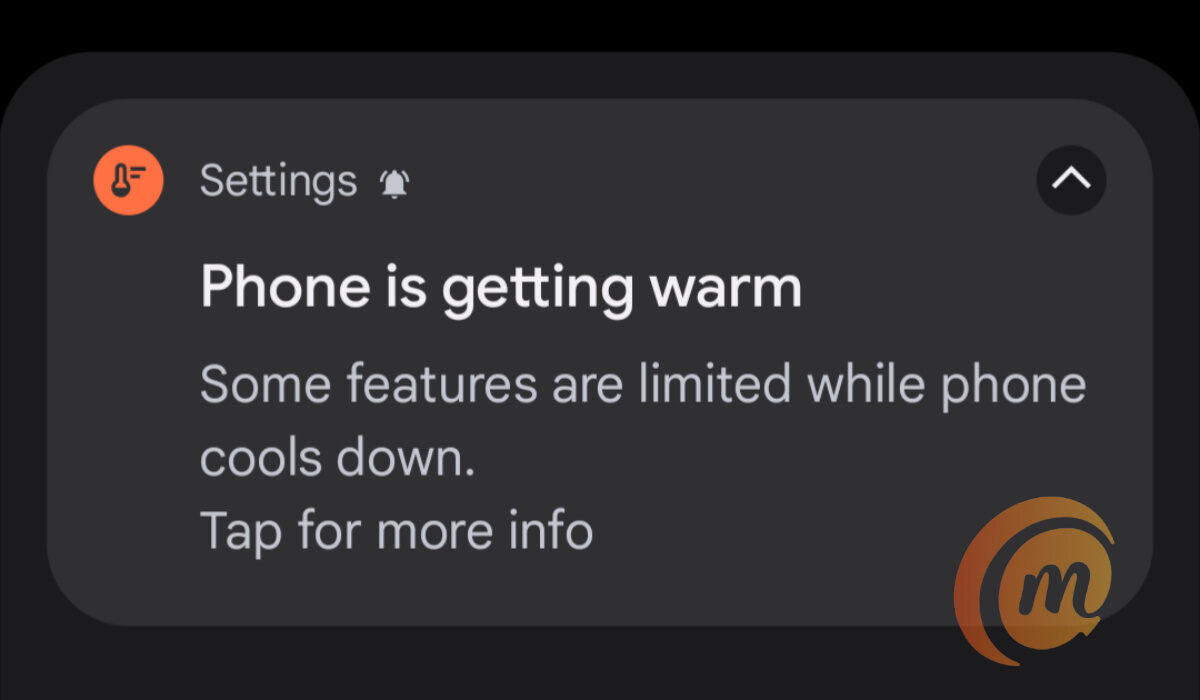
A notification due to the Google Pixel overheating problem
But these are temporary, and less than ideal, fixes. Why should you have to shut down the camera in the middle of taking photos at an important event? Or shut down the phone itself? I have used a few Pixel phones and the experience was the same. Above is a notification that I got used to seeing multiple times every single day on Pixel phones.
The above warning pops up when you are taking multiple photographs or recording videos. Sometimes, it would pop up while using the phone as a hotspot to get work done online on my laptop. Pixel smartphones just love to heat up, like the Human Torch of The Fantastic Four. It is a small miracle that we are not hearing stories of Google Pixel overheating AND combusting.
- Why is my Google Pixel getting hot?
- Google Pixel gets hot under the following circumstances
- The features I disabled to mitigate the Google Pixel overheating problem
Why is my Google Pixel getting hot?
I cannot say for sure why Google Pixel phones get hot. But having owned three models and experienced the same issues on all three, I have identified a few scenarios in which they do. Also, the camera seems to be a big culprit behind the overheating issue. I explain why I believe so below.
Google Pixel gets hot under the following circumstances
My Google Pixel phones got hot whenever I charged them, whenever I enabled the hotspot feature, when I record video for more than a few minutes, and when I used them to take more than a few photos. And then, in order to cool the phone down, the feature in use causing the overheating would be shut down by the phone. Many others have reported these same situations as what they are doing when their Google Pixel gets hot.
One of my observations is that the Pixel phones I have used would also overheat if I left the camera open but not in use . I found that disturbing: overheating from an idle camera? This was ridiculous, but it gave me a pointer to where the overheating was coming from (at least, some of it). The camera . So, I thought to change a few camera-related settings on one of my units. The result is that while the phone still warms up a little (and many phones do that now), the warming notice and automatic disabling of features and services did not happen as often as before any more.
The features I disabled to mitigate the Google Pixel overheating problem
I figured this has something to do with the camera, so I dived into the camera settings and fiddled around a while with settings that looked like could be behind this stressing of the phone. I won’t bore you with all the details. Here are the settings that I now have disabled in the Google camera:
- Google Lens suggestions
- Social share
- Frequent Faces
- Framing hints
- Exposure
- RAW+JPEG control (under Advanced)
- Social media depth features (under Advanced)
- Enable time lapse for Astrophotography (under Advanced)
I know these are a lot of features to disable, but I was desperate to have a stable and functional phone that I could actually use daily without being sabotaged in the middle of an important task. And it looks like I achieved just that. There is still some warmth when you use the phone for a while, but it doesn’t get severely warm or hot any more and those warmth/heat notifications don’t pop-up anymore.
Again, doing these did not solve the Google Pixel overheating problem completely for every model. A colleague implemented the above hacks in her Pixel 3, and the “overheating “Phone is getting warm” notification still pops up an error at random. But it is nowhere as bad as it used to be before applying the above modifications. Feel free to try out the above settings for yourself and see if it makes a difference. If it works for enough people, at least, we’d have given Google an idea of where to look to fix the underlying problem.
For now, it is a relief that I am able to use the Pixel 5a 5G without feeling like I am carrying a hot plate around. If there is anything you have done to mitigate or completely fix the Google Pixel overheating issue, do share. Lastly, if you are interested, please see my Google Pixel 5a 5G review .
Author:Mister Mobility
Digital Skills and Communication Coach | Mobile Phone Connoisseur since 2001 | Tech Blogging since 2004
Add MobilityArena as a preferred source on Google
3CX is a business communications system that offers an encompassing solution for calls, video conferencing, live chat and messaging. Its open standard which means it can be used with any IP Phone or SIP provider. Their apps can be used on Android, iOS and the Web. Their software enables different companies to cut telecommunication costs, boost employee productivity, and enhance customer experience.
3CX phone system reviews on GetApp website
I found reviews on the GetApp website and the site had an overall star review rating of 4.5 stars out of 5 stars. There were a lot of good reviews so let’s start from there. A lot of customers are happy that the company is inexpensive, affordable and easy to set up. Some customers also spoke about their user interface being clean and straightforward. Their great software helps their customers to receive calls and allows them to manage their calls easily and maintain their calling network. There are always a lot of new features and their recorded calls are always good quality. Here’s a few of the good reviews:
•3CX has made it easier to maintain our calling network and allows us to bring its features outside of the office which aids in our day to day. The phone dial pad itself is very user friendly and the software itself has a very ease of use feel to it. As a manager it is nice to view, listen and transfer my teams calls on the fly – the logging system also allows me to keep track of activity within my teams.
•I really like their phone console. It allows everyone to easily manage and monitor their calls throughout the busy work day. That is the best part of their tool.
•Price, Ease of set up and feature rich capabilities. The price can be FREE if you are a small office. Still, even for a larger organization the pricing is extremely affordable. It took less than 90 minutes from download to our complete office set up, including 15 extensions. All this with zero training, just following intuitive user interfaces.
Moving on to the bad reviews, some customers were not happy that 3CX offers very little customisation outside of the user interface. There were also some customers who said they had some issues with call forwarding and poor connection which affects call quality. Some customers also claimed that the system can sometimes be confusing and quite difficult to adapt to. A few customers also mentioned having some issues of delays when they ask for a function and log of incoming and outgoing calls. Apparently, some of their calls are missing and not recorded and some one also mentioned having to restart their software from time to time because it randomly stops working. Here’s some of the reviews:
•Not a ton of cons to be honest, there are some issues of delays from when you ask for a function (click delay) like looking up a contact from the address book and clicking to call the contact, sometimes there is a bit of a delay. The product could use a bit of a refresh look, but overall the ease of use and user friendly Softphone does hit its marks.
•Unfortunately, the provider does not say anywhere that the telephone system is not yet compatible with Windows 11. The TAPI driver cannot find the phone and therefore cannot be set up and configured correctly. A note on your side would be an advantage!
•I have to restart the software from time to time because it will stop working. I also have some issues with the log of incoming and outgoing calls. I would like to be able to call someone right back if they just called and I don’t have their phone number. Some calls are remembered and some are not, it seems random. I can see the number as it comes in but if I need to call that person back sometimes their number doesn’t remain in the log, I do not know why.
(Source)
3CX phone system reviews on g2 website
The g2 site also had an overall star review rating of 4.5 stars out of 5 stars. Let’s start with the good reviews, customers were happy that it was easy to set up and maintain. You can access their phone system on any device and anywhere. A lot of customers praised their receptionist feature and ring groups. Their professional grade software features and performance which are available at a good price were also mentioned. The interface is intuitive and works with most of the major brands of IP SIP phones. Here’s a some of the reviews:
•I can set up the 3CX app on my smartphone and use it if I am away from my desk phone. I like the digital receptionist feature and ring groups, I can even set up holiday greetings on the console management.
•The system was very easy to install. We are currently using almost 200 extensions and this system is a breeze to add new stations. The price was also something that was too good to be true. Don’t be fooled by the low price point. This system can hold its ground with the bigger players at less than half the price!
•Easy to manage, reliable with very low maintenance. We have been using 3CX as our phone system for many years now and the system has been very reliable. The system does not require much maintenance which can be fully automated.
Now on to the bad reviews, there were a few complaints about the cell phone app being a little buggy and the mobile app eating a lot of battery. Some customers also mentioned experiencing random dropped calls and the phone system not being user friendly. Apparently, a customer was finding it hard to delete recordings and there were also some complaints about some features not being available on the mobile app e.g ex direct call and more. Here’s a few of the bad reviews:
•The cell phone app is a little buggy. It will drop calls randomly that are passed through to it from the system. It is just a minor annoyance though and definitely not something that I would consider something that would make me rethink our purchase.
•The only downside of 3CX is that they move slow on their backend, sometimes they only approve certain carriers on updates.
Can’t modify outbound caller IDs without another trunk.
•I wish the upgrade feature was easier. When there is a major upgrade, you must backup the system, uninstall the old version, install the new version and restore the backup.
(Source)
Last Words
After reading through a number of reviews on different sites, 3CX has some improvements to make to fully satisfy their customers but they seem to be doing a decent job.
- Don’t miss our reviews .
- Follow our news on Google News .
- Join our WhatsApp Group , to be notified of the most important articles and deals,
- Follow us on Instagram , Facebook , Twitter , and YouTube .
Author:Dun
Dun enjoys reading and writing, and is always on her smartphone. She currently uses a Google Pixel 3.
