Add MobilityArena as a preferred source on Google
I have been using the UMIDIGI A5 Pro for a little over 7 months now, and for the price, it offers awesome value for the money money. I had shared my experience with it five months ago. Recently a problem showed up that made me consider replacing it with a phone from a different brand, like Redmi.
Since buying this phone, it has received two OTA updates till date. I had already installed the latest of these updates before reading online that there are many bugs in it and people should not update. Too late; I was stuck with bugs and no other update in sight for months.
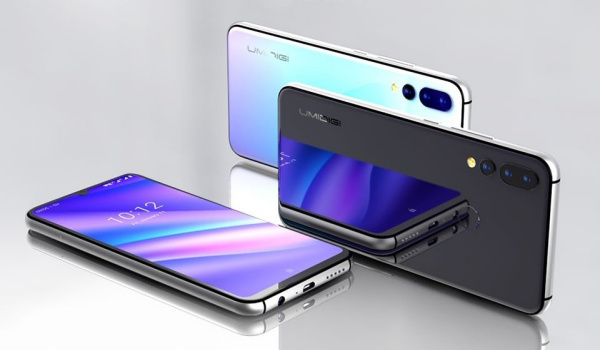
For a while, I didn’t notice anything amiss in the operations of the phone. But eventually, I got bitten by one.
- UMIDIGI A5 Pro Multitasking Problem Shows Up
- Fix for the UMIDIGI A5 Pro Multitasking Problem
UMIDIGI A5 Pro Multitasking Problem Shows Up
Recently, something had been bothering me about the phone.. to the extent that I was actually considering selling it and getting a different brand. The A5 Pro smartphone packs 3 GB of RAM and runs almost stock Android 9 Pie. Performance should not be an issue; right?
Now, however, when I switch from one app to another and then attempt to switch back to the former application, or even any from the Recents List, I discovered that the original application is reloaded afresh. Apparently, it got shut down within such a short period of time.
The implication of this is quite significant if you have to multitask on your smartphone. Let me paint a scenario. Supposing you have to credit about five people with funds. You have your digital banking app open, and you’re on the right page to make those transfers.
You then switch to your Whatsapp to pick an account number from a an existing conversation, or you launch your calculator app to calculate something quickly, or you load your spreadsheet app to check some other information.
You then switch back to your banking application and find that the app refreshes and you are having to log in afresh! Or, you have been composing a fairly lengthy article (like this one), you get interrupted by an urgent email, which you quickly answer, and then switch back to the document you have been composing, only to find the note app is reloaded, obliterating everything you have been typing for fifteen hours.
Clearly, this would cramp anybody’s productivity. Those were the kind of scenarios I was facing. So, I dived into the phone Settings, meticulously looking for what could rectify this undesirable behaviour. I searched and searched and tweaked everything that remotely sounds like it had a connection to the problem, but the behavior persisted.
To make matters worse, there was some added mystification in that the behaviour is not consistent. It happens sometimes; some other time, apps don’t reload. For a 3 GB RAM smartphone with only essential apps installed, a paucity of RAM surely couldn’t be the problem..especialy, since this was not happening originally. Surely, it has to do with memory management, with a view to conserve battery.
So, I went on tweaking battery optimization settings unendingly.. and the situation persisted… albeit randomly.
Fix for the UMIDIGI A5 Pro Multitasking Problem
I was already contemplating getting a Redmi 9C until I happened on the solution, by accident.
There is a little option under Settings called DuraSpeed. This is the key to solving the problem. Why anybody would give such an unimaginative name to something so critical is beyond.me.
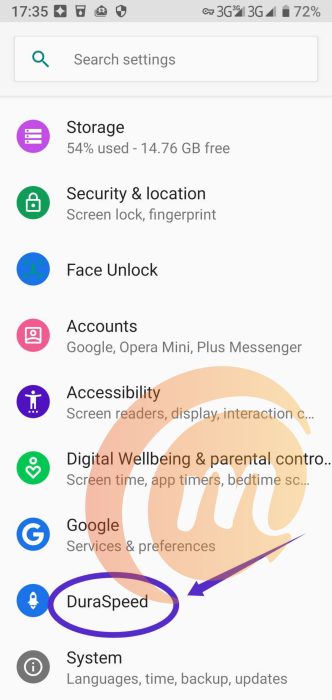
Here is what to do:
- Open the UMIDIGI A5 Pro phone Settings
- Find DuraSpeed in there
- Ensure DuraSpeed is ticked on.
- Select all the apps listed and tick the check boxes ON.
- Next, tick off apps that you would not mind if they get reloaded when you switch back to them.
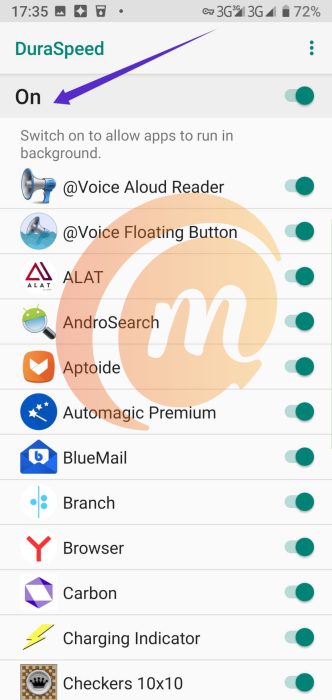
After you have done the above, reboot the phone. You would find that the selected apps don’t reload anymore when you switch away and back, and are no longer crippling your style. And the world is at peace again.
Before discovering the solution, I woild not have dared to leave this long document unsaved and switch to another app. But, while composing this article, I have switched multiple times, and the editor didn’t get reloaded, wasting my minutes of effort.
I imagine that this solution will also work for any other UMIDIGI phones experiencing the same problem with switching between apps. If you own a UMIDIGI device with similar behaviour, you now know how to fix the problem. Use DuraSpeed.
Copyright Notice : Reproduction of this article on any website, eBook, book, newspaper, magazine or other media without express written permission from MobilityArena is a violation of copyright rules and will result in appropriate action being taken against violators.
Author:Ibukun Olaoya
Add MobilityArena as a preferred source on Google
It is odd that even though Xiaomi has launched the Mi 11 range of smartphones in January this year, it has only just now announced the Xiaomi Mi 10S, a premium flagship sports a 6.67-inch AMOLED display with 90Hz refresh rate, a 108-megapixel quad camera, and is powered by a Qualcomm Snapdragon 870 chipset.
It is a remarkable device. From the sleek lines to the powerful internals, this is a smartphone that begs to be purchased and used. Why Xiaomi is announcing this Mi 10 model after Mi 11 models are available is a subject for another discussion.
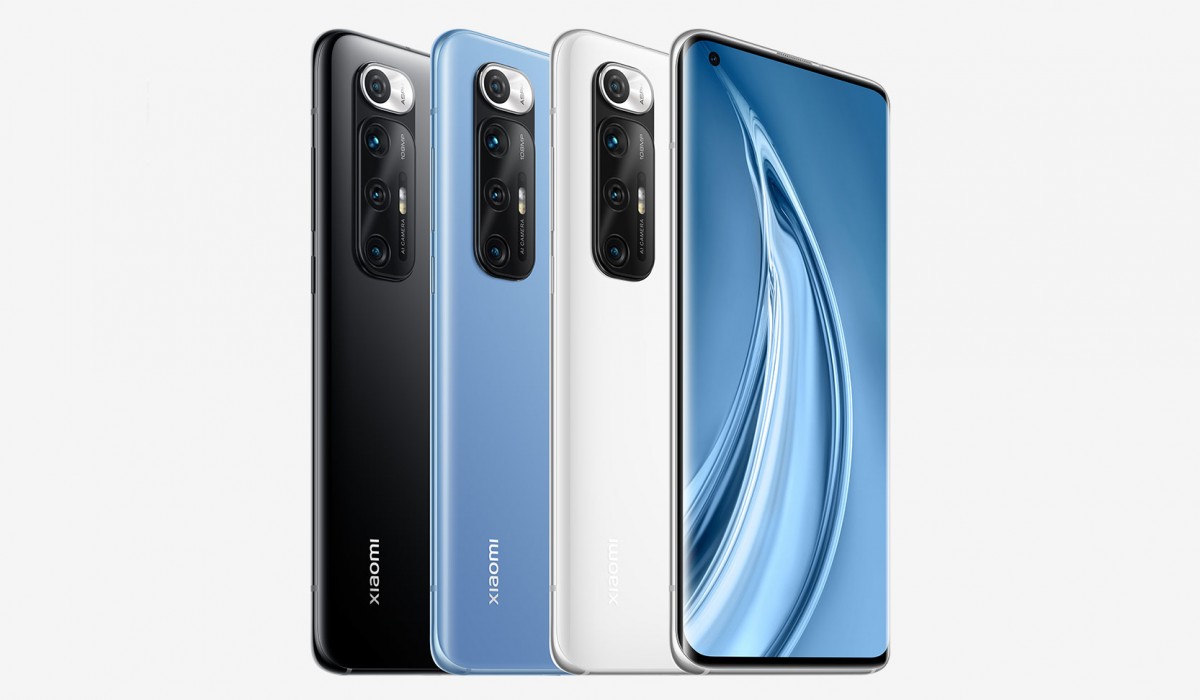
For now, here is a table of key features of the Xiaomi Mi 10S.
Xiaomi Mi 10S Specs
- 6.67-inch punch hole, AMOLED curved display with 90Hz refresh rate, HDR10+, Gorilla Glass 5.
- 20MP front camera
- 108MP main lens + 8MP ultrawide lens + 2MP macro lens + 2MP depth sensor, with OIS.
- MIUI 12, based on Android 11
- Qualcomm Snapdragon 870 (5nm)
- 8GB and 12 GB LPDDR5 RAM options
- 128GB and 256GB UFS3.0 storage options.
- Dual speakers
- Infra-red blaster for remote control
- 4780 mAh battery
- 33W fast charging
- 30W wireless and
- 10W reverse wireless charging.
The Mi 10S comes in beautiful and elegant black, blue and white colour options. It really is abeautiful smartphone.
And to sweeten the deal, its price starts from CNY 3,299 for the 8/128GB base model. The 12/256GB variant carries a price tag of CNY 3,799. That is about $500 and $580 respectively.
Those are attractive prices and a couple hundred of dollars cheaper than the Xiaomi Mi 11 models are going for. And sales kick off on March 12, 2021. But all of those won’t mean jack.
You will be unable to get your hands on the Xiaomi Mi 10S (at least for now), because it has been launched only in China. Even if you were to go out of your way to order one online via AliExpress, Gearbest, or any of the other Chinese retail stores, you’d be getting a phone without Google Mobile Services and apps. That is right: there’d be no Play Store, Gmail, YouTube, etc on it.
Hopefully though, Xiaomi will announce international availability at some point and then everyone who wants one can scramble for it. The Mi 11 went global afterall. What’s stopping the Mi 10S?
Author:Mister Mobility
Digital Skills and Communication Coach | Mobile Phone Connoisseur since 2001 | Tech Blogging since 2004
