Add MobilityArena as a preferred source on Google
How long can you use a power bank? I never had to ask this question until recently. I have had power banks that served me well for such long periods of time that I never needed to ask. You know how some things are not a problem to you until you notice an abnormality? Yes.
For example, I have never had to worry about the mileage of my car. But if I fill my fuel tank and run out of fuel within 3 days without doing anything out of the ordinary with the car, I shall immediately begin to question its fuel consumption.
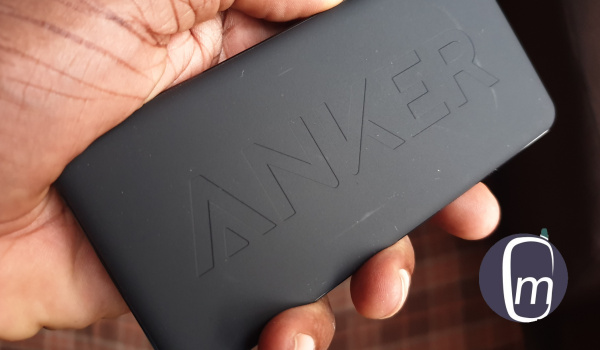
How long can you use a power bank?
That is what has happened to me with my power bank. I began to use the Anker PowerCore II Slim 10000 mAh portable battery in June 2019. Some months ago, I noticed that I would plug it into the power mains to charge for hours and end up with two LED lights instead of four. Four LED lights indicate a full charge.
If I unplugged it and plugged it back in one or two times, it would then charge fully. That behaviour was odd. And it began to get worse. Now, the power bank barely charges beyond one LED light. Drats.
I used another portable battery before this one, an Oraimo Fast Charging 10000mAh power bank , and it was still in active use by its new owner, and giving no such issues. What made it even more interesting was that this Anker unit was a more expensive device than the Oraimo.
In other words, my newer, more expensive Anker PowerCore II Slim 10000 mAh portable battery was misbehaving about a year into use, when an older, less expensive model still worked flawlessly.
- So, how long can you use a power bank?
- Fixing the problem: Resetting the Anker PowerCore II
- How to reset Anker PowerCore II Power bank
- How to use a power bank the right way
- Shopping for a new power bank?
- Is there anything to avoid when buying a power bank?
- Conclusion
So, how long can you use a power bank?
To answer this question, a good power bank should serve you well for nothing less than two years. In many cases, portable batteries work well into 3 or 4 years.
If a power bank is misbehaving after a year of use, there is a problem with it. What made this sad is that Anker is known for their quality power banks.
Fixing the problem: Resetting the Anker PowerCore II
I ran a Google search to see if other Anker PowerCore II users were experiencing the same problem and found a few complaints like that. And I also found out that the device could be reset. Believe it or not, I had no idea that one could reset a power bank.
Anyway, this was new info, and I used it. I performed a reset of my PowerCore II and plugged it to the mains to charge. Voila! Problem solved. My power bank was charging as good as new again.
How to reset Anker PowerCore II Power bank
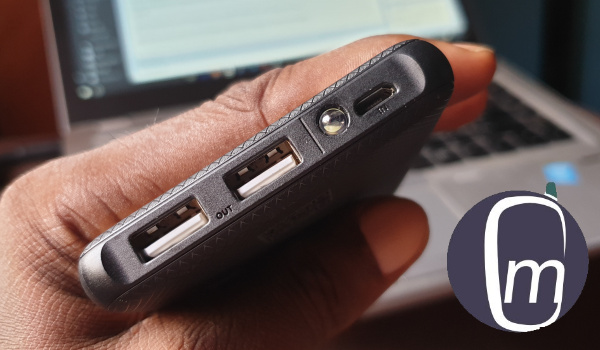
If you are already itching to find out what the reset process is like, here it is. The power bank comes wiith a short USB charging cable in the sales pack. To reset it, use this charging cable to create a loop – plug both its end iinto the two respective ports of the Anker – leaving it in for about 3 to 5 seconds. Some others say to leave it for up to 10 seconds. I did 5 seconds and pulled out the cable.
PS : I have no way of verifying that the above reset information is officially recommended by Anker, but it worked for me. If you use iit, you do so at your own risk. If possible, contact your device manufacturer for assistance.
I later also found a suggestion that pressing and holding the Power button for 30 seconds will reset it too. That sounds safer than the charging cable loop.
How to use a power bank the right way
As with all electronic items, a power bank can be misused and abused, leading to problems. If you want your power bank to function properly and last as long as it should, you need to observe certain rules.
- First, use the appropriate charging cable and charger: preferably use the supplied one. If you have to use a 3rd party cable and charger, make sure that you use the appropriate ones. For example, the Anker PowerCore II is a fast-charging portable battery. Using an inferior cable and a non-fast charger will produce less than satisfactory results.
- Avoid drops and all forms of violence. It may have a plastic shell, but it’s internal components can be damaged by shock.
- Avoid water and liquids. Liquid damage is a common gadget hazard. Most portable batteries are not waterproof, so keep them away from water and liquids generally. Using your power bank in the rain can damage it.
- Don’t leave your power bank discharged for long periods of time. Keep it charged. If possible, top it up before it runs out of juice completely. If you are going to leave your portable battery unused for a period, charge it up to at least the 40% or 50% mark before putting it away.
- Avoid extreme heat and cold environments.
- If you want to charge your smartphone with the power bank, do not plug the power bank itself into a power outlet at the same time.
Shopping for a new power bank?
If you are shopping for a new portable battery, here are some tips. Personally, I am not a fan of bulky gadgets. This is why I love the slim profile of the Anker PowerCore II. In my books, a power bank should not leave a bulge when in your trouser pocket. Anker PowerCore 10000 PD Plus is a newer model and a credible alternative to my current model, but it does not have that slim profile. Still, that just might be how you like your portable battery, so check it out.
If you can still find it in the market, the Soda SP60 6000 mAh portable battery performed well in our testing and usage. Finding it now is the real problem, as Soda Mobile has vanished from the market. There’s this cute itel power bank that I have reviewed and used, but it didn’t last either. It began to fail after some months of use.
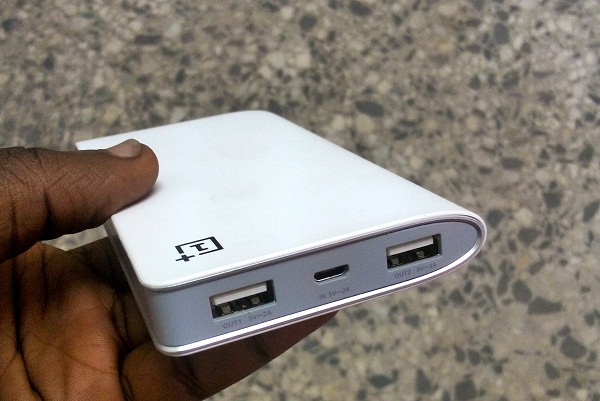
The good thing is that there are many portable battery products out there to pick from. Brands that I have used include: Oraimo, Xaomi, Anker, and OnePlus. There are others as well, so look out for them.
Is there anything to avoid when buying a power bank?
Yes! Those portable batteries that offer humongous battery capacity at ridiculously low prices? Stay. Away. From. Them. They are usually substandard products made by obscure manufacturers. Those ones will develop trouble quickly and die on you just as fast.
Conclusion
In closing, I am glad that my Anker PowerCore II is functioning well now and I do not have to replace it yet. Yay! Hopefully, I can squeeze 2 to 3 years out of it. But now, you also know what to expect from a good power bank in terms of life span. You also know the right way to use a power bank.
Author:Mister Mobility
Digital Skills and Communication Coach | Mobile Phone Connoisseur since 2001 | Tech Blogging since 2004
Add MobilityArena as a preferred source on Google

The rapid evolution of smartphones over the last few years has transformed these devices into powerful tools for business. However, not everybody knows how to get the best out of their smartphone for professional tasks. Using your phone for business requires several skills that texting and surfing the web do not.
Take a look at our top six tips for using your smartphone as a business tool. You’ll boost productivity, save time, and work on-the-go!
1) Use apps that work across platforms
It’s unlikely you’ll be using your smartphone alone for work, so it’s useful to download apps that work across platforms. This means that anything you do in the app version will be automatically updated on the desktop version (and vice versa).
Several business staples have apps for smartphones, such as:
- Google G Suite
- Slack
- Trello
- Skype
- Zoom
- Google Drive
- Microsoft Office 365
If you’re downloading apps that you aren’t using already, always check to see whether they have a desktop version. This will make it much easier to use your smartphone for business, as all changes are synced across platforms.
2) Sync your business email with your smartphone
The best way to keep your inbox clear is to link your work account with your phone. You’ll see messages as they come in, and be able to respond to them immediately. Even if you can’t email back right away, it’s a great way to keep on top of what’s going on, and see responses to any emails you’ve sent.
Do note that some companies may not allow you to this for security-based reasons. If in doubt, check with your company beforehand. If it’s possible, we definitely recommend linking your business email to your phone.
3) Digitize your files
If you’re an established business, why not get all of your paperwork digitized, so you can access it via mobile? By outsourcing document scanning , you canget all of your documents digitized in a time-efficient and cost-effective way.
This makes it easy to access your files, forms, and paperwork from your smartphone, enabling you to work-on-the-go without the need for piles of paper.
4) Make use of voice technology
Voice technology is a great smartphone tool for business people that are constantly on the go. It can be used to complete small tasks such as responding to emails or setting reminders. This can be great for when you’ve got your hands full, or are working on a different task on desktop.
Whether you use Siri or any other voice assistant, save time by speaking rather than typing. This will help you be more productive, as many of us speak much quicker than we write.
5) Home screen optimization
If you’re using your phone for business, it’s important that you keep it organized and distraction-free for optimum productivity. Place the most important apps in the dock, and the next most frequently accessed on your home page.
Try to keep non-work apps such as social media apps away from your home screen, as this will help you avoid aimlessly checking in on them. You could create a sub-folder housing non-work apps to keep them out of site and out of mind.
6) Turn off notifications
Notifications can distract us from the task at-hand. If you’re using your smartphone to focus on one particular task, check your settings and turn off notifications for any non-essential apps.
Even if it’s just for the 20 minutes you need to finish reading a document, you’re much more likely to get it done when you’re totally distraction-free.
Smartphones are great tools for business, and enable you to get much of your work done on the go. Use these handy tips to make sure your smartphone is fully optimized for business!
