Add MobilityArena as a preferred source on Google
Although smartphones have significantly improved our lives through increased access to information, they have been particularly a mixed bag when it comes to their use by students. Indeed, learners could benefit a lot from using their phones to improve the learning experience. If you are a student, then you know smartphones have made it easy for you to find information about virtually anything and in a variety of forms, including videos and images.
However, a growing concern is that allowing smartphones in the classroom impairs learners’ concentration and attention capabilities, distracting them from their academics. Therefore, this post provides an in-depth analysis of how smartphones create distractions in the classroom and why they should not be allowed in school.

Smartphones in the classroom: Some advantages
- Promoting inclusion Smartphones in the classroom can serve as a crucial tool for improving the experiences of students with learning disabilities, such as dyslexia, visual impairments, and attention deficit hyperactivity disorder (ADHD). Learners with these issues could use smartphones to not only take notes but also access cloud-based learning technologies. Given the rapid rate at which individuals with disabilities are enrolling in higher education institutions, allowing them to use smartphones could reduce learning disparities, increasing their education achievement levels. It is also possible that allowing smartphones for some students and not others might brew resentment and animosity from those without access to these technologies. Thus, permitting all students to use smartphones can help alleviate this problem.
- Improving the learning process Smartphones have great potential for enhancing students’ learning outcomes. Besides helping collect instantaneous feedback concerning learning, smartphones could promote collaboration among learners, increasing their engagement with instructors and course materials. For example, a student could use a smartphone to answer questions posted on discussion forums thanks to applications like Learning Catalytics and Poll Everywhere. Smartphones also enable access to collaborative tools, for example, Google Jamboard and Google Docs, which encourage students to collectively contribute ideas to shared projects or provide feedback to their classmates. Still, smartphones have become the easiest way for students to search for information, data, and statistics on the internet. Thus, they could greatly improve the learning environment in schools.
- Boosting creativity Smartphones can also enhance creativity in students. With the numerous applications available on such devices, learners can practice creating short, educative videos to exercise their creativity. Still, they could record audio files, which they could use to improve their speaking and communication skills. Through the videos and tutorials available to them, they can learn new ways of doing things, increasing their general enjoyment in the learning process. Smartphones also provide access to online dictionaries, from which students can learn new words to consolidate their vocabulary.
- Improving organization Smartphones can also help students in organizing their work and staying on top of tasks, deadlines, projects, and other homework assignments. With applications, such as myHomework App, for example, learners can receive notifications and reminders concerning upcoming deadlines and work schedules. The cross-platform app provides a more intuitive and convenient alternative to the conventional paper planner. Concerning the organization of classroom notes, smartphones allow students access to the Evernote app, which enables access and transcribing of notes across several devices. Besides this app, as a student prepared to enter the corporate world after graduation, you want a website you can use to write and organize your coursework. In that case, you can try CustomWritings, an online service with professional coursework writers that could help not only address all your academic writing needs but also be ready for the job market.
Are smartphones a distraction in the classroom: Top reasons why they are
How smartphones create distractions in the classroom
Although smartphones have significantly improved our lives through increased access to information, they have been particularly a mixed bag when it comes to their use by students. Indeed, learners could benefit a lot from using their phones to improve the learning experience. If you are a student, then you know smartphones have made it easy for you to find information about virtually anything and in a variety of forms, including videos and images. However, a growing concern is that allowing smartphones in the classroom impairs learners’ concentration and attention capabilities, distracting them from their academics. Therefore, this post provides an in-depth analysis of how smartphones create distractions in the classroom and why they should not be allowed in school.
Smartphones in the classroom: Some advantages
1. Promoting inclusion
Smartphones in the classroom can serve as a crucial tool for improving the experiences of students with learning disabilities, such as dyslexia, visual impairments, and attention deficit hyperactivity disorder (ADHD). Learners with these issues could use smartphones to not only take notes but also access cloud-based learning technologies. Given the rapid rate at which individuals with disabilities are enrolling in higher education institutions, allowing them to use smartphones could reduce learning disparities, increasing their education achievement levels. It is also possible that allowing smartphones for some students and not others might brew resentment and animosity from those without access to these technologies. Thus, permitting all students to use smartphones can help alleviate this problem.
2. Improving the learning process
Smartphones have great potential for enhancing students’ learning outcomes. Besides helping collect instantaneous feedback concerning learning, smartphones could promote collaboration among learners, increasing their engagement with instructors and course materials. For example, a student could use a smartphone to answer questions posted on discussion forums thanks to applications like Learning Catalytics and Poll Everywhere. Smartphones also enable access to collaborative tools, for example, Google Jamboard and Google Docs, which encourage students to collectively contribute ideas to shared projects or provide feedback to their classmates. Still, smartphones have become the easiest way for students to search for information, data, and statistics on the internet. Thus, they could greatly improve the learning environment in schools.
3. Boosting creativity
Smartphones can also enhance creativity in students. With the numerous applications available on such devices, learners can practice creating short, educative videos to exercise their creativity. Still, they could record audio files, which they could use to improve their speaking and communication skills. Through the videos and tutorials available to them, they can learn new ways of doing things, increasing their general enjoyment in the learning process. Smartphones also provide access to online dictionaries, from which students can learn new words to consolidate their vocabulary.
4. Improving organization
Smartphones can also help students in organizing their work and staying on top of tasks, deadlines, projects, and other homework assignments. With applications, such as myHomework App, for example, learners can receive notifications and reminders concerning upcoming deadlines and work schedules. The cross-platform app provides a more intuitive and convenient alternative to the conventional paper planner. Concerning the organization of classroom notes, smartphones allow students access to the Evernote app, which enables access and transcribing of notes across several devices. Besides this app, as a student prepared to enter the corporate world after graduation, you want a website you can use to write and organize your coursework. In that case, you can try CustomWritings , an online service with professional coursework writers that could help not only address all your academic writing needs but also be ready for the job market.
Are smartphones a distraction in the classroom: Top reasons why they are
1. Many features on smartphones are for entertainment purposes
Smartphones distract students from learning because many focus on their entertainment purposes more than their educational roles. Instead of studying, smartphones can tempt learners to play their favorite video games while in class or watch entertaining content on social networking sites, such as Facebook, Instagram, Twitter, or YouTube. Those students who succumb to this inviting temptation mostly suffer poor academic outcomes due to the inability to concentrate on their coursework. Poor comprehension of learning materials could consequently lead to reduced academic performance, undermining students’ achievement levels. Since many learners are yet to develop the discipline necessary to focus on their studies without much supervision, smartphones distract them more than aid in improved academic performance.
2. Smartphones can undermine sleep quality
Sufficient sleep is one of the key determinants of academic performance in school. Specifically, students who get adequate sleep are able to concentrate fully in the classroom, paying keen attention to the learning process. However, those who spend most of their time on smartphones become addicted, meaning that they use them almost every time, whether at home or school. Such a high exposure to screens, especially at night, could deny students the opportunity to gain enough sleep, which is a prerequisite for effective functioning during the day. Therefore, it can reduce the concentration abilities of students in the classroom, undermining their education outcomes.
3. Smartphones could promote negative student behavior
It is also possible that using smartphones in the classroom could promote negative conduct among students. Behaviors such as harassment and cyberbullying have become quite common in schools with the advent and proliferation of smartphones among the student population. This is because these devices are quite effective at spreading information due to the easy access to social networking platforms like Facebook, Twitter, and Instagram. The craving for likes and social approval on these sites can incentivize some students to post disparaging images or videos of their peers, leading to increased cases of cyberbullying and harassment. Indeed, this is key among the reasons why some experts propose that phones should not be allowed in school.
4. Smartphones undermine long-term learning retention
Using smartphones in the classroom has a damaging effect not only on students using them but also on their peers without phones. When learners divide their attention between listening to the instructor and using their smartphones, they need help comprehending the contents of the lesson despite their beliefs about multitasking. While the effects of this distraction might not be apparent immediately, it becomes quite evident when students begin scoring lowly in end-of-term exams. The performance of students without phones also diminishes because they become easily distracted by the activities of those using these devices in the classroom. Therefore, it is generally detrimental to students’ long-term academic achievement.
Smartphones are notorious for distracting students because of their many appealing entertainment features. However, they could also promote inclusion for learners with disabilities besides improving the learning process. Thus, how smartphones create distractions in the classroom does not entirely mean they are bad for students.
Author:MobileChic
That motivated, gadget-loving geeky chic who tries to stay on top of things. Unapologetic iFan.
Add MobilityArena as a preferred source on Google
Amidst the rapid evolution of technology, the screens of our electronic companions intricately shape the landscape of our modern existence. Whether enchanted by the sleek brilliance of an Apple iPhone or captivated by the vibrant display of a Samsung Galaxy, these devices have seamlessly woven themselves into the tapestry of our daily rituals. However, the journey with these screens is not without its occasional hiccups. This guide is a deep dive into the sophisticated realm of screen restoration, offering insights tailored to both Apple and Samsung users. Join us as we unravel the complexities of addressing screen issues in the ever-evolving world of technology.
- Diagnosing Screen Issues Apple Devices Restoring Apple Screens Restoring Samsung Screens
- FixNow: Your Reliable Repair Partner
- Choosing the Right Screen Protector Material
- Keeping Your Screen Pristine: Best Practices
- Additional Tips for Prolonging Screen Longevity
- Conclusion
Diagnosing Screen Issues
Before diving into the restoration process, it’s crucial to accurately diagnose the problems with the screens. Here are common issues users face:
Apple Devices
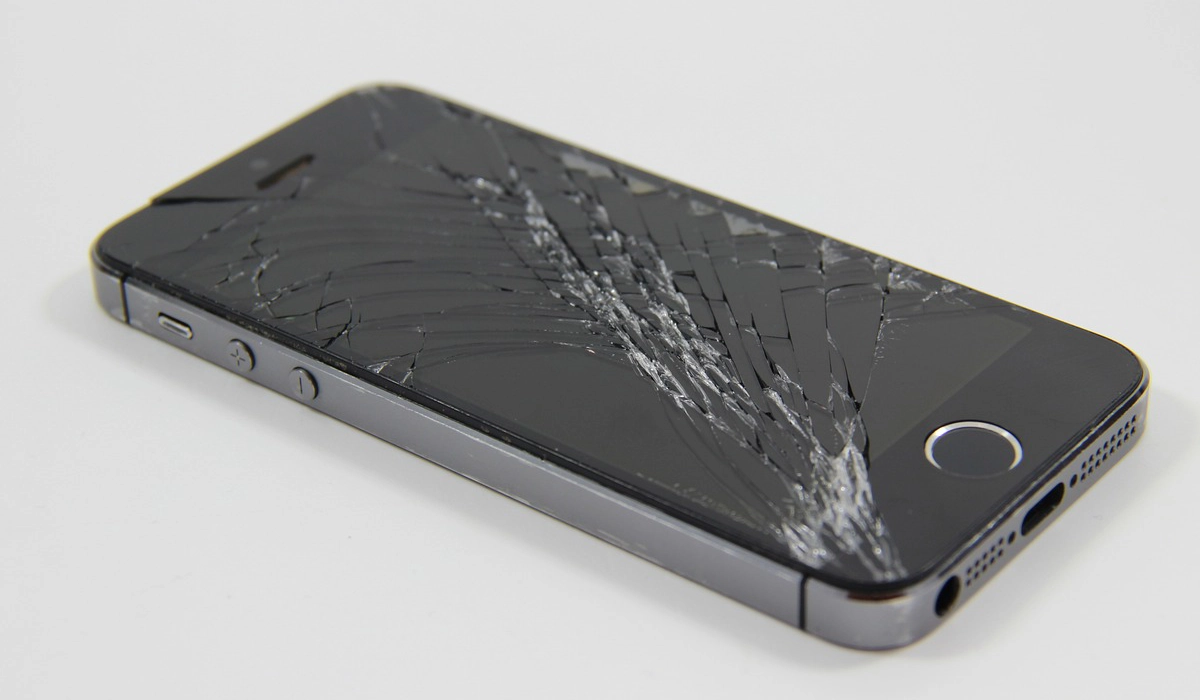
- Cracked Screen : A physically damaged screen is a common woe. Identify the extent of the damage using the table below:
| Damage Level | Description |
|---|---|
| Minor | Hairline cracks with no touch issues |
| Moderate | Visible cracks affecting touch |
| Severe | Complete screen damage |
- Touch Sensitivity : Unresponsive or erratic touch can be attributed to software or hardware issues.
Samsung Devices
- AMOLED Burn-in : With prolonged usage, AMOLED screens may exhibit burn-in issues.
- Ghost Touch : Random touches or swipes without user input can be frustrating.
Restoring Apple Screens
- Cracked Screen Repair
If dealing with a minor crack, applying a screen protector can prevent further damage. For moderate to severe cracks, professional repair services are recommended. Boldly choose authorized service centers for genuine parts.
- Touch Sensitivity Troubleshooting
- Software Reset : Perform a factory reset to eliminate software glitches.
- Hardware Calibration : Adjust touch settings in Settings > Accessibility.
- Display Replacement
For severe damage, a complete display replacement is necessary. Refer to the table below for compatible replacements:
| Apple Device | Compatible Display Replacement |
|---|---|
| iPhone X | OLED Super Retina HD Display |
| iPhone 11 | Liquid Retina HD Display |
| iPhone 12 | Ceramic Shield Front Cover, Super Retina XDR |
Restoring Samsung Screens
- AMOLED Burn-in Mitigation
- Screen Timeout : Reduce screen timeout duration to minimize static images.
- Display Rotation : Enable screen rotation to distribute pixel usage evenly.
- Ghost Touch Resolution
- Screen Calibration : Navigate to Settings > Display > Screen Sensitivity for calibration options.
- Firmware Update : Ensure your device has the latest firmware for bug fixes.
- Professional Repair Services
For persistent issues, seek professional assistance from authorized Samsung service centers. Avoid third-party repairs to maintain warranty validity.
FixNow: Your Reliable Repair Partner
At FixNow, experience top-notch repair and diagnostic services for your electronic devices. Discover key benefits that set FixNow apart:
- Free Diagnosis: Begin your device repair journey with a complimentary diagnosis to uncover issues without initial costs.
- Premium Screen Repairs: FixNow specializes in top-notch screen repairs for various devices, ensuring quality and precision.
- Quality Components: We prioritize durable and high-quality parts, guaranteeing the longevity and optimal performance of your device.
- Swift Repairs: Our skilled technicians are committed to swift and efficient screen repairs, minimizing downtime for your device.
- 12-Month Guarantee: Enjoy peace of mind with our 12-month guarantee on all screen repairs, reflecting our confidence in the durability of our service.
Choosing the Right Screen Protector Material
When selecting a screen protector, consider the material that aligns with your usage preferences.
- Tempered Glass : Offers superior protection against drops and scratches while maintaining touch sensitivity.
- Polyethylene Terephthalate (PET) : Known for its flexibility, PET protectors are easy to apply and less prone to shattering.
- Thermoplastic Polyurethane (TPU) : This film-based protector provides excellent self-healing properties, effectively minimizing minor scratches over time.
By understanding the nuances of different screen protector materials, users can make informed choices to safeguard their devices effectively.
Keeping Your Screen Pristine: Best Practices
Beyond troubleshooting and restoration, adopting best practices can play a pivotal role in maintaining a pristine screen.
Screen-Cleaning Solutions
Regularly clean your device’s screen using a gentle, alcohol-free screen-cleaning solution. Apply the solution to a microfiber cloth and wipe the screen in gentle circular motions, removing fingerprints and smudges without causing damage.
Temperature Considerations
Extreme temperatures can impact screen performance. Avoid exposing your device to excessive heat or cold, as this can affect the responsiveness of the screen and lead to long-term damage. Store and use your device within the recommended temperature range specified in the user manual.
Additional Tips for Prolonging Screen Longevity
Beyond addressing specific screen issues, adopting proactive measures can significantly contribute to extending the lifespan of your device’s screen. Consider the following tips:
- Regular Maintenance : Clean your screen regularly using a microfiber cloth to remove smudges and debris.
- Protective Cases : Invest in a high-quality protective case to shield your device from accidental drops and impacts.
- Update Software : Keep your device’s software up-to-date to benefit from the latest bug fixes and optimizations.
Conclusion
In conclusion, understanding the nuances of screen issues and adopting appropriate restoration methods is paramount. Always prioritize genuine parts and authorized service centers for optimal results. Regular maintenance and cautious usage can significantly extend the lifespan of your device’s screen, ensuring a seamless and immersive user experience.
Author:Anna Makama
Gadget lover making my way through life one day at a time.
