Add MobilityArena as a preferred source on Google
Are you always forgetting to carry your USB cable? Have you ever had the desperate need to charge your device on emergency? This startup may have just come up with a befitting solution. NIFTYX is a wearable charging cable with a power bank. It is a leather bracelet, that serves as a USB cable and a mini-power bank.
There are two variants of this bracelet:
- The LifeSaving Bracelet (NLB) : This one a combination of a power bank and USB cable.
- Awesome Bracelet (NAB): This one is just the USB cable bracelet.
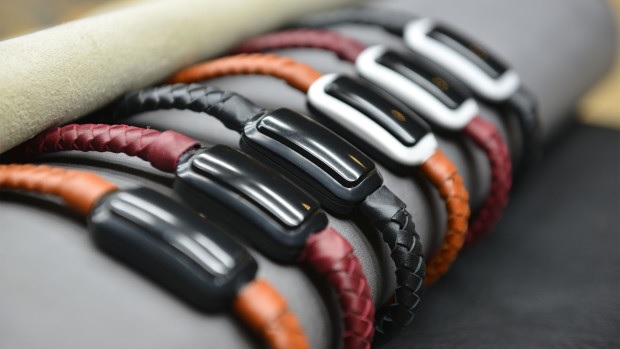
The NIFTYX bracelet
Crafted with leather, these bracelets don’t look at all, like a geeky device. It is currently available in three colors: Burgundy Red, Chestnut Tan, and Twilight Black. You may ask, “What is the power bank battery rating?” Well, it is just 210 mAh. Small really, but enough to give you upto 5% charge in emergencies. Below is a demo video you should check out:
In addition, the bracelet currently supports: microUSB and Lightning ports. Type-C compatibility might appear the future. What do you think of these bracelets? Is the power bank feature is useless? You can buy the bracelet starting from $14. More information can be found on their Indiegogo page.
Source
Author:Etoniru Chibueze
Chibueze is an award-winning gadget reviewer and geek. He loves research, while living and breathing tech. You can reach him on Facebook, Twitter ,OR LinkedIn
Add MobilityArena as a preferred source on Google
There are certain times when you need to browse the internet but also need it to be private. For example, you might want to do some research on a topic but also want to keep your browsing history private. In such cases, you can switch to Incognito mode.
Going incognito is easy to do on Chrome, the default Web browser on Android devices. The feature is available on other browser apps too, but the steps to activate it will vary from browser to browser.

If you use Google Chrome on Android, here’s how to turn on Incognito mode:
- Launch the Chrome app, then tap the three dots icon in the top right corner of the browser screen. You will see a list of options. Select “New Incognito tab”. You can open as many Incognito mode tabs as you like.
- To turn off Incognito mode, tap the square icon at the top right to open your tabs, then close each tab individually. Or else, click on the three dots icon and select “Close Incognito tabs” to close them all. This is important.
There are lots of times when you might want to consider going incognito with your browsing. For example, when you don’t want to be targeted by advertising, use private browsing. Your previous search habits will not affect the current search. Most importantly, whatever you are doing on Incognito Mode is not included in the browser history.
- Don’t miss our reviews .
- Follow our news on Google News .
- Join our WhatsApp Group , to be notified of the most important articles and deals,
- Follow us on Instagram , Facebook , Twitter , and YouTube .
