Add MobilityArena as a preferred source on Google
In addition to unwanted phone calls, many iPhone users complain about receiving unwanted text messages. It can be annoying to keep receiving text messages that you don’t want, especially marketing texts or scam texts attempting to get you to visit malevolent websites.
In this guide, we’ll explain how to block texts on your iPhone. So, keep reading to learn how to stop annoying text messages from disturbing your day.

- How Can I Block Text Messages on My iPhone? Block Saved Contacts Cards Block Unwanted Numbers Filter Messages From Unknown Senders Install a Call-Blocking App
How Can I Block Text Messages on My iPhone?
Spammers’ tricks for sending unwanted messages directly to your iPhone are constantly evolving. Thankfully however, there are several built-in and third-party options for blocking these unwanted text messages on your iPhone. Try one of the following suggestions to block text messages on your iPhone.
Block Saved Contacts Cards
One of the simplest ways to block text messages on your iPhone is to block the contacts you’ve saved on your device. This feature may be useful to you if you’ve recently had a fallout with a family member or friend.
Follow the steps below to block unwanted text messages from your saved contacts:
● Launch the Contacts app.
● Select the person you want to block.
● Click on Block this Caller .
You won’t receive any text messages or calls from the number connected to that contact. There is currently no built-in way to only block text messages while allowing a contact to still call you on your iPhone, or vice versa.
Block Unwanted Numbers
It’s one thing to block a saved contact in your phone, but blocking spam messages from unknown numbers is something else entirely
If you’re receiving these types of messages, you still have the option to prevent the unwanted number from contacting you again.
To block unwanted numbers and thus block texts from them on your iPhone:
● Open the unwanted text message.
● At the top, click the profile icon , then info.
● Select info once more.
● Press Block this Caller
It functions exactly like blocking a saved contact in your phone. Your phone will no longer receive spam calls or messages from such unknown numbers.
Filter Messages From Unknown Senders
It’s all well and good to block phone numbers one at a time until you start getting spam messages daily, multiple times, from various numbers. When this occurs, you can still block all texts from spammers using a feature that is already present on your iPhone.
You only need to filter out messages from unknown senders, and you will never be notified of another scam text again. Here’s how to block texts on your iPhone by filtering messages from unknown senders:
● Navigate to the Settings menu.
● Choose Messages .
● Activate the Filter Unknown Senders toggle.
By doing this, all incoming texts from numbers that aren’t in your contacts will be routed to a different folder. Although you are technically under no obligation to look at this folder, doing so occasionally will help you catch important messages from phone numbers you haven’t added to your contacts.
So, to view your filtered messages, go to Messages > Filters > Unknown Senders .
Install a Call-Blocking App
If you’re dissatisfied with the built-in iPhone options, consider downloading a call-blocking app instead to block texts on your iPhone. These apps serve a single purpose: to block unwanted calls and messages on your iPhone.
Each app will have special features of its own that you can use for purposes other than blocking text messages from reaching your phone. Additionally, you will find tools for caller ID, call filtering, and phone security. Here are a few of the best options:
Truecaller
Truecaller is one of the most widely used apps for blocking text messages and it’s completely free. It contains features that provide more security out of your iPhone. Additionally, the app offers a premium version with app removal, call recording, incognito mode, and the ability to view who has viewed your social media profiles.
Robo Shield
Robo Shield is an iPhone app that does more than just block text messages. It has caller ID, automatic call filtering, number lookup, and automatic number blocking capabilities. You can also configure category-based blocking, which filters messages based on the type of spammer, such as robocalls.
VeroSMS
VeroSMS sends none of user SMS data to its servers, and this is one of its best features. Instead, all filtering is performed directly on your iPhone. With the help of the app, you can add various keywords to your filter list to block certain texts on your iPhone. This will prevent your message inbox from clogging up with messages that contain those words.
In conclusion , we hope you find this guide and its tips useful to block unwanted text messages on your iPhone.
Author:Joan Agie
Add MobilityArena as a preferred source on Google
You already know that you can buy and use Xiaomi phones in the UK. The question is, how popular are they there? Xiaomi has been making lovely smartphones with top-tier performance and fantastic cameras for a while now, whether it is a cheap buy or something a little pricier.
Xiaomi is dominating the smartphone market, which is impressive for a business that only emerged from the shadows in 2017. It is sweeping through Europe and steadily gaining a large number of clients. But is Xiaomi a popular brand in the UK? I answer this question in this article, so you’ll find out how popular Xiaomi is, as well as which of its devices are the most recognised in the UK.
- How Popular are Xiaomi Phones in the UK?
- Do Xiaomi phones in the UK have Google Play Store?
- What are the Most Popular Xiaomi Phones in the UK?
- Where to Buy Xiaomi Phones in the UK
How Popular are Xiaomi Phones in the UK?
The answer? Xiaomi is largely popular in the UK consumer environment. In fact, Xiaomi customers in the UK are spoiled for choices, as the brand sells a variety of models in that market.
There are more budget-friendly Redmi models like the Poco line, as well as gaming-focused Black Shark smartphones and top-tier flagships bearing the full Xiaomi label. Whatever series you want, the bulk of Xiaomi phones is less expensive than comparable Samsung or Apple models while providing a comparable set of features and hardware.
Do Xiaomi phones in the UK have Google Play Store?
Yes, all Xiaomi smartphones released in the United Kingdom have Google Play Store, Google Mobile Services, and Google apps built-in and supported, and you can install millions of Android apps from the Store.
What are the Most Popular Xiaomi Phones in the UK?
Picking the top-tier Xiaomi phones can be difficult because there are so many to choose from in the UK. Also, more money doesn’t always equal better value. In order to save you time, here are the top three Xiaomi devices in the UK:
- Xiaomi 12 Pro
The Pros, Pluses, and Ultras are typically considered high quality in the smartphone world, and Xiaomi is no exception. The Xiaomi 12 Pro is one of the most popular Xiaomi smartphones in the UK. It essentially features fewer dimensions than the Xiaomi Mi 11 in favor of better specifications.
It features a new 50MP telephoto zoom camera that is accompanied by a second 50MP primary lens and a 50MP 118-degree super wide camera. The front of the device features a colorful AMOLED display with excellent color representation and brightness, and the internals deliver all-around quick performance.
Another benefit of the Xiaomi 12 Pro is its quick charging capabilities, which gets you from 0 to 100% in below 30 minutes. The main drawback is its premium price, however, the 12 Pro is the ultimate option if you want only the best Xiaomi.
- Xiaomi Redmi Note 11 Pro 5G
This is another popular Xiaomi smartphone in the UK. In addition to its superior quad camera array, which includes a sizable 108MP primary sensor, and its silky-smooth 120Hz screen, the Xiaomi Redmi Note 11 Pro also boasts a faster 67W charging port, 5G connection, and a better Snapdragon 695 processor.
As a whole, the Note 11 Pro isn’t significantly better than the Note 10 Pro, so if having these things doesn’t bother you, you can save a little bit more. Nonetheless, if you want to extend the lifespan of your next smartphone, we advise spending a little bit more for the latest model, particularly if it has 5G connectivity.
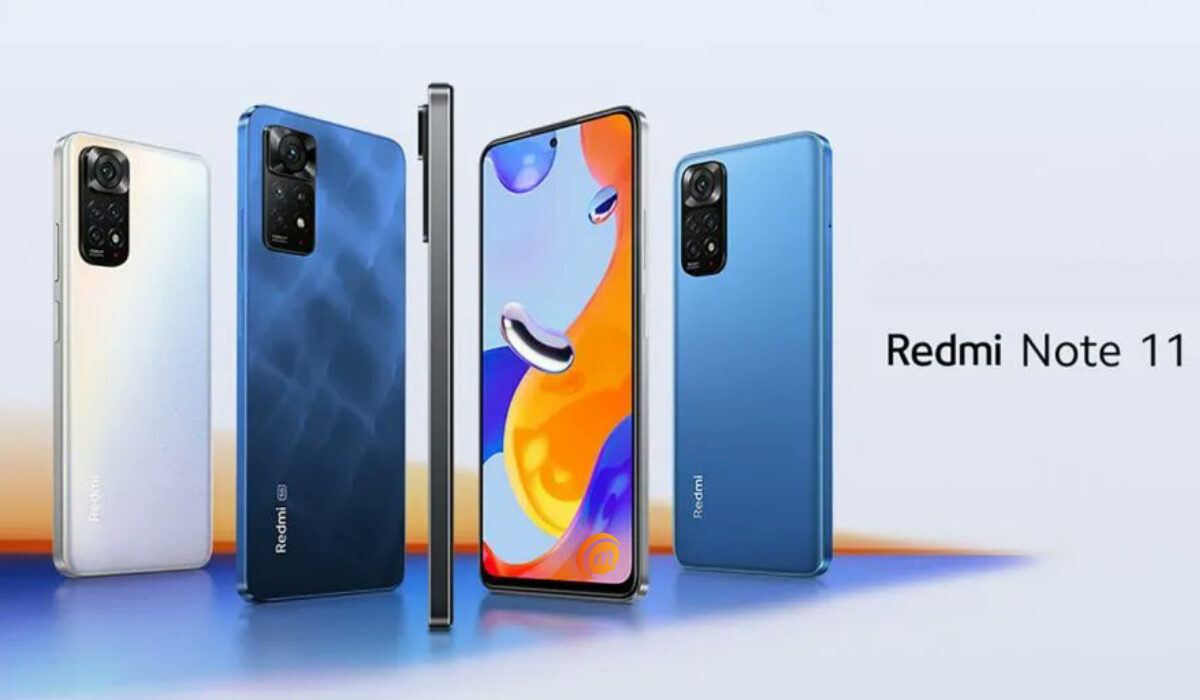
- Xiaomi Redmi Note 11
This is a budget-friendly and thus popular Xiaomi smartphone in the UK. The Redmi Note 11 is one of the finest smartphones that can be had for less money, despite the fact that most smartphones these days seem to cost over four figures.
Due to its speedy Snapdragon 680 CPU, this inexpensive Xiaomi performs better than phones that cost considerably more. Also, the phone has a gorgeous 6.43-inch FHD+ screen with a 90Hz refresh rate on the front and a quad-camera array on the back.
There are several other popular Xiaomi smartphones in the UK , including the Xiaomi 12 Lite, Xiaomi 12T, and the Xiaomi Poco F4, among others. This means the UK smartphone market has different Xiaomi products to choose from, so it is a reasonably respectable brand in the UK consumer environment.
Where to Buy Xiaomi Phones in the UK
In summary , we hope this article has helped you figure out how popular Xiaomi is in the UK, as well as which of its products are topping the UK market.
