Add MobilityArena as a preferred source on Google
This simple and easy tutorial shows you how to change the hotspot name on iPhone 13, to make it easier to identify and connect to. If you have ever turned on your iPhone 13’s personal hotspot so you could share your mobile Internet with your PC or other devices, you must have noticed that it has a generic name. Should there be other active iPhone hotspots present, you will have a hard time figuring out which is yours.
Imagine being in a crowded mall or park or some other public space with lots of people. You are likely to find more than one or two others with an active iPhone WiFi hotspot. If all these hotspots have the same generic name, confusion may set in. It makes sense to personalise your iPhone’s mobile hotspot by giving it a unique name. That way, you and whoever else you choose to share it with can identify it. Here is how to change the hotspot name on iPhone 13.

Yes; you can change the hotspot name on iPhone 13
To change the hotspot name on your iPhone 13 is as simple as changing the name of your iPhone in general. The name change will then reflect on your hotspot name.
- Steps To Change The Hotspot Name On iPhone 13
- How to change your iPhone 13’s hotspot password
Steps To Change The Hotspot Name On iPhone 13
Here is how to go about changing the hotspot name on your Apple iPhone 13:
- Open your iPhone 13’s Settings menu.
- Scroll down and select the General option.
- Tap the About button at the top of the screen.
- Tap the Name button at the top of the screen.
- Tap the small x button to the right of the current name, enter a new name, then tap the blue Done button on the keyboard.
Done. From now on, your personal hotspot name on your iPhone 13 is the new name you entered above, making it easy to identify when sharing your mobile Internet with others.
If you also need to set or change your iPhone 13’s personal hotspot password, that is easy to do as well. It is a great idea to secure your mobile hotspot so anyone cannot just connect to it when it is active and use your data subscription. Giving it a password that you can remember is also a convenience that you can enjoy. Have a look below for quick instructions on how to do it.
How to change your iPhone 13’s hotspot password
Here is how to go about changing your mobile hotspot password:
- Open your iPhone Settings menu.
- Tap Personal Hotspot .
- Tap the toggle switch to turn on Personal Hotspot.
- Tap Wi-Fi Password to change the Wi-Fi Password.
- Be sure to enter something that you can remember but that isn’t easy for others to guess.
That’s it. Your wifi hotspot is now properly secured. Again, it is important to spell it out that it is a good idea to have a strong password on your hotspot. If your password is easy to guess, your children, for example, will figure it out and exhaust your subscription. Children are that creative. Some of your colleagues and acquaintances are too.

Change your iPhone 13’s hotspot name and password
So, secure your mobile hotspot with a strong password. Also, make it a password that you don’t mind sharing with others on occasion. Which means, it is a bad idea to use a password that secures your bank account as your hotspot password. Get the idea?
Now you know how to change the hotspot name and password on your iPhone 13. Even if you upgrade your device to a newer model, the above instructions are valid unless Apple changes how it is done somewhere along the line. Your iPhone 13’s personal hotspot has a unique name and a password you can remember.
Being able to share your mobile Internet for use on your PC or other devices can come in handy during trips and when you are out and about for work or relaxation. You will not always find a public hotspot, and even when you do, you have to be wary of most of them, for security reasons. Where you can, use the personal hotspot on your iPhone to connect your laptop and tablet for urgent work.
- Don’t miss our mobile phone reviews .
- Follow our news on Google News .
- Follow us on Instagram , Facebook , Twitter , and YouTube .
Author:InfoDesk
Add MobilityArena as a preferred source on Google
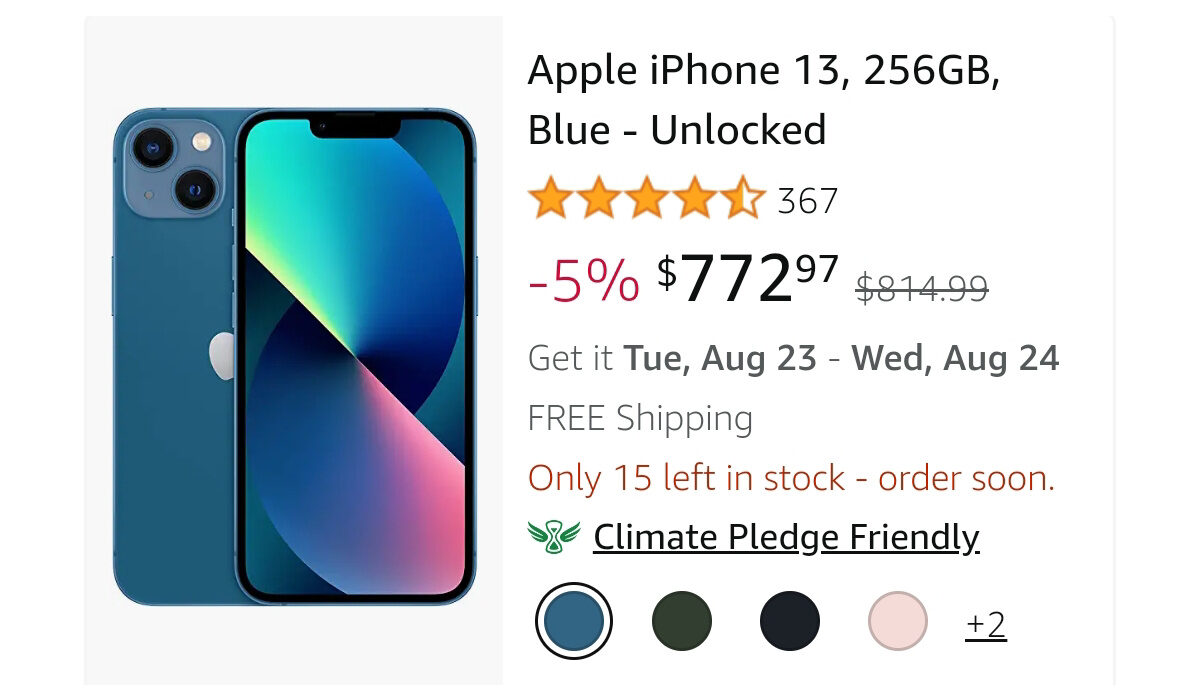
If you don’t want to be locked to a wireless carrier or network, you will definitely want to buy your iPhone 13 unlocked. An unlocked smartphone is one that you can use with any carrier of your choice. That way, you can put the SIM card from any compatible network operator into it and it will work. You can switch between multiple carriers without a fuss.
Buying an unlocked iPhone is liberating. The first question on your mind might be, Do iPhone 13s come unlocked? Yes; they do, depending on where you buy them from. If you buy one from a carrier, with monthly payments, chances are it is locked to that carrier’s network and will not work with a SIM card from another carrier, without you unlocking it first.
The Price: How much does an unlocked iPhone 13 cost?
Where to buy iPhone 13 unlocked
You may be able to buy iPhone 13 from many places, but it is not available unlocked at all of them. Here are a number of places you can buy the iPhone 13 unlocked and use it freely across carrier networks.
The first place is Apple’s store . Whether you are buying from a physical Apple Store or from the official website, buying directly from Apple gets you an unlocked iPhone 13. Freedom.
Are iPhones bought from Best Buy unlocked?
Best Buy is an interesting case. When you buy a phone from Best Buy, it is initially unlocked, but it will then lock itself to the first carrier you use it with. So, you are still stuck. What you get isn’t exactly a truly unlocked iPhone 13.
Can you buy an iPhone 13 unlocked at Costco?
Not at all. Costco phones are sold locked to a carrier. Costco sells contract phones and so require you to sign a contract with Verizon, T-Mobile, or AT&T.
Buying iPhone 13 unlocked in the UK, Germany, and Australia
Can you Buy iPhone 13 Unlocked In India?
Your mobile operator might have it available unlocked, so do ask. Generally speaking, if you are unable to buy from Apple directly, above and beyond any information we have provided on this page, something you can do is ask the retail store if they have the iPhone 13 unlocked. It never hurts to ask direct questions. Also ask if the phone will be locked to the carrier it is activated on. This is important.
- Don’t miss our mobile phone reviews .
- Follow our news on Google News .
- Join our WhatsApp Group , to be notified of the most important articles and deals,
- Follow us on Instagram , Facebook , Twitter , and YouTube .
Author:Mister Mobility
Digital Skills and Communication Coach | Mobile Phone Connoisseur since 2001 | Tech Blogging since 2004
