Add MobilityArena as a preferred source on Google
Inevitably, you’ll run into one battery-related issue or another with your smartphone over time. Battery performance tends to deteriorate with time because they are consumable. After a while, they will stop holding a charge as well as when they were brand-new.
With this in mind, it makes sense to do everything you can to maintain the health of your phone’s battery. If you want your device to run smoothly for as long as possible, you’ll need to check your Android’s battery health regularly and do things to maintain it as long as possible. In this guide, we’ll demonstrate how to check battery health on Android.
- How Can I Check Android Battery Health? Check Android Battery Health with Settings Check Android Battery Health with a Dial Code How to check the battery health of a Samsung phone: Check the Battery Health of Android phones using 3rd Party Apps
How Can I Check Android Battery Health?
There are different options available if you want to check an Android’s battery health. Consider our suggestions below:
Check Android Battery Health with Settings
You should be able to check the battery health on any modern Android device using this method, even though the terminology of some of the Android options may vary. Apart from this possibility, the level of intricacy will vary depending on who produced your phone.
Follow these steps on your device to check Android battery health:
● Choose Battery from the Settings app on your phone. The top-tier menu should make this choice easy to locate, but you can also try using the search bar at the top of the page to find it.
● If the information you need about Android battery health isn’t immediately apparent once you get to the Battery area, check for a choice like Battery usage .
You’ll be able to view your battery status for the previous 24 hours as well as the apps that have been consuming the most power here. You can click on one of the apps in this selection to force it to close or to completely disable it. The choice to disable, force halt, or select an optimization setting will then appear.
Some phone brands will display more information. For instance, phones that run MIUI, such as those manufactured by Xiaomi, Redmi, and POCO, will display the current temperature of your battery.
If you observe any temperature below 50 degrees Celsius (or 122 degrees Fahrenheit), it’s totally normal. Keep in mind that there’s not much need to monitor the temperature regularly.
Check Android Battery Health with a Dial Code
By entering specific sequences of digits, hashes, and asterisks into the call pad in the Phone app, you’ll be able to access some Android phones’ hidden diagnostic menus.
There are a number of these that go to different menus, but we’ll concentrate on the one that has to do with battery information. So here’s how to check Android battery health with a dial code:
● Launch the Phone app on your Android device and use the dial pad. Input the code ##4636## .
● Your phone should direct you to the following menu when you enter the final “*”
● Now check for data regarding batteries. If this data doesn’t display, it may unfortunately mean you can’t use this method to check your Android’s battery health. Otherwise, you’d see details like the battery’s charge level, health, and temperature.
On Xiaomi, Google, and OnePlus devices, this dial code method should work but may not provide the needed battery information. Also, if you try the code on the Samsung Galaxy A52 5G, it may not display this menu.
How to check the battery health of a Samsung phone:
● Using its Samsung Members app (which comes pre-installed on all of its devices), Samsung provides a battery health check of its own. All you need to do is open Samsung Members and choose the Get Help tab.
● Choose the Interactive checks option towards the top of the new menu.
● Choose Batteries from the features listed here.
● You should now be able to view how the Samsung Members app assesses the battery life of your phone.
Check the Battery Health of Android phones using 3rd Party Apps
Apart from the above-described options, another way to check Android battery health is through third-party apps. AccuBattery by DigiBites, Battery by MacroPinch, and CPU-Z by CPUID, are all suitable options to successfully check Android battery health. They will display information about usage, temperature, and typical battery capacity.
In conclusion , we hope you’ve found this guide helpful to check your Android’s battery health. Make sure to follow the instructions correctly for the best outcome.
Author:Joan Agie
Add MobilityArena as a preferred source on Google
AGM G2 Guardian is a rugged smartphone that features a Thermal Monocular Long Detection camera that has uses in industrial, security, and search and rescue situations. AGM says it will survive drops of up to 1.5 metres. You can buy a locked US T-Mobile version of the AGM G2 Guardian or an unlocked version that also works everywhere else in the world.
In a slightly confusing situation, there are two other variants of the G2 Guardian, namely AGM G2 Pro and AGM G2 . They cost less than the G2 Guardian and offer only 8GB RAM + 256 GB storage, where the G2 Guardian offers both 8GB and 12GB RAM.
AGM G2 Guardian: brief specs
- OS: Android 12
- Release Date: 2023
- Network Type: 2G/3G/4G/5G
- Display: 6.58-inch, 1080 x 2408 pixels resolution
- Processor: Qualcomm QCM6490
- Selfie Camera: 32 MP
- Rear camera: 108 MP quad
- RAM: 12 GB
- ROM: 256 GB
- Battery: 7000 mAh
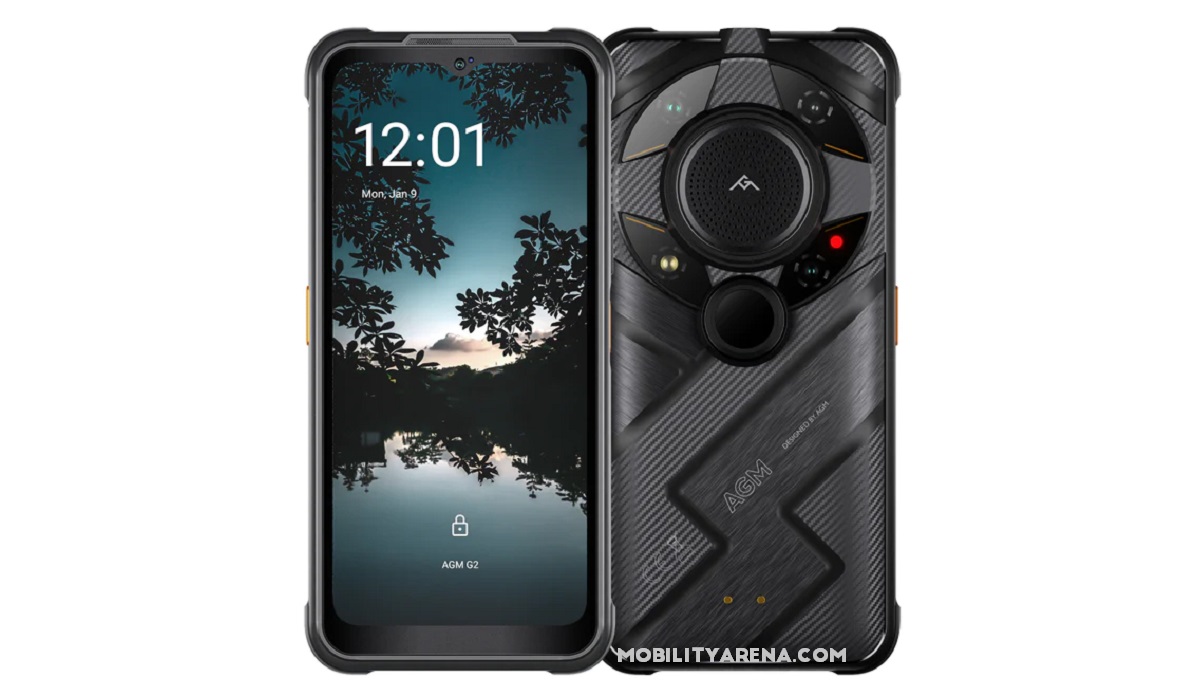
AGM G2 Guardian rugged smartphone
- Detailed Specs
- Prices of AGM G2 by Country Does AGM G2 Guardian have Google Play Store? Will AGM G2 Guardian work in the USA? How powerful is AGM G2 Guardian?
Detailed Specs
Mobile Wireless Network and Software
- 2G mobile network bands : GSM, GPRS, EDGE 850 / 900 / 1800 / 1900 MHz.
- 3G mobile network bands : UMTS, WCDMA, HSDPA 850 / 900 / 2100 MHz
- 4G mobile network bands : LTE. VoLTE.
- 5G mobile network bands : NSA/SA. VoNR. n1, n2, n3, n5, n7, n8, n28, n41, n66,n71, n77, n78,n79
- SIM Type : Nano-SIM, Dual SIM
- Software / OS : Android 12
Design, Form Factor, Appearance
- Dimensions : 177.5 x 85.3 x 25.3 mm
- Weight : 405g
- Display : 6.58 inches, 1080 x 2408 pixels, 120 Hz refresh rate, 20:9 aspect ratio, IPS LCD screen. Gorilla Glass protection.
- Colours : Black.
- Physical Build : IP68/IP69K waterproof (up to 30 minutes in 1.5 metres of water), shock and dust proof. MIL-STD-810H.
Internal Hardware Specs
- CPU/ Processor : 64-bit, 2.7GHz Octa-core
- Chipset : Qualcomm QCM6490
- GPU/ Graphics Processing Unit : Adreno 643
- RAM : 8 GB / 12 GB
- Extended/Virtual RAM : N/A
- Internal Storage : 256 GB
- External Storage : microSD, up to 512 GB (dedicated slot)
Photography, Video Recording
- Main Camera : 108 MP main sensor + Thermal Monocular Long Detection camera + 20 MP Infrared Night Vision lens + 2 MP macro lens, autofocus, LED flash, 1080p@30fps video recording
- Front Camera : 32 MP, fixed focus, Face Recognition, 1080p@30fps video capture
Audio, Video Playback
- Music Support : PCM, AAC / AAC + / eAAC + / MP3 / AMR – NB / WB / APE
- Audio : 3.5 mm audio jack
- Loudspeaker : Mono speaker
- Video Support : H.264/MP4/MPEG4 player
- FM Radio :
Phone Sensors
- Digital Compass : Yes.
- Accelerometer : Yes.
- Proximity Sensor : Yes.
- Ambient Light Sensor : Yes.
- Barometer : No.
- Pedometer : No.
- Heart Rate Monitor : No.
- Gyroscope (G-Sensor) : Yes.
- Fingerprint Scanner : Yes; side-mounted.
- Face Unlock : Yes.
- Iris Scanner : No.
- Motion Sensing / Gesture Control : No.
- Voice Control : No.
- Intelligent Digital Assistant : Yes; Google Assistant.
- Infra-red Blaster : No.
Connectivity Options
- Bluetooth Version : 5.2
- Bluetooth Profiles : A2DP
- WiFi : Wi-Fi 802.11 a/b/g/n/ac/ax/6, hotspot
- GPS : Yes, A-GPS, GLONASS, BDS, Galileo
- USB : microUSB v2.0. Type-C. USB-OTG.
- NFC : Yes.
Miscellaneous Specs and Features
- Battery Type and Capacity : Non-Removable Lithium-Polymer 7000 mAh
- Battery Charging : 18W fast charging
- Wireless Charging : 10W.
- Reverse Charging : No.
- Model Version/Number :
Launch/Release Dates and Information
- Announced : February 2023
- Release Date : March 2023
Prices of AGM G2 by Country
- USA : $899 (8/256GB). $999 (12/256GB). AGM G2 Pro : $799 (8/256GB). AGM G2 : $699 (8/256GB).
- United Kingdom (UK) : £
- European Union : €
- Switzerland : CHF
- Australia : AU$
- UAE (Dubai) : AED
The above prices may change with time from country to country, as market forces and economic policies influence product price movements.
Does AGM G2 Guardian have Google Play Store?
It supports Google Services and software applications, including Play Store and Maps, Gmail, YouTube, and others.
Will AGM G2 Guardian work in the USA?
This is a GSM phone and is supported on US GSM carriers like AT&T and T-Mobile and other networks riding on their networks. It does not support CDMA networks. Do make enquiries from your carrier to know what bands/frequencies are supported on their service.
How powerful is AGM G2 Guardian?
AGM G2 Guardian is powered by a Qualcomm QCM6490 chipset, which is slightly below Dimensity 1200 in performance and above Dimensity 1100. That makes the G2 Guardian an upper mid-range performer.
MobilityArena Buyer’s Guide Verdict
The AGM G2 Guardian is one of the toughest rigged smartphones on the market. Its thermal monocular camera is unmatched, too. And it has great battery life. If you are an outdoor enthusiast or professional in need of a smartphone for capturing night images and videos, the G2 Guardian is as good as it gets.
Our Buyer’s Guide Verdict is a recommendation based on the specifications of the device and a general guide to help you understand how much value a device offers for its price. It is not an endorsement of the device. Ask questions and use your judgement when buying any device; MobilityArena takes no responsibility for your buying decisions .
AGM G2 Guardian Phone Review Rating
The G2 Guardian is a solid rugged smartphone. It is built like a fortress and takes a beating and a dunking without breaking a sweat. It holds on to 5G network signals well, even in fringe areas where other phones like the iPhone SE 2022 and Samsung S23 fail to do so. See our detailed AGM G2 Guardian review .
