Add MobilityArena as a preferred source on Google
People can now enjoy a variety of conveniences thanks to the evolution of smartphones. You get to easily perform many different tasks at home using your smartphones, including entertainment-related activities.
One way to take this experience to the next level is to connect an Android phone to a TV. With this set up, you get to watch movies, play games, and enjoy other entertainment forms on a larger screen. However, not everyone knows how to connect an Android phone to a TV for such purposes, therefore, we’ve created this easy guide.
This article will outline the materials and procedures needed to successfully connect an Android phone to a TV. Ensure to pay close attention to the contents of this guide so you can figure out the process easily.
How Can I Connect an Android Phone to a TV?
When you want to connect an Android phone to a TV, you can choose between establishing a wired or wireless connection. We’ve discussed several ways to achieve both options below.
Wired Options to Connect an Android Phone to a TV
The three main wired solutions to connect an Android phone to a TV are USB-C to HDMI, MHL , and SlimPort . You can check the list of MHL-compatible devices and the list of SlimPort-supported devices to discover which one your smartphone or tablet supports.
USB -C to HDMI
For USB to HDMI connections, support has increased recently. You’ll require a converter for this to transfer signals from the USB connector—either a micro-USB or USB type-C connector—to the HDMI cable and show the output on the TV or monitor of your choice.
Here are the steps that you need to follow:
- Connect the adapter’s USB-C end to your tablet or smartphone.
- Plug the HDMI cable into the adapter
- Connect the other end of the HDMI cable to an HDMI port on your TV or monitor if you haven’t previously done so. Typically, HDMI connectors are located at the back of TVs, monitors, and projectors.
- Navigate to the HDMI source on your TV or monitor.
After you’ve followed these instructions to connect an Android phone to a TV, you’ll be able to enjoy content from your phone or tablet as you please.
MHL
Many Android smartphones and tablets support MHL, which was one of the first significant wired standards used to connect an Android phone to a TV. It makes use of a sophisticated mechanism that enables power and audio/video to be transmitted through the micro USB port on your device.
All you need to do is purchase a micro USB to HDMI (passive MHL) cable and plug it into one of the special HDMI ports found on supported TVs, monitors, and projectors .
SlimPort
Another wired option that is similar to MHL is called SlimPort. The main distinction is the absence of power input. Your gadget won’t be recharged if no power is provided, but the HDMI link will continue functioning. Some modern smartphones, tablets, and laptops that support SlimPort include LG and Google devices.
You’ll need a SlimPort HDMI converter to use SlimPort. The USB connector fits into a powered USB port or wall adapter, the micro-USB plug into your phone, and the HDMI cable connects the adapter and TV.
Wireless Options to Connect an Android Phone to a TV
There are a number of wireless protocols available, and they all appear to contain the word “cast.” Here, we’ll examine a few of them.
Miracast Dongle
Many recent TV models have a wireless HDMI system called Miracast built in. Even if your TV isn’t Miracast compatible, your Blu-ray player or media center might be. If it doesn’t work, you can attach a cheap Miracast dongle to the HDMI connection on your TV.
Open Settings > Device connection > Screen mirroring and follow the instructions there to connect to a Miracast handset using a device running Android 6.0 Marshmallow or later. To enable wireless display on older devices, enter the menu and select Settings > Display > Cast screen.
Google Chromecast
The popular Google Chromecast Ultra is perhaps the easiest way to connect an Android phone to a TV. In essence, this is a mechanism for sending media or the screen from your phone to a TV. Both an HDMI and a USB power cable are included with the Chromecast (most TVs have a USB port that provides enough energy to power the device). It will be ready for use once it has been paired with your Android device.
All you have to do is locate the icon in your preferred apps or use the Cast command in Android’s pull-down Quick Settings menu. For instance, a Cast option exists in the mobile Chrome app.
Android Screen Mirroring
For those who have a recent Android device and a smart TV, this is a fantastic method to connect an Android to a TV. To access your notifications panel, simply slide downwards from the top of your phone’s screen. A screen mirroring option should be present here; it is known as Screen Cast (or Smart View on Samsung devices) . You can now select which TV or monitor you want to mirror your phone to.
If you don’t have access to this capability, you can still use screen mirroring by downloading the Google Home app. Once downloaded, select your TV or monitor by tapping the account button in the bottom right corner, then scroll down to “ Mirror Device.”
In conclusion , you may enjoy your Android phone or tablet’s high-quality output on your HDTV if you have the appropriate hardware. The possibilities are interesting once you know how to connect an Android phone to a TV, whether it be playing games, viewing images, enjoying music, or watching videos.
- Don’t miss our mobile phone reviews .
- Follow our news on Google News .
- Join our WhatsApp Group , to be notified of the most important articles and deals,
- Follow us on Instagram , Facebook , Twitter , and YouTube .
Author:Joan Agie
Add MobilityArena as a preferred source on Google
In 2013, Motorola Mobility, then owned by Google, released the Moto X Android phone. It was assembled here in the United States of America. It was the closest thing to a phone manufactured in the US. Google eventually sold Motorola Mobility to Lenovo. You could say that the Moto X was the last of phones made in America, at least from the well-known brands.
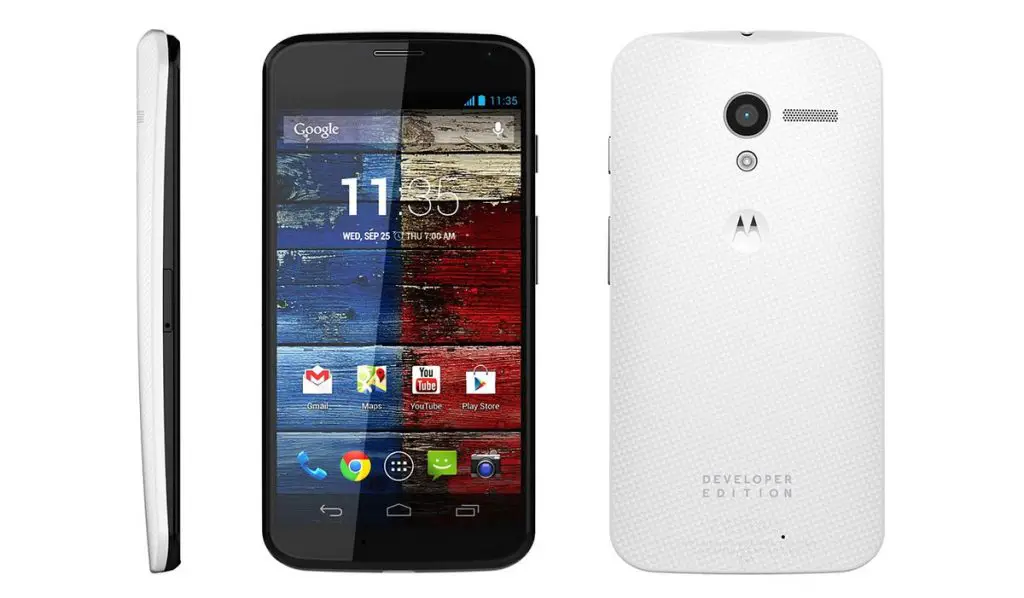
Motorola Moto X (2013) belonged to the last generation of phones made in America. That will change soon.
2013 is a long time ago in the world of mobile phones. A lifetime. Since then, all the brands that you love and buy – Apple iPhone, Samsung Galaxy, Motorola Moto, Nokia, OnePlus, and others – have all manufactured their phones outside of America. Some manufacturing have taken place in locations like Brazil, China, Vietnam, Korea, and India. In recent years, most of it happened in China.
Some of these phone brands have been looking to reduce their risk in China and have started exploring other locations. For example, Some iPhones, Samsung phones, Motorola Moto phones, and Nokia phones are now made in India. Other phone brands that are not popular here in America are also moving some of their manufacturing to India.
But this doesn’t solve the problem of a lack of phones made in America. If you have been in search of phones made in America and have been disappointed to not have found one that you can buy, I have good news for you: that will change soon enough. Why is that so? For starters, the core components in all smartphones is the chipset, also called a processor. A number of top chip makers are now investing in manufacturing facilities here in America (see: Made-in-America Chips by TSMC, Intel, Micron, Samsung to boost local production ).
Chips are highly complex components that require the most specialized skills. Once we have enough chips being manufactured here in America, the next logical step is the production of phones here. No doubt, some components, like screens and batteries, might still be imported, but the core components will be made here and the products assembled right here.
Give it another 3 years – that will be 2025 – and I am convinced that we should have a small handful of phones made in America in stores around the country again. Will brands like Apple and Samsung stop manufacturing phones overseas entirely? I doubt it. The overseas markets are highly competitive in terms of pricing, thanks to products made in China and India. Most brand will likely continue to make phones for the foreign market at those two locations, if they are to be able to compete internationally. But for local consumption here, I expect that only phones from the major brands (read iPhone and Samsung) that are made in America will be found in stores.
Author:MobileChic
That motivated, gadget-loving geeky chic who tries to stay on top of things. Unapologetic iFan.
