Add MobilityArena as a preferred source on Google
No one likes ad interruptions, but in today’s mobile gaming world, they’re a necessary evil. Ads help developers to offer their apps for free (or at least for a limited time) while still earning money for their efforts. You’re probably used to seeing ads because the vast majority of free Android and iPhone games and apps include them.
- How Do I Disable Ads in a Mobile Game?
- How to Disable Ads in Android Games
- How to Disable Ads in Mobile Games on iPhones or iPads
- How to Disable Ads in Mobile Games Using Third-Party Ad Blockers
How Do I Disable Ads in a Mobile Game?
There may not be much you can do to completely avoid ads in your preferred offline games, but there are certainly ways to disable ads in mobile games. This article provides recommendations below that apply to any Android smartphone or iPhone device.
How to Disable Ads in Android Games
You can disable ads in mobile games on an Android phone through numerous ways. Consider the following:
Disabling ads in mobile games can be this simple, but note that this method only works for some games because most of them require a constant internet connection to work.
● Use a VPN service: A VPN service reroutes your traffic and convinces a server that you are in another country. So if you choose a country where advertisers are less likely to target you, you can successfully disable ads in mobile games.
● Use a private DNS: This solution also works to disable ads in mobile games. First, find a reputable ad-blocking DNS server that you can rely on to intercept and filter your traffic. Then, in the Settings menu, choose Network & Internet or Wireless & Networks . Scroll down and tap Private DNS , then enter the DNS of your choice in the field Configure Private DNS .
● If offered, pay for a game or an ad-free subscription: This is the simplest and most legal method to disable ads in mobile games, but most games tend to overlook it. Even monthly payments to disable ads in mobile games do not appear to cover the revenue generated by showing said ads.
How to Disable Ads in Mobile Games on iPhones or iPads
Since iOS does not give its users the same level of freedom as Android, our recommendations for disabling ads in mobile games are significantly less for iPhone and iPad devices.
However, there are a few options that you can try.
● Switch off mobile data and WiFi.: This method of disabling ads in mobile games operates on the same principle as Android. In essence, no internet means no ads on your screen.
To begin, launch your favorite game and allow it to collect all updates. When it’s finished, go to your Control Center and turn off Wi-Fi and mobile data. Turn off the game, wait a few seconds, and then relaunch it.
● Disable internet access for a specific game: This method of disabling ads in mobile games allows you to stay online while preventing the game from connecting to the internet.
First, disable Wi-Fi. Now, navigate to Settings > Mobile Data . Scroll down and find a game or an app, and switch off the toggle next to it. Since this method only works with mobile data, you’ll need to disable Wi-Fi.
● In-app purchase to remove ads: Many games allow you to pay a few dollars to remove ads permanently. It’s worth the small fee to remove annoying ads from games you play frequently.
The cost of disabling ads in mobile games will seem even more reasonable when you consider the time you probably waste watching 15-second video ads and how you could use that time more effectively.
How to Disable Ads in Mobile Games Using Third-Party Ad Blockers
All you’d have to do is install AdLock on your Android or iOS device, turn it on, and go through a two-step setup process. AdLock will then remove ads from mobile games and applications.
● Navigate to Settings , then Safari .
● Click Extensions and enable all AdLock toggles.
● To enable ad-blocking, launch AdLock and toggle the Ad-free web browsing toggle. Wait a few minutes for AdLock to finish downloading all necessary filters.
● Select a plan by tapping the Premium toggle. You’ll get a 7-day trial
To set up AdLock for Android phones:
● Open AdLock, click the hamburger menu, then select Settings .
● In the next window, tap Check for Updates and then UPDATE .
In conclusion , in-game ads can be quite annoying; however, using the tips provided above, it is possible to effectively disable ads in mobile games.
Author:Joan Agie
Add MobilityArena as a preferred source on Google
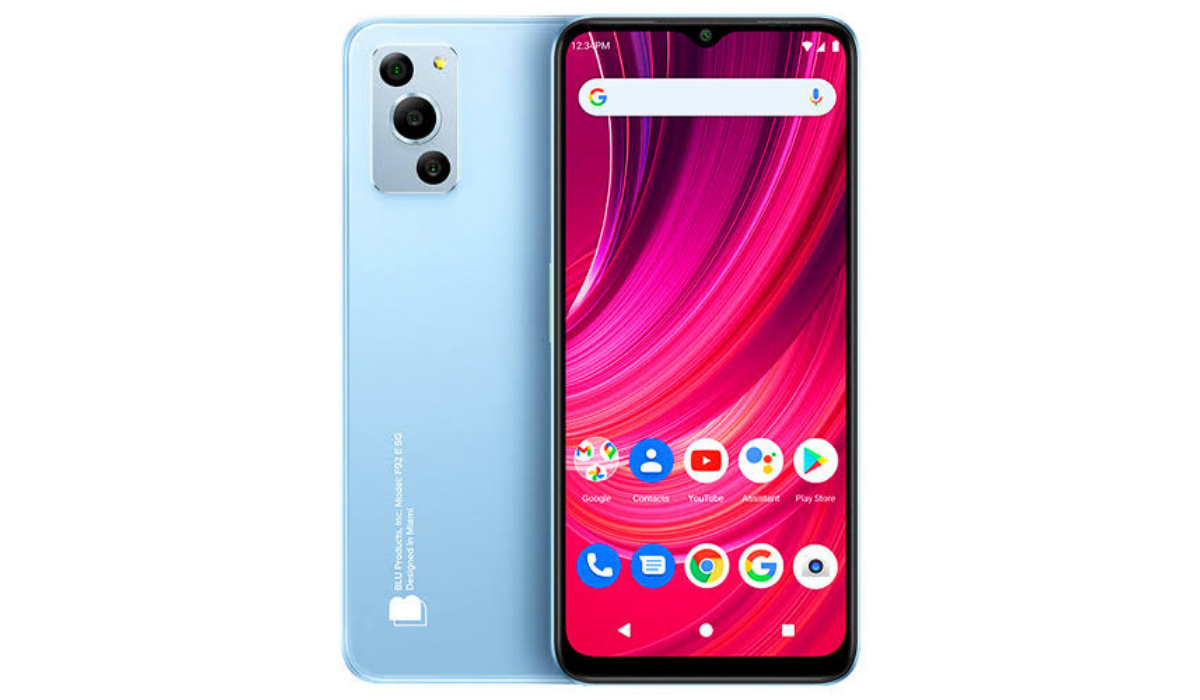
BLU F92e 5G is a budget Android smartphone offering a decent balance between price and features.
Welcome to our complete guide to the BLU F92e 5G. On this page, we cover everything you need to know about this mobile device, including its specifications, price, release date, and more.
BLU F92e 5G: brief information
- OS: Android 12
- Release Date: 2023
- Network Type: 2G/3G/4G/5G
- Display: 6.5-inch, 720 x 1600 pixels resolution
- Processor: Dimensity 700
- Selfie Camera: 13 MP
- Rear camera: 50 MP triple
- RAM: 4 GB
- ROM: 128 GB
- Battery: 5000 mAh
BLU F92e 5G
- Detailed specifications
- Prices in the USA, UK, EU Does BLU F92e 5G have Google Play Store? Will BLU F92e 5G work in the USA?
Detailed specifications
Mobile Wireless Network and Software
- 2G mobile network bands : GSM, GPRS, EDGE 850 / 900 / 1800 / 1900 MHz.
- 3G mobile network bands : UMTS, WCDMA, HSDPA 850 / 900 / 2100 MHz
- 4G mobile network bands : LTE.
- 5G mobile network bands : NSA/SA
- SIM Type : Nano-SIM, Dual SIM
- Software / OS : Android 12
Design, Form Factor, Appearance
- Dimensions : 164.7 x 76 x 8.9 mm
- Weight : 202g
- Display : 6.5 inches, 720 x 1600 pixels, 60 Hz refresh rate, 20:9 aspect ratio, IPS LCD screen
- Colours : .
- Physical Build : Plastic frame. Plastic back panel.
Internal Hardware Specs
- CPU/ Processor : 64-bit, 2.2 GHz Octa-core
- Chipset : Dimensity 700 (7nm)
- GPU/ Graphics Processing Unit : ARM Mali
- RAM : 4 GB
- Extended/Virtual RAM :
- Internal Storage : 128 GB
- External Storage : microSD, up to 256 GB (dedicated slot)
Photography, Video Recording
- Main Camera : 50 MP main sensor, + 2MP macro lens + QVGA depth sensor, autofocus, LED flash, 1080p@30fps video recording
- Front Camera : 13 MP, fixed focus, Face Recognition, 1080p@30fps video capture
Audio, Video Playback
- Music Support : PCM, AAC / AAC + / eAAC + / MP3 / AMR – NB / WB / APE
- Audio : 3.5 mm audio jack
- Loudspeaker : Mono speaker
- Video Support : H.264/MP4/MPEG4 player
- FM Radio : Yes.
Phone Sensors
- Digital Compass : Yes.
- Accelerometer : Yes.
- Proximity Sensor : Yes.
- Ambient Light Sensor : Yes.
- Barometer : No.
- Pedometer : No.
- Heart Rate Monitor : No.
- Gyroscope (G-Sensor) : No.
- Fingerprint Scanner : Yes; side-mounted.
- Face Unlock : Yes.
- Iris Scanner : No.
- Motion Sensing / Gesture Control : No.
- Voice Control : No.
- Intelligent Digital Assistant : Yes; Google Assistant.
- Infra-red Blaster : No.
Connectivity Options
- Bluetooth Version : 5.2
- Bluetooth Profiles : A2DP
- WiFi : Wi-Fi 802.11 a/b/g/n/ac, hotspot
- GPS : Yes, A-GPS, GLONASS, BDS, Galileo
- USB : microUSB v2.0. Type-C. USB-OTG.
- NFC : Yes.
Miscellaneous Specs and Features
- Battery Type and Capacity : Non-Removable Lithium-Polymer 5000 mAh
- Battery Charging : 10W charging
- Wireless Charging : No.
- Reverse Charging : No.
- Model Version/Number :
Launch/Release Dates and Information
- Announced : March 2023
- Release Date : March 2023
Pricesin the USA, UK, EU
- USA : $199 (available on Amazon)
- United Kingdom (UK) : £
- European Union (EU) : €
The above prices may change with time from country to country, as market forces and economic policies influence product price movements.
Does BLU F92e 5G have Google Play Store?
It supports Google Services and software applications, including Play Store and Maps, Gmail, YouTube, and others.
Will BLU F92e 5G work in the USA?
This is a GSM phone and is supported on US GSM carriers like AT&T and T-Mobile and other networks riding on their networks. It does not support CDMA networks. Do make inquiries from your carrier to know what bands/frequencies are supported on their service.
MobilityArena Buyer’s Guide Verdict
Not available.
Our Buyer’s Guide Verdict is a recommendation based on the specifications of the device and a general guide to help you understand how much value a device offers for its price. It is not an endorsement of the device. Ask questions and use your judgement when buying any device; MobilityArena takes no responsibility for your buying decisions .
