Add MobilityArena as a preferred source on Google
I first stumbled on the news via a post over at XDA Developers claiming that the WhatsApp Group Chat user limit has been bumped up from 100 to 256. The post said that the increased limit was visible on WhatsApp version v2.12.367. I had WhatsApp version 2.12.367 on my device, but when I tried to add more than 100 users to a group chat, I got a message saying that I had reached the group capacity.
I did try it again at a later date and the new WhatsApp Group limit of 256 worked. I was able to add 256 users to a group instead of a maximum of 100.
- Is there any way to add more than 256 users in a WhatsApp group? Update: You can now bypass the WhatsApp Group Limit officially How to find your WhatsApp Group Invite Link Frequently Asked Questions About WhatsApp Group Limits Can I add 500 members in WhatsApp group? How can I add 1000 members in WhatsApp group? How can I exceed WhatsApp group limit? What is the current WhatsApp Group Limit?
Is there any way to add more than 256 users in a WhatsApp group?
There is no official way to do add more than 256 users in a WhatsApp group. If your business service, organization, or project requires more than 256 users, you can create multiple groups and assign different admins to each. But unofficially , it is possible.
There are hardcore users who have been able to increase the WhatsApp group limit on their devices by tinkering. If you want to go down that route, you need to root your Android smartphone and then use a File Manager to edit a file.
- Enable root access
- Download and launch ES File Explore.
- Browse to this file: data/data/com.whatsapp/shared_prefs/WhatsApp_Preferences.xml
- Edit the WhatsApp_Preferences.xml file as follows: find the line in the file that says “int name=”participants_size_limit”value=”100″ and replace 256 with the new user limit you want to assign to your Group. Make sure that you do not touch anything else in the file, or add a dot or comma. After changing that figure, save the file and close it.
- Now restart your phone.
You will find that you now have a new WhatsApp group limit and can add more than the official 256 users. May the force be with you. If you run business services, you will be able to add much more members to your group.
Update: You can now bypass the WhatsApp Group Limit officially
You can now add more than 256 users by admitting new members through your Group’s invite link. This is a simple and less technical way to add more than 256 people in your WhatsApp Group. Why go through all the trouble of rooting your phone and editing a file?
Follow the steps below to find the Group invite link, so you can add more than the official WhatsApp Group limit of 256.
How to find your WhatsApp Group Invite Link

Create your Group. Go to Group Info, scroll down till you see “Invite via link”, tap on that, then pick one of the options to use your Group link. Share the link to those you want to add and they will be able to join even if you already have the official WhatsApp Group limit .
You can also disable the link by selecting “revoke link” whenever you do not need new members added any more. That’s it. Whether you use the WhatsApp Group feature for personal purposes or business services, now you can increase your reach.
Can I add 500 members in WhatsApp group?
The official Group limit has since been increased from 256 users, first to 512 users, and in November 2022, up to 1024 users. So, yes; you can now add up to 500 members in a WhatsApp Group.
How can I add 1000 members in WhatsApp group?
Open the WhatsApp group chat that you want to add more users to, tap the group subject, or tap and hold the group in the CHATS tab. Then, tap More options > Group info . Tap Add participants . Go ahead and add the extra users you desire to.
How can I exceed WhatsApp group limit?
The way to exceed WhatsApp group limit is to use the group’s share link. Retrieve the share link from the Group settings and give it out to interested participants. They can then join by clicking on it.
What is the current WhatsApp Group Limit?
In November 2022, the official WhatsApp Group Limit was increased to 1024 users. You can now officially add up to 1024 users to any Group.
Author:Mister Mobility
Digital Skills and Communication Coach | Mobile Phone Connoisseur since 2001 | Tech Blogging since 2004
Add MobilityArena as a preferred source on Google
Microsoft’s Lumia 950 – alongside its bigger brother, the 950XL, is the first smartphone to run Windows 10 Mobile out of the box and is the long awaited upgrade to the Lumia 930 . I have had a unit with me for a little over two weeks now and already did a first impressions post about the 950 . In this Lumia 950 Review, I give you details of what using the Lumia 950 on a daily basis has been like, but don’t forget to go through the detailed Lumia 950 specifications either.
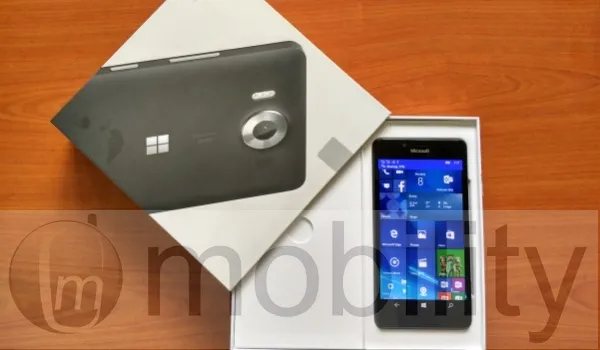
Pros : 1. beautiful, vibrant display. 2. Handy size. 3. Very good camera. 4. Iris recognition is uber cool. 5. Continuum: ability to use your mobile as a PC. 6. Feature-packed calculator. 7. Very comprehensive calendar. 8. Outlook email handles attachments properly.
Cons 1. All-plastic build not exactly premium. 2. Battery life unimpressive. 3. It heats up a lot. 4. Some OS issues with Windows Phone 8 remain unfixed.
Lumia 950 Review: Design
The design of the Lumia 950 is nothing to sing about. What we have here is a black polycarbonate slab. The 950’s predecessor, Lumia 930 , has a much more premium build, which the much cheaper Lumia 650 has taken after. Why Microsoft has left the Lumia 950 looking so plain is beyond me.
Beyond the look, it feels solidly built and is handy (it has a 5.2-inch display) and is lightweight. The polycarbonate rear shell is removable and the battery is removable too. There’s a microSD card slot to augment the 32 GB of built in storage.
Continuum: Your smartphone as a PC
Now, if you have ever dreamed of using your smartphone as a PC, it is a reality today. We hooked up the Microsoft display dock to a monitor, keyboard and mouse, and then connected it to the Lumia 950. What we ended up with was a workable PC. After a brief introductory video, I was able to work on the large screen using the apps on the 950. I had wondered if a smartphone processor would be adequate for working on such a large display. It turned out that I had nothing to worry about. I was able to use Word, browser, file manager, and more via Continuum. Basically, everything that I use my laptop for already.
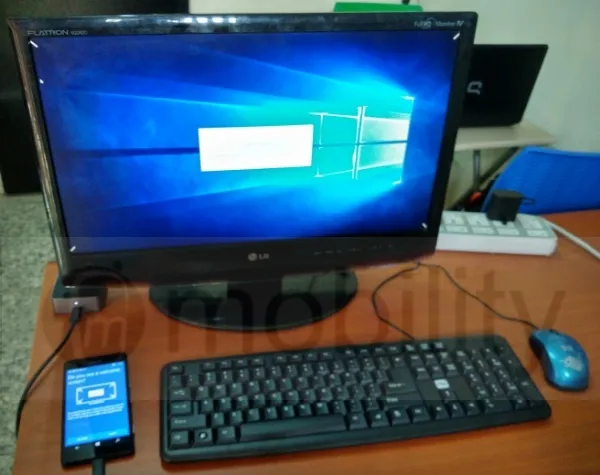
Continuum isn’t perfect yet though. Some apps need optimizing for the big screen. For example, the Facebook app was displayed in the narrow vertical mode that it displays with on the phone. It would have been nice to see it adjust into a wide, split-screen mode on the monitor. But then, it occurred to me that the way I use Facebook on my laptop/PC is in the browser, and I wouldn’t need the app anyway. Microsoft Edge browser works very well via Continuum, rendering desktop views of sites. There is tabbed browsing, just the way you expect it to work on a PC.
Beyond the need for optimization, some apps are also not yet supported. Such apps appear grayed out in the Start Menu. An example is Twitter. Again, the way most people use these services on PC is via the browser, so I do not think that it is much of a big deal. Still, hopefully, such apps will get Continuum support for those who may be interested in using them that way.
Here is a short video clip we recorded during our usage of Continuum:
Lumia 950 Review: Messaging
The 950 has support for Skype messaging built into the Messaging app. Skype messages are handled like SMS right from in there. Of course, there are 3rd party messaging apps available, including WhatsApp, Skype, BBM, Facebook Messenger, Telegram, and WeChat, among others.
Lumia 950 Review: Multimedia
I am disappointed with the audio output of the loudspeaker. While it is loud enough, it lacks the quality that I have been used to on the Lumia 930 and 1520. The sound quality here is tinny, lacking bass. Plugging in an audio or Bluetooth headset redeems the situation a bit, as the audio quality is much better that way.
The new music app, Groove Music, works well, delivering what you would expect from a modern music app. I also like that it has an option that automatically retrieves and updates missing album art and metadata. You get a free 30-day trial of Groove Music Pass, if you’d like to use the service to stream and download music.
Watching video on the gorgeous display is just beautiful. Again, I wish the audio quality was better, but it will do. You can project playing video to a large display, and there is also a built-in video editor.
Lumia 950 Review: Strengths
We have a very sharp and clear display here with Gorilla Glass 3 protection. It is AMOLED, and so we are looking at very deep blacks and vibrant colours.
The Lumia 950 is a very powerful smartphone. This unit returned an AnTuTu score of 61,907, though AnTuTu’s database gives the phone’s best score ever as 70,605 , putting it in 11th place among the top dogs.
Built into the 950 is an eye scanner that has turned out to be a delight to use. Once setup (which was quick and easy), the iris recognition feature works very well. Anytime the display of the 950 is woken up, the scanner starts looking for your eyes to verify their identity and if found, it hollas at you with an onscreen message and unlocks the phone. Iris recognition is so much more convenient than entering a password or using fingerprint recognition. In this case, the failure rate is about 5%, and it may be me, but it appears that the iris recognition gets better and better with use.
Productivity is a strong forte of the Lumia 950. The built-in calculator is superbly feature-packed. It includes a standard calculator by default, but also has options for Scientific, Programmer, and Dae Calculation, as well as Volume, Length, Weight and Mass, Temperature, Energy, Area,, Speed, Time, Power, Data, Pressure and Angle converters.
Outlook Calendar is also very comprehensive and lovely to use. It supports 3rd party services including Google Calendar, Facebook Calendar, as well as Holiday Calendars from scores of countries. And when it comes to creating and editing Office documents, the built-in Excel, Word, and PowerPoint applications work very well.
Last but not the least is Outlook email . Now, I can stop my yearly rant about how Windows smartphones are unable to reply to emails with attachments or send attachments of all file types right from inside the mail app. Outlook email handles attachments perfectly. Not only that, it supports a range of 3rd party services, including Google, Yahoo, iCloud and others. Of course, support for Exchange, Office 365, Live, MSN, and Hotmail is there.
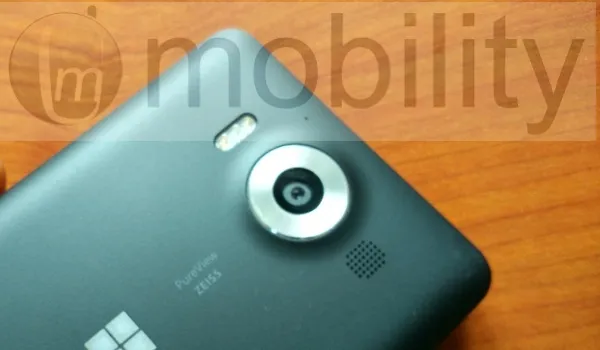
The Lumia 950’s 20 megapixel camera with Carl Zeiss optics and triple LED flash is really, really good. It produces great details and is accurate with colours. I like that it has a dedicated camera button on the side, something that is a rarity these days. There is 4k video recording here as well, and the front-facing 5 megapixel camera takes good shots too. It looks like Microsoft has been able to sustain Nokia’s legacy with camera performance. I have a separate post where I will showcase samples of photographs taken with the Lumia 950. There is a built-in photo editor as well.
Lumia 950 Review: Weak Spots
The Lumia 950’s Achilles’ Heel is its power management. The battery performance is very unimpressive. On an average day, I take the phone off the charger at 100% around 4am, and by 8.30am, it is down to around 30% charge left. I can recall a few times that I went to bed with the battery at around 50% and I woke up to meet the phone switched off and battery empty. Oh; and it heats up badly during use. Sometimes, it is warm even in idle state. I had a hectic week at Social Media Week Lagos, and keeping the phone alive so I could use it was a chore. Bummer.
Other weaknesses involve OS issues with Windows Phone 8 that have remain unfixed. For example, the Store is often a bit sluggish in loading apps and handling updates, 3G Only network mode has been left out, and the grating waits when launching or switching between apps.
Lumia 950 Review: Conclusions
The Lumia 950 is a dual SIM (nano) 4G smartphone. It handles everything that the average modern user expects from a smartphone. People who need specialised apps though may need to look elsewhere, but the everyday smartphone user will not miss any essential apps, so do not let talk of Windows smartphones not having as many apps as Android or iOS throw you if you are an average user.
Continuum extends the frontier of what we can do with a phone and how we can use it. Having used it, I love the concept and could use this daily, but the Lumia 950’s great weakness is just a bit too much to swallow for me. That poor battery performance means that on a hectic day, I am carrying a charging cable around and plugging it in at every opportunity.
If you can live with the battery life, this Windows 10 Mobile flagship is a very capable smartphone in more ways than one. Whether for productivity, messaging, multimedia or social media, it handles things like a champ.
- Don’t miss our reviews .
- Follow us on Instagram , Facebook , Twitter , and YouTube .
Author:Mister Mobility
Digital Skills and Communication Coach | Mobile Phone Connoisseur since 2001 | Tech Blogging since 2004
