Add MobilityArena as a preferred source on Google
One unfortunate experience that is quite common to smartphone and PC uses is the issue of dead pixels. Each pixel of your LCD screen is made up of three subpixels (red, green and blue), which appear white when turned on and black when turned off. A dead pixel occurs when these three subpixels remain off when you turn them on. This is harder to fix than stuck pixels, which are generated when two or more of the subpixels remain on while the rest are off.
Whether your display has stuck pixels or dead pixels, you can still fix it. The following methods are by no means guaranteed to fix your screen, but they are worth a try at least. In any case, the following tips will educate you on how to fix a dead pixel, whether you need to or not.
HOW TO FIX A DEAD PIXEL IN WINDOWS
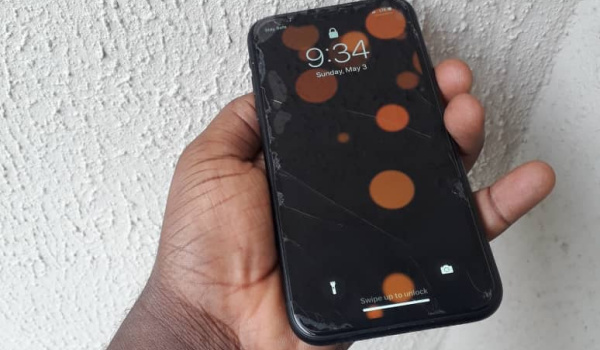
PixelHealer is a free application from Aurelitec that is designed to fix pixel problems. On Windows, this is the first app you should try, as it is compatible with many versions of Windows. Once you download the app, it will present you with colored box window and a settings menu. Either click and drag or use the position and size options to place the color box over the area containing the dead pixels.
Click on Start Flashing, and try not to look directly at the box, especially if you are sensitive to flashing lights. The window will then start flashing multiple colors very quickly. Leave it on for 30 minutes, then check the pixel again. Basically, you are trying to shock the pixel back to life, forcing a proper response that will have it acting like it should. If this does not work, you can try the iOS fix below, which also works on Windows.
HOW TO FIX A DEAD PIXEL ON IOS
On iOS, you can make use of JScreenFix. This is similar to PixelHealer, but since it is a web-application you do not need to download anything. The steps are similar to that of PixelHealer, too. This method uses both HTML5 and JavaScript, and it may work on both LCD and OLED screens.
HOW TO FIX A DEAD PIXEL ON ANDROID
First, download the app Dead Pixel Detect and Fix (DPDF). This free app is available for Android 2.3 and later, and it features an interface that is both self-explanatory and easy to navigate. This app lets you cycle through various colors to locate and fix a potentially dead pixel or stuck pixel using an extended series of flashing screens.
FIXING A DEAD PIXEL WITH THE PRESSURE METHOD
If none of the above methods have worked for you, you can try the pressure method. You must be careful, however, as this may cause further problems for your device.
First, locate the problematic area of you screen. Then find a tool with a blunt, narrow edge, preferably the cap of a pen or a corner of a pencil eraser. Now, wrap your tool in a damp, scratch-free cloth. Turn off your screen, then begin to apply pressure to the troublesome area for 5 to 10 seconds, using the wrapped tip. Do this several times. When you finish, try to locate the area filled with dead pixels.
If none of the above methods work, it may be time to replace your display. In the meantime, you now know how to fix a dead pixel, in case the problem comes up again.
- Don’t miss our mobile phone reviews .
- Follow our news on Google News .
- Join our WhatsApp Group , to be notified of the most important articles and deals,
- Follow us on Instagram , Facebook , Twitter , and YouTube .
Author:EmmyCN
Add MobilityArena as a preferred source on Google
In the past year, there have been a lot of convertible laptops with skinny screen bezels. Combined with the edge-to-edge lass, this makes these laptops look good and also gives a larger screen on a small body. But looking at the Lenovo Yoga 720, you might be forgiven for not thinking so highly of the MacBook Air any more. Both devices look about the same.
Looking at the Lenovo Yoga 720, you might be forgiven for not thinking so highly of the MacBook Air any more. Both devices look about the same. However, the Lenovo Yoga 720 boasts of a full-HD IPS touchscreen, with edge-to-edge lass and a minimal bezel. Also, the screen rotates to the back, as the Yoga 729 doubles as a tablet. Plus, the device is pen-enabled, so you can also write and draw on the screen, all for $100 less than the MacBook Air.
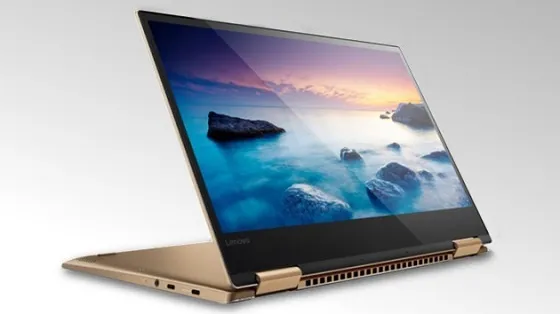
The Yoga 720 has a good colour performance. However, it is not quite good enough for critical photo and video editing. But this does not mean you cannot do these things on the device, though. The screen reaches a suitable brightness level for outdoor use, and t supports Active Pen. Also, the hinges on the screen adjust to keep the device in any position you want.
The keyboard is not as firm as Lenovo’s ThinkPad models. However, the keys still have a fair amount of travel to make typing comfortable. Lenovo used a Windows Precision touchpad, which works really well. This means that you get full multitouch gesture support for three-and-four-finger gestures for quickly switching between applications, activating Cortana or hiding all open windows.
Now, the Lenovo Yoga 720 does not have so many ports. It has one USB 3.0 Type-A pot, two USB 3.1 Type-C pots and a headphone/mic jack. One of the USB Type-C ports is used for charging and supports Thunderbolt 3, so with a dock or adapters you can add video outputs, an Ethernet jack and more.
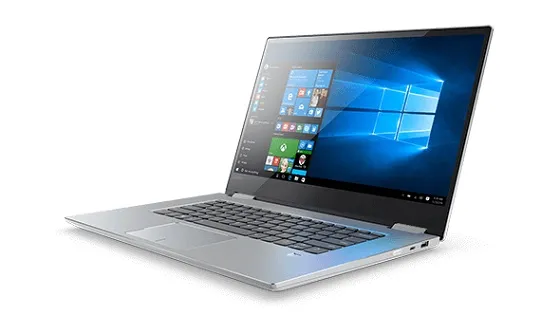
The Lenovo Yoga 720 has a base configuration of 2.5GHz Intel Core i5-7200U, 8 GB of memory, and a 256GB PCle SSD for storage. You can also get the system with more memory and storage. But this base configuration is good enough for day-to-day tasks. Reports say that the Yoga 720 battery runs for up to 8 hours and 46 minutes. This is not bad, just not particularly great.
All in all, one could certainly say that the Lenovo Yoga 720 is a great 2-in-1 device. It has a premium look and feel, but lacks the huge price tag. This device would be great for students or the home office, where some extra flexibility comes in handy and a nice design is appreciated.
LENOVO YOGA 720 SPECIFICATIONS
Display: 13-inch 1,920×1,080 IPS touch
PC CPU: 2.5GHz Intel Core i5-7200U
PC Memory: 8 GB DDR4 SDAM 2,133MHz
Graphics: 128MB dedicated Intel HD Graphics 620
Storage: 256 GB PCle SSD
Networking: 802.11ac, Bluetooth 4.1
Operating System: Windows 10 Home (64-bit)
Price: $799
Don’t miss our reviews .
Follow our news on Google News .
Join our WhatsApp Group , to be notified of the most important articles and deals,
Follow us on Instagram , Facebook , Twitter , and YouTube .
