Add MobilityArena as a preferred source on Google
From a distance, everything is perfect. The grass is always green on the other side. But owning a device opens your eyes to the issues that users of the said device face. I was almost sure the iPhone was a perfect phone and had no issues – until I bought one. I was trying to update my iPhone recently when I ended up with an ‘ Attempting Data Recovery ’ loop on my phone screen.
Before now, I had no idea that was a thing. But it looks like it is a common enough problem faced by Apple iPhone users around the world. while trying to install iOS updates. If your iPhone is stuck in an Attempting Data Recovery loop , below are the steps I took to solve the problem.
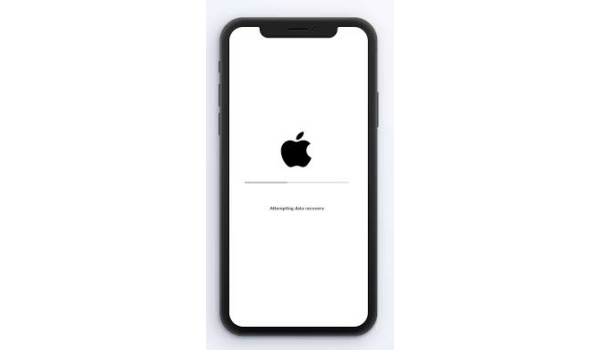
Why does your iPhone keep saying Attempting Data Recovery?
The Attempting Data Recovery loop issue occurs for a number of reasons, but at the root of them all is an update bug that occurs fairly often when updating your device to a new iOS version via iTunes.
Fix the “Attempting Data Recovery” Loop Issue by Performing a Force Restart
One of the things I learned from following Mister Mobility over the years is that a simple restart or a force restart is a solution to many problems that my smartphone throws up. It turns out that a force restart is one of the ways to fix this A ttempting Data Recovery loop problem.
Depending on which iPhone model you have, the way to go about a force restart differs. Here are the different methods for different iPhone models.
How to force restart iPhone 8 all the way to iPhone 11 Pro Max:
- Press and quickly release the Volume Up button
- Press and quickly release the Volume Down button
- Press and hold the Power button until you see the Apple logo.
- Enter your passcode at the startup sequence.
How to force restart iPhone 7/7 Plus:
- Press and hold the Power button
- Without releasing the Power button, press and hold the Volume Down button until the Apple logo appears on the screen
- Enter your passcode at startup.
How to force restart iPhone 6s/SE or earlier:
- Press and hold down the Home button
- Without releasing the Home button, press and hold the Power button until the Apple logo appears on the screen
- Release both buttons and wait for the start sequence
- Enter your passcode at start sequence.
Once the force restart is complete, your iPhone or iPad should work well once again and not display the Attempting Data Recovery loop on the screen any more . If the problem is solved now, you can stop here now. The next section of this article is not for you. The next section is for you only if you do not remember your passcode will following the above steps to fix the Attempting Data Recovery loop problem.
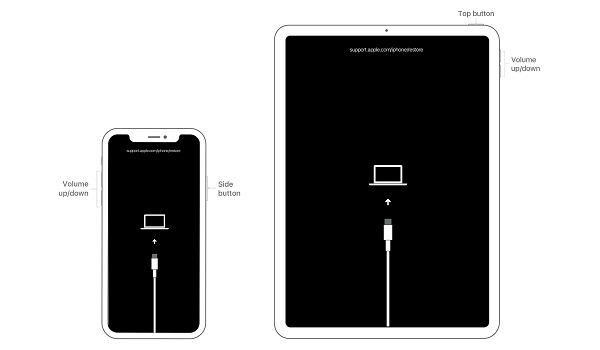
How to fix an iPhone or iPad stuck on attempting data recovery loop without a passcode
What if you forgot your passcode while fixing the Attempting Data Recovery loop?
This is a fairly common problem too during a recovery attempt. Some times, you forget your passcode, and since it is needed to complete the Attempting Data Recovery fix steps above, you are stuck at that point. What can you do?
Yes; you can fix this situation, but you will lose all the data on your iPhone or iPad. Not remembering your passcode means you will be denied access to all data on the phone. It is unpleasant news, but it is a security measure to ensure that your data does not fall into the hands of strangers.
Hopefully, you had your device backed up before the Attemping Data Recovery loop problem showed up. That way, you can restore them after recovering your device. If you don’t have any backups, I am afraid that’s it: your data is as good as gone.
To recover your iPhone or iPad without a passcode, you will need a computer. If you do not have one and cannot find one to use, you have to send your iDevice to an authorised service centre for recovery.
- If using an iPhone 8 or later, press and hold down the Side button and one of the volume buttons until the power off slider appears.
- Drag the slider to turn off your device.
- Press and hold the Side button and connect your iPhone or iPad to your computerand keep holding the Side button until you see the recovery mode screen.
- Locate your device on your computer.
- When you see the option to Restore or Update, choose Restore, and Finder or iTunes will download available software for your device.
- iTunes will complete the process and you have your iPhone or iPad back in brand new state.
- Next, you have to set it up all over again and restore any data you have backed up. Like I said before, if you do not have any backup available, all your data is gone.
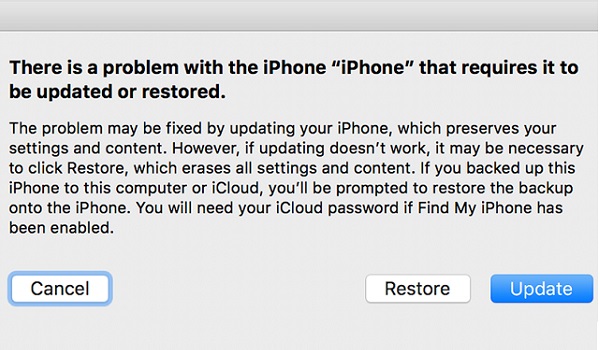
Fixing the Attempting Data Recovery loop issue without a passcode: restore your iPhone or iPad to factory state
Note that if the above process takes more than 15 minutes, your device will exit recovery mode and you’ll need to repeat this process.
That is it, friends. A force restart solved the Attempting Data Recovery loop problem for me. Thankfully, I did not forget my password and so did not have to wipe the data on my iPhone or worry about whether I had backups or not. Let me know how it goes with you. It will be nice to know that this article helped someone else out.
PS : I am told that there are 3rd party software available that you can use to recover your lost data should this happen to you.
Author:MobileChic
That motivated, gadget-loving geeky chic who tries to stay on top of things. Unapologetic iFan.
Add MobilityArena as a preferred source on Google
Anyone willing to contact a resident of the UK has to dial a digit code before the phone number. This digit code is known as area code. Though they are as omnipresent as grass, people tend to pay less attention to their importance and significance.
This post is a move to throw light on the beginning of area codes like 0117 dialing code and their importance, alongside telling how cNumber can help your business.
- The Beginning Of Area Codes In the UK
- cNumber – Helping Businesses To Make A Name
- How is cNumber helping Businesses to Gain Significance In Particular Area?
- Endnotes
The Beginning Of Area Codes In the UK
Only the area code of London was an exception. Around 1980, it was realized that the UK was running out of number combinations using this format. This is why British Landline System launched a new telephony dialing plan on 16 April 1995.
Under this plan, geographic area codes and some telephone numbers were changed. A “1” was added as a prefix to most of the area codes while the area codes in areas like Bristol, Leeds, Leicester, Nottingham, and Sheffield, the area codes were entirely changed.
Earlier, area codes were considered essential for landline calls. With the change of time, mobile phones overshadowed landline phones. But, the significance of area code hasn’t faded.
From a business point-of-view, area code is still very important as they help the people to locate the presence of a business.

cNumber – Helping Businesses To Make A Name
cNumber is the UK’s prime VoIP phone number provided that can help businesses of all kinds to firm their feet in a certain part of the UK.
Taking the help of its local phone number, a business situated outside the UK can associate itself with the targeted market without being present there.
As these local phone numbers are driven by VoIP technology, any business can hold over communication system which is:
- Cost-effective
- Easy to set-up and maintain
- Highly scalable and mobile
- Feature-packed
As these local phone numbers have a cloud-based infrastructure one can use them instantly. There are no set-up and installation protocols to follow-up. cNumber takes care of this aspect from its customers’ side.
Starting from the set-up to system maintenance, cNumber looks after everything. They are plug-and-play resources that can be at one’s service after buying a subscription plan.
How is cNumber helping Businesses to Gain Significance In Particular Area?
For overseas businesses or businesses coming out from a particular region in the UK, the VoIP-based local phone numbers are nothing but a blessing.
Their diligent use enables a business to reach the doors of success in a below-mentioned manner.
Familiarity with the locals
In a local region, local customers are the target. Having a business phone number that shares a similar area code as of the targeted customers helps to make acquaintances easily.
It gives the impression that the business is located nearby and helps customers to become familiar with the business.
Cost-effective calling
Using the local phone number of the targeted region is a cost-effective deal for both the customers and businesses. Calls made on landline/mobile numbers of the same area codes are charged as per the local rates.
For unlimited calling plans, the calls are often free of charge as well. It’s a big relief for a business situated outside as international calling expenses are too high in this case.
The local phone numbers of cNumber are powered by VoIP technology and expert very less call incurring charges. Hence, a business can save big on calling aspects using them.
Meet the state law compliance
There are some areas like Aberdeen, Brighton, Bradford, Middlesbrough, and many more where one can’t make a call without adding area code before a phone number. If these areas are the targeted markets of a business then having area code local numbers is important.
Endnotes
Area codes are not going to lose their sheen now and ever. If a business seeks to gain impeccable significance in the local vicinity then a local phone number with area codes is important.
cNumber’s local area code numbers are perfect for this job. With cloud-based deployment and impressive feature-suite, they will make things easier than ever.
