Add MobilityArena as a preferred source on Google
The TCL 20 SE is a budget smartphone aimed at users who do not want to spend a fortune on much more expensive models. The device has a 6.82″ Display. It has a 48 MP + 5 MP ultrawide lens + 2 MP depth sensor + 2 MP macro lens camera setup at the back, a 13 MP selfie camera in front, and a 5,000mAh battery.
Why would you need to make TCL 20 SE run faster? Basically, because it is a budget Android phone powered by a basic processor and limited RAM. Which means that the phone slows down under certain scenarios, especially during more intensive use. Let’s have a quick look at the detailed specs first.
TCL 20 SE specs at a glance:
- Body:172.1 x 77.1 x 9.1 mm, 206g; glass front, plastic frame, plastic back.
- Display: 6.82″ HD+ display, 720×1640 pixels resolution, 263 ppi density.
- Chipset: Qualcomm Snapdragon 460.
- CPU: Octa-core (4×1.8 GHz Kryo 240 & 4×1.6 GHz Kryo 240); Adreno 610.
- Memory: 64/128GB, 4GB RAM.
- OS/Software: Android 11, TCL UI.
- Rear camera: 48 MP (f2.0) main, 5 MP (f/2.2) Ultrawide, 2 MP (f/2.4) depth, 2 MP (f/2.4) macro.
- Front camera: 13 MP (f/20).
- Video capture: Rear camera: 1080p@30fps; Front camera: 1080p@30fps.
- Battery: 5000mAh; 18W Fast charging.
- Misc: Fingerprint reader (rear-mounted), dual speakers.
If, for some time, you have been looking to make your TCL 20 SE run faster and smoother than it has, or you are having problems with your device lagging, here are some easy steps you can follow to make that possible.
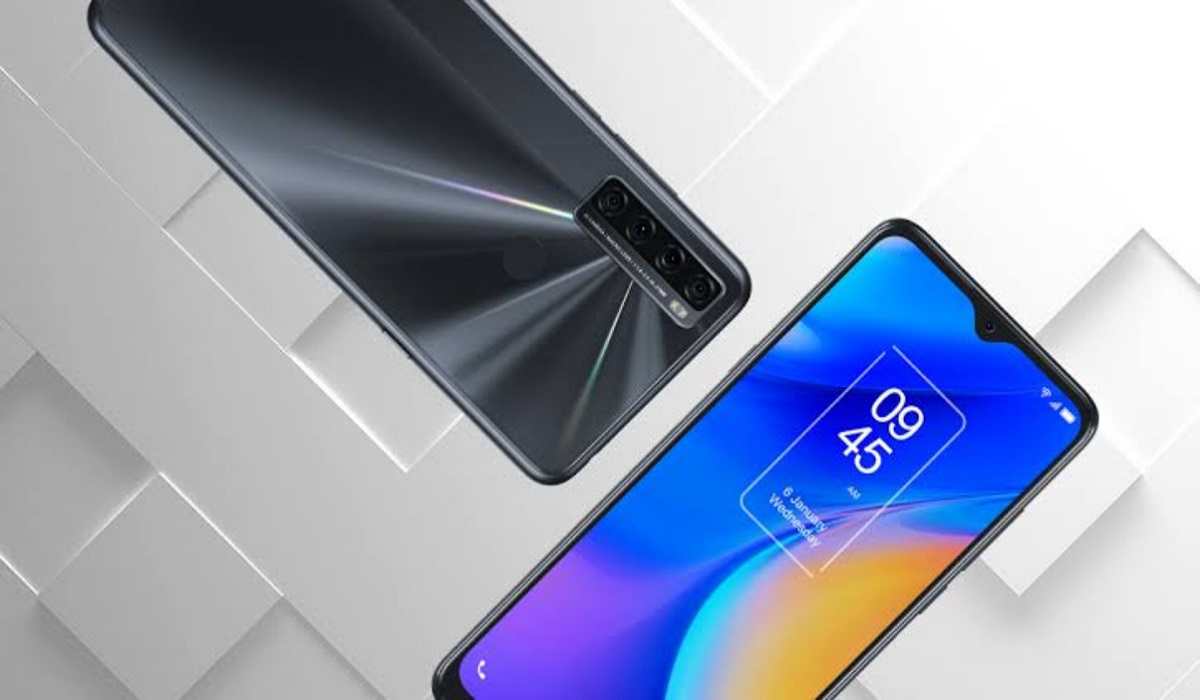
Make TCL 20 SE run faster: Delete Unused apps
Any smartphone user would love to have all their desired apps installed. This might lead to large amounts of apps piling up on the device, over time. It is important to form a habit of uninstalling unused apps and games. Having lots of these apps will hinder and slow down the performance of your TCL 20 SE.
Especially when you have some of them running in the background. They also become so many and have so much data on each one of them, that there is barely any storage space left for your device to run as smoothly as you may have liked.
Make TCL 20 SE run faster: Clear App Cache
Cleaning the cache of the app on your TCL 20 SE is important in terms of sending up your phone. Clearing the cache of an app can make that particular app run faster and smoother than it did before, and reduce possible lag. Clearing cache is also very important for entry-level devices too to help them improve their performance. As they are not as powerful as high-end devices. You can clear the cache of any app by long-pressing the app icon, selecting App info , and then Storage . There will be an option to Clear the cache . Select that and you’re good to go.
Make TCL 20 SE run faster: Run Software Updates
It is important to keep your TCL 20 SE up to date. This is because, with every new update, there might be security enhancements (which are crucial) but there might also be performance improvements added to the update that can make your overall experience, and device speed, better.
Make TCL 20 SE run faster: Restarting your Device
It is well known that any device can perform faster and better simply off of a restart. The same holds for the TCL 20 SE. Doing this should address most of the performance issues, as it deletes temporary files to speed up the phone and clears the phone’s memory.
Make TCL 20 SE run faster: Use the Lite Version applications
Lite versions of apps are the shortened versions of these said apps. These include: TikTok, Facebook, e.t.c. The lite versions are usually limited in comparison to the actual applications and don’t offer as many features. These lightweight apps, which do not work your device as hard as the main ones, are designed for entry-level smartphones and designed for users who want to keep their apps simple or use something simple. They help boost the performance of your device and lower your data and charges.
Make TCL 20 SE run faster with a Hard Reset
If you are looking for a simple method that will help you to make your TCL 20 SE run faster, it may be the most effective. If you do a hard reset on your TCL 20 SE, then all the phone data will be deleted, and the phone’s storage will be clean. At the same time, the random-access memory of your TCL 20 SE will start working like new again. However, you need to back up all the data before performing a hard reset.
- Don’t miss our mobile phone reviews .
- Follow our news on Google News .
- Join our WhatsApp Group , to be notified of the most important articles and deals,
- Follow us on Instagram , Facebook , Twitter , and YouTube .
Author:Flamez
Flamez loves basketball, art, gadgets and cars.
Add MobilityArena as a preferred source on Google
The benefits of meditation are numerous. It sharpens the mind and increases concentration, productivity, and creativity at work. It makes you feel more at ease overall. It’s absurd that the majority of people don’t have the time or free time to incorporate meditation into their daily routines. The smartphone meditation apps should be helpful.
Both Android and iOS devices can use the meditation apps on this list.

- Head space
Headspace is one of the greatest guided meditation apps available today for beginners (and more experienced meditators). This application is focused on achieving mindfulness through instruction in meditation.
Through 10 simple meditations for 10 days, it offers basic guidance for leading a happier and better life in its free form. The software was built by English Buddhist monk Andy Puddicombe with today’s modern and hectic lifestyle in mind. In other words, nothing will be as normal; everything is highly fluid and organic.
- The Mindfulness App
One of the top free mindfulness apps available on Google Play and the App Store is the Mindfulness App. With the help of this program, you’ll be able to stay out of trouble and create a tranquil, peaceful, and ultimately healthier mental state. You can find the following there for both beginner and higher levels:
An explanation of mindfulness, including what it is and how it functions.
Notifications to ensure you don’t forget to take a break.
Guided or quiet meditations lasting three to thirty minutes (timed).
Data and details about your development, to see how you advance.
Additionally, there are 200 different guided meditations available in the subscription edition.
25 highly fascinating courses from key figures in the field.
The possibility to listen to the lessons and exercises
- Calm
Free meditation and relaxing apps for your iPhone or Android device. It only takes a few minutes per day and a pair of headphones to shut off the outside world. This application allows you to:
i. Reduce stress and anxiety.
ii. Sleep peacefully (ideal to avoid insomnia).
iii. From day to day, raise your happiness and sense of self-worth.
iv. Learn to forgive and to not pass judgment on others.
V. Calm down any little children inside.
vi. Improve your relationship in the family, and at work.
There are several relaxation programs, some geared toward novice users and others for more experienced ones. Some last for 10 minutes, while others are between 7 and 21 days. The Calm app provides the following to help us feel better:
- Sam App: Self-help Anxiety Management
SamApp is one of the top anxiety-relieving apps available. Self-help Anxiety Management, often known as “Self-help and Anxiety Management,” is the source of the abbreviation SAM.
We enjoy it for a number of reasons:
i. The software was created by psychologists and scientists to reduce anxiety.
ii. It includes a wealth of materials that can be used to enrich our lives and fight this psychological issue.
iii. It bears a resemblance of an internal social network for SAM app users.
iv. Statistics can be used to monitor your development.
A set of useful tools will be excellent for overcoming anxiety and social phobia, to put it briefly. one of the top self-help programs available today. Of course, in English for now.
- Zenfie
Like other prior ones, Zenfie uses guided meditation activities to promote mindfulness. At last! You’ll be able to relax, focus more clearly, overcome anxiety, sleep better, and accomplish your inner objectives.
The number of free sessions is slightly constrained, and you must pay to access the “good” information. Behind her is French psychologist and personal development specialist Jean Doridot. Once we pay for the application, we can access a variety of content, including:
i. Ways to get a better night’s sleep.
ii. Elevated self-esteem and assurance.
iii. Give up attempting to manage everything in your environment.
iv. Meditations, either guided or unguided, set to soothing music.
v. Better communication with our friends, family, coworkers, or anybody else.
The “Zenfie Kids” version is inside, which was created to help kids unwind at night and get a good start on the day. Both Android and iOS smartphones and tablets can use it.
- Don’t miss our mobile phone reviews .
- Follow our news on Google News .
- Join our WhatsApp Group , to be notified of the most important articles and deals,
- Follow us on Instagram , Facebook , Twitter , and YouTube .
