Add MobilityArena as a preferred source on Google
The hardware Bixby button on my Samsung Galaxy S9 Plus is the most redundant feature ever. I have used Bixby for a period and haven’t found it as useful as I’d like. And even if I were to find Bixby useful, there are other actions I would prefer to remap Bixby button to.
Bixby button is a dedicated button on the side of the phone (and some other Samsung phones) that can be used to launch Bixby Voice or Bixby Home.
Samsung has been adamant about it and made it next to impossible to reassign or remap Bixby button for other uses besides launching Bixby. For example, the button would probably make for a good hardware camera shutter. Another cool use would be for taking quick screenshots, launching the browser, or launching any other app of your preference.
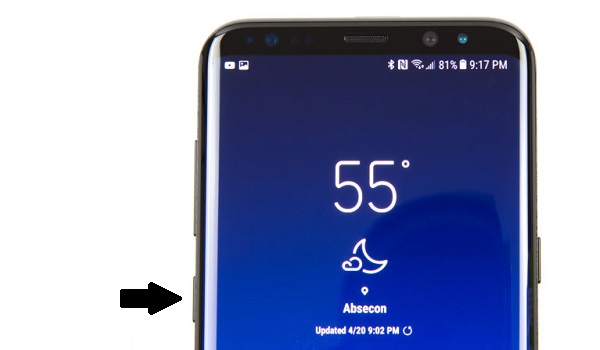
You will find the Bixby button on your Samsung smartphone where the arrow points
- How to Remap Bixby Button Using 3rd Party Apps
- You Can Now Make Bixby Button Your Own
- List of Samsung Phones with Bixby Button
How to Remap Bixby Button Using 3rd Party Apps
There have been a number of attempts by developers to create an app that lets you remap Bixby button . Those efforts have been mostly futile, as Samsung has consistently frustrated those developers. Yes; Samsung has been a big bully with regard to this matter.
Is it by force to use Bixby or to use the button for Bixby? Which is why there has been a lot of clamour by S8 and S9 users for the ability to remap Bixby button.
You Can Now Make Bixby Button Your Own
There is good news though. Samsung has announced that the option to customize the button for use as a shortcut to other apps and actions is on the way. Here is the official statement from Samsung:
Bixby Key Customization is compatible with the Galaxy S10, and will be available via a software update on previously released Bixby-enabled flagship smartphones running Android Pie OS.
The new customization feature is already available on Galaxy S10 devices and will filter down to Note9, S9, and S8 devices soon. You will be able to remap Bixby button to execute some other action or launch your favourite apps.
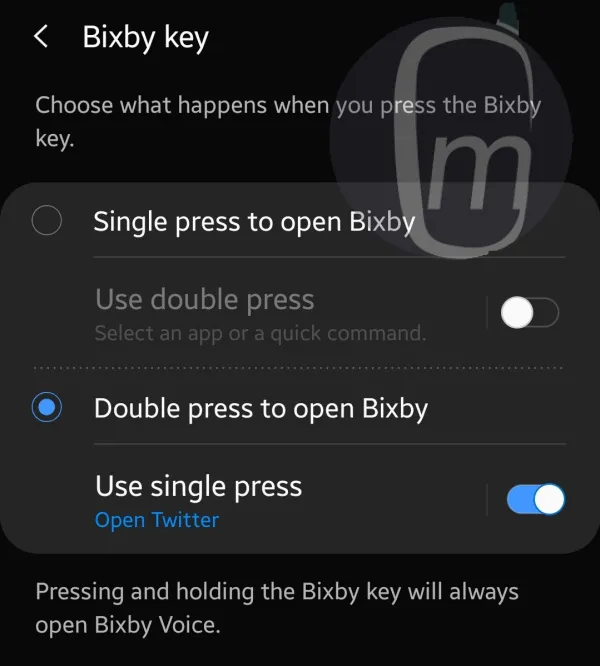
What Samsung has done is not totally let you get rid of Bixby on the key. Instead, you will be able to customize the button to launch Bixby with either a single or double press, and then map the other option to the activity or app of your choice. Fair enough.
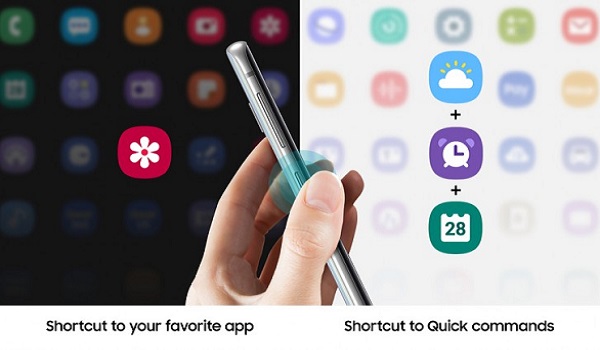
Being able to use the key for other actions is great news indeed. Our phones, our usage patterns. That is what makes a smartphone really smart – the ability to adapt to the user, and not the other way around.
To get this new feature and be able to remap Bixby button, make sure that your device is running Android Pie. Samsung is already rolling out the remap feature as an app update to Bixby. After the app update is installed, open the phone Settings > Advanced features > Bixby key . Customize it as you wish.
PS: Beyond being able to customize the button, Bixby itself needs to get a lot better and more usable. Right now, it is one of the features that I do not find useful on my Galaxy S9 Plus. It is so redundant that I even disabled Bixby Home on my device.
List of Samsung Phones with Bixby Button
Not all Samsung phones have a Bixby button. The Samsung phones that have a Bixby button are:
- Galaxy S8 and S8+
- Galaxy S9 and S9+
- Galaxy Note 8 and Note 9
- Galaxy S10e, S10, and S10+
- Galaxy Fold
These phones have a dedicated button on the side that can be used to launch Bixby Voice or Bixby Home.
However, newer Samsung phones such as the Galaxy S20, S21, Note 10, Note 20, and Fold/Flip series do not have a separate Bixby button. Instead, they have a Side button that can be customized to perform different functions, such as turning off the phone, calling Bixby, or opening an app. You can also use voice commands or swipe gestures to access Bixby on these devices.
If you are a lover of Bixby or would like to try out new features, you just might find the new Bixby Text Call feature, introduced in 2023, useful.
- Don’t miss our reviews .
- Follow our news on Google News .
- Follow us on Instagram , Facebook , Twitter , and YouTube .
Author:Mister Mobility
Digital Skills and Communication Coach | Mobile Phone Connoisseur since 2001 | Tech Blogging since 2004
Add MobilityArena as a preferred source on Google
If you have been looking at the prospect of purchasing a Samsung Galaxy A20 but have yet to do so, you might want to hold off and consider what Samsung has to offer in the A20s. Samsung Galaxy A20s (2019) is a minor upgrade, to be sure, but it just might be what you are looking for. Come along with me as I walk you through this Samsung Galaxy A20 vs Samsung Galaxy A20s comparison.
Samsung releasing the Galaxy A20s is a smart move. If you have a product that is doing well in the market, you should milk it as much as possible by offering more variants and/or versions of it. As a matter of fact, Samsung has a Galaxy A20e in the market as well too. Talk about milking a popular product to the last drop.
So, if you are in the market for a budget Samsung smartphone and you are torn between the Samsung Galaxy A20 and Samsung Galaxy A20s, the information below will help you make up your mind.
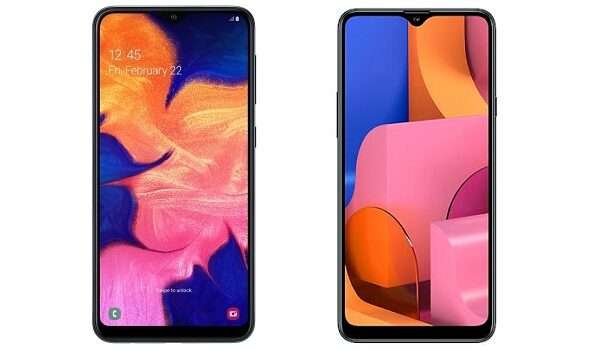
Samsung Galaxy A20 vs Samsung Galaxy A20s: Time to make a choice
Our faithful comparison table is our first stop to see how these two devices compare.
Samsung Galaxy A20 vs Samsung Galaxy A20s Comparison Table
Here is a quick comparison table to help you see how the Samsung A20 vs A20s smartphones stand side by side.
| Samsung Galaxy A20 | Samsung Galaxy A20s |
|---|---|
| 6.4 inches, 720 x 1560 pixels, 19.5:9 ratio Super AMOLED display | 6.5 inches, 720 x 1560 pixels, 19.5:9 ratio IPS LCD display |
| Android 9 Pie + One UI | Android 9 Pie + One UI |
| Octa-core EXYNOS 7884, 1.6 GHz (14 nm) | Octa-core Snapdragon 450 , 1.8 GHz (14 nm) |
| 8MP selfie camera | 8MP selfie camera |
| 13 + 5 MP rear dual camera with LED flash | 13 + 8 + 5 MP rear triple camera with LED flash |
| 32 GB internal storage + dedicated microSD slot, up to 1 TB | 32 GB / 64GB internal storage + dedicated microSD slot, up to 1 TB |
| 3 GB RAM | 3 GB / 4 GB RAM |
| 4000 mAh battery + 15W fast charging | 4000 mAh battery + 15W fast charging |
| $145 (₦51,500) | $160 (₦55,500) |
Samsung Galaxy A20 vs Samsung Galaxy A20s: The Similarities
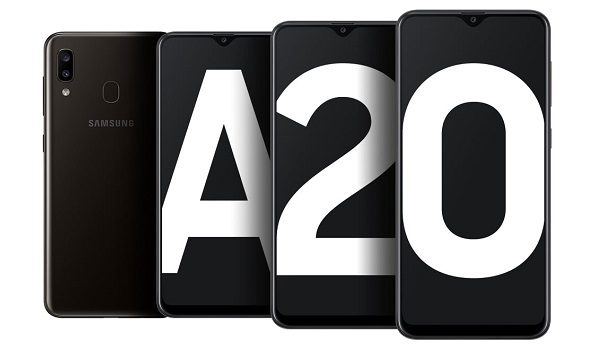
Samsung Galaxy A20 and Samsung Galaxy A20s are very identical in size, with only 1 or 2 centimetres diffrence in dimensions, so you might not be able to tell them apart without a closeup side-by-side lineup. Both smartphones are very similar in terms of design, and that is understandable. Afterall, what separates one from the other is an “s”.
What else do they have in common? They both have a waterdrop display of the same resolution – 720 x 1560 pixels. They have the same internal storage and RAM. And they both run Android 9. As far as expandable memory capability is concerned, there is no difference either: both phones have a dedicated microSD card slot that supports cards of up to 1TB storage.
The battery capacity and charging standard are the same on both phones as well. The selfie cameras and fingerprint scanners are the same. The Galaxy A20 and A20s are pretty much identical twins. But even identical twins have tiny, noticeable differences. So, let’s have a look at where these two siblings differ.
Samsung Galaxy A20 and Samsung Galaxy A20s: The differences
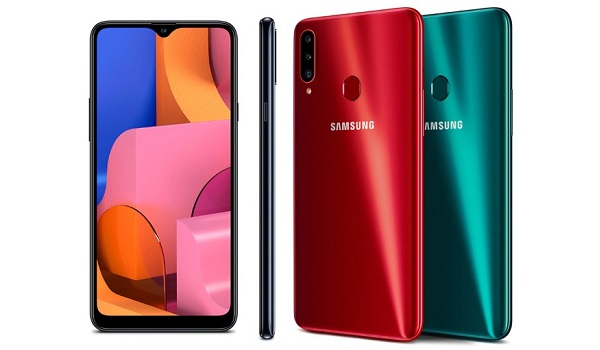
While the displays share the same resolution, that of the Galaxy A20s is slightly bigger (just 0.1″ bigger) and is no longer Super AMOLED but an IPS LCD panel. With AMOLED displays, you get deeper blacks and better contrast. They are also more expensive to fix, should you break them. So, bear that in mind.
If you look at the back side of both phones though, there is a marked difference: the Galaxy A20 has a dual camera, while the A20s has a triple camera.
On the inside, the Galaxy A20s has a more capable, more powerful processor and so delivers better performance compared to its older sibling.
Lastly, the Galaxy A20s has a 4GB/64GB variant for those who want more RAM and storage space.
Samsung Galaxy A20 vs Samsung Galaxy A20s: Conclusions
In conclusion, the A20s gives up the Super AMOLED display and compensates you with a triple camera and a Snapdragon processor. And that is pretty much the most significant things to note.
While on paper, the A20s’ triple camera is the better specc’d when compared to the A20’s dual camera, it does not necessarily mean that it delivers better photos. We need a shootout to determine that.
But we know for sure that the A20’s AMOLED display produces better contrast and depth than the LCD panel on the A20s. Why did Samsung ditch AMOLED for LCD? I have no idea.
We also know for sure that the Snapdragon 450 chipset is a more capable one. Lastly, the A20s offers two memory options – a 4GB/64GB in addition to the base configuration of 3GB/32GB. Of course, that higher variant costs more. So, let’s stick with the 3GB/32GB for now (that is what is available in the country anyway).
There is about ₦5,000 difference in the prices of both devices. Is it big enough to influence your buying decision? At the end of the day, your decision will depend on your purchasing power. But costs aside, which of these two budget Samsung phones will you opt for?
- Don’t miss our reviews .
- Join our WhatsApp Group , to be notified of the most important articles and deals,
- Follow us on Instagram , Facebook , Twitter , and YouTube .
Author:Mister Mobility
Digital Skills and Communication Coach | Mobile Phone Connoisseur since 2001 | Tech Blogging since 2004
