Add MobilityArena as a preferred source on Google
If you are tired of seeing those pesky notifications to install this app or that in folders in your smartphone, I have written this guide to show you how to remove recommended apps in Xiaomi phones (remove promoted apps from MIUI folders). One of the most propagated untruths by fans on the Internet is that there are no ads on Xiaomi phones (this includes Poco and Redmi phones).
I have owned, used, and reviewed a handful of Xiaomi phones, and I experienced ads in them all. I currently use a Xiaomi Mi Note 10 Pro , and it has ads everywhere – ads in the notification menu, ads inside the music app and other apps, and ads in folders. PS : See my Xiaomi Mi Note 10 Pro review (opens in new tab).
Xiaomi’s MIUI is riddled with ads. And this is no surprise. Xiaomi’s business model is that they make money from data to subsidies the cost of their phones. That means ads and use of your personal data. That is why Xiaomi phones are more affordable than competing phones from most other brands.
When I point out the presence of ads, Xiaomi fanboys and girls are also quick to point out that the ads can be disabled. What they do not tell you is that you have to dig around into settings scattered all over the place to do so.
It looks like a deliberate design to frustrate users from getting rid of all of the ads. I can’t think of any other reason why the process is this convoluted. In this article, I show you how to remove promoted apps from MIUI folders and stop getting those pesky ads and notifications everywhere else.
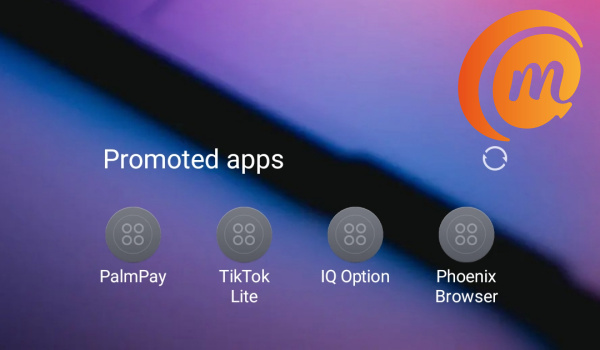
You can turn off or remove promoted apps from MIUI in Xiaomi phones
As MIUI 12 is the latest version of Xiaomi’s software, and the version I have on my Mi Note 20 Pro, this guide is based on MIUI 12.
- How to remove Promoted Apps from MIUI folders
- How to disable Personal Ad Recommendations in MIUI 12
- How to get rid of system ads in MIUI 12
- Get rid of or remove promoted apps from MIUI, e.g. Music, File Manager, Browser, etc, in MIUI 12
How to remove Promoted Apps from MIUI folders
For a long time, I couldn’t find out how to stop Folders on my Xiaomi phone from displaying promoted apps – basically ads promoting apps. I did find it. Here’s how to remove them.
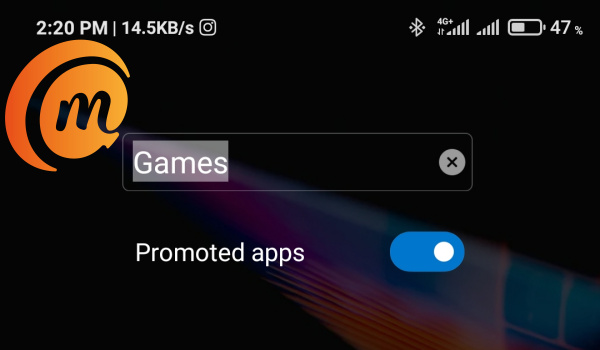
You have to go to each folder where the promoted apps are showing. Open the folder and tap on the name. Right below the name will appear a “Promoted Apps” slider (as seen in the screenshot below). Toggle the slider to disable promoted apps and that’s it.
How to disable Personal Ad Recommendations in MIUI 12
This setting allows Xiaomi to collect all sorts of personal data of yours for use in recommending ads to you. To stop that from happening, follow these steps:
- Go to Settings ,
- Select Privacy
- Scroll down to Ads and select it
- Toggle Opt out of Ads Personalisation to disable it.
Next, go back to your Settings main page, and type Ad Services in the search box there. A menu by that name will show up in the search results. Select it, and toggle “Personalised ad recommendations” to disable it. Don’t get tired now; you are just about half way through.
How to get rid of system ads in MIUI 12
Make sure you have an active Internet connection on your phone for this part. Go back to Settings, and scroll down till you see Passwords & Security. Select it and follow these steps:
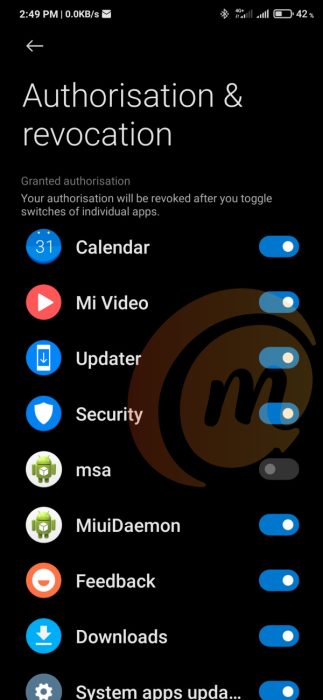
- Scroll down and select Authorization & revocation
- Find msa on the list and toggle the button next to it to disable it.
- After 10 seconds, you are presented with a Revoke button. Hit it and that should be it.
If it doesn’t work out the first time, try it again till it does. This msa guy is can be quite stubborn on occasion.
Get rid of or remove promoted apps from MIUI, e.g. Music, File Manager, Browser, etc, in MIUI 12
And this is the last leg! Apps often show up while using a number of apps in Xiaomi phones. These apps are Xiaomi’s own apps and include Music, File Manager, Browser, and Security app.
You have to open each of these apps one by one and execute the following procedure: Go to the settings of the app in question and look for menus that say things like Receive recommendations , Receive referrals , or Show ads . Toggle the menu slider to disable these options . Like I said, you have to do it for each app. Once done, you’re good.
As you can see, it is a mostly tedious work to get rid of all ads on Xiaomi and Redmi phones. But you are done now and should be able to enjoy a nuisance-free usage of your smartphone.
If your Xiaomi or Redmi phone runs an older version of MIUI, the steps will vary mildly, but you should be able to find all the above menus and settings to remove promoted apps, system ads, as well as ads in individual apps.
- Don’t miss our mobile phone reviews .
- Follow our news on Google News .
- Follow us on Instagram , Facebook , Twitter , and YouTube .
Author:Mister Mobility
Digital Skills and Communication Coach | Mobile Phone Connoisseur since 2001 | Tech Blogging since 2004
Add MobilityArena as a preferred source on Google
Scores of phone models are announced each month, but it is not every day that a smartphone with superb value is announced. The new LG K42 is one such rare smartphone, because it is delivers much more functional value than its peers do.
What is the package that the LG K42 offers? There are the standard features like a 6.6-inch 720×1600 IPS display and an 8 MP selfie camera in a centred punch hole at the front, a MediaTek Helio P22 chipset, 3GB of RAM, 64GB of internal storage, and a 4000 mAh battery on the inside, as well as a triple camera setup – made up of a 13 MP main camera, a 5 MP ultrawide, a 2 MP macro cam, and a 2 MP depth sensor – at the back.
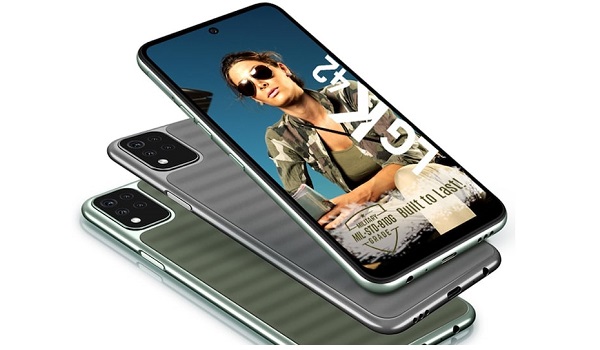
In addition, there is a side-mounted fingerprint sensor, a dedicated Google Asistant button, 3D sound engine, and 10W enhanced charging to help top up the battery faster. All of these are still standard fare.
And now for the exciting extras, LG says they applied an anti-scratch UV coating on the K42 so that it is more resistant to scratches and scrapes. UV stands for “unique wave” and gives the back of the phone a more premium and durable pattern. In addition, this phone is military-grade certified, having passed MIL-STD-810G testing.
What is MIL-STD-810G?
This is not the same as being water-proof or dust-proof. Having MIL-STD-810G durability means that the phone was built to be tough and has been tested and passed tests for shock, extreme temperatures, vibration, and humidity.
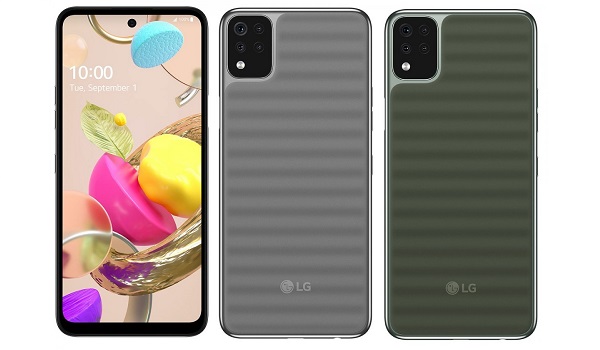
In summary, the LG K42 offers decent performance and utility with military-grade durability for a low price. It is as juicy as it gets.
It has been launched in India where it sells for INR 10,990. LG is no longer officially present in Nigeria, and that is a bummer, because this will be a bestseller and would have done well here. If you really want one outside India, you can order it from Flipkart and have it shipped to your country.
The news is that the LG K42 will be officially available in launch in a handful of Latin American markets like Costa Rica, Ecuador, El Salvador, Guatemala, Honduras, Nicaragua, and Panama.
LG K42 Specs
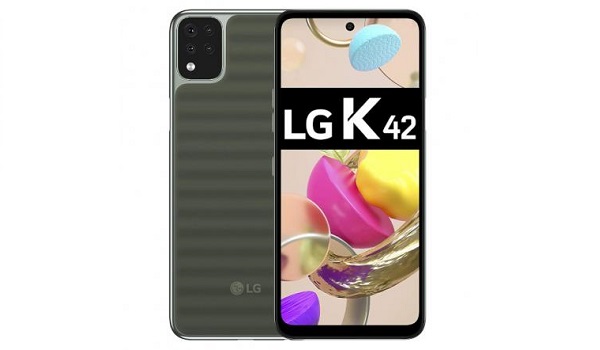
- Operating System: Android 10
- Network Type: 2G/3G/4G
- Dimensions: 76.7 x 165.0 x 8.4 mm
- Weight: 182g
- Colours: Green. Gray.
- Display: 6.6-inch full HD+ (720×1600 pixels), 20:9 aspect ratio, punch hole display
- Front Camera: 8 MP
- Main camera: 13MP main lens + 5MP Super Wide-Angle lens + 2MP Macro lens + 2MP depth sensor
- Processor: 2.0 GHz Octa-Core, Mediatek MT6762 Helio P22
- RAM: 3 GB
- ROM (Internal Storage): 64 GB
- Expandable Storage Memory: MicroSD card, up to 256 GB
- Audio: 3D Sound Engine
- Sensors: Fingerprint Sensor (side-mounted), Accelerometer, Digital compass
- Connectivity: Bluetooth 5.0. 802.11 /b/g/n (Single Band) WiFi.
- Model Number: LMK420EMW
- Battery/Charging: 4,000mAh with 10W fast charging
- Announced: September 2020
- Release Date: January 2021
- Price: INR 10,990 in India, where it has been announced.
The LG K42 is great value for money and one wishes that LG were pushing it in more countries around the world.
Author:Mister Mobility
Digital Skills and Communication Coach | Mobile Phone Connoisseur since 2001 | Tech Blogging since 2004
