Add MobilityArena as a preferred source on Google
If you are the kind of person who is always on the go and at the same time a candid reader of Mobility Arena or any other website, you might have wondered how you could save web pages for offline viewing.
Yes, this method of offline reading saves data and also gives us the content we wish to read at the exact time we need it. Offline reading can also help students study better. You may find a particular article that helps you in one way or the other and go-ahead to save it for later consultation and further analysis, even without an internet connection.
Whether you are a user of Chrome or Safari on iOS, you will find information in this article that will show you how you can save web pages for offline viewing.
The methods we are going to use are quite straightforward to aid you in better understanding the issue in consideration, also they will only address mobile browsing on either an Android device or an iPhone.
Save Webpages For Offline Viewing On Chrome

Save Webpages For Offline Viewing On Chrome
To save webpages for offline viewing on your Android device, tap on the three dot icon in the top right corner of the screen. A pop-up menu will appear, at the top of the menu are some icons find the download icon and tap on it as well.
You will get a notification stating that a download has been initiated on your device and its progress. The moment the download is finished, you can access the webpage by going to the download section of your Chrome browser , and there you will find the offline version of the webpage that can be accessed anywhere and anytime.
On an iPhone, the steps are similar but with a few adjustments. Tap the share icon on your Chrome browser, then from the pop-up menu, select “add to reading list.”
To access the saved article, tap on the three dots in the bottom right corner of the screen, then select reading list from the options displayed and there you will find all your saved web pages.
Save Webpages For Offline Viewing On Safari
Save Webpages For Offline Viewing On Safari
If you are an iPhone user and Safari is your default or go-to web browser, then the steps here are as well straightforward.
All you need to do is first, tap the share icon in the button of your screen, a pop-up menu will appear housing various sharing options. Just like on Chrome for iPhones, select “add to reading list,” and you will have saved the webpage for offline viewing.
To access saved webpages here, tap the bookmark icon and select the eyeglass shaped icon to view the part of the already saved webpage of your reading list.
You are reading Mobility Arena .
- Don’t miss our reviews .
- Join our WhatsApp Group , to be notified of the most important articles and deals,
- Follow us on Instagram , Facebook , Twitter , and YouTube .
Author:KittysTech
Tech analyst, Collins Eshiet, writes about technology. Follow me on Twitter @KittysTech.
Add MobilityArena as a preferred source on Google
| Vivo V23e specs in brief |
|---|
| OS: Android 11 Release Date: November 2021 Network Type: 2G/3G/4G Display: 6.44-inch, 1080 x 2400 pixels resolution Processor: MediaTek Helio G96 Selfie Camera: 50 MP Rear camera: 64 MP triple RAM: 8 GB ROM: 128 GB Battery: 4030 mAh Related: |
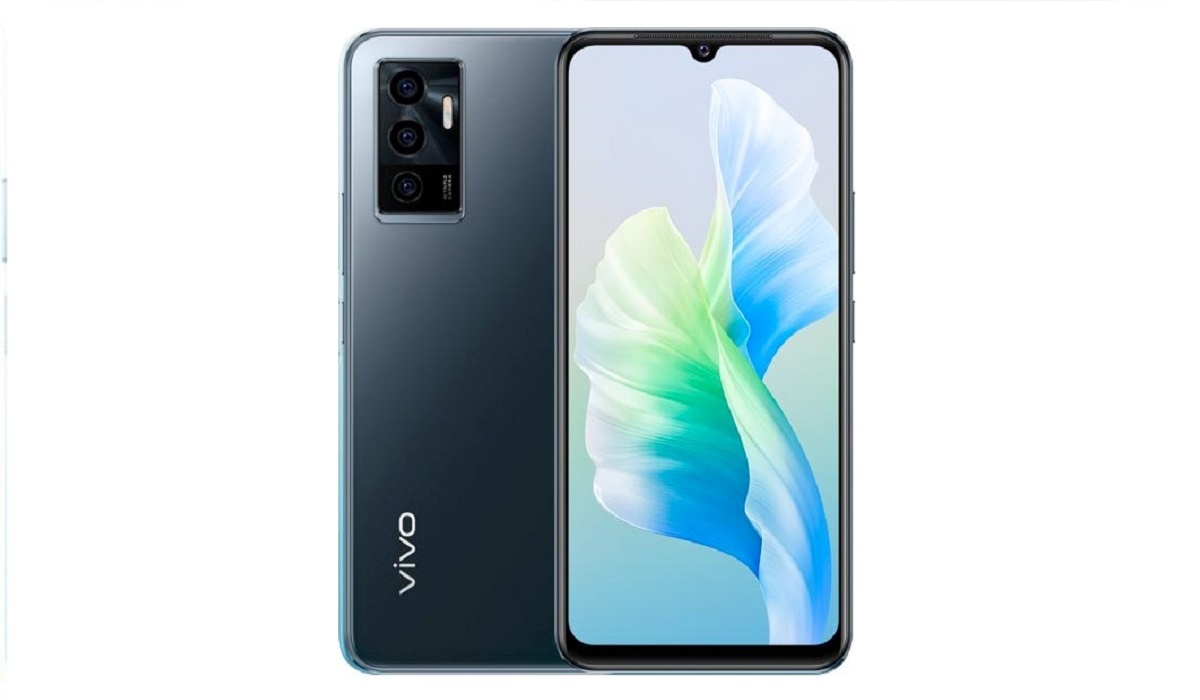
Vivo V23e specs & features
Mobile Wireless Network and Software
- 2G mobile network bands : GSM, GPRS, EDGE 850 / 900 / 1800 / 1900 MHz.
- 3G mobile network bands : UMTS, WCDMA, HSDPA 850 / 900 / 2100 MHz
- 4G mobile network bands : LTE.
- 5G mobile network bands : No.
- SIM Type : Nano-SIM, Dual SIM
- Software / OS : Android 11 + Funtouch OS
Design, Form Factor, Appearance
- Dimensions : 160.9 x 74.3 x 7.4 mm
- Weight : 172g
- Display : 6.44 inches, 1080 x 2400 pixels, 20:9 aspect ratio, AMOLED screen
- Colours : BlueMoonlight Shadow. Sunshine Coast.
- Physical Build : Plastic
Internal Hardware Specs
- Processor Type : 64-bit, 2.05 GHz Octa-core, Cortex
- Processor Name : MediaTek Helio G96 (12 nm)
- Graphics Processor : ARM Mali G57 MC2
- RAM : 8 GB
- Internal Storage : 128 GB
- External Storage : microSD (shared slot)
Photography, Video Recording
- Main Camera : 64 MP main lens + 8 MP ultra-wide angle lens + 2 MP macro lens, autofocus, Dual-LED dual-tone flash, 4k@30fps, 1080p@30fps video recording
- Front Camera : 50 MP, auto-focus, Face Recognition, 4k@30fps, 1080p@30fps video capture
Audio, Video Playback
- Music Support : PCM, AAC / AAC + / eAAC + / MP3 / AMR – NB / WB / APE
- Audio : 3.5 mm audio jack
- Loudspeaker : Mono speaker
- Video Support : H.264/MP4/MPEG4 player
- FM Radio : Yes.
Phone Sensors
- Digital Compass : Yes.
- Accelerometer : Yes.
- Proximity Sensor : Yes.
- Ambient Light Sensor : Yes.
- Barometer : No.
- Pedometer : No.
- Heart Rate Monitor : No.
- Gyroscope (G-Sensor) : Yes.
- Fingerprint Scanner : Yes; under display.
- Face Unlock : Yes.
- Iris Scanner : No.
- Motion Sensing / Gesture Control : No.
- Voice Control : No.
- Intelligent Digital Assistant : Yes; Google Assistant.
- Infra-red Sensor : No.
Connectivity Options
- Bluetooth Version : 5.2
- Bluetooth Profiles : A2DP, LE, aptX HD
- WiFi : Wi-Fi 802.11 a/b/g/n/ac, hotspot
- GPS : Yes, A-GPS, GLONASS, GALILEO, BDS
- USB : microUSB v2.0. Type-C. USB-OTG
- NFC : No.
Miscellaneous Specs and Features
- Battery Type and Capacity : Non-Removable Lithium-Polymer 4030 mAh
- Battery Charging : 44W quick charge
- Wireless Charging : No.
- Reverse Charging : No.
- Model Version/Number :
Launch/Release Dates and Information
- Announced : November 9, 2021
- Release Date : November 9, 2021
Vivo V23e Prices by Country
The phone was first launched in Vietnam with a price tag of 8,490,000 VND.
- International/Global :
- European Union :
- Nigeria : ₦
- Egypt : Egyptian Pound
- UAE : AED
- India : Indian Rupee
- Iraq : Iraqi Dinar
- Kenya : Ksh.
- Ghana :
The above prices may change with time from country to country, as market forces and economic policies influence product price movements.
Does Vivo V23e have Google Play Store?
It supports Google Services and software applications, including Play Store and Maps, Gmail, YouTube, and others.
Will Vivo V23e work in the USA?
This is a GSM phone and is supported on US GSM carriers like AT&T and T-Mobile and other networks riding on their networks. It does not support CDMA networks. Do make enquiries from your carrier to know what bands/frequencies are supported on their service.
MobilityArena Buyer’s Guide Verdict
Selfie cameras have always been the weak link in the chain of camera phones. There are not a lot of smartphones with a 50-megapixel front camera. Vivo V23e is one of them, and this makes it a very compelling device.
Our Buyer’s Guide Verdict is a recommendation based on the specs of the device and a general guide to help you understand how much value a device offers for its price. It is not an endorsement of the device. Ask questions and use your judgement when buying any device; MobilityArena takes no responsibility for your buying decisions .
Vivo V23e Phone Review Rating
Not available.
- Don’t miss our reviews .
- Join our WhatsApp Group , to be notified of the most important articles and deals,
- Follow us on Instagram , Facebook , Twitter , and YouTube .
